Key Takeaways
- The April 2026 update (KB5083769) improved performance and fixed File Explorer bugs but didn't add meaningful customization toggles
- Registry edits remain the only way for Home users to access settings Microsoft hides behind the UI
- Chris Titus Windows Utility has 54,000+ GitHub stars, showing massive demand for registry-based debloating
April's Update Fixed Bugs, Not Preferences
Microsoft's April 2026 update (KB5083769) delivered real improvements. File Explorer loads large network volumes in about 1 second now instead of 15. The Settings app got a visual overhaul. Performance boosts and reliability fixes landed across the board.
But here's the thing: these are practical fixes. They solve problems that shouldn't have existed in the first place. They don't address the core frustration power users have with Windows 11, which is the lack of accessible customization options.
“Our goal is to make the OS faster, calmer, and more predictable to use by focusing on UI consistency.”
— Pavan Davuluri, Windows Chief at Microsoft
Faster and calmer? Sure. But "consistent" often means "we've decided how things should look, and you don't get a vote." If you want to remove Bing suggestions from your Start Menu search, move the taskbar, or disable features that slow your system down, you still need the Registry.
The Settings App Still Hides Too Much
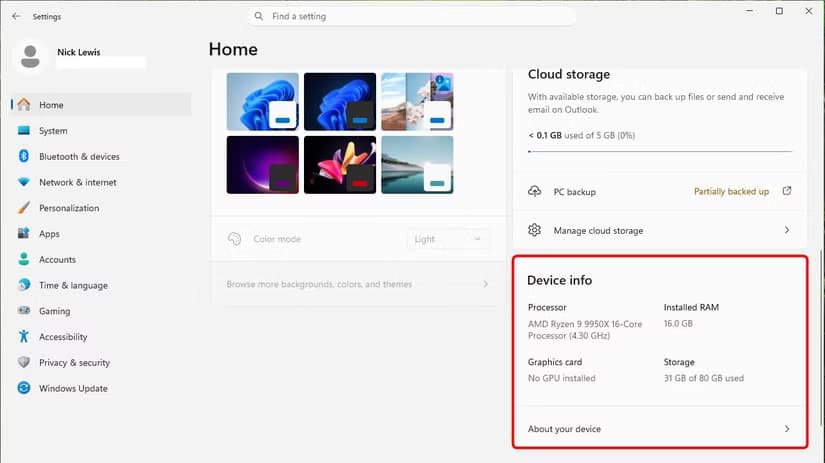
Microsoft has improved the Settings app over the past decade. The April update added graphics and storage details to the home page. This is welcome, but it highlights a pattern: Microsoft adds what should have been there from day one, then calls it an improvement.
“The change that really got me excited is the addition of graphics and storage details... This should have been available from the start. I'm not sure why it was so hard to include.”
— Mauro Huculak, Editor at Windows Central
The problem isn't what Microsoft added. It's what they still hide. Certain behaviors remain accessible only through scripts, Group Policy edits, or the Registry itself. For Home edition users, Group Policy isn't even an option, which makes the Registry the only path to many Pro-level settings.
Nick Lewis, an editor at How-To Geek who has been tinkering with Windows for 20 years, puts it plainly: "The Registry remains the only way for Home users to access Pro-level settings that Microsoft still hides behind the UI."
What Registry Tweaks Actually Accomplish
Registry tweaks aren't about obscure technical wizardry. They're about reversing decisions Microsoft made for you. Want to disable Search Highlights and Bing results cluttering your local search? That's a Registry edit. The payoff? About 150MB of RAM freed up.
Gamers use Registry tweaks to prioritize GPU interrupts and disable network throttling. The result is a 3-5% increase in 1% Low FPS, which is the metric that measures smoothness during demanding scenes. It's not a massive gain, but it's free performance Microsoft chose not to expose through a toggle.
The popularity of debloating tools tells the story. Chris Titus's Windows Utility has over 54,000 GitHub stars. People don't download and run scripts because they enjoy risk. They do it because Microsoft ships Windows with features they don't want and provides no simple way to remove them.
Registry Edits Are Portable
One underrated advantage of Registry tweaks: they export easily. You can build a .reg file with your preferred settings, back it up, and apply it to any new Windows installation in seconds. This beats clicking through Settings menus on every fresh install.
For IT admins managing multiple machines, this portability matters even more. A single Registry file can standardize behavior across a fleet of PCs faster than navigating each machine's Settings app individually.
The Risk Is Real, But Manageable
Registry editing carries risk. A wrong edit can break features or prevent Windows from booting. But the danger is often overstated for common tweaks. Disabling Bing search suggestions won't brick your PC. Changing your taskbar alignment won't corrupt your user profile.
The sensible approach is straightforward: create a System Restore point before editing, use trusted sources for Registry keys, and avoid touching values you don't understand. Most popular tweaks have been tested by thousands of users and documented extensively.
More tips on avoiding common device pitfalls
Microsoft's Design Philosophy Is the Real Issue
The April update proves Microsoft can ship quality improvements when they prioritize them. File Explorer is genuinely faster. The Settings app looks better. These are wins.
But the update also reveals Microsoft's philosophy: fix what's broken, don't empower what's working. Users who want to customize their experience beyond Microsoft's defaults are still left digging through the Registry or hunting for third-party tools.
Until Microsoft surfaces more customization options in the UI, the Registry will remain a power user's best friend. Not because people enjoy editing hex values, but because it's often the only way to make Windows work the way they want.
Logicity's Take
Frequently Asked Questions
Is editing the Windows 11 Registry safe?
It's safe if you follow basic precautions. Create a System Restore point before making changes, use trusted sources for Registry keys, and avoid modifying values you don't understand. Common tweaks like disabling Bing search are well-documented and low-risk.
What did the Windows 11 April 2026 update actually fix?
The update (KB5083769) improved File Explorer performance, reducing load times for large network volumes from 15 seconds to about 1 second. It also reworked the Settings app, added Smart App Control options, and delivered general reliability fixes.
Why can't I customize Windows 11 without the Registry?
Microsoft doesn't expose many customization options in the Settings app, especially for Home edition users. Features like disabling Bing search suggestions, moving the taskbar, or prioritizing GPU interrupts require Registry edits or Group Policy changes.
What are Windows debloating tools?
Debloating tools are scripts or utilities that remove pre-installed apps, disable telemetry, and apply Registry tweaks to streamline Windows. The Chris Titus Windows Utility is a popular example with over 54,000 GitHub stars.
Can Registry tweaks improve gaming performance?
Yes. Tweaks that prioritize GPU interrupts and disable network throttling can improve 1% Low FPS by 3-5%, making gameplay smoother during demanding scenes. Results vary by hardware and game.
Need Help Implementing This?
Source: How-To Geek
Manaal Khan
Tech & Innovation Writer
Produced with AI assistance and reviewed by the Logicity editorial team. Learn more in our Editorial Policy.






