Key Takeaways
- A creative brief should guide execution, not dictate it — define the problem and constraints, then give the creative team room to solve it
- Include 8 core components: overview, objectives, audience, key messages, deliverables, timeline, budget, and stakeholders
- Front-load decisions in the brief to cut revision cycles and kill scope creep before it starts
A creative brief is a one-to-three page document that aligns teams on project direction before work begins. It covers deliverables, target audience, tone, and success metrics. The format is negotiable, whether a Google Doc, slide deck, or mood board, but the function is not: catch misalignment early, or eat revision hours later.
Disclosure
Some links in this post are affiliate links — Logicity earns a commission if you sign up, at no extra cost to you. We only link products we have used or actively recommend.
Most creative work doesn't fail at execution. It fails at the "everyone assumed we meant the same thing" stage. A strong brief forces those assumptions into the open before someone spends a week rendering the wrong concept.
What does a creative brief actually do?
A brief guides execution without dictating it. Micromanaging the "how" kills creativity and demoralizes the team receiving it. A useful brief explains the problem, the audience, the constraints, and what success looks like, then steps back.
Creative briefs sit within a larger project brief. Design briefs, in turn, sit within the creative brief. Some information overlaps, but if two briefs look nearly identical, you're loading people down with details they don't need.
The brief is also your alibi. When a stakeholder tries to expand scope midstream with the innocent menace of "while we're in there," you have something concrete to point to. That alone justifies the time it takes to write one.
The 8 components every creative brief needs
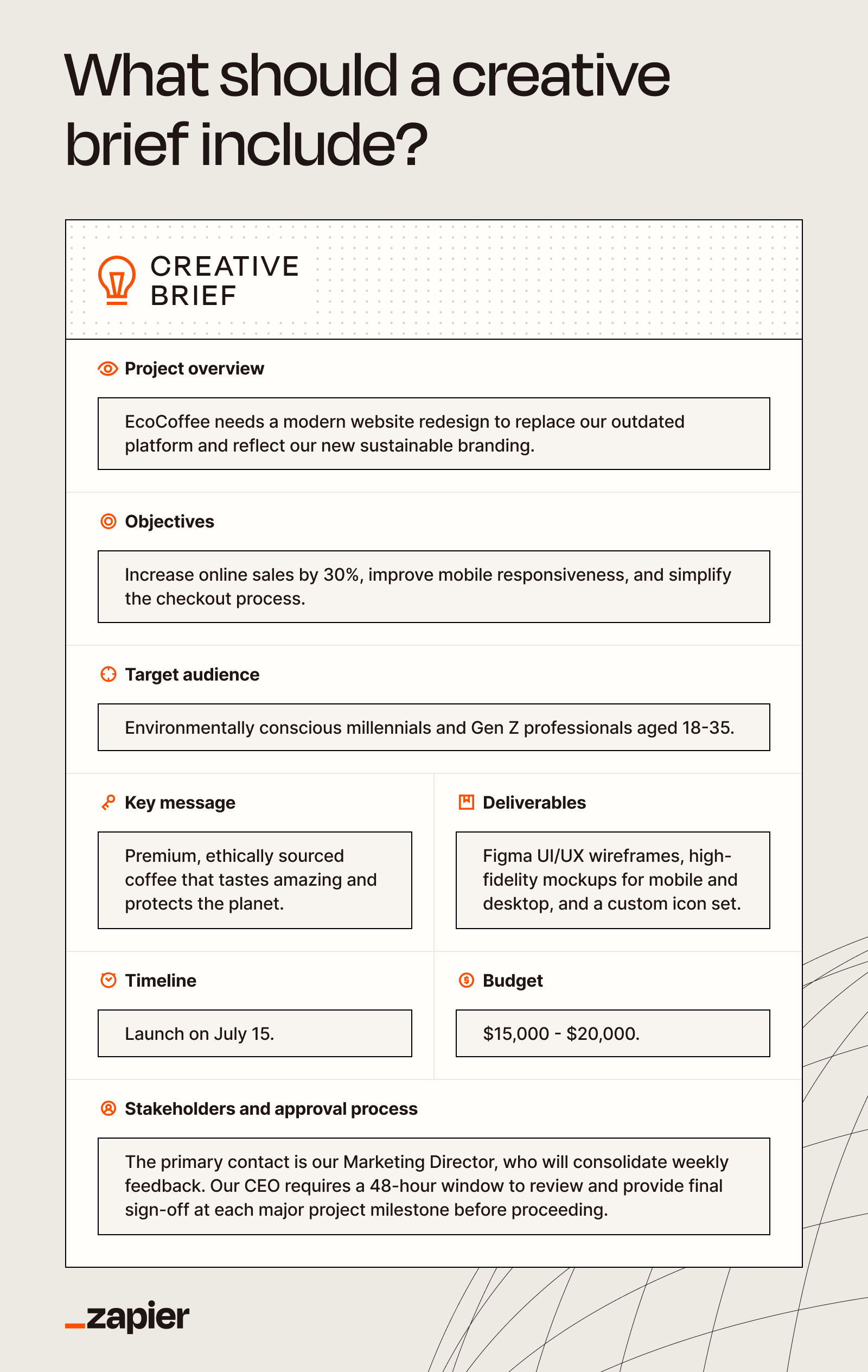
Structure varies by project, but these eight elements appear in nearly every effective brief:
- Project overview: A one-paragraph summary of what you're making and why. If you can't explain it in a paragraph, the project isn't scoped tightly enough.
- Objectives: What does success look like? Be specific. "Increase brand awareness" is not an objective. "Drive 5,000 signups in 30 days" is.
- Target audience: Who is this for? Include demographics, pain points, and what matters to them. The more specific, the better the creative output.
- Key messages: The 2-3 things the audience must take away. Not a tagline brainstorm. The core ideas that shape everything else.
- Deliverables: Exactly what assets are being produced. Format, dimensions, quantities. No ambiguity.
- Timeline: Key milestones and the final deadline. Include review cycles. If stakeholder reviews aren't scheduled, they'll happen anyway, just slower.
- Budget: Total allocation and any constraints. Knowing the budget prevents a team from pitching a concept that costs three times what's available.
- Stakeholders: Who approves what, and when. Decision-making ambiguity is the leading cause of "can we just get one more opinion on this?"
Not every project needs every component at the same depth. A social media campaign brief looks different from a brand identity brief. But skipping sections entirely is how scope creep finds a door.
How to write a creative brief that people actually use
The difference between a brief that guides work and one that gets skimmed and forgotten comes down to a few practices:
Write for the person reading it. A beautifully written three-page document is worthless if the recipient opens it, sees a wall of text, and asks an AI to summarize it. Which they will. Match the format to your audience. Designers might prefer a mood board. Copywriters might need more context on tone.
Front-load decisions. Every decision you make in the brief is a decision the creative team doesn't have to divine from Slack threads, kickoff calls, and a Pinterest board. The more you clarify upfront, the fewer revision cycles downstream.
Leave room for creativity. State the problem clearly. Define constraints. Then stop. The brief should explain what needs to happen, not how to do it. If you've already designed the solution in your head, you don't need a creative team. You need production.
Get sign-off before work begins. A brief that changes mid-project is worse than no brief. Lock in stakeholder approval on the brief itself before creative work starts.
Audience research is the foundation of any creative brief's target audience section
Common creative brief mistakes
The most damaging briefs aren't the ones missing information. They're the ones that seem complete but carry hidden ambiguity.
- Vague objectives: "Make it pop" is not a direction. "Increase CTR on the landing page from 2.1% to 3.5%" is.
- Too many stakeholders: If seven people have approval authority, no one does. Name a single decision-maker.
- No constraints: Unlimited budget and timeline sounds generous. In practice, it means the team has no idea how to scope the work.
- Dictating creative execution: Describing the exact visual treatment you want defeats the purpose of hiring creative professionals. State the problem, not the solution.
The "husky chef" problem, where a client wanted a heavyset man and the designer delivered a Siberian Husky in a toque, happens when briefs are too short. Four words is not a brief. It's a guessing game.
Automating your briefing workflow
For teams running multiple campaigns or working with external agencies, the briefing process itself becomes overhead. The same information gets retyped, fields get missed, and stakeholder approvals stall in someone's inbox.
Automation tools like Zapier, Make, or n8n can connect your intake forms to project management tools. A form submission in Typeform or Tally can automatically generate a templated brief in Notion or Airtable, assign reviewers, and trigger Slack notifications. No manual handoff required.
This doesn't replace the thinking that goes into a good brief. But it eliminates the friction that causes teams to skip the brief entirely because "we'll just figure it out on the call."
Explores automation approaches for connecting data sources to AI tools in your workflow
Logicity's Take
For RevOps teams managing creative requests across multiple stakeholders, the brief is where alignment either happens or doesn't. Zapier's free tier handles basic routing; Make offers more complex logic at $9/month. But the tool matters less than the habit. If your team skips briefs because they're tedious to create, automate the tedious parts.
Frequently asked questions
Frequently Asked Questions
How long should a creative brief be?
One to three pages. Long enough to cover objectives, audience, deliverables, timeline, and constraints. Short enough that the person reading it actually reads it.
What's the difference between a creative brief and a design brief?
A design brief is narrower, focusing specifically on visual deliverables and technical requirements. It typically sits within a larger creative brief that covers strategy, messaging, and audience.
Who writes the creative brief?
Usually the project owner or account lead on the client side. The person closest to the business objectives and stakeholder expectations. Not the creative team, though they should have input.
Can I use a template for every project?
Templates save time, but adapt them. A video production brief needs different fields than a landing page brief. A rigid template applied to every project creates busywork.
Need Help Implementing This?
Logicity helps operations teams automate creative workflows, from intake forms to project kickoffs. Get in touch to see how we can streamline your briefing process.
Source: The Zapier Blog
Huma Shazia
Senior AI & Tech Writer
Produced with AI assistance and reviewed by the Logicity editorial team. Learn more in our Editorial Policy.