Key Takeaways

- Zapier now positions itself as a complete system for data capture, storage, and action — not just workflow triggers
- Tables creates a linked database automatically when you build Forms, eliminating manual data routing
- You can connect your Zapier system directly to AI agent harnesses through MCP servers, enabling natural language queries
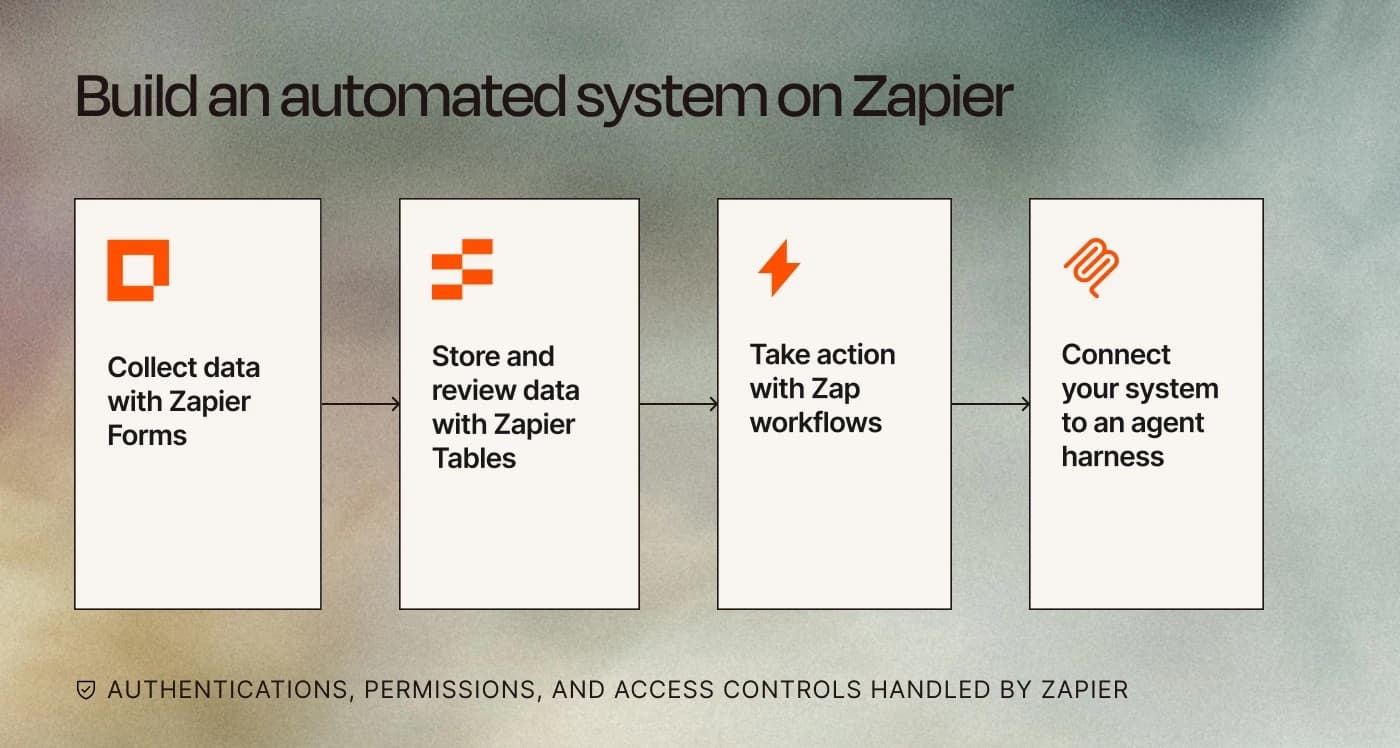
Zapier has published a detailed framework for building what it calls a "complete system" on its platform. The approach combines Forms for data collection, Tables for storage, and Zaps for action, all with native security and access controls. The real pitch here: stop treating Zapier as a connector between other tools and start treating it as the central hub.
Disclosure
Some links in this post are affiliate links — Logicity earns a commission if you sign up, at no extra cost to you. We only link products we have used or actively recommend.
This matters for operations teams because it addresses a common pain point: automation sprawl. You set up a form here, a database there, connect them through Zapier, then wonder why data still slips through gaps. The unified approach eliminates handoff points where things break.
Why most form builders fail at automation
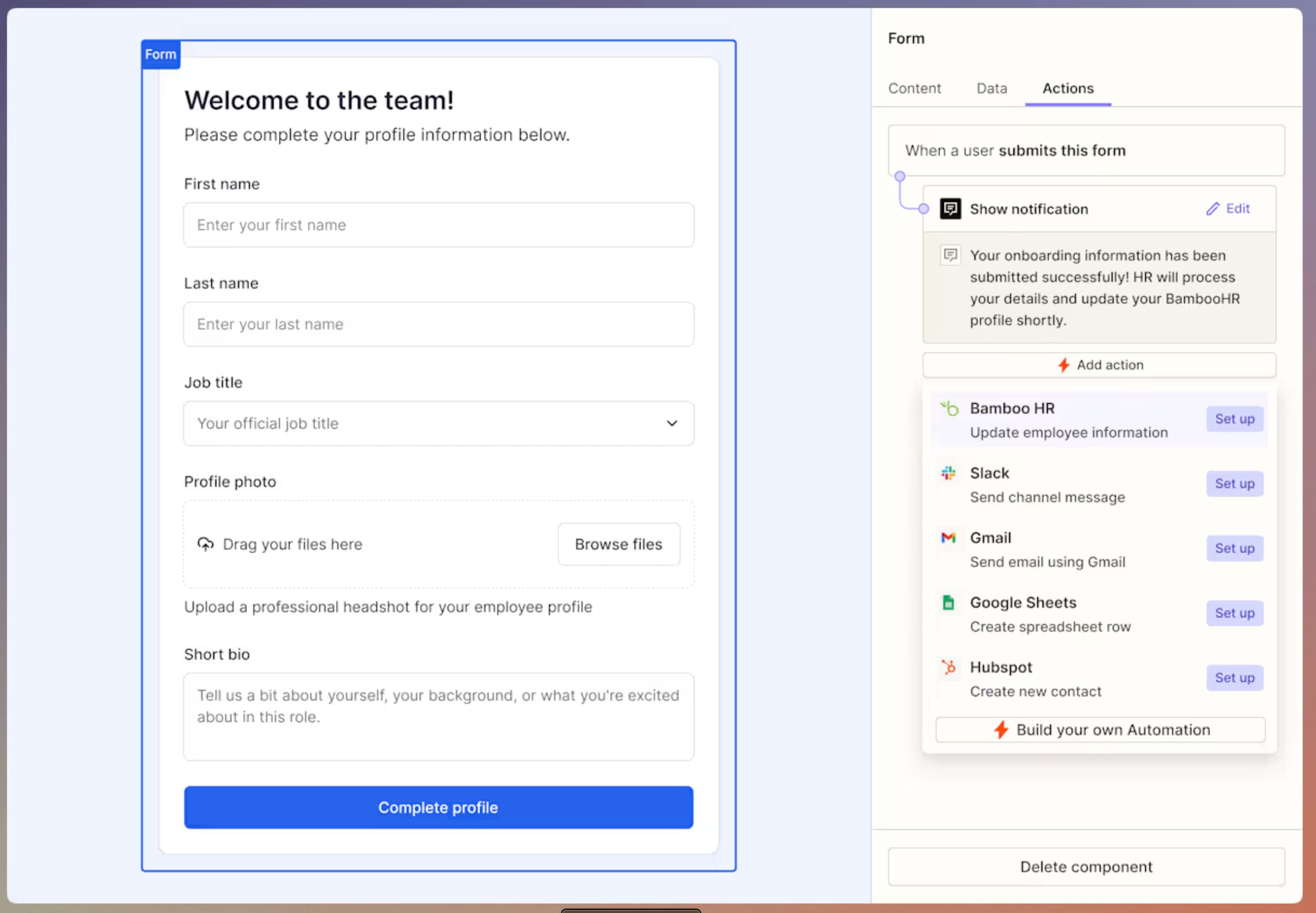
The first step in Zapier's framework starts with Forms, and the company makes a pointed critique: most form builders treat automation as an afterthought. You can connect them to other tools, sure, but complex routing or multi-step workflows require stitching together several different services.
Consider the typical lead capture setup. A form on your website captures submissions. Those go somewhere, maybe a spreadsheet or CRM. Then someone needs to route them to the right sales rep, trigger a follow-up sequence, and update your reporting. Each handoff is a potential failure point.
Zapier Forms connects directly to the platform's 9,000+ app integrations without requiring a separate connector. You can build landing pages, trackers, and Kanban views from the same interface. There's no submission-based pricing, which stands out from competitors like Typeform and Jotform that charge per response at scale.
Tables creates automatic data links
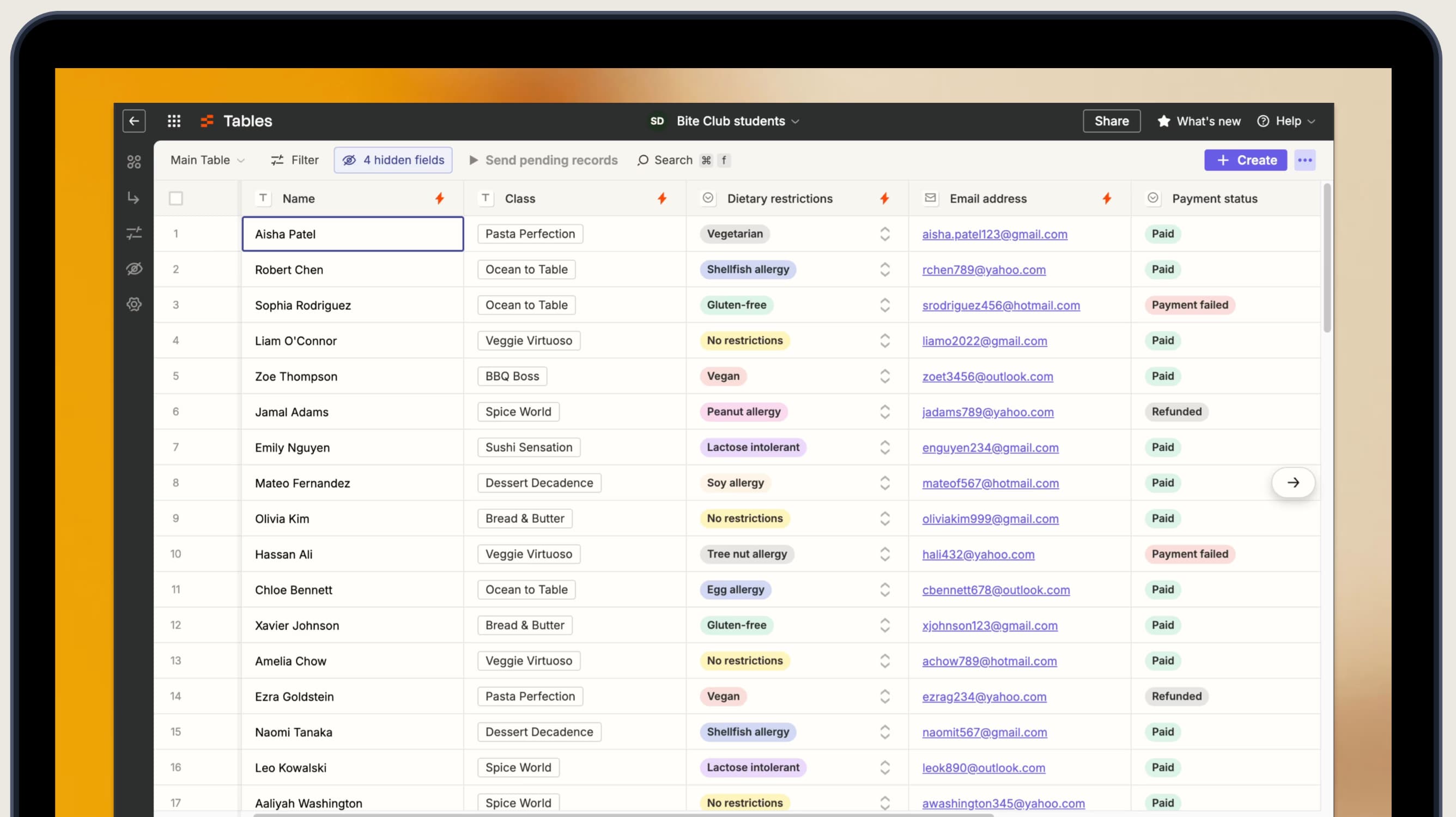
The second component is Tables, Zapier's no-code database. Here's where the "system" framing becomes concrete: whenever you build anything with Forms, Tables automatically creates a linked database. Data flows in without configuration.
This solves a surprisingly common problem. RevOps teams often maintain separate form and database tools that require manual syncing or custom integrations. The automatic link means form submissions appear instantly in your table, ready for review, sorting, or triggering downstream actions.
Tables also includes built-in AI fields. Need to draft personalized responses to each lead? Create an AI field that generates drafts based on submission data. Review them, edit if needed, then send with a single click through a connected Zap.
Compare this to using Airtable or Notion as your database layer. Both are powerful, but connecting them to forms and automation requires additional setup. The native integration in Zapier's stack eliminates that friction.
Covers cost optimization strategies relevant to scaling AI-powered automation
Taking action with Zaps: automatic or manual
The third layer is where stored data becomes action. Zap workflows can be created directly within Tables, running processes across your entire tech stack. A new lead submission can notify your sales team in Slack, add the prospect to HubSpot or Salesforce, and trigger a follow-up sequence, all from a single trigger.
By default, these workflows run automatically when new rows appear. But Zapier offers a useful alternative: button-triggered workflows. Transform any Zap into a clickable button in your table, and it only fires when someone manually activates it. This creates human-in-the-loop checkpoints for sensitive processes.
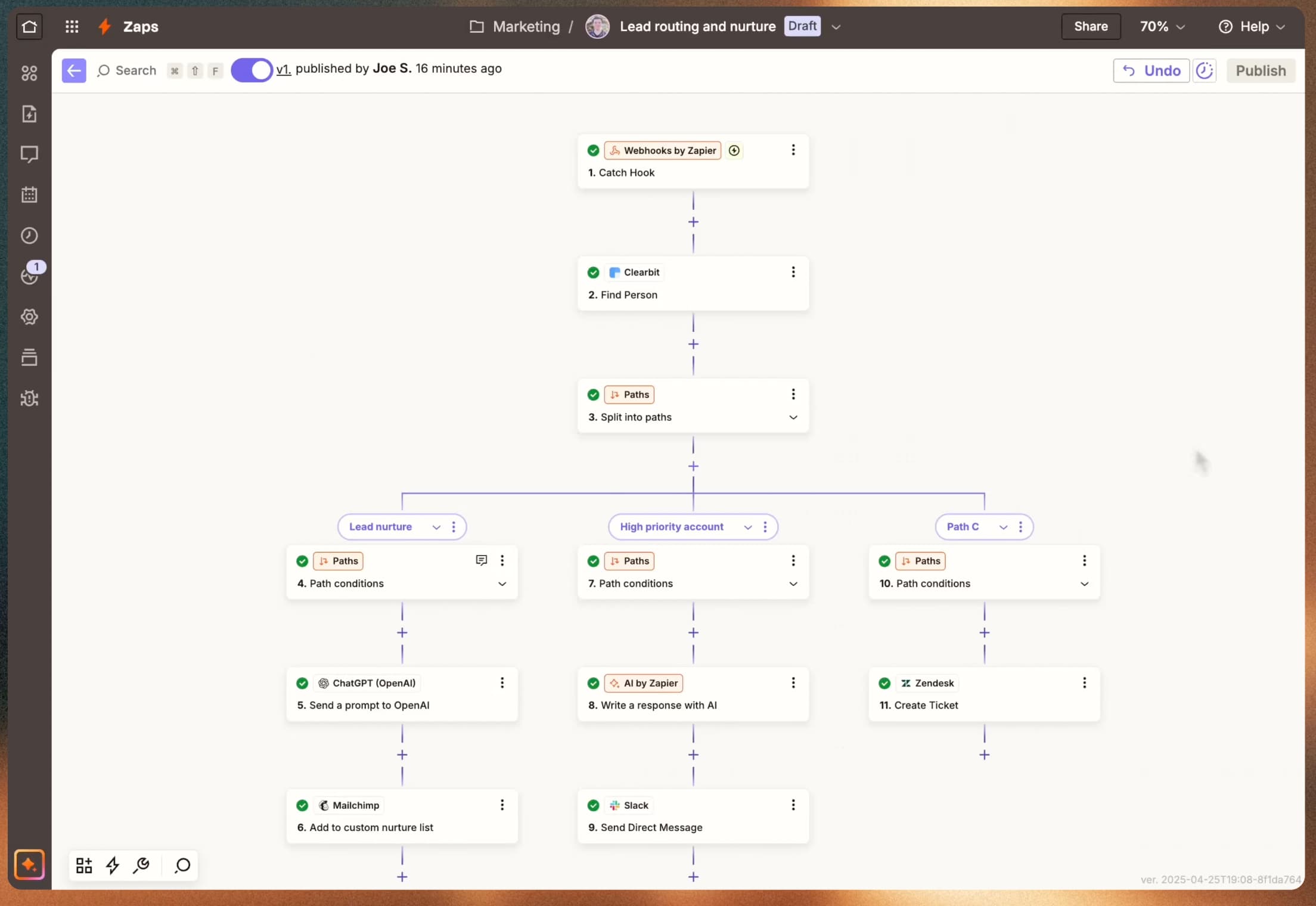
The company highlights AI by Zapier as an enhancement here. Instead of running a fixed sequence of steps, you can add agentic AI steps that analyze, categorize, or decide next actions based on the data. A lead routing workflow could use AI to score prospects and assign them to different sequences based on that analysis.
For complex systems, Zapier Canvas provides a diagramming tool to map out apps, teams, and processes visually. This helps when you're building more than a simple three-step workflow. Employee onboarding, software request approvals, vendor management, these multi-stage processes benefit from a visual overview before you start building.
Explains how to apply agentic AI capabilities within automation workflows
Connecting to AI agent harnesses via MCP
The fourth step is the most forward-looking. Zapier now offers MCP (Model Context Protocol) servers that connect your entire system to AI agent harnesses. If you're working in Claude, ChatGPT, or another AI environment, you can install Zapier's MCP connection and query your data through natural language.
This means an AI agent can access your Forms, Tables, and Zaps as tools. Ask it to pull leads from the past week, trigger a specific workflow, or summarize data from your tables. The system you built becomes accessible through conversation rather than clicking through interfaces.
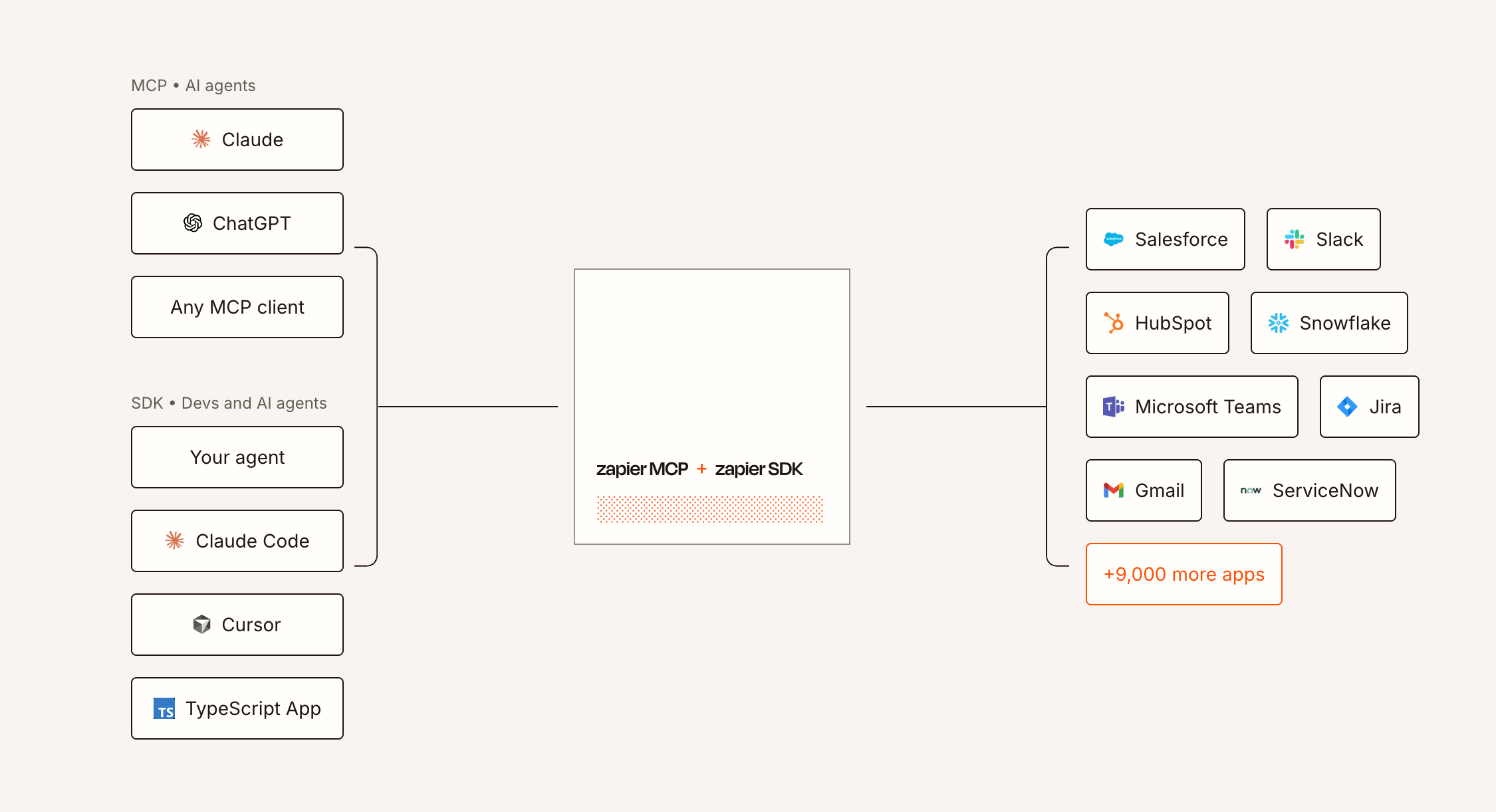
The security implications matter here. Because access controls exist at the Zapier platform level, your MCP connection inherits those permissions. An agent can only access what the connected user account can access. This addresses a real concern with AI tool access: preventing overly broad permissions that expose sensitive data.
What this approach costs in practice
Zapier doesn't publish granular pricing for the full stack in this guide, but the components are available across plan tiers. Forms and Tables are included in Team and Company plans. The AI features, including AI fields in Tables and AI by Zapier steps, consume task credits.
For comparison, building a similar system with separate tools gets expensive quickly. Typeform starts at $25/month for basic automation. Airtable Team plans run $20/user/month. Then you need Zapier to connect them, plus your CRM and communication tools. The consolidated approach has cost advantages if you're already committed to the Zapier ecosystem.
The trade-off is lock-in. Building your system entirely on Zapier makes migration harder. If you later decide Make or n8n better fits your workflow, you're rebuilding from scratch rather than swapping a connector.
Logicity's Take
This framework represents Zapier's evolution from middleware to platform. For RevOps teams already deep in the Zapier ecosystem, the unified approach eliminates real friction. The automatic Forms-to-Tables link alone saves hours of integration work. But the MCP connection is the sleeper feature here. As AI agents become standard operating tools, having your operational data accessible through natural language queries changes how you interact with systems. The question isn't whether this works, it's whether you're ready to centralize this much on a single vendor. Compare carefully with Make (starts at $9/month for 10,000 operations) and n8n (self-hosted option with no per-operation fees) before committing.
When this approach makes sense
The complete system framework fits specific scenarios. Teams already using Zapier for multiple workflows benefit most. Consolidating reduces tool sprawl and subscription costs. The automatic data linking between Forms and Tables removes integration maintenance.
It's less compelling if you need specialized form features like conditional payment processing or if your database requirements exceed what Tables offers. Power users of Airtable's advanced formulas or relational features might find Tables limiting.
The AI agent integration matters most for teams already experimenting with Claude, ChatGPT, or custom agents. If you're not using AI assistants for operational queries, the MCP server feature is future-proofing rather than immediate value.
Frequently Asked Questions
Does Zapier Tables replace Airtable or Notion databases?
For basic automation-centric use cases, yes. Tables handles storage, filtering, and action triggers well. It lacks Airtable's advanced relational features and Notion's document integration. Evaluate based on your specific database complexity needs.
What's the cost of running AI fields in Tables?
AI fields consume Zapier task credits. The exact cost depends on your plan tier and credit allocation. Team plans include credits; additional credits cost roughly $0.01-0.02 per task depending on volume.
Can I connect Zapier's MCP server to self-hosted AI models?
MCP connections work with any system that supports the Model Context Protocol. This includes Claude, ChatGPT with plugins, and self-hosted setups running compatible interfaces. Check your AI platform's MCP documentation for connection requirements.
Need Help Implementing This?
Logicity's implementation guides cover automation architecture for RevOps teams. Contact us for a workflow audit or subscribe to the newsletter for more tactical breakdowns.
Source: The Zapier Blog
Huma Shazia
Senior AI & Tech Writer
Produced with AI assistance and reviewed by the Logicity editorial team. Learn more in our Editorial Policy.