Key Takeaways
Build your FIRST Enterprise AI Agent in 12 minutes (NO CODING)

- Enterprise AI succeeds when tied to specific problems, not broad rollouts
- Integration with existing tech stacks and compliance requirements separates enterprise AI from consumer tools
- Process automation, predictive analytics, and AIOps represent the highest-impact use cases for operations teams
Enterprise AI fails when companies buy a stack of licenses, roll them out company-wide, and hope for the best. It works when teams start with a specific problem and build from there. That distinction, drawn from years of interviewing enterprise leaders, separates the success stories from the expensive shelfware.
Disclosure
Some links in this post are affiliate links — Logicity earns a commission if you sign up, at no extra cost to you. We only link products we have used or actively recommend.
The term itself is straightforward: enterprise AI means using artificial intelligence, machine learning, and AI agents to analyze data and automate processes across large organizations. What makes it "enterprise" isn't the underlying technology. It's the scale of integration required, the security and governance demands, and the fact that failures affect entire organizations rather than individual users.
What separates enterprise AI from consumer AI?
Consumer AI tools operate in isolation. You open ChatGPT, ask a question, get an answer. Enterprise AI has to connect to dozens or hundreds of applications in a company's tech stack while handling sensitive data in compliance with GDPR, SOC 2, and industry-specific regulations. IT teams need granular control over who can use it, what data it can access, and how it behaves.
The core applications break down into four categories. Data insights: AI sifts through information from multiple sources, surfacing patterns that would take humans months to identify manually. Process automation: AI handles repetitive tasks across systems, freeing teams for higher-value work. Predictive analytics: AI forecasts outcomes based on historical performance and market data. Personalization: AI tailors customer interactions at a scale no human team could match.
For operations and RevOps teams specifically, the automation layer is where most of the immediate value sits. Tools like Zapier let you build automated workflows across your entire tech stack without waiting for IT to build custom integrations. Alternatives like Make and n8n offer similar capabilities with different pricing models and complexity trade-offs.
Where does enterprise AI actually pay off?
The benefits sound predictable: increased efficiency, lower costs, faster decisions, better customer experiences, scalability, and stronger risk management. The question is where these gains materialize in practice.
Efficiency gains come from removing repetitive work. Processing invoices, updating records across systems, reconciling data between CRMs like HubSpot or Salesforce and your ERP. These tasks consume hours of skilled labor and introduce human error. AI handles them without fatigue or mistakes.
Cost reduction follows from automation, but the bigger savings often come from predictive maintenance. In logistics and manufacturing, predicting equipment failures before they happen eliminates unplanned downtime. For ops teams managing SaaS infrastructure, similar logic applies to monitoring systems and preempting outages.
The scalability argument is real but often oversold. Once an AI-powered process works, it can handle ten times the volume without ten times the headcount. That's true for customer inquiries, data processing, and report generation. But scaling an AI system still requires monitoring, tuning, and maintenance. It's not a one-time investment.
How AI is already crossing traditional job boundaries in enterprise settings
Seven use cases that actually work
Enterprise AI benefits don't materialize because you bought software. They require pointing AI at specific, measurable problems. Here are seven approaches that organizations are using successfully.
AIOps for IT operations uses machine learning to monitor systems, detect anomalies, and either fix issues automatically or flag them for human review. Without it, IT teams play constant Whac-a-Mole with problems that pop up faster than they can be addressed. AIOps platforms aggregate data from across IT infrastructure, identify patterns that indicate impending failures, and trigger automated responses. The result is fewer outages and faster resolution when problems do occur.
Customer service automation handles common questions around the clock. AI-powered chatbots can resolve straightforward inquiries without human intervention, escalating only complex cases to live agents. The key is training the system on your actual support tickets, not generic data. Integration with your CRM ensures the AI has context about each customer's history and current status.
Sales forecasting and pipeline analysis applies predictive analytics to your CRM data. AI identifies which deals are likely to close, which are stalling, and what factors correlate with wins. For RevOps teams, this means more accurate revenue forecasts and earlier intervention on at-risk deals.
Document processing and data extraction automates the work of reading contracts, invoices, and forms. AI extracts relevant fields, validates data against business rules, and routes documents to the right systems. For operations teams handling high volumes of paperwork, this eliminates a significant manual bottleneck.
Supply chain optimization uses AI to forecast demand, optimize inventory levels, and identify potential disruptions. The models analyze historical sales data, market trends, and external factors like weather or shipping delays. Operations teams get recommendations on when to reorder, how much to stock, and which suppliers to prioritize.
Fraud detection and compliance monitoring applies AI to transaction data, flagging anomalies that might indicate fraud, policy violations, or compliance risks. The systems learn normal patterns and alert when behavior deviates. For finance and ops teams responsible for risk management, this provides continuous monitoring that manual audits can't match.
Workflow orchestration connects multiple AI capabilities into end-to-end automated processes. A customer inquiry triggers document retrieval, sentiment analysis, response generation, and CRM updates, all without human intervention except for edge cases. This is where platforms like Zapier, Make, and n8n provide the connective tissue between specialized AI tools and your existing applications.
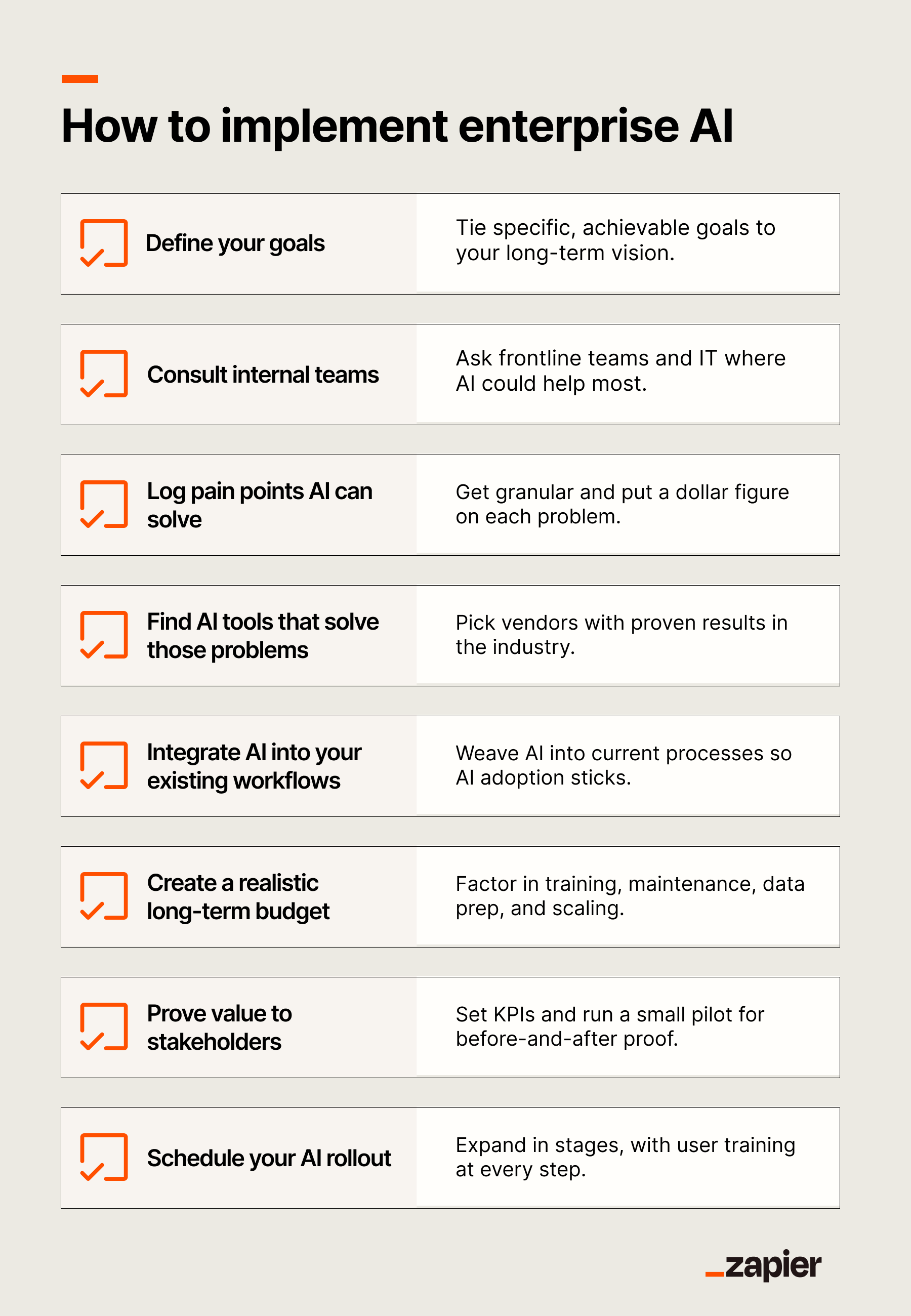
How to implement enterprise AI without failure
The implementation path matters more than the technology choice. Companies that succeed with enterprise AI follow a consistent pattern: start small, prove value, then expand. Companies that fail do the opposite.
Begin with a specific problem that has measurable outcomes. "Reduce invoice processing time from 15 minutes to 2 minutes" is implementable. "Transform our operations with AI" is not. The problem should be painful enough to justify the effort but contained enough to manage risk.
Get your data in order before you start. AI systems are only as good as the data they ingest. If your CRM is full of duplicates and outdated records, AI will amplify those problems. Clean, standardized, accessible data is a prerequisite, not a nice-to-have.
Choose tools that integrate with your existing stack. The most powerful AI in the world is useless if it can't connect to your CRM, your ERP, and your communication tools. Prioritize platforms with pre-built connectors or robust APIs. For operations teams, Airtable often serves as a flexible intermediate layer between AI systems and legacy applications.
Build governance from the start. Decide who can access AI systems, what data they can use, and how decisions will be audited. These questions get harder to answer once AI is already embedded in critical processes. Address them upfront.
Measure everything. Track time saved, errors reduced, costs cut, and revenue influenced. Without concrete metrics, AI projects become expensive experiments that get defunded when budgets tighten. With them, you build the case for expanding successful implementations.
The challenges nobody talks about
Enterprise AI projects fail more often than vendors admit. The common failure modes are predictable.
Integration complexity kills projects. Large organizations have tech stacks built over decades, with legacy systems that predate APIs. Connecting AI to these systems requires custom development, ongoing maintenance, and often compromises in what the AI can actually access.
Data quality problems surface after implementation. Teams discover their data is messier than they thought. Fields that should be standardized contain free text. Records that should be unique are duplicated. Cleaning this up takes longer than the AI implementation itself.
Change management gets underestimated. Employees resist AI that changes their workflows, especially if they weren't involved in the decision. Successful implementations require communication, training, and genuine feedback loops. Dictating new processes from above rarely works.
Costs exceed initial estimates. The AI platform license is often the smallest expense. Data preparation, integration development, training, and ongoing maintenance add up. Budget for the full lifecycle, not just the software purchase.
Related guidance on evaluating enterprise tools for operations workflows
How to choose an enterprise AI platform
Platform selection depends on your primary use case. For workflow automation and integration, Zapier, Make, and n8n offer different trade-offs between ease of use, flexibility, and cost. Zapier has the largest connector library but higher pricing at scale. Make provides more complex logic at lower cost but with a steeper learning curve. n8n is self-hostable for organizations with strict data residency requirements.
For predictive analytics and data science, you're looking at platforms like Databricks, DataRobot, or cloud-native options from AWS, Google Cloud, and Azure. These require data engineering capability in-house or from a partner.
For customer-facing AI like chatbots and personalization engines, dedicated platforms often outperform general-purpose tools. Intercom, Zendesk, and Freshdesk have built-in AI capabilities that integrate with their core products. Building custom on top of OpenAI or Anthropic APIs offers more flexibility but requires development resources.
Evaluate security and compliance features carefully. Enterprise AI platforms should support SSO, role-based access control, audit logging, and data encryption. Verify that the platform meets the specific compliance requirements for your industry, whether that's HIPAA for healthcare, PCI-DSS for payments, or SOC 2 for general enterprise use.
Logicity's Take
The enterprise AI market is crowded with vendors promising transformation. Operations and RevOps teams should ignore the hype and focus on specific, measurable wins. Start with process automation for high-volume, repetitive tasks. Zapier's Team plan starts at $69/month per user for 2,000 tasks. Make's Pro plan runs €16/month for 10,000 operations. n8n's self-hosted option is free for unlimited workflows if you have DevOps capacity. Pick the tool that fits your volume and technical capability, prove ROI on one workflow, then expand. The companies that treat AI as a strategic initiative rather than a specific problem-solving tool are the ones writing off failed projects two years later.
FAQ
Frequently Asked Questions
How long does enterprise AI implementation typically take?
A focused pilot project can be operational in 4-8 weeks. Broader deployments across multiple departments typically take 6-12 months when you include data preparation, integration, and change management. The timeline depends heavily on data quality and existing infrastructure.
What's the minimum budget for enterprise AI?
Workflow automation projects can start under $1,000/month using tools like Zapier or Make. Custom AI solutions requiring data science and engineering typically require $50,000+ for a pilot phase. Full enterprise deployments with multiple use cases often run into six figures annually.
Do we need a data science team to implement enterprise AI?
Not for workflow automation and pre-built AI features in existing tools. Predictive analytics, custom models, and complex integrations do require data engineering and ML expertise, either in-house or from a consulting partner.
Enterprise AI is neither magic nor hype. It's a set of tools that work when applied to specific problems with measurable outcomes. The organizations getting value from it started small, proved results, and expanded methodically. The ones still waiting for transformation are the ones who bought enterprise licenses and expected the technology to figure out the rest.
Need Help Implementing This?
If you're evaluating enterprise AI platforms or planning your first automation workflows, reach out to the Logicity team. We help operations and RevOps teams scope projects, select tools, and avoid the common implementation pitfalls covered in this guide.
Source: The Zapier Blog
Manaal Khan
Tech & Innovation Writer
Produced with AI assistance and reviewed by the Logicity editorial team. Learn more in our Editorial Policy.