Key Takeaways
- CRMs centralize customer data so sales, marketing, and support teams stop working in silos
- The best CRM is the one your team will actually use, not the one with the most features
- Automation features like task creation, lead scoring, and follow-up reminders are where CRMs really shine
- A good CRM turns 'where do we stand?' from a guessing game into an answerable question
Read in Short
CRM software centralizes all your customer and prospect data so everyone on your team can see the same information. The real magic happens when you use it for automation, like creating tasks, sending follow-ups, and scoring leads. Pick a CRM your team will actually use, not just the fanciest one.
Here's a scene that plays out in thousands of companies every single week. It's Monday morning. The sales manager asks the team, 'Where do we stand?' And every person in that room lies. Not on purpose. They just genuinely don't know. Their data lives in four different places. Last touchpoints are scattered across email, Trello, Slack, and one guy's actual physical memory. Which, let's be honest, is not a database.
This exact problem is why CRM systems exist. Not to create more dashboards that nobody reads. Not to give executives fancy charts. The whole point is to make 'where do we stand?' a question with an actual, verifiable answer.
But here's the thing. Many teams either don't use a CRM at all, or they use one so badly it might as well be a screensaver. So let's break down what CRMs actually do, with real workflow examples that show what's possible when a team commits to using one properly.
What Is a CRM System, Really?
A customer relationship management system is software that puts all your customer and prospect data in one place. Sales, marketing, and service teams can manage interactions, track deals, and build better relationships without playing telephone across departments.
Think of it as a central nervous system for customer information. It stores everything you need to quickly see who each customer is, what they want, what they've bought, what they've complained about, and who last talked to them. Pretty basic stuff, but shockingly hard to track without a dedicated system.
The Real Goal of a CRM
Despite the name, CRMs aren't just about contact management. They're about coordination. Sales, marketing, and success teams get a shared view of the customer so they can act like one company instead of three departments waving at each other across a foggy field.
What a CRM Actually Manages
- Logging new leads as they come in from various sources
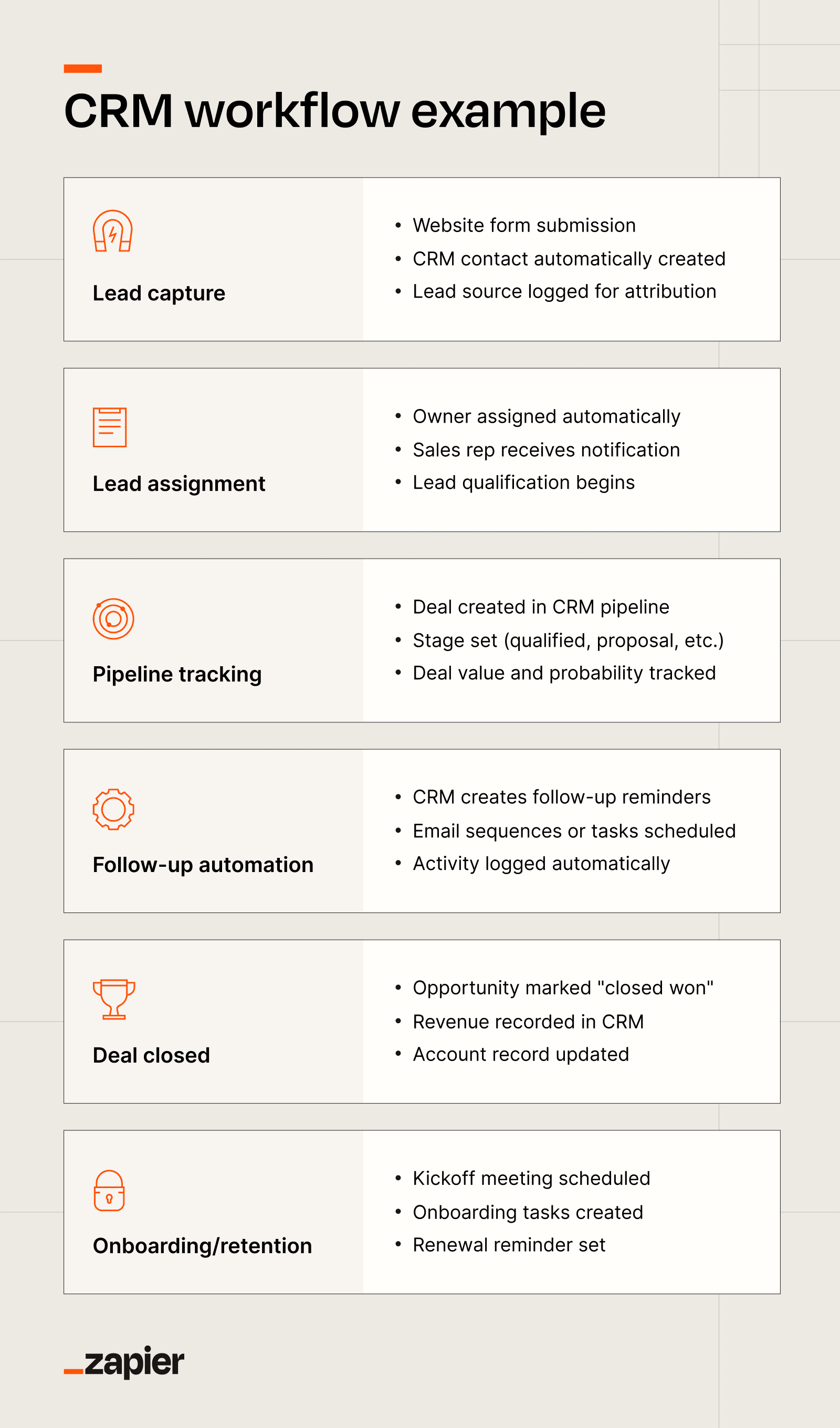
- Tracking deals through different sales stages
- Documenting support issues and customer complaints
- Managing upcoming renewals before they slip through the cracks
- Coordinating marketing campaigns across your customer base
Most CRMs also let you automate chunks of this process. Creating tasks automatically. Sending follow-up emails without manual intervention. Assigning owners based on territory or deal size. Scoring leads so your team knows who to call first. Generating reports that actually mean something.
Why Teams Fail With CRMs
So if CRMs are so great, why do so many teams end up managing deals in spreadsheets anyway? Because they bought powerful software that nobody actually uses.
Choosing a CRM comes down to two boring but decisive questions. Will your team actually use it? And will leadership actually trust what it says? You can have the most sophisticated system on the market, but if it's too clunky, too rigid, or too disconnected from how your team actually works, people will route around it.
If a system slows people down, they'll find workarounds. Those workarounds become habits. And suddenly your expensive CRM is just an expensive address book that nobody updates.
If you're looking to automate parts of your workflow beyond CRMs, building AI agents can handle repetitive tasks like data entry and follow-up scheduling.
What to Look For When Choosing a CRM
Forget the feature comparison charts for a second. The best CRM is the one your team will actually open every day. That sounds obvious, but it's surprisingly easy to get distracted by bells and whistles.
- Ease of use: Can a new rep figure it out in an afternoon, or does it require a certification course?
- Integration capabilities: Does it connect to your email, calendar, and the other tools your team already uses?
- Automation features: Can it create tasks, send emails, and update records without manual work?
- Customization: Can you adapt it to your sales process, or do you have to adapt your process to the software?
- Reporting: Can leadership pull accurate data without begging someone to export a spreadsheet?
Real CRM Workflow Examples
Let's get specific. Here's what actually happens when a CRM is working properly.
Lead Capture and Assignment
A potential customer fills out a form on your website. The CRM automatically creates a new lead record, scores them based on criteria you've set, and assigns them to a sales rep based on territory or availability. The rep gets notified immediately. No manual data entry. No leads sitting in an inbox for three days.
Deal Stage Tracking
Every deal moves through stages. Qualification, demo, proposal, negotiation, closed. A good CRM tracks this visually and updates automatically based on actions. When a rep sends a proposal, the deal moves to the proposal stage. When a contract gets signed, it moves to closed. Leadership can see exactly where every deal stands at any moment.
Automated Follow-Up Sequences
You send a proposal on Tuesday. If the prospect doesn't respond by Friday, the CRM automatically sends a follow-up email. If they still don't respond, it creates a task for the rep to call them Monday. This happens without anyone having to remember anything.
Customer Support Coordination
A customer opens a support ticket. The support team can see their entire history, including what they bought, who their sales rep was, and any previous issues. When the ticket gets resolved, the sales rep gets notified so they can check in. Everyone looks like they're on the same page because they actually are.
The Automation Sweet Spot
CRM automation isn't about replacing humans. It's about handling the stuff humans forget to do. Creating follow-up tasks. Sending reminder emails. Updating records. The rep still builds the relationship. The CRM just makes sure nothing falls through the cracks.
Types of CRM Systems
Not all CRMs work the same way. Some focus on sales pipelines. Others emphasize marketing automation or customer service. Here's the basic breakdown.
| CRM Type | Best For | Key Features |
|---|---|---|
| Sales CRM | Sales teams tracking deals | Pipeline management, deal tracking, forecasting |
| Marketing CRM | Marketing teams nurturing leads | Email campaigns, lead scoring, segmentation |
| Service CRM | Support teams managing tickets | Ticket tracking, knowledge base, customer history |
| All-in-One CRM | Teams wanting everything in one place | Combines sales, marketing, and service features |
Most modern CRMs try to do a bit of everything. The question is which area they prioritize and whether that matches your biggest pain point.
When a CRM Actually Works
Here's what changes when a team actually commits to using their CRM properly.
- Customers don't have to repeat themselves when they talk to different people at your company
- Teams stop duplicating work because everyone can see what's already been done
- Revenue stops depending on whether a single person remembered to 'circle back'
- Monday meetings become about strategy instead of status updates
- New hires can get up to speed by reading deal history instead of asking a million questions
The kicker? None of this is revolutionary technology. It's just basic coordination that becomes possible when everyone works from the same source of truth.
AI is reshaping how CRMs work, with features like automated lead scoring and intelligent follow-up suggestions becoming standard.
The Bottom Line
CRMs aren't magic. They're just databases with workflows attached. But that's exactly what most sales teams need. A single place where customer data lives, where deal progress is visible, and where follow-ups happen automatically.
The challenge isn't finding a CRM with enough features. It's picking one your team will actually use and then committing to it. If people are still tracking deals in personal spreadsheets or relying on memory, you don't have a CRM problem. You have an adoption problem.
Fix that, and suddenly Monday meetings get a lot more honest.
Frequently Asked Questions
What's the difference between a CRM and a spreadsheet?
A spreadsheet stores data. A CRM connects that data to workflows, automation, and team collaboration. You can track contacts in a spreadsheet, but you can't automatically assign leads, send follow-up sequences, or give everyone a shared view of deal progress.
How long does it take to implement a CRM?
Basic setup can take a few days. Getting your team to actually use it consistently? That's weeks to months of habit building. Start simple and add complexity as people get comfortable.
Do small businesses need a CRM?
If you have more than a handful of customers and more than one person talking to them, yes. The threshold is lower than most people think. Once you can't remember every customer interaction, you need a system.
Source: The Zapier Blog
Huma Shazia
Senior AI & Tech Writer
Produced with AI assistance and reviewed by the Logicity editorial team. Learn more in our Editorial Policy.






