Key Takeaways
- Trello works for way more than just work projects. Think meal planning, house hunting, even wedding coordination.
- The Kanban format (Backlog → To Do → In Progress → Done) adapts to almost any workflow with steps.
- You can automate repetitive Trello tasks with tools like Zapier to save hours of manual card shuffling.
- Personal productivity boards for daily planning and goal tracking can replace expensive specialized apps.
- Starting from example templates beats building boards from scratch every time.
I have a confession. I'm the kind of person who spends three hours building the perfect to-do list and then does absolutely nothing on it. Color-coded labels? Check. Due dates with reminder notifications? Obviously. Subtasks nested inside subtasks? You better believe it.
If this sounds familiar, Trello was basically made for people like us. The drag-and-drop Kanban boards scratch that organizational itch in a way that regular task lists just can't. And the best part? You can use them for literally anything that has steps. Work stuff, sure. But also vacation planning. Recipe collections. Even tracking which shows you're binge-watching.
So here's the thing. I pulled together 16 Trello board examples that actually work. Some are for your job. Some are for your chaotic personal life. All of them will let you procrastinate productively by organizing things instead of doing things.
Work Trello Boards: Get Your Professional Life Together
Let's start with the obvious stuff. Trello shines for work projects because the visual workflow just makes sense. You can see exactly where everything stands without digging through endless email threads or Slack messages.
1. General Project Management
This is the classic setup. Your lists are basically Backlog, To Do, In Progress, In Review, and Done. Every project becomes a card. Every card moves left to right as it progresses. Dead simple, works for everything from software launches to office renovations.
2. Agile Sprint Planning
Don't want to pay for Jira? Trello can handle Agile workflows surprisingly well. Set up lists for your sprint backlog, current sprint, and completed items. Add custom fields for story points. It's not as feature-rich as dedicated Agile tools, but it's way less complicated and honestly, that's sometimes exactly what you need.
3. Sales CRM Pipeline
Your lists become your pipeline stages: Lead, Contacted, Meeting Scheduled, Proposal Sent, Negotiating, Closed Won, Closed Lost. Each deal is a card with all the details. Drag cards through your funnel as deals progress. For small sales teams, this beats paying per seat for expensive CRM software.
4. Marketing Campaign Tracker
Running campaigns across multiple channels is chaos without a system. Set up lists for each campaign phase: Planning, Assets In Progress, Ready for Review, Scheduled, Live, and Completed. Attach files directly to cards. Tag team members. Keep everything in one place instead of scattered across a dozen Google Docs.
5. Content and Editorial Calendar
Content teams love this one. Track articles, videos, podcasts, or whatever you're creating from initial idea through publication. Your lists might be Ideas, Assigned, Drafting, Editing, Ready to Publish, and Published. Add due dates and you've got yourself a functional editorial calendar without expensive software.
6. Social Media Planning
Planning posts across Instagram, Twitter, LinkedIn, and TikTok? Create lists for each platform or each week. Cards hold your post copy, images, and hashtags. Move them through Drafted, Scheduled, and Posted stages. Way easier than juggling three different scheduling tools.
7. Meeting Agenda Board
This one's underrated. Create a board for recurring team meetings. Lists can be Topics to Discuss, Currently Discussing, Discussed, and Action Items. Team members add agenda cards before meetings. You work through them during. Action items get assigned and tracked after. Meetings actually become productive. Wild concept.
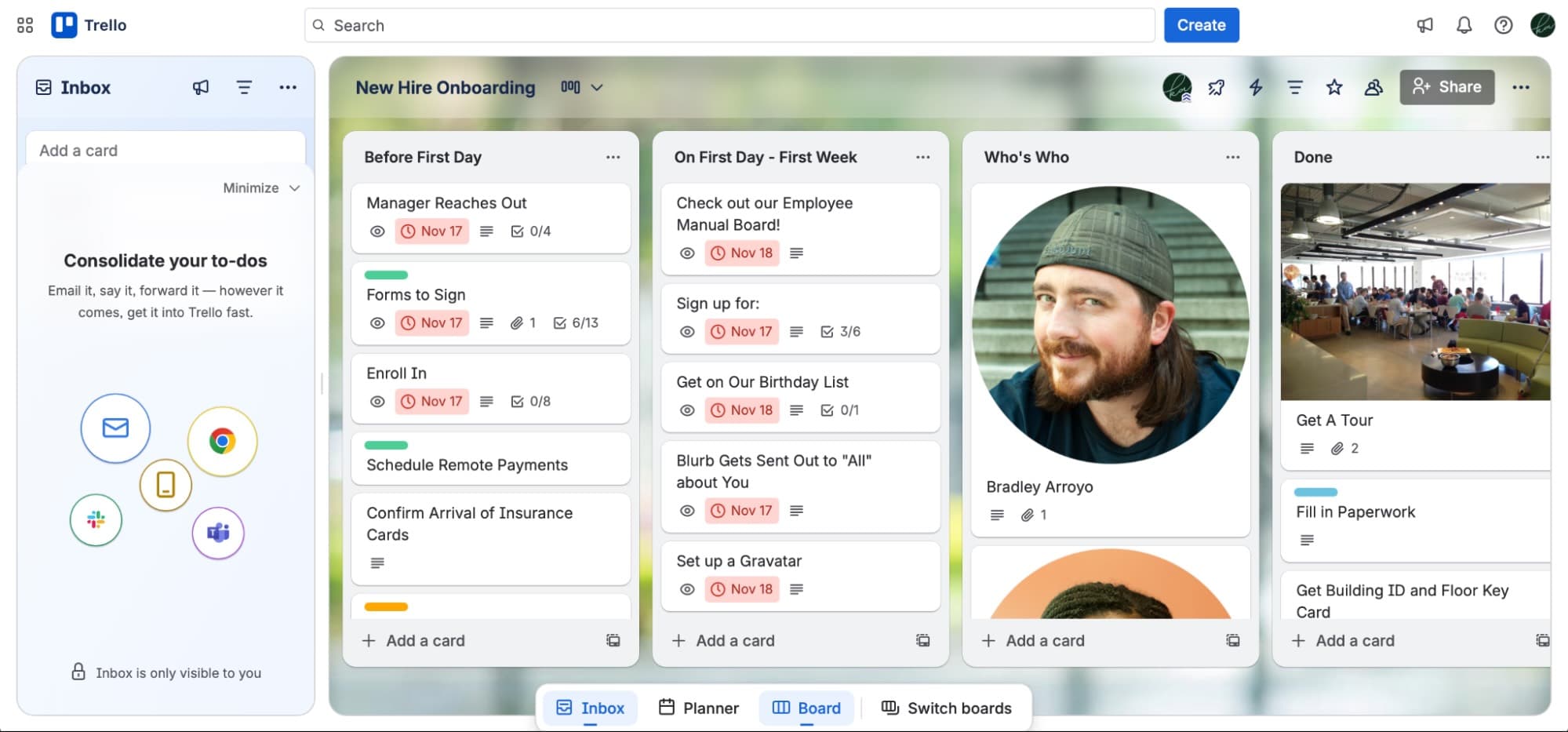
8. Candidate Tracking for Hiring
Small companies without fancy applicant tracking systems can use Trello to manage hiring. Lists follow your interview process: Applied, Phone Screen, Technical Interview, Final Round, Offer Extended, Hired, and Rejected. Each candidate is a card with their resume attached and interview notes in the comments.
If you're organizing work projects in Trello, you're probably thinking about productivity. This piece digs into why moving fast isn't always the answer.
Personal Productivity Boards: Organize Your Actual Life
Here's where Trello gets fun. The same system that tracks work projects can organize your personal chaos too.
9. Daily Planner Board
Forget fancy planner apps. Create lists for each day of the week or time blocks within a single day. Morning, Afternoon, Evening. Or Monday through Sunday. Drag tasks where they belong. Move unfinished items to the next day. Simple visual time blocking without subscription fees.
10. Goal Tracking System
Big goals need to be broken down or they just sit there intimidating you. Create lists for Annual Goals, Quarterly Initiatives, Monthly Milestones, and Weekly Actions. Your huge scary goal becomes a card. The steps to get there become checklist items. Suddenly it feels achievable.
11. Personal Finance Tracker
Look, this won't replace actual budgeting software for complex finances. But for simple tracking? Lists for Income Sources, Regular Bills, Savings Goals, and Upcoming Expenses work great. Cards can have due dates for bill payments. You can see your financial picture at a glance.
12. Reading and Media Backlog
Books to read. Shows to watch. Podcasts to check out. Games to play. We all have massive backlogs. Create lists for each media type or use stages like Want to Start, Currently Enjoying, and Finished. Add ratings in the comments when you're done. Never forget a recommendation again.
Pro Tip
Use Trello's card cover feature to add book covers, movie posters, or album art. Makes browsing your backlog way more fun than a boring text list.
Life Events and Home Organization Boards
Some of the best Trello use cases have nothing to do with productivity apps at all. They're for managing the real-world stuff that would otherwise live in scattered notes and forgotten browser tabs.
13. Recipe Collection
Stop screenshotting recipes and losing them in your camera roll. Create a Trello board with lists organized by meal type: Breakfast, Lunch, Dinner, Snacks, Desserts. Or organize by cuisine. Each recipe is a card. Paste the ingredients and instructions right in. Attach the original link. Never lose that amazing soup recipe again.
14. Household Chores Tracker
Living with roommates or family? Chore wars are real. Create lists for Daily, Weekly, and Monthly tasks. Assign cards to people. Add recurring due dates. Track what's done and what's been neglected for three weeks. It won't solve all your household arguments, but it'll help with the ones about who last cleaned the bathroom.
15. Wedding and Big Event Planning
Planning a wedding nearly broke me. Trello saved it. Lists for each category: Venue, Catering, Photography, Flowers, Invitations, and so on. Cards for each vendor to contact or decision to make. Checklists for tasks within each card. Budget tracking in custom fields. Honestly this setup works for any major event. Birthdays, reunions, conferences, whatever.
16. Vacation and Travel Planning
The research phase of vacation planning is half the fun. Create lists for Destinations to Consider, Flights, Hotels, Things to Do, Restaurants to Try, and Packing. Save links to everything you're considering. Build out your itinerary card by card. When you book something, add the confirmation details. Your entire trip lives in one searchable place.
| Board Type | Best For | Key Lists to Include |
|---|---|---|
| Project Management | Work deliverables | Backlog, In Progress, Review, Done |
| Content Calendar | Editorial teams | Ideas, Drafting, Editing, Published |
| Goal Tracking | Personal growth | Annual, Quarterly, Monthly, Weekly |
| Event Planning | Weddings, parties | By vendor or task category |
| Travel Planning | Vacation research | Flights, Hotels, Activities, Packing |
Making Trello Actually Work: Automation Tips
Here's the honest truth about Trello. It's powerful, but it can also become a time sink if you're manually shuffling cards around all day. The kicker? You can automate most of the tedious stuff.
Tools like Zapier connect Trello to hundreds of other apps. New form submission? Automatically create a Trello card. Card moves to Done? Log it in a spreadsheet. Due date approaching? Send yourself a Slack reminder. The boards manage themselves while you do actual work.
- Connect form submissions to automatically create cards with all the details filled in
- Archive completed cards after a set number of days to keep boards clean
- Send weekly digest emails with all cards due in the coming week
- Automatically assign cards based on labels or list placement
- Create cards from emails, calendar events, or social media mentions
Butler, Trello's built-in automation tool, handles simpler automations without leaving the app. But for cross-app workflows, you'll want something more robust.
Frequently Asked Questions
Is Trello free to use?
The free tier is surprisingly generous. You get unlimited cards, up to 10 boards per workspace, and basic automations. Paid plans add more power-ups, automation runs, and admin features.
Can multiple people use the same board?
Absolutely. That's half the point. Invite team members, assign cards to specific people, leave comments, and everyone stays in sync.
How is Trello different from Asana or Monday?
Trello is more visual and flexible, less structured. If you want strict project management features, those tools might fit better. If you want a digital whiteboard that works for anything, Trello wins.
Can I use Trello offline?
The mobile app has limited offline support. You can view boards and make changes that sync when you're back online. Not perfect, but workable.
Start Somewhere, Then Iterate
The biggest mistake people make with Trello? Trying to build the perfect board on day one. Don't do that. Start simple. Use it for a week. Notice what's missing or annoying. Adjust.
These 16 examples are starting points, not final destinations. Steal the list structure. Add your own labels. Delete what you don't need. The beauty of Trello is that it bends to your workflow instead of forcing you into someone else's system.
And if you spend two hours perfecting your board setup instead of doing actual work? Hey, at least you're in good company. Some of us just express love through organization systems. Nothing wrong with that.
Source: The Zapier Blog
Manaal Khan
Tech & Innovation Writer
Produced with AI assistance and reviewed by the Logicity editorial team. Learn more in our Editorial Policy.