Key Takeaways

- Easy Notes offers Google Keep simplicity without requiring a Google account or cloud sync
- OneBattery shows real-time charging wattage and battery health data directly on your lock screen
- All three apps prioritize local data storage over cloud tracking
Why These Three Apps Stand Out
Discovering new apps used to be fun. Now it mostly means wading through tracking algorithms and ad-supported software that treats your data as the product. These three apps take a different approach. One is completely free. The other two are partially free with affordable unlock options.
Easy Notes: Google Keep Without the Google
Google Keep looks good and works well. But it requires a Google account, which means your notes live on Google's servers. Easy Notes solves this by keeping everything local on your device.
The workflow is simple: tap a button in the bottom right, add a title, start typing. You get bulleted lists for organizing thoughts, checkboxes for shopping lists, and image insertion. It matches Keep's simplicity without the privacy trade-offs.
Easy Notes also doubles as a Markdown editor. Tap the formatting buttons for headers, bold, or italics, and you'll see the familiar hashtags and asterisks that Markdown uses. Hit the preview button to see your formatted text. This makes it far simpler than heavyweight options like Obsidian.
The app includes word count display, which writers and note-takers will appreciate. Easy Notes is open source and available exclusively on F-Droid, the open source app repository.
OneBattery: Real Charging Data on Your Lock Screen
OneBattery answers a question most Android users have wondered about: what's actually happening when your phone charges?
The app transforms your lock screen when you plug in a charger. Instead of just showing "Charging" or an estimated completion time, you see the exact charge percentage and the exact wattage your phone is pulling. This lets you verify whether fast charging is actually working.
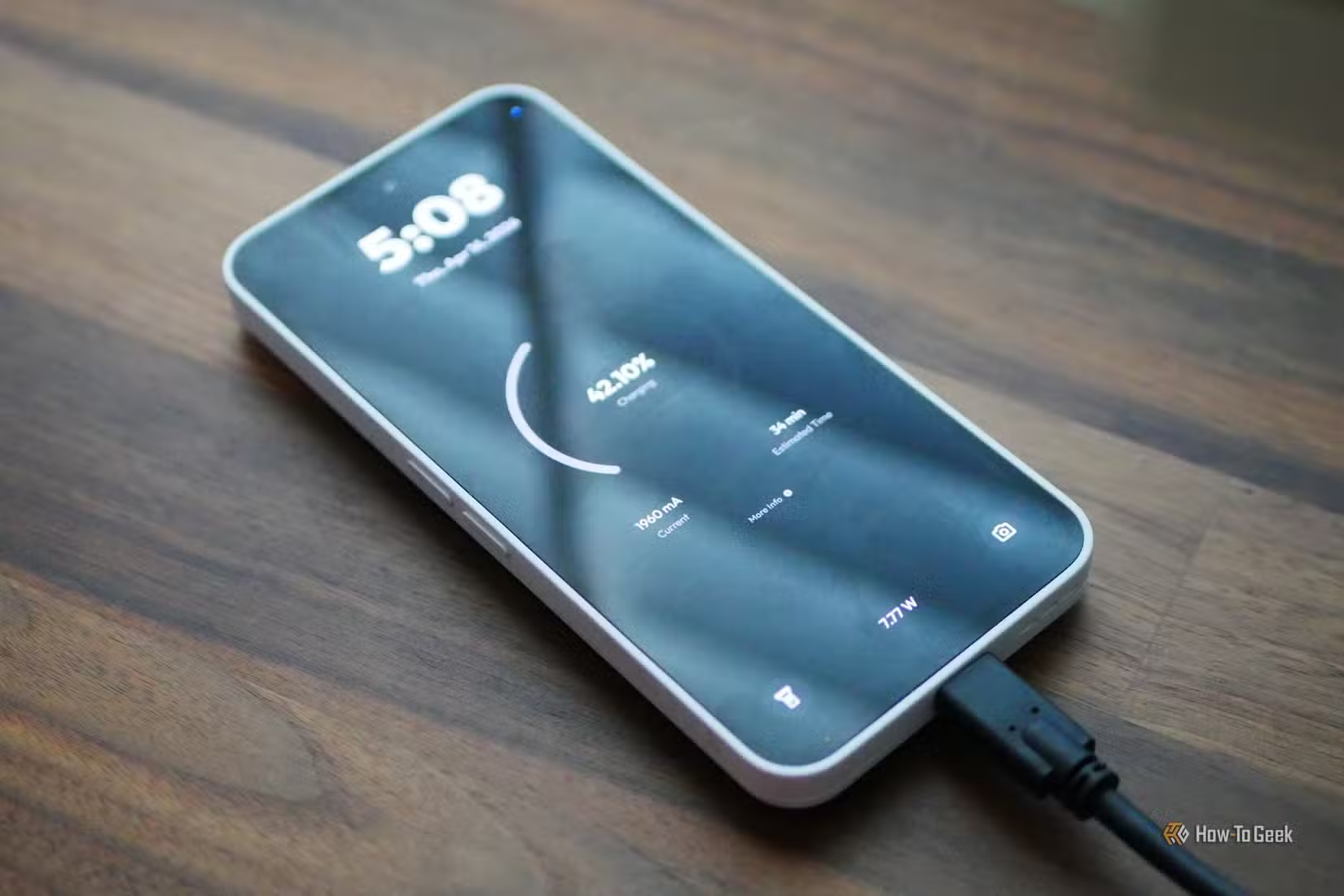
Many users discover their "fast charger" isn't delivering advertised speeds. A charger rated for 65W might only push 15W due to cable limitations, phone temperature, or compatibility issues. OneBattery makes this visible at a glance.
Dive into the full app and you get detailed battery health information. This is useful for older phones where battery degradation affects daily use, or when buying a used device and wanting to verify battery condition.
What Makes These Apps Different
The common thread across these recommendations: they prioritize function over data collection. Easy Notes stores everything locally. OneBattery provides hardware monitoring without requiring cloud connectivity or account creation.
- No mandatory account creation
- Local data storage by default
- No advertising or tracking
- Open source or transparent pricing
For professionals who handle sensitive information, local-first apps reduce attack surface. Your notes never leave your device unless you explicitly export them. Your battery data isn't aggregated on some server for analytics purposes.
More on Android vs iOS ecosystem choices
Installation and Pricing
Easy Notes is completely free and available only through F-Droid. If you don't have F-Droid installed, you'll need to add it first from f-droid.org. The F-Droid store specializes in open source Android apps and provides an alternative to Google Play.
OneBattery is available on Google Play with a free tier that covers basic functionality. The full unlock is affordable and removes limitations on advanced features.
Logicity's Take
Weekend Project: Audit Your Current Apps
Installing these apps takes five minutes. But here's a better weekend project: review what permissions your current note-taking and utility apps actually have. Check Settings, then Apps, then Permissions on your Android device.
You might find that a simple flashlight app has access to your contacts, or that a calculator can read your files. Apps like Easy Notes and OneBattery request minimal permissions because they don't need your data to function.
More productivity tools and workflows
Frequently Asked Questions
Is Easy Notes available on Google Play?
No. Easy Notes is open source and available exclusively through F-Droid, the open source app repository for Android.
Can OneBattery damage my phone's battery?
No. OneBattery only reads battery data. It doesn't modify charging behavior or battery settings. It's a monitoring tool, not a battery management app.
Do these apps sync across devices?
Easy Notes stores data locally by default, so there's no automatic sync. You can manually export notes if needed. OneBattery data is device-specific since it monitors local hardware.
What Android version do these apps require?
Check F-Droid for Easy Notes requirements and Google Play for OneBattery. Most modern Android apps require Android 8.0 or higher.
Are there iOS versions of these apps?
These specific apps are Android-only. iOS users can look for similar local-first alternatives on the App Store, though Apple's ecosystem has fewer open source options.
Need Help Implementing This?
Source: How-To Geek
Manaal Khan
Tech & Innovation Writer
Produced with AI assistance and reviewed by the Logicity editorial team. Learn more in our Editorial Policy.