Key Takeaways

- Attackers send VBScript files via compromised WhatsApp accounts, disguised as invoices and billing statements
- The malware installs ManageEngine Endpoint Central, giving attackers full remote control of victim PCs
- Campaign targets users in Brazil, India, Mexico, Singapore, UK, Spain, Taiwan, Australia, Russia, Vietnam, and Malaysia
A WhatsApp phishing attack is spreading across 11 countries, using compromised accounts to send VBScript malware disguised as business documents. Kaspersky researchers found the campaign targeting users in Brazil, India, Mexico, Singapore, the UK, Spain, Taiwan, Australia, Russia, Vietnam, and Malaysia with fake invoices, billing statements, and financial reports.
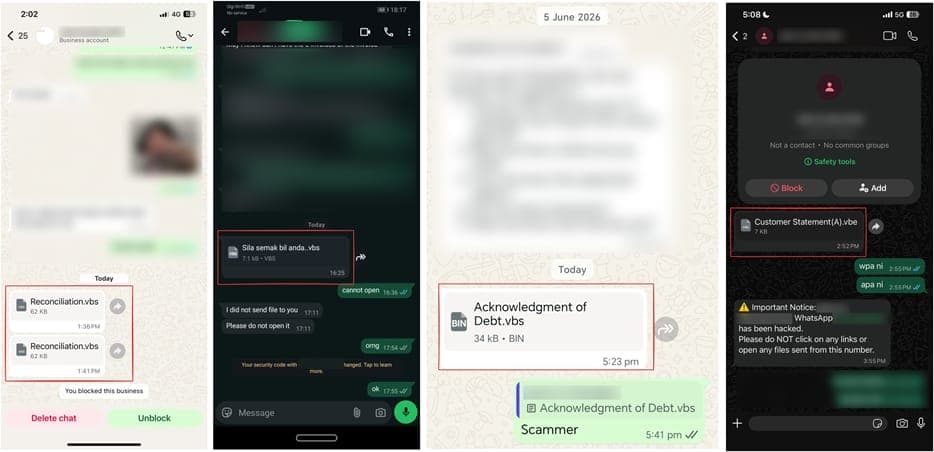
The attack works because the malicious files arrive from contacts the victim actually knows. Attackers first compromise a WhatsApp account, then blast VBScript files to everyone in that person's contact list. The file names look legitimate. They're localized into multiple languages. A user in Brazil might receive what looks like a billing notice in Portuguese from their accountant.
How the WhatsApp phishing attack chain works
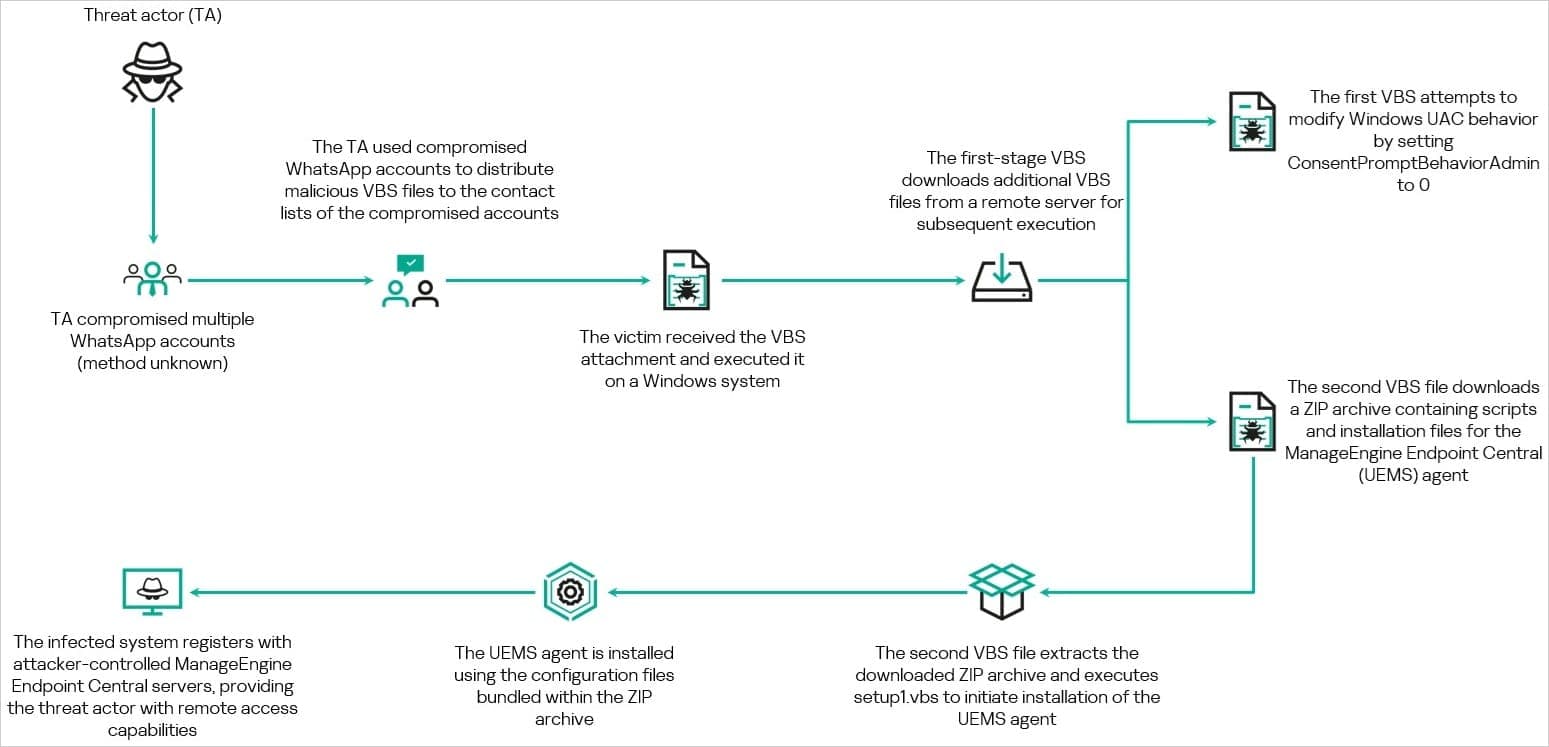
The infection begins when a victim downloads and opens the VBScript file on Windows. The script is heavily obfuscated, hiding its true purpose from casual inspection. Once executed, it reaches out to attacker infrastructure to fetch two additional scripts.
These secondary scripts do the real damage. They modify Windows Registry entries to disable User Account Control (UAC) protections, then download a ZIP archive containing ManageEngine Endpoint Central. This is legitimate IT administration software, the kind enterprises use to manage fleets of computers from a central dashboard.
The attackers install it silently and configure it to phone home to their own command servers. At that point, they have full remote administration access to the victim's machine. They can browse files, execute commands, install additional malware, or pivot deeper into a corporate network.
Desktop vs. Web client: a key difference
Kaspersky noted an important distinction in how the malware executes. When received through WhatsApp Web, the VBScript file must be downloaded first. But on the WhatsApp Desktop client for Windows, the file can execute directly via Windows Script Host (wscript.exe). This makes the desktop app a higher-risk vector.
The difference matters for corporate security teams. Many businesses use WhatsApp Desktop for convenience. That convenience now carries additional risk.
Who's behind the campaign?
Kaspersky hasn't attributed the attacks to a specific group. The researchers found signs of Chinese language use in the code and infrastructure overlap with IP addresses previously linked to ValleyRAT and Gh0st RAT operations. Both are remote access trojans with Chinese origins.
But the evidence isn't strong enough for confident attribution. The researchers also noted they still don't know exactly how the initial WhatsApp accounts were compromised. That gap in the attack chain leaves open questions about whether this is a sophisticated state-linked operation or financially motivated cybercrime.
Why legitimate tools make this attack dangerous
The use of ManageEngine Endpoint Central is clever. It's a real, signed, trusted application used by IT departments worldwide. Security tools are less likely to flag it as malicious. The attackers are using a technique called "living off the land," abusing legitimate software to avoid detection.
This approach has grown popular among threat actors. Endpoint detection systems trained to spot obvious malware may not flag authorized IT administration tools, even when they're being used for unauthorized purposes.
How to protect yourself
Kaspersky's advice is straightforward: treat files from contacts with suspicion, even trusted ones. If your colleague sends an unexpected invoice, call them. Verify through a secondary channel before opening anything.
- Never open VBS, JS, or script files received via messaging apps
- Verify unexpected documents through a phone call or separate message
- Scan all downloaded files with up-to-date antivirus before execution
- Consider using WhatsApp Web instead of Desktop to require manual downloads
- Monitor for unexpected remote administration tools on corporate machines
The fact that messages come from real, compromised contacts is what makes this campaign effective. Traditional phishing advice tells users to watch for unknown senders. Here, the sender is someone you know. The only defense is skepticism about unexpected files, regardless of who sends them.
Logicity's Take
This campaign highlights a growing blind spot: messaging apps have become the new email for business communications, but security practices haven't caught up. Most companies have email filtering, attachment scanning, and phishing training focused on Outlook. Few have equivalent controls for WhatsApp, Telegram, or Signal. The attackers are exploiting that gap. Expect more campaigns to follow this playbook as messaging-based phishing matures.
Frequently Asked Questions
Can this WhatsApp phishing attack affect Mac or iPhone users?
The current campaign targets Windows specifically. The VBScript files require Windows Script Host to execute. Mac and iPhone users cannot run these files, though compromised accounts could still spread the malware to Windows contacts.
How do I know if my WhatsApp account was compromised?
Check your sent messages for files you didn't send. Look for contacts asking about documents they received from you. Enable two-step verification in WhatsApp settings, and review linked devices for unknown sessions.
What is ManageEngine Endpoint Central?
It's legitimate IT administration software from Zoho that allows system administrators to remotely manage computers, deploy software, and configure settings. The attackers are abusing it because security tools don't flag it as malware.
Why do attackers use VBScript instead of executable files?
VBScript files can be heavily obfuscated, making them harder for security tools to analyze. They also appear less threatening than .exe files to casual users and can execute directly on Windows without additional software.
Is WhatsApp doing anything to stop this attack?
The source doesn't mention any response from WhatsApp or Meta. The attack exploits compromised user accounts rather than a platform vulnerability, which limits what WhatsApp can do technically.
Another remote code execution vulnerability requiring immediate attention from security teams
Need Help Implementing This?
If your organization needs help assessing messaging app security policies or implementing endpoint monitoring for unauthorized remote administration tools, contact the Logicity team for expert guidance.
Source: BleepingComputer
Manaal Khan
Tech & Innovation Writer
Produced with AI assistance and reviewed by the Logicity editorial team. Learn more in our Editorial Policy.