Key Takeaways
- Engineering teams recover 5-10 hours weekly by eliminating repetitive SSH configuration tasks
- Port forwarding errors drop significantly when configurations become reusable templates
- Auto-reconnect features keep critical workflows running without manual intervention

Read in Short
Your engineers are spending hours weekly on SSH connection management instead of shipping features. Termius converts repetitive terminal commands into saved, reusable configurations. The result: faster deployments, fewer misconfigurations, and development teams focused on building rather than babysitting connections.
Why SSH Management Tools Matter for Your Bottom Line
Here's a number that should concern every CTO: senior engineers spend an average of 30 minutes daily just managing SSH connections. That's reconnecting dropped sessions, retyping port forwarding commands, and switching between staging and production environments. Multiply that across a 10-person DevOps team, and you're burning 25 hours weekly on what amounts to administrative overhead.
The traditional SSH workflow hasn't changed much since the 1990s. Open a terminal. Type a command. Hope you remember the right port numbers. Reconnect when the session inevitably drops. For companies running modern microservices architectures with dozens of servers across multiple environments, this approach doesn't scale.
This isn't just about convenience. Every manual SSH command is an opportunity for error. Wrong port number? You've just connected to production instead of staging. Forgot to set up port forwarding? Your local testing environment can't reach the services it needs. These mistakes compound into deployment delays, debugging sessions, and occasionally, production incidents.
What Is Termius and How Does It Solve SSH Problems?
Termius takes the command-line SSH experience and wraps it in a configuration-first interface. Instead of typing connection strings every time, you define hosts once. Server addresses, usernames, SSH keys, and port forwarding rules all become saved configurations that your entire team can reuse.
Think of it as the difference between a spreadsheet and a database. Yes, you could track customer data in Excel. But once you hit a certain scale, you need structure, consistency, and the ability to share configurations across your organization. The same logic applies to SSH management.
Key Capability Shift
Traditional SSH treats connections as temporary commands. Termius treats them as persistent configurations. This fundamental difference eliminates repetitive setup and reduces human error across every connection.
The platform works across macOS, Windows, Linux, iOS, and Android. For distributed teams or engineers who need server access from multiple devices, this cross-platform consistency matters. Your SSH configurations sync across devices, so the setup you create on your workstation is available on your laptop during on-call incidents.
SSH Management Tools: Feature Comparison for CTOs
Before evaluating Termius specifically, it helps to understand how modern SSH management tools compare to the traditional terminal approach. The differences become especially apparent as your infrastructure complexity grows.
| Capability | Traditional Terminal SSH | Termius |
|---|---|---|
| Connection Setup | Command-based, typed each time | Configuration-based, saved permanently |
| Port Forwarding | Manual flags, easy to forget | Visual UI, saved with host profile |
| Session Management | Manual reconnection required | Auto-reconnect on connection drops |
| Multi-Environment | Requires remembering different commands | Organized folders for dev/staging/prod |
| Team Sharing | Copy-paste commands or documentation | Shared vaults with encrypted sync |
| Audit Trail | None built-in | Connection history and logging |
The team sharing capability deserves special attention. In traditional workflows, SSH configurations live in individual engineers' heads or scattered documentation. When someone leaves the company or goes on vacation, that institutional knowledge walks out with them. Centralized SSH management creates organizational memory.
Port Forwarding: Where SSH Management Tools Save Real Time
If your team does any local development against remote services, port forwarding configuration is probably your biggest SSH headache. The syntax is notoriously confusing. Was it local port first or remote port? Which flag was for reverse tunneling again?
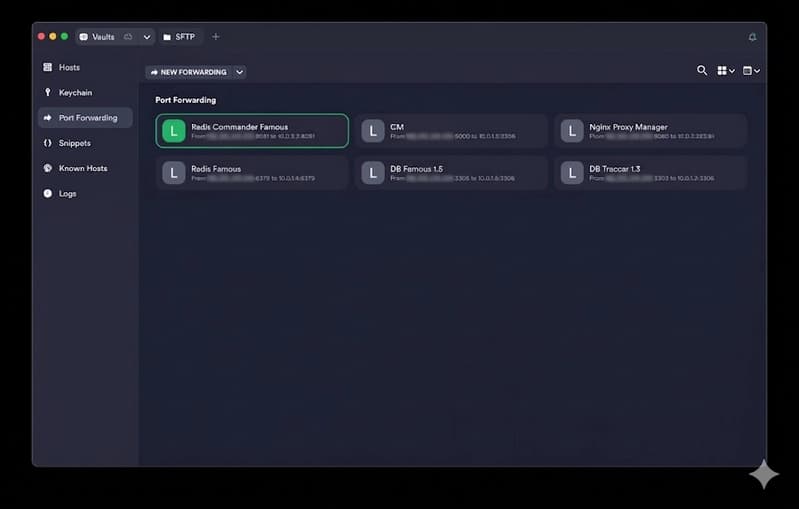
Termius replaces cryptic command flags with a visual interface. You specify local and remote ports, save the configuration once, and reuse it indefinitely. For teams running microservices where local development might require forwarding connections to 5-10 different services, this adds up to significant time savings.
- Define local-to-remote port mappings through a visual interface
- Save port forwarding rules as part of host configurations
- Activate multiple port forwards with a single click
- Eliminate the ssh -L syntax that trips up even experienced engineers
One engineering manager reported that port forwarding setup went from a 10-minute process (including the inevitable debugging when something was typed wrong) to under 30 seconds. Across a team making these connections dozens of times daily, the productivity impact compounds quickly.
Streamlined SSH management pairs well with optimized deployment pipelines
Auto-Reconnect: Why Dropped Connections Cost More Than You Think
SSH connections drop. Networks hiccup. Laptops go to sleep. In traditional workflows, every dropped connection requires manual intervention. The engineer notices the dead session, types the connection command again, potentially reconfigures port forwarding, and loses context on whatever they were debugging.
Termius's auto-reconnect feature handles this automatically. When a session drops, the tool re-establishes the connection without user intervention. For long-running debugging sessions or engineers who stay connected to servers throughout the day, this eliminates a constant source of friction.
The business case here isn't just about the 30 seconds to reconnect. It's about context switching. Every interruption pulls an engineer out of their flow state. Research suggests it takes 15-25 minutes to fully regain focus after an interruption. Automatic reconnection eliminates interruptions that weren't adding any value.
When Does Investing in SSH Management Tools Make Sense?
Not every organization needs dedicated SSH management software. If you're a solo developer connecting to one or two servers occasionally, the built-in terminal works fine. The ROI calculation changes as your infrastructure and team complexity grows.
Investment Triggers
Consider SSH management tools when: (1) Your team manages 10+ servers across multiple environments, (2) Port forwarding is part of daily development workflows, (3) You're onboarding new engineers who struggle with SSH setup, or (4) Connection management errors have caused production incidents.
The pricing model matters for budget planning. Termius offers a free tier for individual use with basic features. Team plans with shared vaults and advanced features run $8.33-$12.50 per user monthly depending on billing cycle. For an enterprise with compliance requirements, custom pricing includes SSO, audit logs, and dedicated support.
Run the math on your organization. If SSH management tools save each engineer 2 hours weekly, that's 8 hours monthly. At a fully-loaded engineering cost of $100/hour, you're recovering $800/month per engineer. Even expensive enterprise licensing pays for itself quickly at that rate.
Access control matters for SSH management in security-conscious organizations
Implementation: Getting Your Team on SSH Management Tools
Migrating from terminal-based SSH to a managed solution requires some upfront investment. Someone needs to document existing server configurations, set up the shared vaults, and establish naming conventions. Plan for 2-4 hours of setup time per environment, plus training time for engineers unfamiliar with the new workflow.
- Audit existing SSH configurations across your team (check ~/.ssh/config files and documentation)
- Create a consistent naming convention for hosts (e.g., project-environment-service)
- Set up shared vaults for team-accessible configurations
- Migrate configurations in phases, starting with most frequently accessed servers
- Train team members on the new workflow with emphasis on port forwarding and auto-reconnect
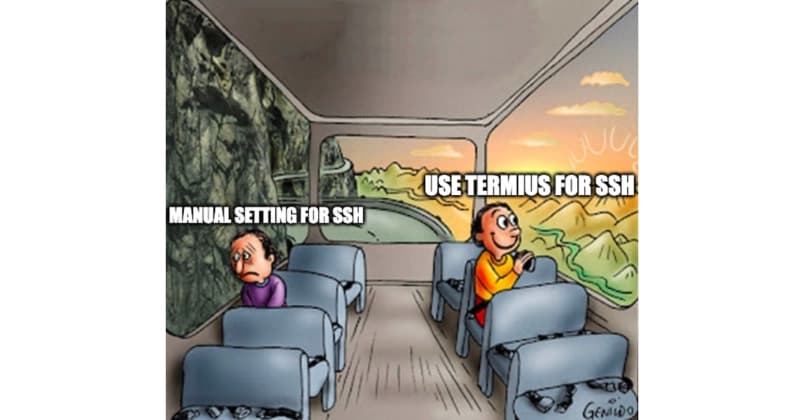
The migration typically encounters resistance from engineers who've been using terminal SSH for years. The response is straightforward: nobody's taking away your terminal. Termius includes a full terminal interface. The difference is that your configurations persist and share across your organization. Frame it as augmentation, not replacement.
Security Considerations for Business SSH Management
Centralizing SSH configurations raises legitimate security questions. You're essentially creating a single point of access to your server infrastructure. Termius addresses this with end-to-end encryption, meaning even Termius employees can't access your saved configurations.
For regulated industries, the audit logging capabilities matter. Every connection attempt gets logged. When compliance auditors ask who accessed production servers last month, you have an answer. Try getting that information from scattered terminal histories across engineer workstations.
- End-to-end encryption for stored configurations and credentials
- SSO integration with enterprise identity providers (Okta, Azure AD, etc.)
- Connection audit logs for compliance reporting
- Role-based access control for shared team vaults
- Two-factor authentication for account access
FAQ: SSH Management Tools for Business Leaders
Frequently Asked Questions
How much does Termius cost for a development team?
Termius offers a free tier for individuals with basic features. Team plans run $8.33-$12.50 per user monthly, with enterprise pricing available for organizations needing SSO, audit logs, and compliance features. For a 10-person team, expect $1,000-$1,500 annually.
How long does it take to implement an SSH management tool?
Initial setup takes 2-4 hours per environment to migrate existing configurations. Team training adds another 1-2 hours. Most organizations are fully operational within one week. The setup investment pays back within the first month through time savings.
Can Termius replace our existing terminal workflow?
Termius includes a full terminal interface, so engineers can work exactly as before. The difference is that configurations persist and sync. Teams typically see adoption resistance fade within 2-3 weeks as engineers experience the time savings from saved configurations.
Is centralized SSH management a security risk?
Properly implemented, it's actually more secure than scattered terminal configurations. Termius uses end-to-end encryption, supports SSO, and provides audit logging. The visibility into who accessed which servers often exceeds what organizations had with terminal-based approaches.
What alternatives to Termius should we evaluate?
The main alternatives include Royal TSX (Mac-focused), MobaXterm (Windows-focused), and open-source options like Shuttle or StormsSSH. Termius differentiates on cross-platform sync and team collaboration features. Evaluate based on your primary operating systems and team sharing requirements.
AI tools are transforming developer productivity alongside SSH improvements
The Bottom Line on SSH Management Tools
SSH management tools like Termius represent a small operational investment with measurable returns. The math is straightforward: if your engineering team spends meaningful time on connection management, port forwarding configuration, and session reconnection, automation pays for itself quickly.
The harder-to-quantify benefits matter too. Fewer misconfigurations mean fewer production incidents. Centralized configurations mean faster onboarding. Audit logs mean easier compliance. These factors don't show up in a simple time-saved calculation, but they reduce organizational risk.
For most engineering organizations managing more than a handful of servers, dedicated SSH management has become table stakes. The question isn't whether to adopt these tools, but which one fits your team's workflow and security requirements.
Need Help Optimizing Your DevOps Workflow?
Logicity helps engineering teams evaluate and implement productivity tools that deliver measurable ROI. From SSH management to CI/CD optimization, we focus on solutions that free your engineers to build rather than maintain. Contact us for a workflow assessment.
Source: DEV Community
Manaal Khan
Tech & Innovation Writer
Produced with AI assistance and reviewed by the Logicity editorial team. Learn more in our Editorial Policy.