Key Takeaways
- Skills trigger automatically based on context in your prompts, no special syntax needed
- Commands require explicit /invocation and only run when you call them
- Use Skills for recurring standards like code reviews or accessibility checks
- Use Commands for procedural tasks you want full control over
- Both are defined as .md files but serve very different purposes
Read in Short
Skills = automatic triggers based on what you say. Commands = manual triggers using /syntax. Both are markdown files, but Skills are always-on context while Commands only fire when explicitly called.
If you've been doing any "vibe coding" with Claude lately, you've probably stumbled across two features that seem almost identical at first glance: Skills and Commands. Both live in .md files. Both automate stuff. So what's the actual difference?
Here's the thing. The difference isn't in how they're written. It's in how Claude discovers and uses them. And picking the wrong one for your use case can either annoy you with unwanted automation or leave you typing the same prompts over and over again.
What Are Skills in Claude?
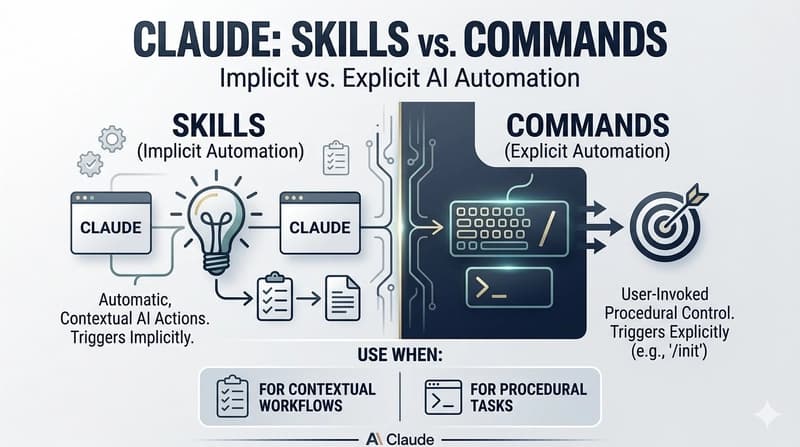
Think of Skills as preloaded instructions that Claude just knows about. You define them once, and Claude automatically considers them whenever they're relevant to your conversation. No special syntax required.
Say you create an accessibility review skill. Next time you tell Claude something like "Review this component for accessibility," it'll automatically pull in those skill instructions without you typing /anything. The skill just kicks in based on context.
- Implicitly available without explicit calls
- Triggered by natural language in your prompts
- Perfect for consistent standards you want applied everywhere
- Can be scoped to specific projects or contexts
- Reduces repetitive prompt engineering
Skill Example
An accessibility skill containing WCAG guidelines and common a11y patterns would automatically activate when you mention "accessibility," "a11y," or "screen reader" in your prompts. Claude connects the dots for you.
What Are Commands in Claude?
Commands are the opposite philosophy. They sit there doing nothing until you explicitly wake them up with a forward slash. Claude has built-in commands like /init, /compact, and /clear. But you can build your own custom ones too.
The key word here is control. Commands give you deterministic, predictable behavior. They run exactly when you want them to run. Not before. Not by accident.
- Explicit /invocation required every time
- Runs only when called, never automatically
- Can be local to a project, global, or system-level
- Great for multi-step procedural tasks
- Zero risk of unintended triggers
Building a report generator? Make it a command. Creating a database migration script? Command. Anything where you'd be annoyed if it ran when you didn't want it to? Definitely a command.
Skills vs Commands: The Core Difference
Both are markdown files. Both automate workflows. So why do we need two systems?
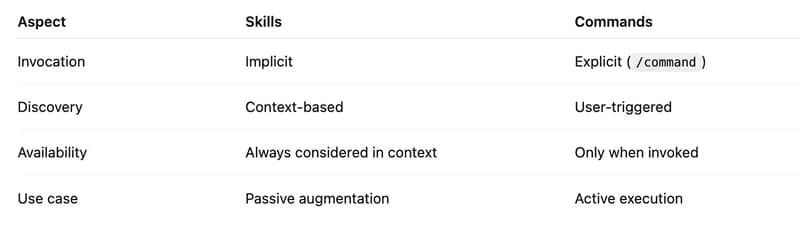
| Aspect | Skills | Commands |
|---|---|---|
| Invocation | Automatic, context-driven | Explicit /slash syntax |
| Discovery | Claude considers them implicitly | Only activated when called |
| Best For | Standards, reviews, consistent patterns | Procedural tasks, reports, transformations |
| Risk Level | May trigger unexpectedly | Never runs without explicit call |
| Setup Complexity | Define once, works everywhere | Need to remember command names |
The mental model I use: Skills are like muscle memory. Commands are like tools you grab from a drawer. Muscle memory happens automatically when the situation calls for it. Tools require you to consciously reach for them.
When Should You Use Skills?
Skills shine when you want something to happen consistently without thinking about it. Code review standards are a perfect example. You probably want the same quality checks applied every single time someone asks Claude to review code.
- Accessibility checks you want running on all UI reviews
- Security best practices for code audits
- Your team's specific coding standards and conventions
- Documentation formatting rules
- Performance optimization patterns you always want flagged
Basically, if you find yourself adding the same instructions to prompts over and over, that's a skill waiting to be created. Write it once, forget about it, let Claude handle the rest.
If you're optimizing your dev workflow with Claude Skills, you might also want to streamline your clipboard management.
When Should You Use Commands?
Commands are your go-to when you need explicit control. Multi-step procedures. Tasks that shouldn't run accidentally. Anything destructive or resource-intensive.
- Report generation that queries external APIs
- Database migrations or schema changes
- Deployment scripts and CI/CD triggers
- Bulk transformations on codebases
- Any task with side effects you want to control precisely
The rule of thumb? If accidentally triggering something would cause problems, make it a command. You really don't want your deployment script firing because you casually mentioned "deploy" in a conversation about something else.
Getting Started With Your Own Skills
Creating a skill is straightforward. You write a markdown file with structured instructions, and Claude picks it up. There's even a starter template you can fork to get going quickly.
# Accessibility Review Skill

## When to Apply
Activate when the user asks for accessibility review, a11y check, or WCAG compliance.

## Instructions
1. Check all interactive elements for keyboard accessibility
2. Verify color contrast ratios meet WCAG AA standards
3. Ensure all images have meaningful alt text
4. Validate form labels and error messages
5. Test focus management and tab order
Drop that in the right location, and now every time you ask Claude to review accessibility, it knows exactly what you expect. No more copying and pasting the same checklist.
Building Custom Commands
Commands follow a similar format but require that explicit /trigger. You define what the command does, and it only runs when you call it by name.
# /generate-report

## Description
Generates a weekly project status report from git commits and open issues.

## Steps
1. Fetch commits from the last 7 days
2. Categorize by feature, bugfix, or chore
3. Pull open issues and their priorities
4. Format output as markdown report
5. Save to /reports directory with timestamp
Now typing /generate-report gives you consistent output every time. And it never runs unless you explicitly ask for it.
Quick Decision Framework
Still not sure which to use? Here's the fastest way to decide:
Pick Skills If...
You want automatic behavior, the task should be context-aware, and you want to reduce how much you type in prompts. Examples: code review standards, accessibility checks, documentation formatting.
Pick Commands If...
You need explicit control, the task is procedural with multiple steps, and you definitely don't want it triggered by accident. Examples: generating reports, running transformations, deployment scripts.
The Bottom Line
Skills and Commands aren't competing features. They're complementary tools for different problems. Skills handle the stuff you always want considered. Commands handle the stuff you want to trigger deliberately.
Start by identifying your most repetitive prompt additions. Those become Skills. Then look at your procedural, multi-step tasks that need precision. Those become Commands.
Once you've got a few of each set up, your Claude workflow gets way smoother. Less typing, more consistency, and exactly the automation level you actually want.
Frequently Asked Questions
Can I have both Skills and Commands for the same task?
Yes, but it usually doesn't make sense. Pick the invocation style that matches how you want to use it. If you want automatic, use a Skill. If you want manual, use a Command.
Do Skills slow down Claude's responses?
Not noticeably. Skills are lightweight context additions. Claude is designed to handle them efficiently alongside your regular prompts.
Can I share Skills and Commands with my team?
Absolutely. Since they're just markdown files, you can commit them to your repo and everyone gets the same automation setup.
What happens if a Skill triggers when I don't want it to?
You can scope Skills to specific contexts or projects. If one is too aggressive, adjust its trigger conditions or convert it to a Command instead.
Source: DEV Community
Huma Shazia
Senior AI & Tech Writer
Produced with AI assistance and reviewed by the Logicity editorial team. Learn more in our Editorial Policy.