Key Takeaways
- Claude Code's context loss isn't a model problem, it's a workflow problem that requires structural solutions
- A 9-agent team across 3 groups (strategic, technical, ops) can run full sprint cycles autonomously
- 18 skills encode every phase so you stop re-prompting the same context every sprint
- The system proved itself by catching 2 bugs in its own configuration during autonomous operation
- Everything runs on plain markdown and JSON with no additional installation beyond Claude Code
Read in Short
Stop fighting Claude Code's context amnesia with better prompts. One developer built a 9-agent sprint system that handles PM duties, code review, security audits, and QA testing autonomously. After 55+ production sprints, it even caught bugs in itself.
Here's a frustrating pattern you've probably hit if you've spent any real time with Claude Code: you write what feels like the perfect prompt, get great results for a session, then come back the next day and... nothing sticks. Your AI coding partner has forgotten everything. Decisions get remade. Context evaporates. Your codebase becomes less of a coherent project and more of a geological record showing every time you had to start over.
A developer who goes by rbah31 on DEV Community spent two months banging their head against this exact problem. And they finally named what took way too long to recognize: Claude doesn't drift because your prompts suck. It drifts because there's no structure underneath the session.
The Real Problem Isn't the AI
Look, we've all been there. You spend hours crafting the most detailed CLAUDE.md file. You paste in frameworks and templates that some popular repo promised would fix everything. And for a bit, things work better. Then gradually, you forget to update them. The AI forgets to follow them. You're back to square one.
This developer took a completely different approach. Instead of trying to write better prompts, they built a methodology. Think of it like giving Claude Code an entire dev team instead of just instructions.
The Agent Team Structure
So what does this AI dev team actually look like? There are three groups working together:

- Strategic Group (3 agents): A PM agent that orchestrates sprints, an independent QA challenger that questions decisions, and a marketing strategist
- Technical Group (5 agents): Architect, code reviewer, security auditor, ops engineer, and QA tester
- Operations (1 agent): A monitor that watches over everything
The kicker? No agent reviews its own work. The code reviewer doesn't check the architect's decisions on the same output. The QA challenger exists specifically to poke holes in what everyone else approved. It's basically building in the kind of healthy friction that good human teams have naturally.
Why This Matters
Each agent has a defined role, persistent memory across sessions, and instructions it can't override. This solves the context evaporation problem because the structure persists even when individual sessions don't.
The Sprint Cycle
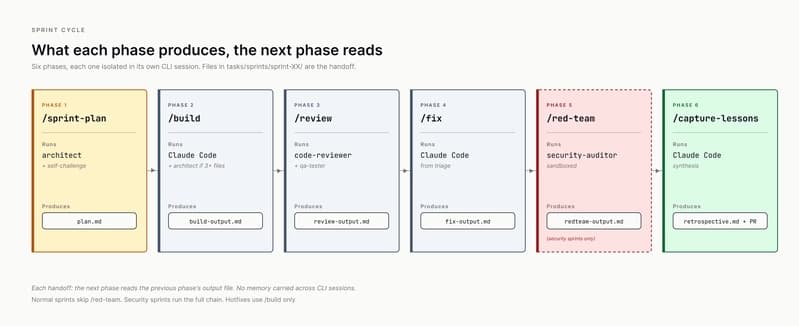
The workflow follows a cycle that'll feel familiar if you've ever worked in agile:
/sprint-plan → /build → /review → /fix → /red-team (optional) → /capture-lessonsThere are 18 skills total that encode every phase. You stop prompt-engineering the same context every single sprint because the skill just runs it. Want to do a security audit? There's a skill for that. Need code review? Skill. The whole thing becomes invoke and validate rather than explain and hope.
You can run this two ways. Manual mode has you invoke each phase, validate the output, then move on. Autonomous mode lets the strategic PM agent orchestrate end-to-end while you just review the final PR.
When the System Debugged Itself
Here's where this gets genuinely impressive. Two days before publishing the methodology, the workflow caught two bugs in its own configuration. And these weren't obvious crashes. They were subtle interpretation errors that would have caused silent failures.
The first bug: the PM agent hit an ambiguous instruction in the project's CLAUDE.md file that said "one phase = one session." It interpreted this as requiring human approval between phases. That's exactly backwards from what autonomous orchestration should do. Sessions are technical CLI isolation for keeping context clean, not gates where humans need to sign off.
The second bug was sneakier. The /sprint-plan skill was instructing Claude to enter plan mode inside non-interactive sessions. In that mode, plan mode triggers an exit waiting for human approval. Exit code 0. Nothing written. Silent failure. Your sprint planning just... doesn't happen. And you might not notice for a while.
Both bugs got fixed in v3.5.1. But the fact that the system surfaced its own inconsistencies before they hit production? That's the whole point. Not a system that looks clean on paper. A system that actually works.
If you're optimizing your dev workflow, you might also want to speed up your local environment with better DNS settings
The Production Numbers
This isn't a weekend experiment that looked cool in a demo. The developer ran 55+ sprints on an actual production SaaS. We're talking multi-tenant architecture, AWS Lambda combined with ECS Fargate, Stripe billing integration, real customers using it right now.
The methodology survived contact with reality. That matters way more than how elegant the system diagram looks.
What Makes This Different From Other Claude Frameworks
There are tons of CLAUDE.md templates floating around. Most of them are static documents you paste once and gradually stop updating. This is different because it's a methodology that runs itself.
| Traditional Approach | Agent Team Approach |
|---|---|
| Paste template, forget over time | Living system that enforces itself |
| Single AI with no structure | 9 specialized agents with defined roles |
| Context lost every session | Persistent memory across sessions |
| You prompt-engineer every task | Skills encode the workflow |
| Silent failures go unnoticed | System catches its own bugs |
Everything runs on plain markdown and JSON. You don't need to install anything beyond Claude Code itself. The barrier to trying this is basically just reading the docs and setting up your agent definitions.
Should You Actually Use This?
Honestly, this seems like overkill if you're building a simple side project. If your codebase fits in one developer's head and you're shipping features every few days, the overhead of setting up 9 agents probably isn't worth it.
But if you're building something serious? A production app with real architecture decisions, security requirements, and code that needs to last? This approach solves real problems. The context loss issue in Claude Code is genuinely painful at scale. Having agents that can't review their own work catches mistakes that would otherwise slip through. And the fact that it caught bugs in itself is honestly the most compelling proof of concept possible.
Getting Started
The full methodology including agent definitions, skills, and documentation is available on DEV Community. Everything is plain markdown and JSON, so you can adapt it to your own workflow without any lock-in.
The Bigger Picture
What's interesting here isn't just the specific implementation. It's the mental shift from "write better prompts" to "build better structure." AI tools are getting powerful enough that the bottleneck isn't capability anymore. It's workflow design.
We're still in the early days of figuring out how humans and AI agents should actually work together. Most people are still treating Claude Code like a really smart autocomplete. Building an entire agent team that runs sprint cycles autonomously? That's a glimpse at where this is all heading.
And the fact that the system can debug itself? That's not just convenient. That's the foundation for AI development workflows that actually scale.
Source: DEV Community
Manaal Khan
Tech & Innovation Writer
Produced with AI assistance and reviewed by the Logicity editorial team. Learn more in our Editorial Policy.