Key Takeaways

- RBAC uses 5 tables: users, roles, permissions, and two mapping tables to connect them
- Permissions become data rows instead of hardcoded if/else checks in your code
- The pattern creates automatic audit trails through granted_by and granted_at columns
- One SQL query can answer any 'does this user have this permission?' question
- The schema doubles as a communication tool for explaining access control to non-technical stakeholders

Read in Short
Stop writing if role == 'admin' checks scattered throughout your code. RBAC database design uses 5 tables (users, roles, permissions, plus two mapping tables) to store permissions as data. One SQL query handles all authorization checks. You get automatic audit trails, easy permission changes without code deploys, and a schema that even non-developers can understand.
What Is RBAC Database Design and Why Should You Care?
Here's a scenario that'll sound familiar. You're building a web app, and different users need different access levels. So you write some quick checks: if role == 'admin', show everything. If role == 'manager', show most things. If role == 'user', show the basics.
Then the requirements change. The warehouse team shouldn't see pricing. Finance needs to know who approved what. The supervisor can assign shifts but only managers can approve overtime. Suddenly your clean permission logic looks like spaghetti code with nested if/else statements everywhere.
RBAC database design fixes this by treating permissions as data, not code. Instead of scattering authorization logic throughout your application, you store it in a relational database. The app asks one simple question: does this user have this permission? A single SQL query answers it.
The 5-Table RBAC Schema Explained
The beauty of RBAC database design is its simplicity. You don't need a fancy framework or a complex library. You need five tables that any relational database can handle.
- Users Table: Your list of people. Standard stuff — user ID, email, name, the basics.
- Roles Table: Think of these as job titles for system access. 'warehouse_staff', 'finance_manager', 'production_supervisor' — whatever makes sense for your organization.
- Permissions Table: Every action your system can perform. These are typically formatted as resource:action pairs like 'inventory:read', 'pricing:update', or 'overtime:approve'.
- User-Role Mapping Table: Connects users to their roles. One user can have multiple roles.
- Role-Permission Mapping Table: Connects roles to their permissions. This is where the magic happens.
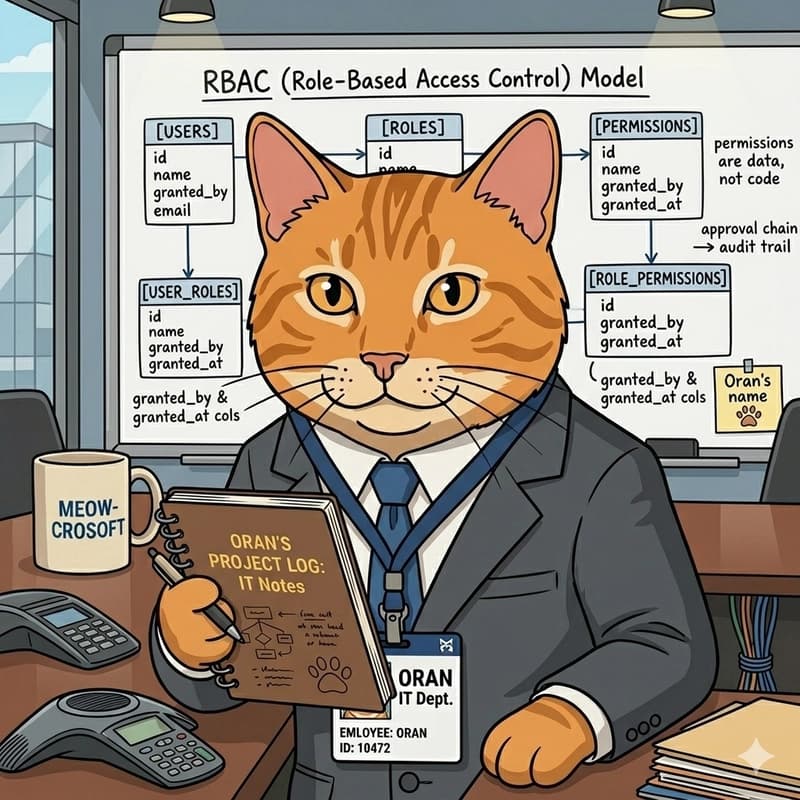
The two mapping tables are junction tables (also called bridge tables or associative tables). They handle the many-to-many relationships that make RBAC flexible. A user can have multiple roles. A role can have multiple permissions. A permission can belong to multiple roles.
How to Implement RBAC Permission Checks in Your Application
Once your schema is set up, authorization checks become dead simple. Instead of writing conditional logic, you run a query.
SELECT COUNT(*) FROM users u
JOIN user_roles ur ON u.id = ur.user_id
JOIN role_permissions rp ON ur.role_id = rp.role_id
JOIN permissions p ON rp.permission_id = p.id
WHERE u.id = ? AND p.name = ?
If the count is greater than zero, the user has the permission. That's it. No nested conditionals. No special cases. Just data.
Want to check if a warehouse worker can view inventory but not pricing? That's two permission rows in the database. The warehouse_staff role gets 'inventory:read' but not 'pricing:read'. Your application code doesn't need to know anything about warehouse-specific rules.
Pro Tip
Cache permission lookups aggressively. Load all of a user's permissions when they log in and store them in session or a fast cache like Redis. You don't want to hit the database on every single action.
RBAC vs Hardcoded Permissions: A Real Comparison
Let's look at what happens when requirements change. Say the production supervisor now needs to approve overtime (they couldn't before).
| Scenario | Hardcoded Approach | RBAC Database Design |
|---|---|---|
| Adding new permission | Write new if/else, test, deploy code | INSERT one row, no deploy needed |
| Auditing who has access | Grep through codebase, hope you find it all | SELECT query shows everything |
| Explaining to stakeholders | 'It's complicated, let me show you the code' | 'Here's a spreadsheet export of the roles table' |
| Removing access | Find and delete code, test, deploy | DELETE one row, instant effect |
| Temporary access | Ugh, feature flags? Time-based code? | Add row with expiration date |
The RBAC approach wins on every dimension except initial setup time. And even that's not much — we're talking about creating five tables and writing a few queries.
Building Audit Trails with RBAC Database Design
Here's something that'll make your compliance team happy. When permissions live in a database, you get audit trails almost for free.
Add two columns to your user-role mapping table: granted_by and granted_at. Now every permission change is a row, and every row is an audit record. You can answer questions like 'who gave this person admin access?' and 'when did that happen?' with a simple query.
ALTER TABLE user_roles ADD COLUMN granted_by INT REFERENCES users(id);
ALTER TABLE user_roles ADD COLUMN granted_at TIMESTAMP DEFAULT CURRENT_TIMESTAMP;
ALTER TABLE user_roles ADD COLUMN revoked_at TIMESTAMP NULL;
Want to keep historical records? Don't delete rows when revoking access. Set a revoked_at timestamp instead. Now you have a complete history of who had what access and when.
If you're implementing RBAC for security compliance, you might also want automated vulnerability tracking
Why RBAC Works as a Communication Tool
Something unexpected happens when you implement RBAC properly. It becomes easier to talk to non-technical stakeholders about access control.
Try explaining nested if/else permission checks to a finance manager. Their eyes glaze over in seconds. But draw five boxes on a whiteboard? That's a conversation anyone can follow.
When someone asks 'can the new accountant have the same access as Sarah?', the answer is simple: copy Sarah's role assignments. One query. No code change. No deployment. No waiting for the next sprint.
This kind of transparency builds trust. When finance can see exactly who has access to what (and who granted it), they stop treating IT like a black box.
Common RBAC Database Design Mistakes to Avoid
RBAC isn't complicated, but there are a few pitfalls that trip people up.
- Too many granular permissions: Don't create a permission for every single button click. Group related actions logically. 'inventory:manage' is often better than 'inventory:create', 'inventory:update', 'inventory:delete' as separate permissions.
- Hardcoding role names in code: The whole point is that roles are data. If your code says if role == 'admin', you've missed the point. Check for permissions, not roles.
- Forgetting about permission inheritance: Some systems need hierarchical roles where 'manager' automatically includes everything 'employee' can do. Design for this upfront if you need it.
- No default deny: Always start from 'no access' and grant permissions explicitly. Never assume a missing permission means 'allowed'.
- Ignoring performance: Permission checks happen constantly. Index your tables properly and cache aggressively.
Once you have RBAC working on the backend, you'll need to conditionally show/hide UI elements based on permissions
When RBAC Database Design Isn't Enough
RBAC handles most permission scenarios, but it's not perfect for everything. If you need attribute-based decisions ('users can only edit their own posts' or 'managers can only see their department's data'), you'll need to combine RBAC with additional logic.
The pattern for this is usually RBAC for coarse-grained permissions (can this user access the posts feature at all?) combined with application logic for fine-grained filtering (only show posts owned by this user).
Some teams move to ABAC (Attribute-Based Access Control) for complex scenarios, but honestly? RBAC with a few application-level filters handles 90% of real-world needs. Don't over-engineer it.
Getting Started with RBAC: Your First Steps
Ready to implement RBAC in your project? Here's a practical starting point.
- Map out all the actions your system performs. Be thorough but not obsessive — you can always add permissions later.
- Group users by what they need to do, not by job title. Two people with the same title might need different access.
- Create your five tables with proper foreign keys and indexes.
- Write a single hasPermission(userId, permissionName) function that runs the SQL query. Use this everywhere.
- Add the audit columns from day one. You'll thank yourself later.
- Build a simple admin UI for assigning roles. Even a basic CRUD interface beats editing the database directly.
The original source for this pattern comes from a developer who learned it the hard way — by building a permission system that broke and then researching what actually works. You can read the full story on DEV Community where Oran's journey from hardcoded checks to RBAC is documented in detail.
Frequently Asked Questions About RBAC Database Design
Frequently Asked Questions
What's the difference between RBAC and ACL (Access Control Lists)?
ACLs assign permissions directly to users for specific resources. RBAC adds a layer of abstraction through roles. In practice, RBAC scales better because you manage roles (tens of them) rather than individual user permissions (thousands). When someone joins a team, you assign them a role instead of copying permissions from another user.
How do I handle permissions for API endpoints?
Create permissions that map to your API resources and actions. Something like 'api:users:read' or 'api:orders:create'. Your API middleware checks these permissions before processing requests. Most frameworks have RBAC middleware packages that handle this pattern.
Should I use an existing RBAC library or build my own?
For most projects, use a library. Frameworks like Laravel, Django, and Rails have mature RBAC packages. Rolling your own makes sense if you need custom audit logging, unusual inheritance patterns, or want to deeply understand the system. The 5-table pattern is simple enough that custom implementations are reasonable.
How do I migrate from hardcoded permissions to RBAC?
Start by listing all your existing permission checks. Create permissions for each one. Then create roles that group these permissions logically. Update your code to check permissions instead of roles. You can do this incrementally — one feature at a time — rather than a big-bang migration.
Can RBAC handle multi-tenant applications?
Yes, but you need to scope roles and permissions to tenants. Add a tenant_id column to your roles table so each tenant can have their own role definitions. Some permissions might be global (everyone gets them) while others are tenant-specific. The 5-table pattern extends naturally to this use case.
The Bottom Line on RBAC Database Design
RBAC database design isn't glamorous. It won't make for exciting conference talks. But it solves a problem that every non-trivial application faces: who can do what, and who said they could.
Five tables. A handful of queries. That's all it takes to replace scattered permission logic with clean, auditable, explainable access control. Your future self (and your compliance team) will thank you.
The pattern has been around for decades because it works. It's one of those 'boring technology' choices that lets you focus on building features instead of debugging permission spaghetti. And in a world obsessed with the new and shiny, sometimes boring is exactly what you need.
Source: DEV Community
Manaal Khan
Tech & Innovation Writer
Produced with AI assistance and reviewed by the Logicity editorial team. Learn more in our Editorial Policy.