Key Takeaways
- Google launched a dedicated Gemini app for Windows 10 and 11 users
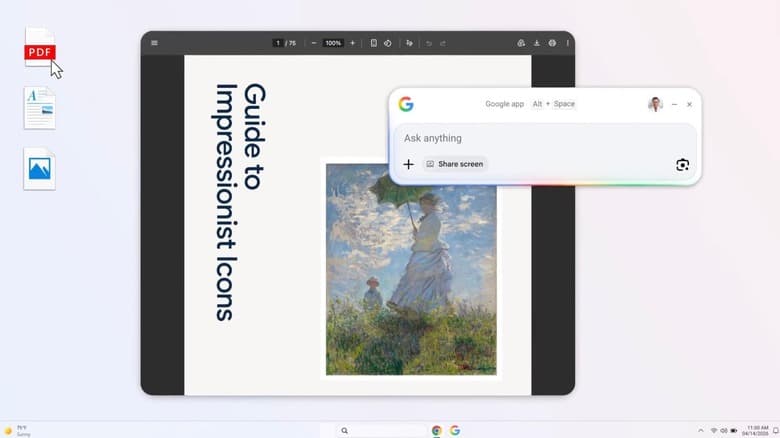
- Alt + Space keyboard shortcut opens the AI search bar instantly
- The app can search web, local files, installed apps, and Google Drive
- Screen sharing feature lets you use Google Lens on anything displayed on your monitor
- Rolling out globally today in English
Read in Short
Google released a Windows desktop app for Gemini that you can summon with Alt + Space. It searches the web, your local files, Google Drive, and can even analyze what's on your screen using Google Lens. Available now for Windows 10 and 11.
Look, if you've been waiting for Google to make Gemini more accessible on Windows, today's your day. The company just launched a dedicated desktop app that basically puts their AI chatbot a keyboard shortcut away. And honestly? It's about time.
The app works on both Windows 10 and Windows 11, which is a nice touch. Google didn't pull that annoying move where they gate new features behind the latest OS version. So whether you're still holding onto Windows 10 or you've made the jump to 11, you're covered.
How It Actually Works
Here's the deal. Once you install the app, you hit Alt + Space and boom, a search bar pops up. Type in whatever you want. It's that simple. The search can pull results from the web just like regular Google, but there's an AI Mode toggle that kicks in Gemini's smarts for follow-up questions and deeper exploration.
But the web search stuff isn't even the interesting part. What caught my attention is that this thing can search through your local files, other apps you have installed, and your Google Drive. That's genuinely useful. Instead of opening File Explorer and hunting around, or jumping between Chrome tabs to find that one Google Doc, you can just ask Gemini to find it.
Google Lens on Your Desktop? Yeah, That's Here Too
Okay so this is the feature that feels kind of wild. The app has screen sharing built in, which means you can use Google Lens to search based on whatever's displayed on your monitor. See something interesting in a video? Want to know more about an image in an article? Just share your screen with the app and let Lens do its thing.
I can already think of a dozen use cases for this. You're watching a tutorial and want to know what software they're using. You see a product in someone's YouTube setup video and want to buy it. You're reading a document with a chart you don't understand. Screen sharing plus AI search could be pretty powerful for all of that.
What You Can Search
The Gemini Windows app searches across: Web results with AI Mode, local files on your computer, installed applications, Google Drive documents, and on-screen content via Google Lens.
The Bigger Picture Here
This launch fits into Google's broader push to get Gemini in front of as many eyeballs as possible. They've been integrating it into Chrome, into Search, into Workspace apps. A standalone Windows app is just another entry point. And with Microsoft pushing Copilot hard on Windows, Google probably felt the pressure to have something native rather than just relying on browser access.
For the full picture on where Google is taking Gemini next, check out our I/O 2026 preview
The timing is interesting too. Microsoft has been embedding Copilot deeper into Windows with each update. There's a dedicated Copilot key on newer keyboards. The AI assistant shows up in the taskbar. Google needed an answer to that, and this app is basically it.
Should You Actually Download This?
That depends entirely on how much you already use Gemini. If you're constantly switching to a browser tab to chat with Google's AI, having a system-wide shortcut will save you time. The local file search and Google Drive integration make it more useful than just another chatbot window.
✅ Pros
- • Quick access via Alt + Space shortcut
- • Searches local files, not just the web
- • Google Drive integration built in
- • Google Lens for screen content
- • Works on Windows 10, not just 11
❌ Cons
- • Only available in English for now
- • Requires you to be invested in Google's ecosystem
- • Another app running in the background
- • Overlaps with browser-based Gemini access
If you're not already a Gemini user though, this probably won't convert you. It's an access point, not a reason to switch from whatever AI assistant you're currently using. The app itself is just a shell around Gemini's existing capabilities.
Availability and Requirements
The app is rolling out globally starting today. You'll need to be running at least Windows 10, and right now it's English-only. Google will presumably add more languages over time, but they haven't announced a timeline for that.
- Available globally as of today
- Requires Windows 10 or Windows 11
- English language only at launch
- Free to download and use
Installation should be straightforward through whatever distribution method Google is using. Once it's on your system, set up that Alt + Space shortcut as muscle memory and you're good to go.
Final Thoughts
Is this a game-changer? Probably not. But it's a solid quality-of-life improvement for people who use Gemini regularly. The local file search and screen sharing features give it an edge over just keeping a browser tab open. And the fact that it works on Windows 10 means Google isn't leaving a huge chunk of users behind.
The real test will be how well the local search actually works. If it can reliably find files across my messy hard drive and connect the dots with my Google Drive stuff, I'll keep it around. If it's clunky or slow, I'll probably forget it exists within a week. We'll see.
Frequently Asked Questions
Is the Google Gemini Windows app free?
Yes, the app is free to download and use. You'll need a Google account to access Gemini's features.
What's the keyboard shortcut to open Gemini on Windows?
Press Alt + Space to open the Gemini search bar from anywhere on your desktop.
Does the Gemini Windows app work on Windows 10?
Yes, it works on both Windows 10 and Windows 11. No need to upgrade your OS.
Can Gemini search my local files?
Yes, the app can search through files on your computer, installed applications, and your Google Drive.
Manaal Khan
Tech & Innovation Writer
Produced with AI assistance and reviewed by the Logicity editorial team. Learn more in our Editorial Policy.