Key Takeaways
- Choose SQL when data relationships are explicit and accuracy is non-negotiable
- Choose NoSQL when data changes often or needs to scale across distributed systems
- Modern databases are converging: PostgreSQL handles JSON natively, MongoDB supports ACID transactions
The Forty-Hour Lesson
A developer recently shared a painful lesson: they built their first app on a SQL database because a YouTube tutorial said it was "the right way." The app was supposed to be simple. A water-tracking tool. Instead, they got an education in relational database design, foreign key constraints, and the psychological torture of writing JOIN statements for what should have been a basic logging feature.
Forty hours later, they discovered NoSQL databases. Suddenly, the choice between SQL and NoSQL became the central question. One side wants structure, precision, and rules. The other wants speed, simplicity, and flexibility. Neither is universally better. The right choice depends on how your data looks and what you need to do with it.
The Quick Answer
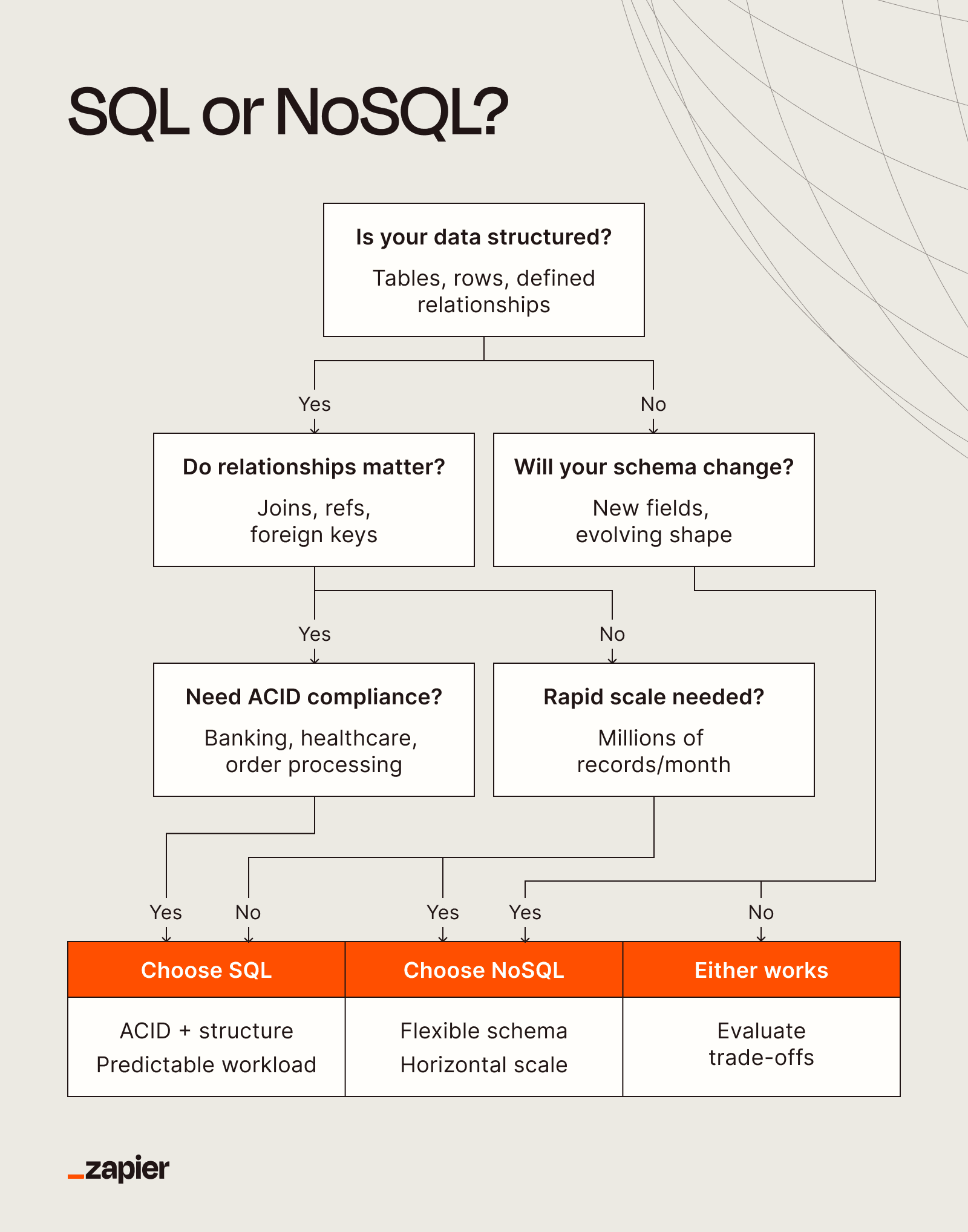
Choose SQL if your data is structured, relationships are explicitly defined, and accuracy is non-negotiable. Choose NoSQL if your data changes often, does not fit neatly into tables, or needs to scale quickly across distributed systems.
The line between these two camps is blurrier than it used to be. PostgreSQL, a SQL database, handles JSON natively now. MongoDB, a NoSQL database, supports multi-document ACID transactions. The databases themselves are converging, even if the mental models behind them remain distinct.
But the core tradeoffs still hold: schema rigidity versus flexibility, vertical versus horizontal scaling, strict versus eventual consistency. These tradeoffs should drive your decision.
| Feature | SQL | NoSQL |
|---|---|---|
| Query language | Structured Query Language (SQL) | Varies: MongoDB Query Language, CQL, Cypher, others |
| Schema | Rigid, predefined | Flexible, often schemaless |
| Data structure | Tables with rows and columns | Key-value, document, graph, wide-column |
| Scalability | Vertical (scale up) | Horizontal (scale out) |
| Consistency model | ACID | BASE (for most systems) |
| Best for | Structured data, complex joins | Unstructured data, fast-scaling apps |
| Examples | MySQL, PostgreSQL, SQL Server | MongoDB, Cassandra, Redis, DynamoDB |
What Is SQL?
SQL stands for Structured Query Language. It is the industry standard for managing relational databases. If you have ever opened Airtable and felt a thrill because every column had a clear purpose, SQL might be your preference.
SQL databases rely on fixed schemas. You define your tables, columns, and relationships before you start storing data. Every row in a table follows the same structure. Every relationship between tables is explicit.
This rigidity is both SQL's greatest strength and its biggest limitation. When your data fits the model, SQL databases are powerful. They enforce data integrity at the database level. They handle complex queries across multiple related tables. They guarantee that transactions either complete fully or not at all.
When SQL Makes Sense
- Your data has clear, stable relationships. Think customer orders, inventory systems, or financial records.
- Accuracy matters more than speed. Banking, healthcare, and compliance systems need ACID guarantees.
- You need complex queries. SQL excels at joining data from multiple tables and running aggregate functions.
- Your team knows SQL. It has been the standard for decades. Finding developers who can write SQL is easier than finding specialists in specific NoSQL query languages.
Common SQL databases include MySQL, PostgreSQL, Microsoft SQL Server, and SQLite. Each has its own strengths. PostgreSQL is known for advanced features and JSON support. MySQL powers much of the web. SQLite runs locally without a server.
What Is NoSQL?
NoSQL stands for "not only SQL." It is a broad category that includes any database that does not use the traditional table-based relational model. NoSQL databases come in several types: document stores, key-value stores, graph databases, and wide-column stores.
The common thread is flexibility. Most NoSQL databases do not require you to define a schema before storing data. You can add fields to one document without changing others. You can store nested objects directly. You can evolve your data model as your application changes.
NoSQL databases also scale differently. SQL databases typically scale vertically. You get a bigger server with more RAM and faster CPUs. NoSQL databases are designed to scale horizontally. You add more servers to your cluster, and the database distributes data across them.
When NoSQL Makes Sense
- Your data structure changes often. Startups iterating on product features benefit from schema flexibility.
- You need to handle massive scale. Social media feeds, IoT sensor data, and real-time analytics often need horizontal scaling.
- Your data is hierarchical or nested. Document databases like MongoDB store complex objects naturally.
- Speed matters more than consistency. Some NoSQL databases offer eventual consistency. Your data might be slightly stale, but reads and writes are fast.
Common NoSQL databases include MongoDB (documents), Redis (key-value), Cassandra (wide-column), and Neo4j (graph). Each is optimized for different use cases. MongoDB handles JSON-like documents. Redis stores data in memory for extreme speed. Cassandra handles massive write loads. Neo4j excels at relationship-heavy queries.
The Convergence
Modern databases are borrowing features from each other. PostgreSQL added native JSON support, letting you store flexible documents inside a relational database. MongoDB added multi-document ACID transactions, giving you consistency guarantees that were once exclusive to SQL.
This convergence means the choice is less binary than it used to be. You can use PostgreSQL for most relational data and store some flexible JSON in a JSONB column. You can use MongoDB and still get transaction support when you need it.
But the mental models remain different. SQL encourages you to think about normalization, relationships, and data integrity from the start. NoSQL encourages you to think about access patterns, denormalization, and horizontal scaling. The database you choose shapes how you design your application.
Making the Decision
Start with your data. Is it structured with clear relationships? SQL. Is it unstructured, nested, or constantly evolving? NoSQL.
Consider your scale requirements. Do you need to handle millions of writes per second across geographic regions? NoSQL scales horizontally more easily. Is your data volume modest and your queries complex? SQL handles joins and aggregations better.
Think about consistency. Can your application tolerate slightly stale data? NoSQL's eventual consistency might be fine. Does every transaction need to be immediately consistent? SQL's ACID guarantees matter more.
Finally, consider your team. SQL has been the standard for decades. Training and hiring are easier. NoSQL databases each have their own query languages and best practices. The learning curve varies.
Logicity's Take
The SQL versus NoSQL debate is less about which technology is better and more about matching the tool to the job. Most applications can work with either. The real risk is choosing based on hype or familiarity rather than your actual data patterns. Spend an hour mapping out your data relationships and access patterns before you pick. That hour will save you the forty-hour lesson.
Frequently Asked Questions
Frequently Asked Questions
Can I use both SQL and NoSQL in the same application?
Yes. Many applications use SQL for transactional data like orders and payments, and NoSQL for logs, sessions, or user-generated content. The key is choosing the right database for each type of data rather than forcing everything into one model.
Is NoSQL faster than SQL?
Not inherently. NoSQL databases can be faster for specific access patterns, especially simple key-value lookups or writes at massive scale. SQL databases can be faster for complex queries that join multiple tables. Speed depends on the operation, not the database type.
Which is better for startups: SQL or NoSQL?
NoSQL's schema flexibility appeals to startups iterating quickly on product features. But SQL's enforced structure can prevent data quality issues as you grow. Many startups succeed with either. Pick based on your data model, not your company stage.
Does PostgreSQL count as NoSQL since it supports JSON?
No. PostgreSQL is a relational database with NoSQL-like features. Its core model is still tables, rows, and SQL queries. The JSON support adds flexibility but does not change its fundamental architecture.
What does ACID mean for databases?
ACID stands for Atomicity, Consistency, Isolation, and Durability. These properties guarantee that database transactions complete fully or not at all, maintain data integrity, run without interference from other transactions, and survive system failures. SQL databases enforce ACID by default.
Databases are just one layer of infrastructure. This piece covers other foundational open-source tools.
Need Help Implementing This?
Choosing the right database architecture can save months of rework later. If you are evaluating SQL versus NoSQL for a new project or considering a migration, reach out to our team at Logicity.in. We can help you map your data patterns and make a decision that scales.
Source: The Zapier Blog
Manaal Khan
Tech & Innovation Writer
Produced with AI assistance and reviewed by the Logicity editorial team. Learn more in our Editorial Policy.






