Key Takeaways
- High-performance mobile workstations now available under $1,600, down from $2,000+ typical pricing
- Desktop replacement strategy could cut hardware costs 15-25% while improving workforce flexibility
- Wi-Fi 7 and Bluetooth 5.4 future-proof connectivity for 3-4 year deployment cycles
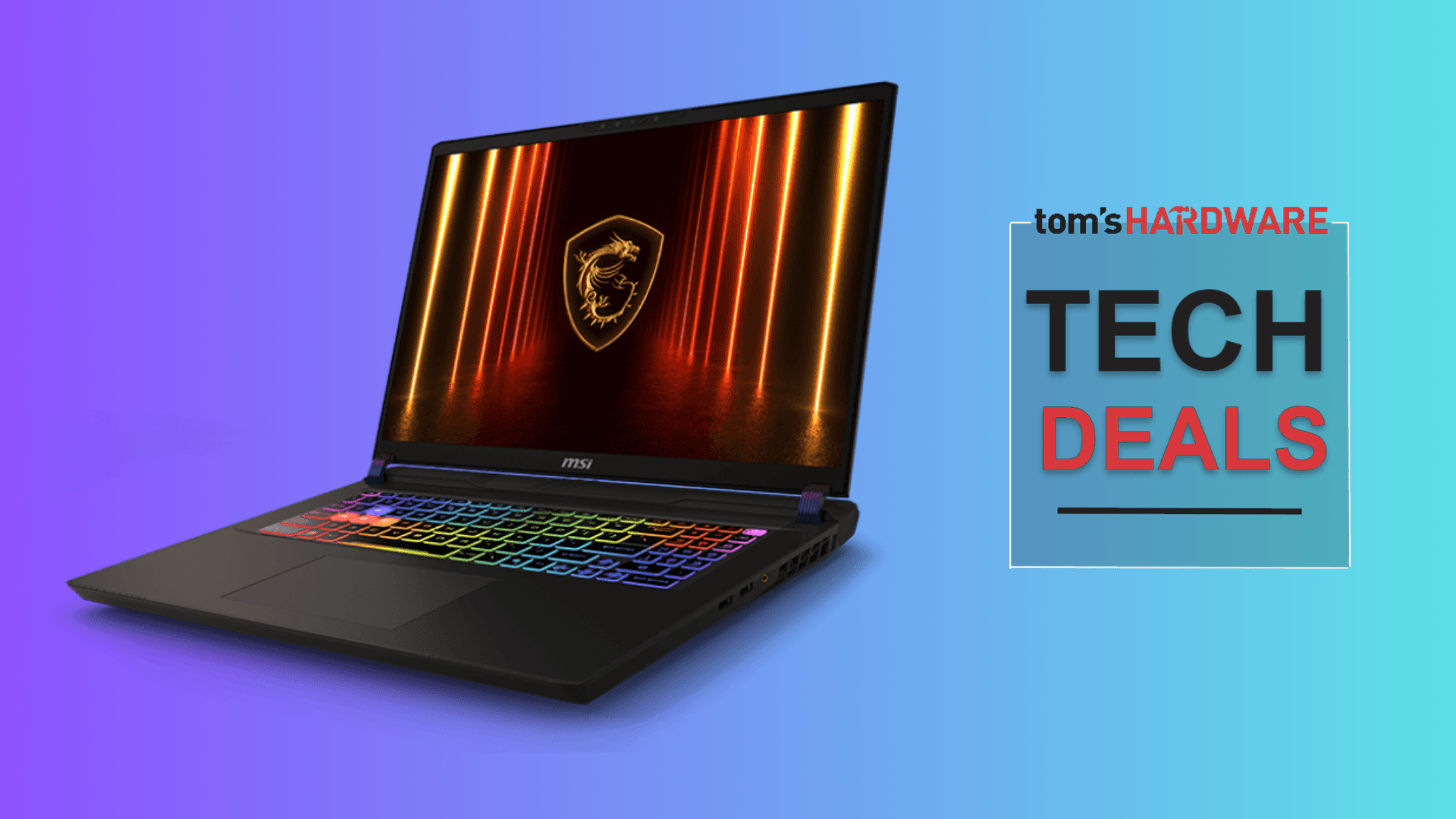
According to [Tom's Hardware](https://www.tomshardware.com/laptops/gaming-laptops/nvidia-rtx-5070-ti-gaming-laptop-is-on-sale-for-19-percent-off-msis-vector-16-has-a-144-hz-screen-and-comes-with-pragmata-for-free), MSI's Vector 16 gaming laptop with Nvidia's RTX 5070 Ti GPU has dropped to $1,529 on Newegg, representing a 19% discount that brings desktop-class graphics power into mobile workstation territory at a price point that wasn't possible six months ago.
Here's why this matters if you're managing a tech budget: the line between "gaming laptop" and "professional mobile workstation" has effectively dissolved. What MSI markets to gamers, your engineering teams can use for 3D rendering, AI model testing, and video production. The only difference is the RGB lighting.
Why Should CTOs Care About Gaming Laptop Deals?
The traditional enterprise laptop procurement process is broken. Companies pay $2,500-3,500 for "business-class" mobile workstations with inferior specs to machines marketed as gaming laptops. The Vector 16's 140W RTX 5070 Ti outperforms workstation GPUs costing twice as much.
This isn't about buying toys for your team. It's about recognizing that the "gaming" label is a marketing distinction, not a technical one. The same Nvidia architecture that renders video games also accelerates machine learning inference, video encoding, and CAD rendering.
| Specification | MSI Vector 16 | Typical Business Workstation | Cost Difference |
|---|---|---|---|
| GPU | RTX 5070 Ti (140W) | RTX A2000 or Quadro equivalent | Gaming GPU 2-3x faster |
| Price | $1,529 | $2,800-3,500 | Save $1,000-2,000 |
| CPU | Intel Core Ultra 7 255HX (20 cores) | Intel Core i7 (8-14 cores) | More cores, similar price |
| Display | 16" 240Hz, 16:10 aspect | 14-15" 60Hz, 16:9 | Larger, smoother display |
| Build Quality | Plastic, loud fans | Metal chassis, quieter | Business wins here |
The tradeoff is real: plastic chassis and audible fans won't impress clients in a quiet boardroom. But for developers, designers, and data scientists who need raw compute power, the specs-per-dollar ratio crushes traditional enterprise offerings.
How Does RTX 5070 Ti Performance Impact Business Workflows?
Let's translate gaming benchmarks into business outcomes. The RTX 5070 Ti with 16GB of video memory handles workloads that would bring lesser machines to a crawl.
- Video editing: Export 4K projects 40-60% faster than integrated graphics, saving 2-3 hours per project
- AI/ML development: Run inference on models up to 7B parameters locally, reducing cloud compute costs
- 3D rendering: Complete architectural visualizations in hours instead of overnight batch processing
- Multi-monitor support: Drive up to four external displays for trading desks or monitoring dashboards
The 20-core Intel Core Ultra 7 255HX adds serious CPU muscle. Your data team can run pandas operations on large datasets while simultaneously joining video calls. That sounds basic, but try doing it on a MacBook Air without the fans screaming.
Desktop Replacement Strategy: Does It Actually Save Money?
The real business case isn't the 19% discount on one laptop. It's whether consolidating desktop + laptop fleets into high-powered mobile workstations makes financial sense.
Consider a typical knowledge worker setup: a $1,200 laptop for travel plus a $1,500 desktop for heavy work. That's $2,700 per employee, plus the IT overhead of managing two devices. A single $1,529 machine that handles both use cases cuts hardware costs 43% and simplifies your support matrix.
Quick Math: Desktop Replacement ROI
For a 50-person team replacing desktop + laptop combos with capable mobile workstations: Hardware savings of $58,000 upfront. Reduced IT support tickets (one device vs. two). Faster deployment when new hires join. Trade-off: Slightly shorter lifespan (3-4 years vs. 5 for desktops).
The 90Wh battery in the Vector 16 matters here. All-day runtime means your team isn't tethered to desks. Hybrid work models actually work when the hardware supports them. Understanding your [USB-C port speeds](usb-c-port-speed-check-stop-losing-hours-to-slow-transfers) becomes critical when these machines become the primary work device.
What Are the Real Tradeoffs for Enterprise Use?
Gaming laptops aren't perfect for every business scenario. Here's an honest assessment of where the Vector 16 falls short compared to traditional business machines.
✅ Pros
- • Exceptional GPU performance for the price
- • Upgradeable RAM and storage (rare in thin laptops)
- • Wi-Fi 7 future-proofs connectivity for 4+ years
- • 16:10 aspect ratio adds screen real estate for productivity
- • SD card reader and full port selection (no dongle life)
❌ Cons
- • Plastic build won't survive executive scrutiny
- • Fan noise in high-performance mode disrupts calls
- • No enterprise management features (vPro, TPM status unclear)
- • 2.4kg weight limits true portability
- • Gaming aesthetic may violate corporate appearance standards
The enterprise management gap is significant. If your IT team relies on Intel vPro for remote management, or requires specific TPM configurations for compliance, verify compatibility before ordering 50 units. MSI's enterprise support isn't Dell or Lenovo-tier.
If you're evaluating Intel's latest architecture
Is Wi-Fi 7 Worth Planning For in 2025?
The Vector 16 includes Wi-Fi 7 and Bluetooth 5.4, which might seem like marketing fluff in 2025 when most offices run Wi-Fi 6. But hardware refresh cycles typically span 3-4 years, and Wi-Fi 7 adoption is accelerating.
Wi-Fi 7 delivers theoretical speeds up to 46 Gbps and dramatically reduces latency. For video-heavy workflows, cloud-based development environments, or offices deploying new access points, these machines will hit peak performance when your infrastructure catches up.
The right [tech accessories can cut friction](tech-accessories-beat-apps-cut-friction-boost-productivity) in ways software can't. A laptop with future-proof connectivity is an accessory-level decision that compounds over its lifespan.
What Does This Deal Signal About GPU Laptop Pricing?
The 19% discount on a current-generation GPU laptop is unusual this early in the product cycle. Typically, RTX 50-series machines would hold MSRP for 6-12 months. This suggests either inventory pressure or a more competitive laptop market than expected.
For procurement planning, the implication is clear: waiting for Black Friday or end-of-quarter sales may not be necessary. Aggressive deals are appearing throughout the year. Build flexibility into your purchasing process to capture these opportunities.
Should Your Company Buy Gaming Laptops for Work?
The answer depends on your workforce profile and corporate culture. Here's a decision framework.
- Identify roles that need GPU acceleration: video editors, ML engineers, 3D designers, data scientists
- Calculate current cost per employee for compute-capable machines (desktop + laptop if applicable)
- Evaluate appearance requirements: client-facing roles may need traditional business aesthetics
- Check IT management compatibility: verify vPro, TPM, and MDM support
- Run a pilot with 5-10 units before fleet deployment
For startups and scale-ups without rigid procurement policies, gaming laptops are an arbitrage opportunity. You get better specs at lower cost because MSI's marketing targets consumers instead of enterprise buyers. The silicon doesn't know the difference.
Logicity's Take
At Logicity, we run AI agent development and Claude API integrations on machines that would be classified as gaming hardware. The reality is that local model testing, video content production, and heavy Next.js builds demand serious GPU compute. We've found that the 16GB VRAM tier is the sweet spot for running inference on mid-sized language models without cloud round-trips. The MSI Vector 16's 140W TDP variant is particularly interesting because it can sustain performance during extended batch processing without thermal throttling—something cheaper gaming laptops struggle with. For Indian tech businesses evaluating mobile workstations, the import and warranty considerations matter as much as specs. Newegg deals often don't include local warranty coverage, so factor in the risk of international RMAs. Our recommendation: if your team needs GPU acceleration and you have IT capacity to support non-traditional hardware, these deals are worth serious consideration. Just don't deploy them to your sales team.
Frequently Asked Questions
Frequently Asked Questions
How much does the RTX 5070 Ti laptop cost after the discount?
The MSI Vector 16 with RTX 5070 Ti is currently $1,529 on Newegg, down from the $1,899 MSRP. Including the bundled $60 game, the effective discount is over 20%.
Is a gaming laptop worth it for business use?
For roles requiring GPU acceleration (video editing, ML development, 3D rendering), gaming laptops offer 30-50% better specs-per-dollar than traditional business workstations. The tradeoffs are build quality, enterprise management features, and aesthetics.
How long will an RTX 5070 Ti laptop stay relevant for professional work?
Expect 3-4 years of strong performance for current workloads. The 16GB VRAM provides headroom for AI model growth, and Wi-Fi 7 future-proofs connectivity. Budget for replacement in 2028-2029.
Can RTX 5070 Ti handle local AI model inference?
Yes. 16GB VRAM supports inference on models up to 13B parameters (like Llama 2 13B) at reasonable speeds. For development and testing, this eliminates cloud API costs. Production deployment still requires server-grade hardware.
What's the total cost of ownership compared to a business laptop?
Initial hardware cost is 40-50% lower. Support costs may be slightly higher due to non-standard hardware. Battery replacement and repair parts availability are wildcards. Over 3 years, expect 20-30% TCO savings if your IT team can support mixed fleets.
Related reading on hardware decisions that impact productivity
Need Help Implementing This?
Logicity helps startups and enterprises build AI-powered solutions that actually run on the hardware they have. Whether you're deploying local inference, optimizing cloud costs, or building AI agents with Claude, we bring hands-on experience from shipped projects. Get in touch to discuss your tech infrastructure strategy.
Source: Latest from Tom's Hardware
Manaal Khan
Tech & Innovation Writer
Produced with AI assistance and reviewed by the Logicity editorial team. Learn more in our Editorial Policy.