Key Takeaways
- On-premise gives you full control but requires you to handle all maintenance, patching, and disaster recovery
- Cloud computing offers speed and easy integrations but comes with vendor lock-in and potential hidden costs
- 78% of organizations now use hybrid or multi-cloud strategies, placing workloads where they make the most sense
The on-premise vs. cloud debate has been running for over a decade. And after all that time, the core question remains surprisingly simple: do you want to manage infrastructure yourself, or are you comfortable outsourcing it?
On-premise means running software and systems in your own environment. Cloud means using tools and platforms a vendor provides. Neither is inherently right or wrong. The choice depends on your operational load, budget, and how much flexibility you need.
But here's what's changed: most companies no longer pick one or the other. According to industry data, 78% of organizations now run hybrid or multi-cloud strategies. The smart question isn't "which one?" It's "which workloads go where?"
What On-Premise Actually Means
Running on-premise is like powering your home with a private generator. You get full control over the electricity, but you also handle repairs, upgrades, and outages yourself.
In practice, this means running your software, hardware, and systems in your own environment. That could be local servers in your building, a dedicated computer, or a LAN setup. You own it all. You maintain it all.
This setup makes sense for regulated industries with legacy systems. Think of a manufacturing company running an ERP on-site. A hospital keeping patient data in-house. A fintech company using internal risk models that can't leave their network.
Before cloud computing became mainstream, on-premise was the default for most businesses. Even today, teams choose it to retain maximum control over data and environment. Some are moving back to it.
On-Premise Pros and Cons
✅ Pros
- • Full control over runtime and data location
- • Easy to customize without third-party constraints
- • Stable, predictable performance for latency-sensitive workloads
- • No vendor pricing lock-in
❌ Cons
- • High upfront and operational costs
- • Total responsibility for patching and maintenance
- • Harder integration with modern SaaS tools
- • High availability and disaster recovery are complex to manage
The cost question is more nuanced than it appears. On-premise has higher upfront capital costs. But for stable, predictable workloads, the unit economics often beat cloud by 2x or more over time. That's driving a trend called "cloud repatriation," where companies move steady-state workloads back to their own servers.
What Cloud Computing Actually Means
Cloud is like plugging into your state's power grid instead of running a dedicated generator. You're using a vendor's platform to host your data and apps. The provider handles backups and maintenance on their environment.
It's the easiest solution to get started with. But the trade-off is relying on the provider's pricing, rules, and uptime. You're renting, not owning.
This deployment model appeals to distributed teams that don't work in one place. Businesses that prioritize speed over control. Companies that expect seamless tool integrations without building connectors themselves.
The rise of remote teams and tighter SaaS integration continues to drive cloud adoption. Gartner projects that 95% of new digital workloads will be deployed on cloud-native platforms by 2025.
Cloud Computing Pros and Cons
Pros: Low upfront costs with pay-as-you-go pricing, Instant scalability for burstable workloads, Provider handles infrastructure maintenance and security patches, Easy integration with modern SaaS ecosystems. Cons: Hidden costs from egress fees and over-provisioned resources, Vendor lock-in makes switching expensive, Less control over data location and compliance, Security misconfigurations are your responsibility.
“99% of cloud security failures will be the customer's fault through 2026. The risk isn't the cloud itself, but the misconfiguration of it.”
— Gartner Research
That Gartner stat highlights a common misconception. Cloud providers handle infrastructure security. But configuration, access controls, and data protection remain your problem. Moving to cloud doesn't eliminate security work. It changes what kind of security work you do.
The Hidden Cost Problem
Cloud pricing looks simple until you get the bill. That 30% waste figure comes from unused instances, over-provisioned resources, and egress fees that add up faster than expected.
HackerNews discussions frequently frame the cloud vs. on-premise debate as "operational complexity vs. capital expenditure." The community often warns that hidden egress fees and vendor lock-in can destroy the cost benefits initially promised. That's partly why cloud repatriation has become a trend.
SaaS sprawl often drives cloud costs higher than necessary
On-Premise vs. Cloud: Direct Comparison
| Factor | On-Premise | Cloud |
|---|---|---|
| Upfront Cost | High (hardware, facilities, staff) | Low (pay-as-you-go) |
| Ongoing Cost | Predictable, often lower for steady workloads | Variable, can spike with usage |
| Control | Full control over data and environment | Limited to provider's options |
| Scalability | Manual, requires planning | Instant, on-demand |
| Maintenance | Your responsibility entirely | Provider handles infrastructure |
| Integration | Complex with modern SaaS | Native integrations common |
| Security Responsibility | 100% yours | Shared model (infrastructure vs. configuration) |
| Best For | Regulated industries, stable workloads | Distributed teams, variable demand |
Why Most Companies Choose Both
The binary choice is outdated. With 78% of organizations running hybrid or multi-cloud strategies, the real decision is workload placement.
A hybrid approach means keeping sensitive, core systems within your own physical or private infrastructure while using cloud for burstable, customer-facing applications. You get data sovereignty where it matters and scalability where you need it.
AWS, Azure, and Google all offer hybrid solutions that bridge on-premise stability with cloud innovation. The Cloud Native Computing Foundation discusses how organizations are adopting "cloud-smart" strategies rather than "cloud-only," balancing cost and control based on each workload's requirements.
How to Decide What Goes Where
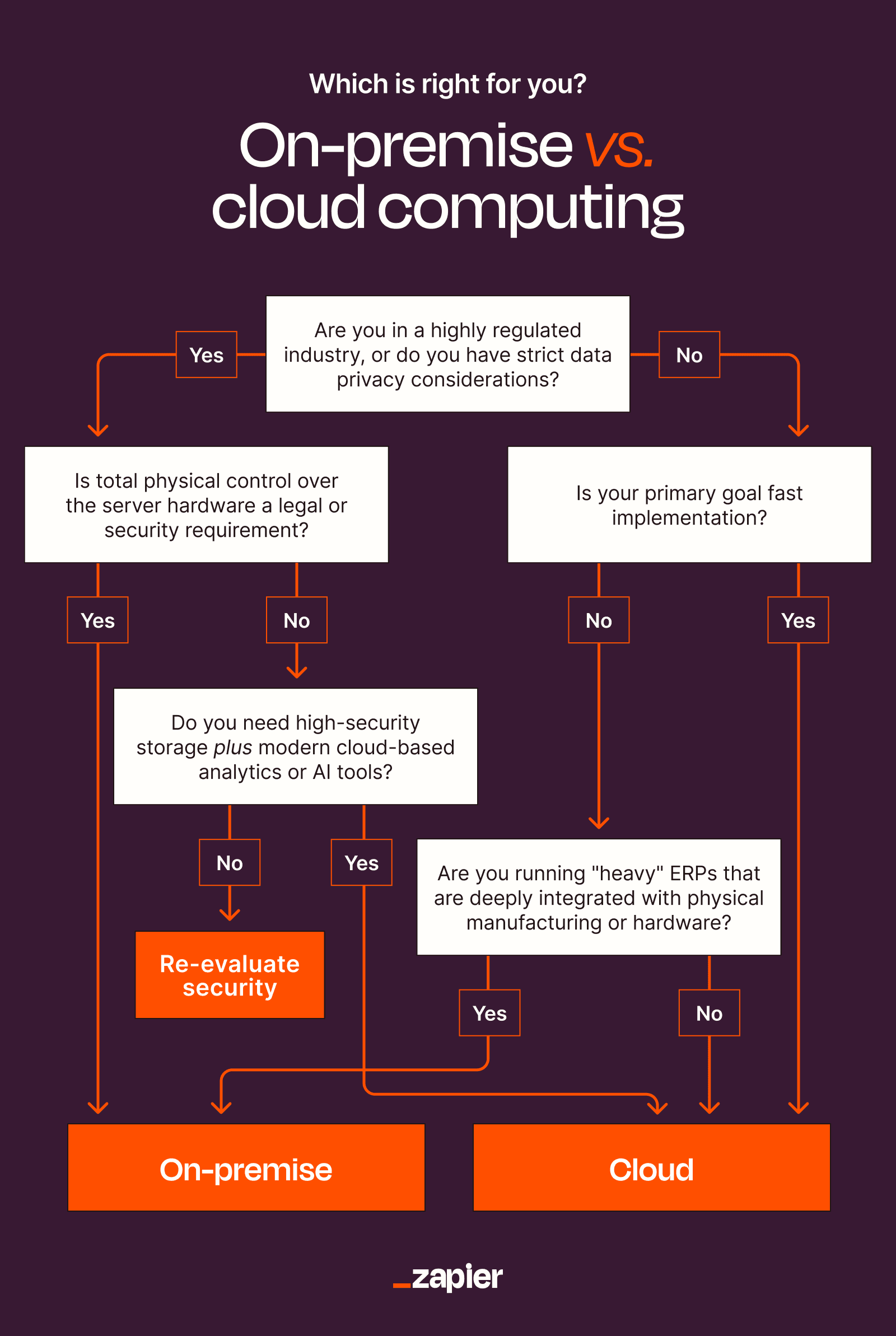
Start by categorizing your workloads. Ask three questions about each one:
- Is the demand stable or burstable? Stable workloads with predictable usage often cost less on-premise over a 3-5 year horizon. Burstable workloads with unpredictable spikes benefit from cloud elasticity.
- What are the compliance requirements? Regulated data with strict residency requirements may need to stay on-premise or in a private cloud. General business apps can go anywhere.
- How critical is latency? Applications requiring millisecond response times to local systems perform better on-premise. Customer-facing apps serving global users benefit from cloud edge networks.
Most organizations end up with a split: development environments, customer-facing apps, and collaboration tools in the cloud. Core databases, sensitive data processing, and legacy systems on-premise.
The Integration Factor
Cloud computing enables broad integration across your tech stack. Modern SaaS tools expect to connect with other cloud services through APIs and native integrations. On-premise systems often require custom middleware or manual data transfers.
If your business relies heavily on SaaS tools for CRM, marketing, HR, and finance, keeping core data in on-premise silos creates friction. You'll spend more time building bridges than using the tools.
Conversely, if your core business runs on legacy software that doesn't have cloud equivalents, forcing everything into cloud creates its own integration headaches. The tools don't match the workflows.
Network configuration matters whether you're on-premise or connecting to cloud
The Bottom Line
There's no universal right answer. A hospital with strict HIPAA requirements and legacy medical systems has different needs than a startup building customer-facing apps for global users.
The trend is clear: pure on-premise is declining, but pure cloud isn't winning either. The future is hybrid, with thoughtful workload placement based on cost, compliance, and operational requirements.
Start with what you have. Audit your current infrastructure costs and pain points. Identify which workloads could benefit from cloud scalability. Figure out which ones need to stay close to home. Then build a roadmap that moves you toward the right balance, not an ideological commitment to either extreme.
Logicity's Take
Frequently Asked Questions
Is cloud computing cheaper than on-premise?
It depends on the workload. Cloud is cheaper for variable, unpredictable demand because you only pay for what you use. But for stable, predictable workloads running 24/7, on-premise often costs less over 3-5 years. The key is matching the pricing model to the usage pattern.
What is cloud repatriation?
Cloud repatriation is the trend of companies moving workloads from public cloud back to on-premise or private infrastructure. This typically happens when cloud costs exceed expectations, especially due to egress fees, or when companies realize steady-state workloads are cheaper to run in-house.
Is cloud computing more secure than on-premise?
Neither is inherently more secure. Cloud providers handle infrastructure security, but configuration and access controls remain your responsibility. 99% of cloud security failures through 2026 are expected to be customer misconfigurations, not provider breaches.
What is a hybrid cloud strategy?
Hybrid cloud combines on-premise infrastructure with public cloud services. Companies typically keep sensitive data and stable workloads on-premise while using cloud for burstable applications, development environments, and customer-facing services. About 78% of organizations now use some form of hybrid approach.
When should a company stay fully on-premise?
Fully on-premise makes sense for organizations with strict regulatory requirements, legacy systems that can't be migrated, workloads requiring zero-latency local performance, or operations in locations with poor internet connectivity. Healthcare, manufacturing, and some financial services often fall into this category.
Need Help Implementing This?
Source: The Zapier Blog
Manaal Khan
Tech & Innovation Writer
Produced with AI assistance and reviewed by the Logicity editorial team. Learn more in our Editorial Policy.