Key Takeaways

- APIs require developers to manually code each integration; MCP lets AI agents discover available tools at runtime
- MCP can consume 50,000+ tokens just initializing complex servers, creating significant overhead
- Developers report up to 90% reduction in custom integration code when using MCP instead of building proprietary API wrappers
Picture a world where every new appliance in your house came with its own proprietary outlet. Your toaster needs a triangular socket. Your lamp needs a hexagonal one. Every time you buy something new, you hire an electrician to install a custom adapter.
That's roughly what connecting AI tools to other apps looked like before MCP existed. APIs are the outlets. They let software talk to each other and have worked well for decades. But a developer has to set each one up manually. MCP is like giving your AI agent a universal adapter and letting it figure out the connections instead.
MCP and APIs aren't in competition. They solve different problems. But knowing when to reach for each is increasingly useful, even if you're not writing code yourself.
What is an API?
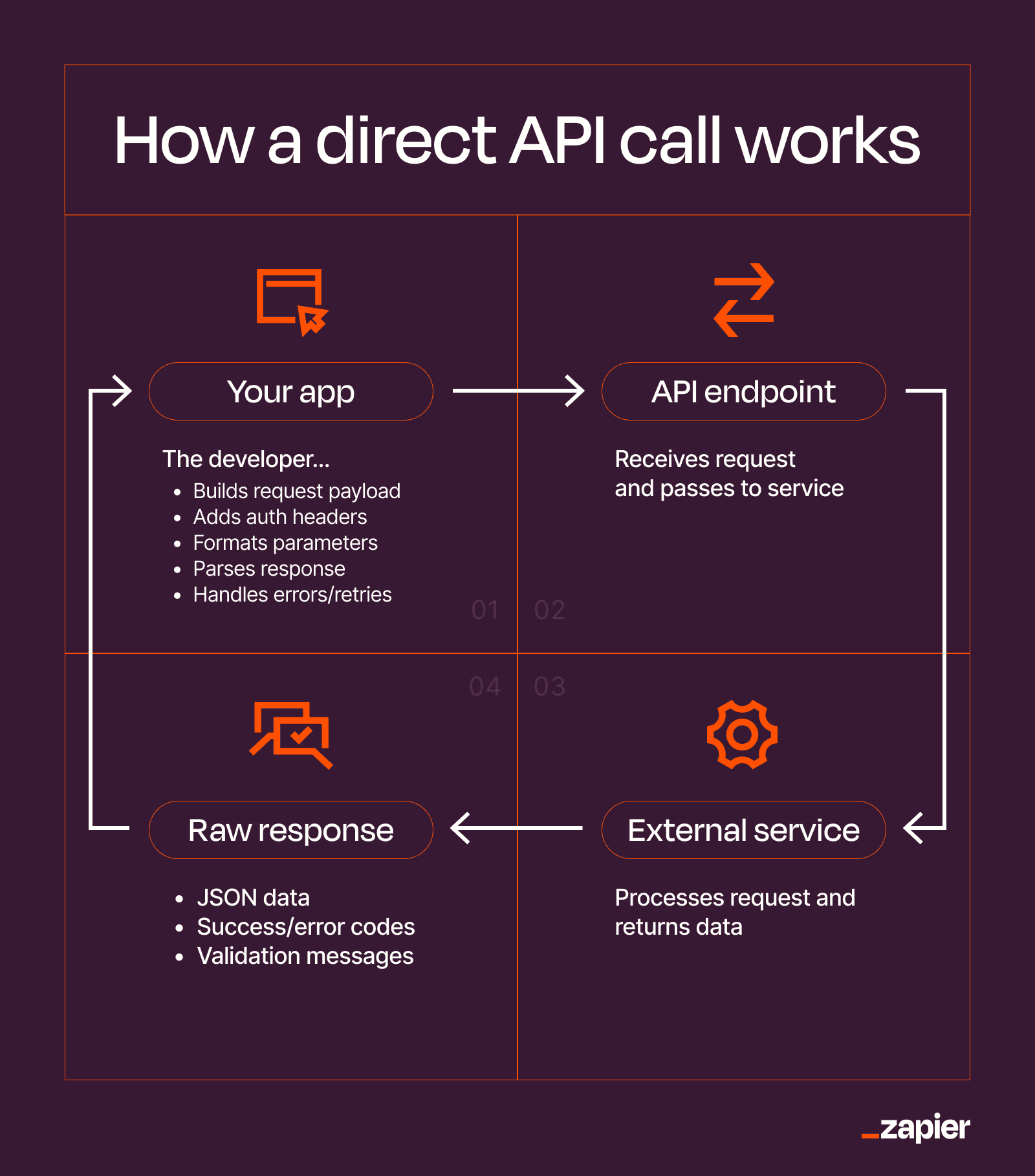
An API (application programming interface) is a set of rules that defines how two pieces of software communicate. One app sends a request to another app's API and gets a response back. That's it.
Say you're building a project management tool and you want it to automatically create a calendar event whenever someone adds a due date. To do that, you'd write code that calls Google Calendar's API. That code is a specific request, formatted a specific way, sent to a specific URL, with your credentials attached.
Google Calendar's API receives it, creates the event, and sends back a confirmation. That whole exchange is the API at work. And it requires a developer to set up every piece of it: reading the documentation, writing the code, handling authentication, and figuring out what to do when something goes wrong.
APIs are everywhere. When you sign in to an app with Google, you're using an API. When your weather app shows the forecast, it's calling a weather service's API. When Zapier connects your CRM to your email tool, it's making API calls behind the scenes.
What is MCP?
MCP (Model Context Protocol) is an open standard introduced by Anthropic in late 2024 that gives AI assistants a structured way to connect to external tools and take action inside them.
Before MCP, an AI could tell you what to do in another app, but it couldn't do it for you. MCP changes that.
Say you ask Claude, "Move my 3 p.m. call to tomorrow and send the updated invite to everyone." Without MCP, Claude would cheerfully explain how to open your Google Calendar app and update the event yourself. With MCP connected to your Google Calendar, Claude can look at the available actions, figure out which ones apply, and handle everything for you.
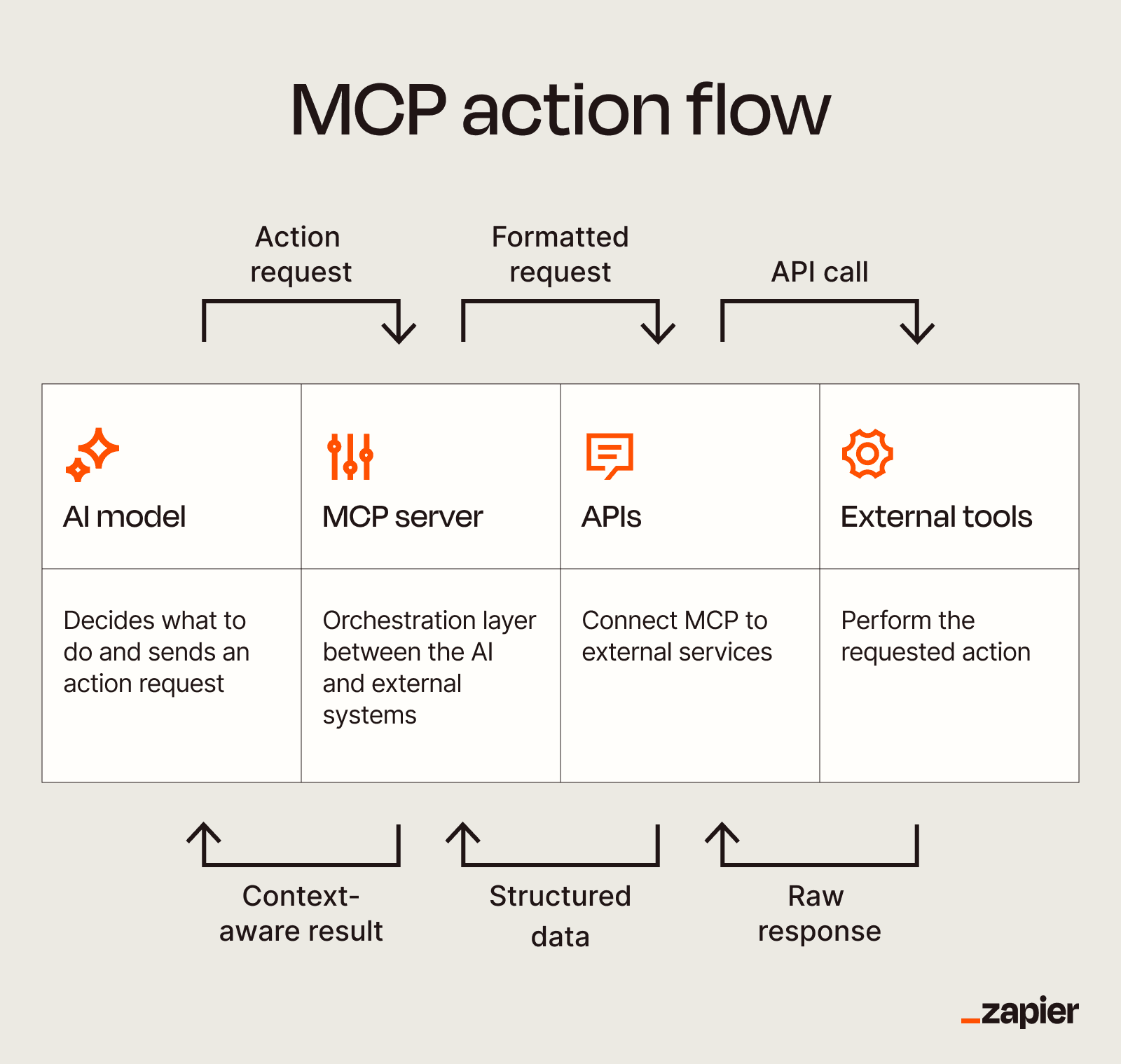
The key difference is flexibility. A developer using an API has to know in advance which endpoints exist and what to call. An AI using MCP can ask the server what tools are available, what each tool does, and what parameters it needs. Then it decides which ones to use based on your request.
MCP was created to solve what developers call the "N x M" problem. If you have N AI models and M data sources, you previously needed to build N times M unique integrations. MCP introduces a standardized communication layer. Any agent can dynamically discover available tools, resources, and prompts from any MCP server.
MCP vs API: The Key Differences
| Attribute | Traditional API | MCP |
|---|---|---|
| Setup | Manual coding per integration | Agent discovers tools at runtime |
| Flexibility | Fixed endpoints, predetermined | Dynamic discovery of available actions |
| Token overhead | Minimal | Can exceed 50,000 tokens for complex servers |
| Production maturity | Battle-tested, decades old | Emerging standard, still evolving |
| Best for | Stable, high-volume integrations | Multi-tool agent workflows |
The fundamental shift is from explicit to implicit. With an API, you tell the code exactly what to do: call this endpoint, pass these parameters, handle this response. With MCP, you tell the AI what you want accomplished, and it figures out which tools to use.
This flexibility comes with tradeoffs. The biggest one is overhead. When an AI agent initializes an MCP server, it needs to load information about all available tools into its context window. For complex servers with many capabilities, this can consume 50,000 tokens or more before the agent does anything useful.
The Production Readiness Debate
The developer community is split on whether MCP is ready for serious production use.
Supporters point to the integration simplicity. Developers report up to 90% reduction in custom integration code when using MCP versus building proprietary API wrappers for multiple LLMs. Instead of maintaining separate connectors for Claude, GPT-4, and every other model, you build one MCP server and let any compatible agent connect to it.
Critics argue the "context window tax" makes MCP impractical for many use cases. Denis Yarats, CTO at Perplexity, has been direct about their approach: "We are moving away from MCP in favor of simpler, battle-tested CLI and REST patterns for our production agents."
The concern isn't that MCP doesn't work. It's that the overhead costs may outweigh the flexibility benefits for high-volume production systems where every token counts.
When to Use a Traditional API
APIs remain the right choice for several scenarios:
- High-volume, stable integrations where the same operation runs thousands of times per day
- Systems where token costs matter and you can't afford discovery overhead
- Well-defined workflows where the steps are known in advance and won't change
- Legacy system integration where MCP servers don't exist yet
- Real-time applications where milliseconds matter and you can't wait for tool discovery
If you know exactly what you need to do and you'll do it the same way every time, a direct API call is faster, cheaper, and more reliable than having an AI figure it out each time.
Deep dive into the differences between SDKs and APIs for developers building integrations.
When to Use MCP
MCP shines in different situations:
- Multi-tool agent workflows where the AI needs to combine actions across several apps
- Exploratory tasks where you don't know in advance which tools you'll need
- Building AI assistants that should adapt to new capabilities without code changes
- Internal tools where development speed matters more than per-query cost
- Prototyping integrations before committing to production API implementations
The value proposition is clearest when you're building AI agents that need to work across many tools. Instead of hardcoding logic for every possible combination, you let the agent discover what's available and reason about which tools to use.
GitHub's new desktop app shows how agent-native tools are changing developer workflows.
The Practical Middle Ground
Most teams won't choose exclusively between MCP and APIs. They'll use both.
MCP works well for the "long tail" of integrations where you need flexibility and the volume doesn't justify custom development. Direct API calls work better for your core, high-volume operations where optimization matters.
Think of it like this: MCP is your universal adapter for occasional use. APIs are your dedicated outlets for the appliances you use every day.
Logicity's Take
Practical look at AI automation costs for teams evaluating agentic tools.
Frequently Asked Questions
Does MCP replace APIs?
No. MCP uses APIs under the hood. It's a protocol layer that sits on top, letting AI agents discover and use APIs dynamically instead of requiring manual integration for each one.
How much does MCP's token overhead actually cost?
It depends on the server complexity, but initializing an MCP server with many tools can consume 50,000+ tokens before the agent performs any action. At current LLM pricing, this adds meaningful cost to each session.
Can I use MCP with any AI model?
MCP was created by Anthropic but is an open standard. Any AI system can implement MCP support. Claude has native support, and other models are adding compatibility.
Is MCP secure for production use?
MCP includes authentication and access control mechanisms, but it's newer than established API security patterns. Organizations should evaluate their specific security requirements before deploying MCP in production.
What's the easiest way to try MCP?
Zapier offers an MCP integration that connects to thousands of apps. Claude Desktop also supports MCP servers directly, letting you experiment without writing code.
Need Help Implementing This?
Source: The Zapier Blog
Huma Shazia
Senior AI & Tech Writer
Produced with AI assistance and reviewed by the Logicity editorial team. Learn more in our Editorial Policy.