Key Takeaways

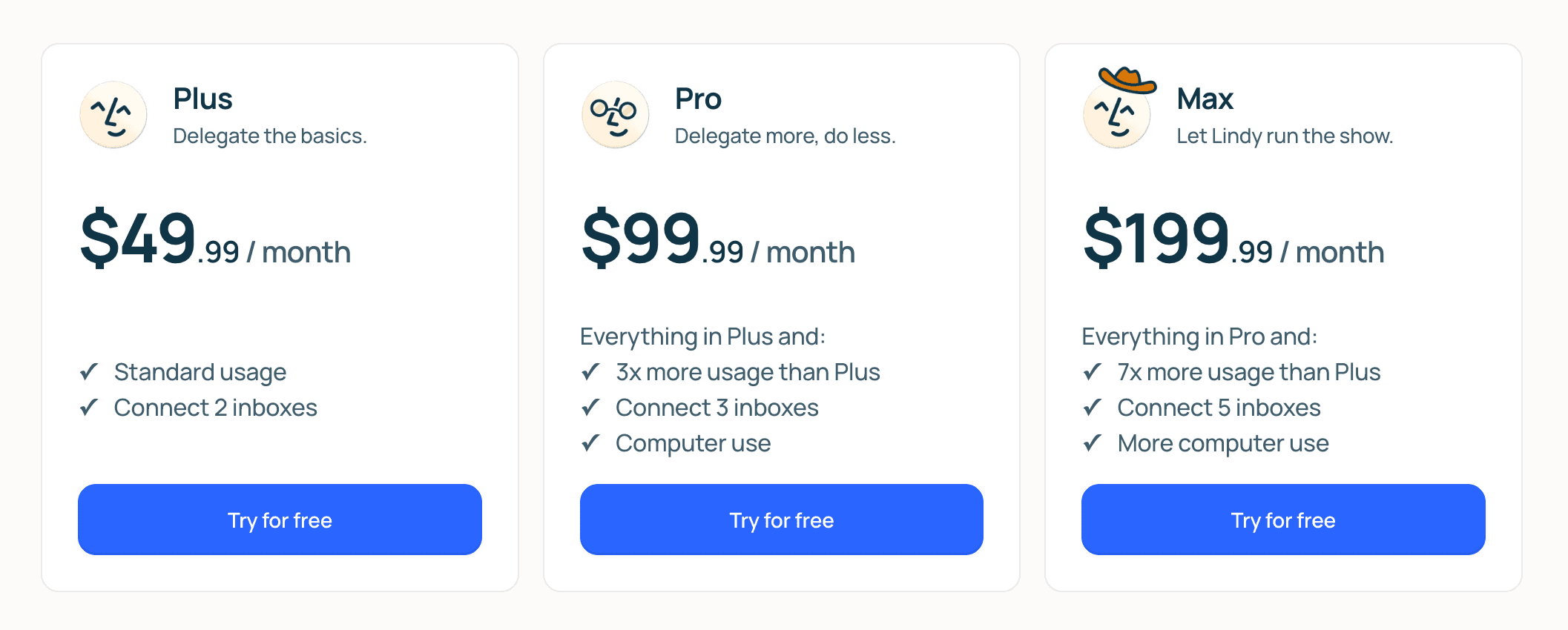
- Lindy AI plans range from $49.99 (Plus) to $199.99 (Max) per month, with Enterprise pricing for organizations
- The credit-based system can make complex automations expensive. A single multi-step email triage task consumes 10-20 credits
- Lindy excels at autonomous web navigation and agentic decision-making, while Zapier remains better for high-volume deterministic workflows
Lindy AI positions itself as your AI employee. It lives in iMessage, joins your Zoom calls, drafts emails in your voice, and navigates web apps on your behalf. The pitch is compelling: save up to 10 hours a week on repetitive administrative work. But the pricing structure requires careful examination before you commit.
Unlike traditional automation tools that charge flat monthly fees, Lindy uses a tiered system with credit-based consumption. That means your actual monthly cost depends not just on which plan you choose, but on how often you use complex features.
Lindy AI Plans at a Glance
| Plan | Price/Month | Inboxes | Key Feature |
|---|---|---|---|
| Plus | $49.99 | 2 | Core automation, meeting prep |
| Pro | $99.99 | 3 | Computer use (web navigation) |
| Max | $199.99 | 5 | 7x usage capacity, enhanced autonomy |
| Enterprise | Custom | Unlimited | SSO, admin controls, security |
Plus Plan: $49.99 Per Month
The entry tier covers the essentials. You get inbox and schedule management, meeting prep, and access to Lindy's integration library, which now spans over 5,000 apps. The Plus plan supports two connected email accounts, enough for most people juggling work and personal inboxes.
This tier works well if you need help with straightforward tasks: summarizing emails, preparing meeting briefs, managing your calendar. It won't let Lindy navigate websites autonomously on your behalf. That's reserved for higher tiers.
Pro Plan: $99.99 Per Month
The Pro tier triples the usage capacity of Plus and adds a third inbox connection. The headline feature is "computer use," which allows Lindy to operate web applications directly. Instead of just reading your email, Lindy can log into your CRM, update records, and navigate multi-step workflows across browser tabs.
This is where Lindy starts to feel less like a smart assistant and more like an autonomous agent. If you're managing back-to-back meetings while juggling ad hoc requests across multiple tools, Pro removes the bottleneck of manual task execution.
Max Plan: $199.99 Per Month
The Max tier is built for people running multiple projects or businesses. It provides 7x the usage capacity of Plus, supports five inbox connections, and includes enhanced computer use capabilities for resource-heavy tasks.
At this level, Lindy can essentially run the show across your apps and browser with minimal intervention. If you're a founder managing three ventures or a consultant with multiple client engagements, the centralized inbox management alone might justify the price.
Enterprise: Custom Pricing
The Enterprise plan transforms Lindy from a personal assistant into an organizational tool. Features include SSO, administrative controls, and security compliance features. Pricing is custom, negotiated based on team size and usage requirements.

The Credit System: Where Costs Can Surprise You
Here's where Lindy's pricing gets complicated. Each plan comes with a usage allocation, but complex tasks consume more credits. A multi-step email triage task requiring high-level reasoning can burn through 10-20 credits per execution.
Community feedback on Reddit and Hacker News consistently flags this as a concern. Users praise how easy Lindy is to set up, but note that high-frequency complex automations can become unexpectedly expensive compared to flat-rate subscription alternatives.
The 7-day free trial gives you full Pro features, which is helpful for gauging your actual credit consumption before committing. But pay attention to your usage patterns during the trial. If you're running dozens of complex automations daily, do the math on monthly credit costs.
Lindy vs. Zapier: Different Tools for Different Problems
The comparison comes up constantly, but these tools solve different problems. Zapier excels at deterministic, high-volume data synchronization: when X happens, do Y. It's reliable, predictable, and you know exactly what you're paying.
“The future isn't about setting up 'if-this-then-that' rules; it's about defining the goal and letting an agent navigate the complexity of your actual software to achieve it.”
— Flo Crivello, CEO of Lindy AI
Lindy takes a fundamentally different approach. It uses large language models to make autonomous decisions, adapting to context rather than following rigid workflows. This makes it powerful for tasks that require judgment, like drafting responses in your voice or triaging customer support tickets based on urgency.
The tradeoff is predictability. Zapier does exactly what you tell it, every time. Lindy makes decisions, which means occasional surprises. In one viral moment, a Lindy agent accidentally Rickrolled a customer during a help request. Amusing, but a reminder that autonomous agents require oversight.
The community consensus is clear: Lindy currently leads for autonomous web-navigation agents, while Zapier remains the preferred choice for reliable, high-volume data synchronization. Choose based on what you actually need.
Who Should Consider Lindy?
- Small business owners drowning in email and meeting prep who value time over cost optimization
- Power users managing multiple inboxes and complex, ad hoc workflows
- Anyone whose work involves lots of context-switching between web apps
- Teams ready to move from deterministic automation to agentic decision-making
The claimed 10 hours saved per week is based on small business owners using Lindy for newsletter and inbox triage. Your results will vary based on your workflow complexity and how well Lindy's capabilities match your actual bottlenecks.
✅ Pros
- • Autonomous web navigation eliminates manual task execution
- • Learns your voice and style from feedback
- • 5,000+ app integrations cover most business tools
- • iMessage interface is convenient for quick interactions
❌ Cons
- • Credit-based pricing can lead to unpredictable monthly costs
- • Complex automations consume credits quickly (10-20 per task)
- • Autonomous decision-making occasionally produces unexpected results
- • Entry price of $49.99/month is steep for basic automation
Logicity's Take
Frequently Asked Questions
Does Lindy AI offer a free plan?
No permanent free plan exists. Lindy offers a 7-day free trial with full Pro features, after which you must choose a paid tier starting at $49.99 per month.
How does Lindy's credit system work?
Each plan includes a usage allocation measured in credits. Simple tasks consume fewer credits, while complex multi-step automations requiring high-level reasoning can use 10-20 credits per execution.
Can Lindy replace Zapier?
They serve different purposes. Lindy excels at autonomous, judgment-based tasks like email triage and meeting prep. Zapier is better for reliable, high-volume deterministic workflows where predictability matters more than adaptability.
What apps does Lindy integrate with?
Lindy supports over 5,000 app integrations as of mid-2026, including Slack, Salesforce, and hundreds of other business tools.
Is Lindy AI worth it for a small business?
It depends on your workflow. Users report saving up to 10 hours per week on email and meeting prep. But if your automation needs are simple and high-volume, a flat-rate tool like Zapier may be more cost-effective.
Need Help Implementing This?
Source: The Zapier Blog
Manaal Khan
Tech & Innovation Writer
Produced with AI assistance and reviewed by the Logicity editorial team. Learn more in our Editorial Policy.