Key Takeaways
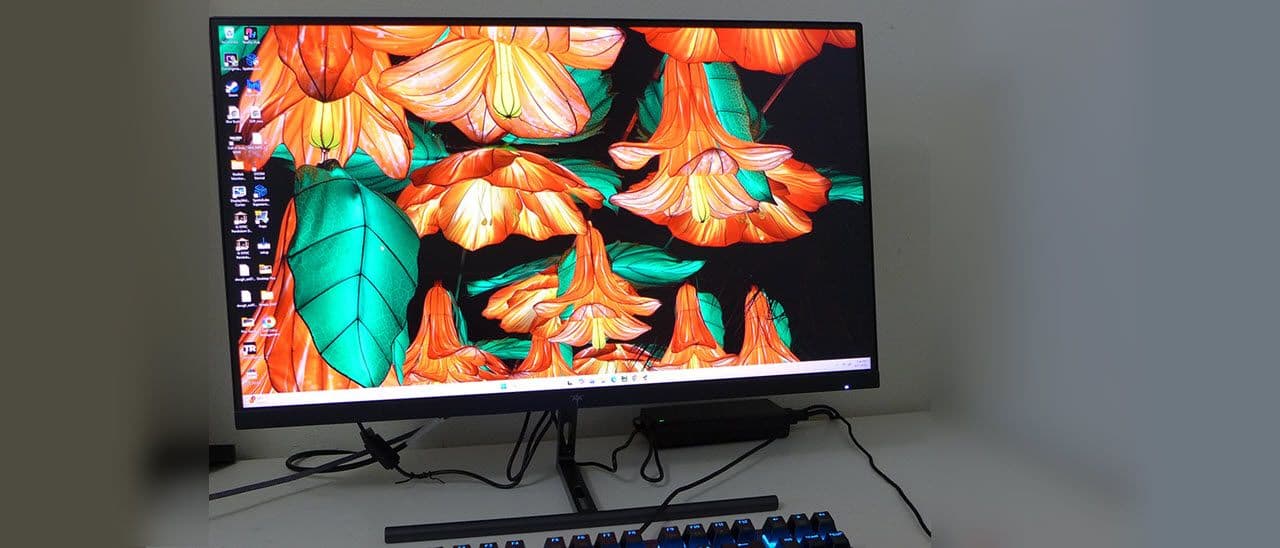
- The KTC H27P3 costs $550, saving $300 compared to the $850 Asus XG27JCG with similar 5K resolution
- 218 ppi pixel density means individual pixels are invisible even at close viewing distances
- Factory calibration is accurate enough that most users won't need to calibrate the display
Dual-mode gaming monitors have been trickling into the market from major display manufacturers. The pitch is simple: switch between resolutions on the fly to trade pixel density for frame rates. Most offer 4K natively and double their refresh rate when you drop to 1080p. The KTC H27P3 takes a different approach. It runs at 5K (5120x2880) for productivity work, then switches to QHD (2560x1440) at 120Hz for gaming.
The result is 218 pixels per inch on a 27-inch panel. That's sharp enough that you can press your face against the screen and still not see individual dots. (Don't actually do this. Grease spots are annoying to clean.)
Specs and Features
The H27P3 uses an IPS Black panel with edge-array W-LED backlighting. IPS Black technology delivers a 2,000:1 contrast ratio, roughly double what standard IPS panels achieve. The display supports 10-bit color (8-bit plus FRC) and covers the DCI-P3+ gamut, making it suitable for color-critical work.
Connectivity includes DisplayPort 1.4, HDMI 2.0, and USB-C. Two USB 3.2 downstream ports sit on the monitor for peripherals. A 3.5mm headphone jack handles audio output since there are no built-in speakers. Power consumption sits at 23.9 watts when brightness is set to 200 nits.
The panel measures 24.1 x 17.9 x 7 inches with the stand attached. Bezels are slim: 8mm on the top and sides, 18mm on the bottom. The whole unit weighs 8.25 pounds.
Gaming Performance
Let's be direct: this is not a competitive gaming monitor. The 7ms GTG response time and 120Hz maximum refresh rate won't satisfy esports players chasing the lowest input lag. FreeSync and G-Sync compatibility help smooth out frame delivery, but fast-paced shooters will still show motion blur.
For casual gaming, though, the H27P3 performs well. The 120Hz QHD mode is comfortable for RPGs, strategy games, and single-player adventures. HDR10 support is present, but without dynamic contrast, the HDR experience is limited.
✅ Pros
- • 218 ppi pixel density is unmatched at this price point
- • Perfect color accuracy out of the box, no calibration needed
- • USB ports and gaming enhancements included
- • $300 cheaper than comparable Asus XG27JCG
❌ Cons
- • No dynamic contrast limits HDR performance
- • 120Hz refresh rate is low for competitive gaming
- • Minimalist stand with limited adjustability
Image Quality
The H27P3's standout feature is image quality. Tom's Hardware found the display required no calibration. Color accuracy, grayscale tracking, and gamma were all spot-on from the factory. That's unusual at any price point, let alone $550.
Brightness peaks at 500 nits, enough for well-lit rooms but not for HDR content that demands local dimming zones. The 2,000:1 contrast ratio from the IPS Black panel delivers deeper blacks than standard IPS, though it can't match VA or OLED panels.
The Value Proposition
The Asus XG27JCG offers similar 5K resolution with faster switching to QHD at 330Hz. It costs $850. The KTC H27P3 costs $550. That $300 difference buys you higher refresh rates on the Asus, but if 120Hz is fast enough for your needs, the KTC keeps that money in your pocket.
The minimalist stand is the main design compromise. It lacks the height adjustment, swivel, and pivot options found on pricier monitors. If ergonomic positioning matters, budget for a VESA arm.
Who Should Buy This
The KTC H27P3 fits a specific use case: productivity-focused users who want exceptional sharpness for text, spreadsheets, and creative work, with enough gaming capability for casual sessions. Content creators working with color-accurate material will appreciate the factory calibration. Developers staring at code all day will love the pixel density.
Competitive gamers should look elsewhere. The 120Hz ceiling and 7ms response time can't compete with 240Hz+ monitors designed for esports.
Logicity's Take
Frequently Asked Questions
Is the KTC H27P3 good for gaming?
For casual gaming, yes. The 120Hz QHD mode works well for RPGs and single-player games. Competitive esports players should choose a higher refresh rate monitor.
Does the KTC H27P3 need calibration?
No. Tom's Hardware found the display accurate out of the box for color, grayscale, and gamma.
What's the difference between the KTC H27P3 and Asus XG27JCG?
Both are 27-inch 5K monitors. The Asus offers 330Hz at QHD versus 120Hz on the KTC. The KTC costs $550 versus $850 for the Asus.
Does the KTC H27P3 have good HDR?
It supports HDR10, but lacks dynamic contrast and local dimming. HDR performance is limited compared to dedicated HDR monitors.
If you're building a new workstation to pair with a 5K monitor
Need Help Implementing This?
Source: Latest from Tom's Hardware
Manaal Khan
Tech & Innovation Writer
Produced with AI assistance and reviewed by the Logicity editorial team. Learn more in our Editorial Policy.