Key Takeaways
- Tolaria stores notes as plain markdown files with YAML frontmatter, ensuring full portability
- Every vault is a git repository with complete version history and no server dependencies
- The app supports AI agents including Claude Code and Codex CLI for knowledge base automation
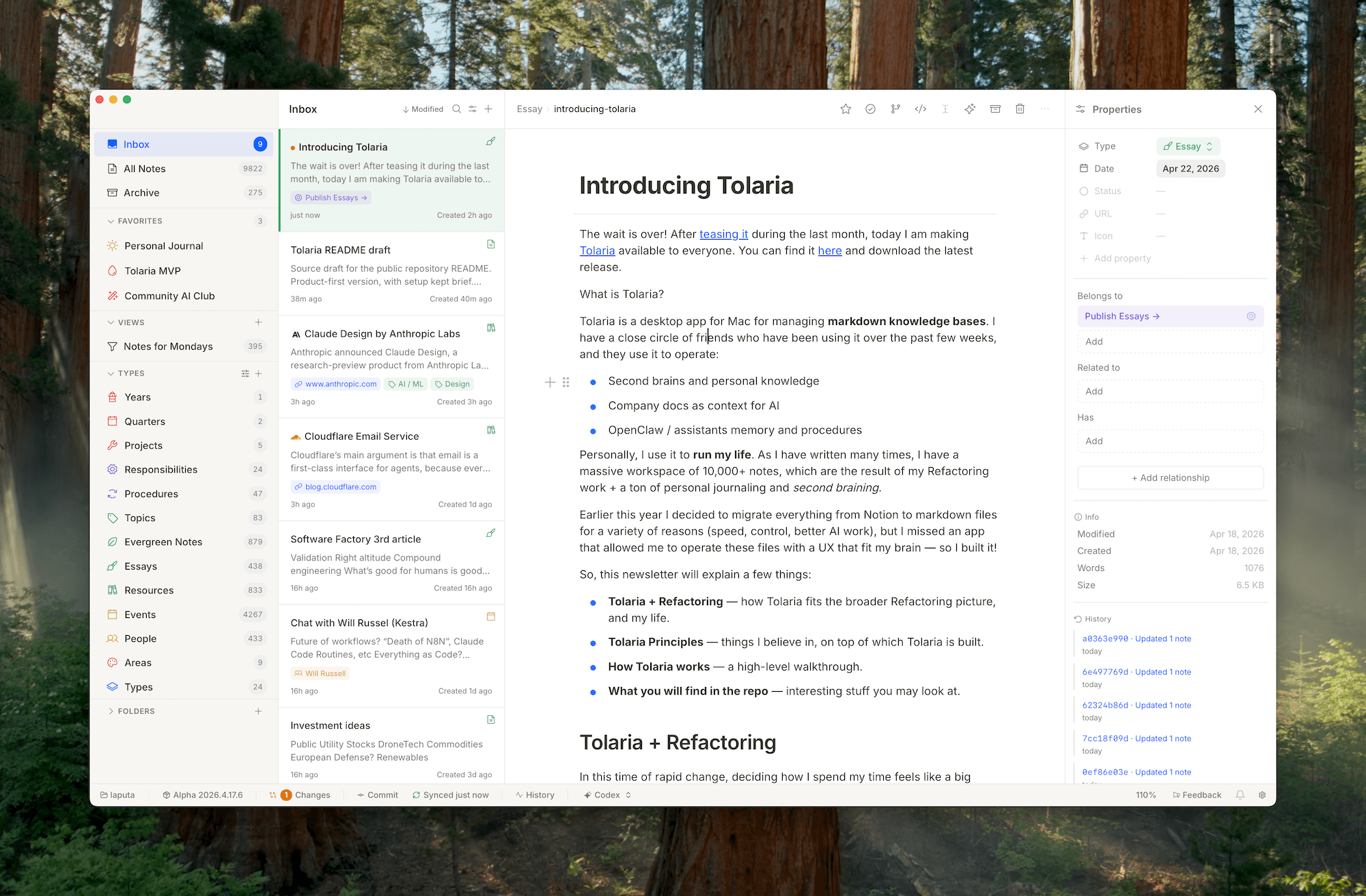
If you've ever felt trapped by a proprietary notes app, Tolaria might catch your attention. This new open-source macOS application takes a strict files-first approach to knowledge management. Your notes are plain markdown files. They work with any editor. No export steps needed.
The app appeared on Hacker News as a Show HN project from developer Luca, who built it to manage his personal vault of over 10,000 notes. That's a mix of work documentation from his Refactoring project, personal journaling, and what he calls "second braining."
Core Design Principles
Tolaria operates on seven stated principles that set it apart from apps like Notion, Obsidian, or Roam Research.
First, every vault is a git repository. You get full version history, can use any git remote you want, and have zero dependency on Tolaria's servers. There are no Tolaria servers. The app works completely offline.
Second, there's no account creation, no subscription, no cloud sync to worry about. If you stop using Tolaria tomorrow, your notes remain as markdown files in a git repo. Open them in VS Code, Obsidian, or any text editor.
- Files-first: Plain markdown with YAML frontmatter, no proprietary formats
- Git-first: Every vault is a repository with full version control
- Offline-first: No accounts, subscriptions, or cloud dependencies
- Open source: Free to use, modify, and contribute to
- Keyboard-first: Designed for power users who avoid the mouse
AI Integration Without Lock-in
One interesting design choice is what Tolaria calls "AI-first but not AI-only." The app supports Claude Code and Codex CLI out of the box. It includes an AGENTS file that helps AI tools understand the vault structure.
But here's the key part: since your vault is just markdown files in a git repo, you can point any AI tool at it. Nothing stops you from using Cursor, GitHub Copilot, or a custom script. The AI compatibility comes from the file format, not from proprietary integrations.
This makes Tolaria useful for teams storing company documentation as context for AI assistants. You can also use it for what the project calls "OpenClaw/assistants memory and procedures," essentially giving AI agents a structured memory they can read and write to.
Types as Navigation, Not Enforcement
Most knowledge base tools enforce schemas. Create a "Meeting Notes" template and you get required fields, validation rules, and angry red warnings when you skip something.
Tolaria takes a different approach. Its type system serves as "lenses, not schemas." Types help you filter and find notes. They don't enforce anything. No required fields, no validation. Just helpful categories.
For a personal vault with 10,000+ notes accumulated over years, this flexibility makes sense. Not every note from 2019 will fit whatever schema you'd design today.
Technical Stack
Tolaria is built with Tauri, React, and TypeScript. For developers who want to run or contribute locally, the requirements are straightforward: Node.js 20+, pnpm 8+, Rust stable, and macOS.
pnpm install
pnpm dev
# For native desktop app:
pnpm tauri dev
The project includes architecture documentation (ARCHITECTURE.md) covering system design, tech stack, and data flow, plus an abstractions guide for contributors.
Getting Started
Download the latest release from GitHub. On first launch, Tolaria offers to clone a "getting started" vault that walks you through the app's features. Since the whole thing is git-based, this walkthrough vault is itself a repo you can inspect, modify, or delete.
The developer has also published Loom walkthroughs covering workspace organization, inbox workflows, and saving web resources to Tolaria.
✅ Pros
- • Complete data portability with plain markdown files
- • Full version history through native git integration
- • No subscription or account required
- • AI agent compatibility built into the file structure
❌ Cons
- • macOS only for now
- • Requires comfort with git for full version control benefits
- • No mobile companion app
- • Feature set still evolving as an early open-source project
Logicity's Take
Frequently Asked Questions
Is Tolaria free to use?
Yes. Tolaria is free and open source with no accounts, subscriptions, or hidden fees.
Can I use Tolaria on Windows or Linux?
Currently, Tolaria is macOS only. The project is built with Tauri, which supports cross-platform development, but no Windows or Linux releases are available yet.
How does Tolaria compare to Obsidian?
Both use local markdown files. Tolaria emphasizes native git integration and AI agent compatibility, while Obsidian focuses on bidirectional linking and a plugin ecosystem. Tolaria has no sync service or mobile apps.
Can I sync my Tolaria vault across devices?
Yes, through any git remote. Push your vault to GitHub, GitLab, or a private server, then clone it on another Mac. There's no proprietary sync service.
What AI tools work with Tolaria?
Claude Code and Codex CLI are officially supported. Since vaults are just markdown files, any AI tool that reads local files can access them.
Need Help Implementing This?
Source: Hacker News: Best
Huma Shazia
Senior AI & Tech Writer
Produced with AI assistance and reviewed by the Logicity editorial team. Learn more in our Editorial Policy.




