Key Takeaways
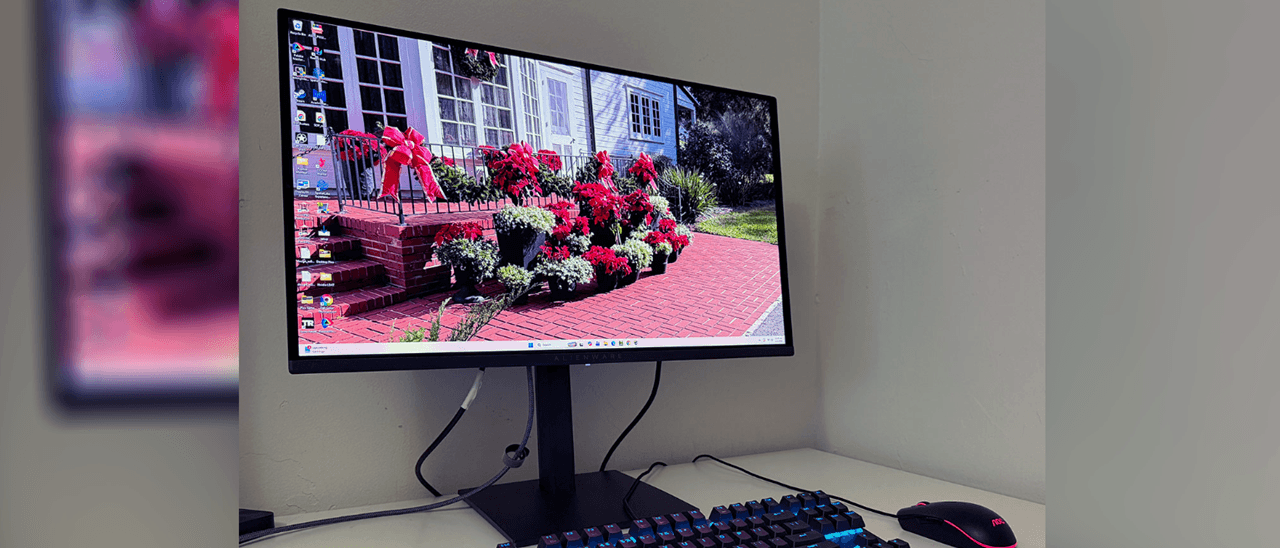
- At $350, this is the cheapest QD-OLED gaming monitor ever released
- 240Hz refresh rate with 0.03ms response time delivers flawless motion
- Fills 111% of DCI-P3 color gamut, beating many premium competitors
- Three-year burn-in warranty included at this price point
- Missing USB ports and speakers, but those are easy tradeoffs
Read in Short
The Alienware AW2726DM is a $350 QD-OLED gaming monitor that doesn't feel like a budget product. You get 27 inches, 2560x1440 resolution, 240Hz, and color accuracy that hangs with monitors at double the price. If you've been waiting for OLED to become affordable, stop waiting.
So Here's Why This Monitor Is a Big Deal
Let me be direct with you. A year ago, if you wanted a QD-OLED gaming monitor, you were looking at $800 minimum. Good luck finding anything under $600 that didn't have some serious compromises. The idea of getting Quantum Dot OLED tech for $350? That was fantasy territory.
And yet here we are. Alienware didn't just break the $500 barrier with the AW2726DM. They absolutely demolished it. This thing costs less than many mid-range IPS gaming monitors, and it's running circles around them in image quality.
What You're Actually Getting
The spec sheet reads like something from a much pricier category. We're talking a 27-inch panel with 2560x1440 resolution, which hits that sweet spot where everything looks sharp without murdering your GPU. The 240Hz refresh rate means buttery smooth gameplay, and the 0.03ms response time? That's OLED territory where motion blur basically doesn't exist.
| Spec | AW2726DM | Typical $600+ OLED |
|---|---|---|
| Panel Size | 27 inches | 27-32 inches |
| Resolution | 2560x1440 (QHD) | 2560x1440 (QHD) |
| Refresh Rate | 240Hz | 240-360Hz |
| Response Time | 0.03ms | 0.03ms |
| Color Gamut | 111% DCI-P3 | 100-110% DCI-P3 |
| Price | $350 | $500-800 |
The color performance is where things get interesting. This panel covers over 111% of the DCI-P3 gamut, which is actually a tick higher than average for the category. Out of the box accuracy is decent, and with a quick calibration, you're getting image fidelity that rivals displays costing significantly more.
The Tradeoffs (And Why They Don't Really Matter)
Look, at $350, something had to give. Alienware stripped out USB ports and internal speakers. That's it. That's the sacrifice.
✅ Pros
- • Stunning QD-OLED image quality at an unheard-of price
- • 240Hz with perfect motion resolution above 200fps
- • Very low input lag for competitive gaming
- • 111% DCI-P3 color gamut coverage
- • Three-year burn-in warranty included
- • Solid build quality despite budget price
❌ Cons
- • No USB ports for peripherals
- • No built-in speakers
- • Not as bright as premium competitors
- • Missing sRGB mode
Here's the thing about those missing features. How many of you actually use your monitor's built-in speakers? I'm guessing roughly zero percent of people reading a gaming monitor review. You've got headphones or external speakers. And USB ports on a monitor? Nice to have, but hardly essential when your PC is right there.
The brightness being lower than some competitors is worth noting if you're gaming in a sun-drenched room. But for most setups, especially the cave-like gaming dens many of us inhabit, it's not going to be an issue.
If you're upgrading your monitor for serious gaming sessions, you'll want to know about Blizzard's latest changes to Classic WoW
Gaming Performance That Punches Way Above Its Weight
The input lag situation is excellent. We're talking numbers that competitive players will appreciate, with motion resolution staying perfect above 200fps. If you're playing fast-paced shooters or anything where reaction time matters, this monitor won't be the thing holding you back.
Adaptive-Sync support means both AMD FreeSync and Nvidia G-Sync Compatible work here. No tearing, no stuttering. It just works. HDR10 support is included too, though let's be honest, HDR on monitors is still kind of a mess compared to TVs. But it's there if you want it.
Quick Specs Rundown
27-inch QD-OLED panel | 2560x1440 QHD | 240Hz refresh rate | 0.03ms response time | HDR10 | DisplayPort 1.4 + 2x HDMI 2.1 | 21.6W power consumption | 13 lbs with stand
Build Quality and Warranty
You might expect a $350 monitor to feel cheap. Flimsy plastic, wobbly stand, that sort of thing. The AW2726DM doesn't play that game. Build quality is genuinely solid, with a stand that offers height adjustment from about 15.5 to nearly 21 inches.
The panel itself is impressively thin at just 3mm at its thinnest point, though it bulges to about 42mm where the electronics live. Bezels are reasonably slim too. Nothing about this screams budget product when you're looking at it on your desk.
That three-year burn-in warranty is huge. OLED burn-in has always been the boogeyman keeping some people away from the technology. Having that coverage at this price point removes a major psychological barrier to entry.
Who Should Buy This Monitor
This is going to sound reductive, but: almost everyone looking for a gaming monitor right now should at least consider this thing. The value proposition is genuinely unprecedented.
- Competitive gamers wanting fast response times without premium prices
- Anyone who's been waiting for OLED to become affordable
- PC builders on a budget who don't want to compromise on display quality
- Console gamers with PS5 or Xbox Series X thanks to HDMI 2.1 support
- Content viewers who want gorgeous colors for movies and shows
The only people I'd steer away are those who absolutely need USB passthrough, require an sRGB mode for color-accurate work, or game in extremely bright environments where the lower peak brightness might be noticeable.
Planning a new PC build around this monitor? Microsoft's new update feature might save you some headaches during setup
The Bottom Line
I've reviewed a lot of gaming monitors, and rarely does something come along that genuinely shifts the conversation. The Alienware AW2726DM does exactly that. At $350, it's not competing with other budget monitors. It's making previously mid-range and even some premium options look overpriced by comparison.
Are there better monitors out there? Sure. The 360Hz displays exist, brighter panels exist, and you can find monitors with more connectivity options. But none of them come anywhere close to this value equation.
If you've been on the fence about OLED gaming, get off the fence. This is the monitor that makes the technology accessible to everyone. And honestly? For most gamers, this is probably all the monitor they'll ever need.
Should You Buy It?
Yes. Unless you specifically need features this monitor lacks (USB ports, speakers, sRGB mode), the AW2726DM offers performance that rivals displays costing twice as much. This is the new benchmark for gaming monitor value.
Frequently Asked Questions
Does the Alienware AW2726DM work with PS5 and Xbox Series X?
Yes, it has two HDMI 2.1 ports that support current-gen consoles at their maximum output capabilities.
Is burn-in still a concern with QD-OLED monitors?
OLED burn-in is possible with static images displayed for extended periods, but Dell includes a three-year burn-in warranty for peace of mind.
Can I use this monitor for color-accurate work?
It offers excellent color accuracy after calibration, but the lack of an sRGB mode means it's primarily optimized for gaming and entertainment rather than professional color work.
What graphics card do I need for 240Hz at 1440p?
For competitive games like CS2 or Valorant, even mid-range GPUs can hit 240fps. For AAA titles at max settings, you'll want an RTX 4070 or better to approach that refresh rate.
Source: Latest from Tom's Hardware
Huma Shazia
Senior AI & Tech Writer
Produced with AI assistance and reviewed by the Logicity editorial team. Learn more in our Editorial Policy.