
Key Takeaways

- ReAct agents achieve 34% higher success rates than standard AI approaches in complex decision-making tasks
- The framework forces models to verify assumptions by calling external tools like search engines, APIs, and databases
- With 2,500+ academic citations, the ReAct paper has become the foundational architecture for modern autonomous agents
Here's a scenario that will sound familiar if you've worked with AI agents: the model reasons through a multi-step task, takes actions, and delivers a confidently structured answer. The problem? It's completely wrong. The agent never checked its assumptions against real data.
This is the core failure mode of raw LLMs. They reason from training data and assumptions, not from what's actually true right now. The ReAct framework, introduced by Princeton and Google researchers in 2022, was designed to fix exactly this problem.
What ReAct Actually Means
ReAct stands for Reasoning and Acting. It's both a prompting technique and an architectural pattern that forces LLMs to think out loud, take real actions, and base their next steps on what they actually find.
A standard LLM can reason through a problem and give you a plausible answer. A ReAct agent can reason through a problem, call a search engine, query a database, hit an API, and then use what it finds to decide what to do next. The difference is grounding. Instead of generating answers from memory, it retrieves evidence.
The Thought-Action-Observation Loop
ReAct runs in a continuous cycle with four stages. Understanding this loop is key to understanding why the framework produces more reliable outputs than standard prompting.
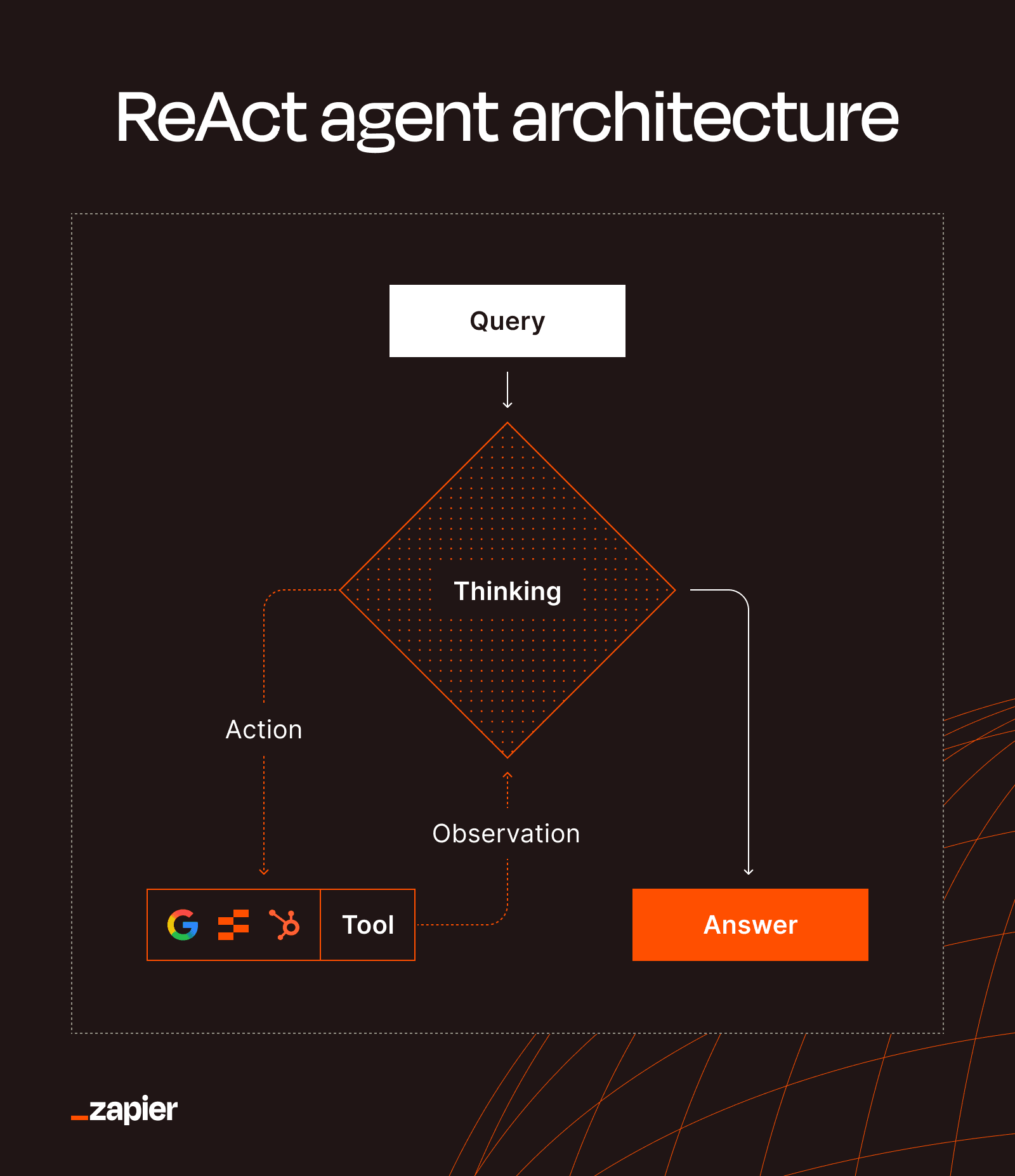
- Thought: The model reasons through what it knows, what it still needs, and what the next logical step should be.
- Action: It calls an external tool. This could be a search engine, API, database, or any other resource it can access.
- Observation: It evaluates what came back. Results might be search results, code output, database records, or error messages.
- Loop: Based on those results, it either takes another action or delivers a final answer.
This loop continues until the agent is confident it has enough information to respond. If you're wondering whether an agent could get stuck cycling forever, there's a guardrail: a configurable iteration limit prevents infinite loops and runaway cloud bills.
Why This Matters for Hallucinations
The hallucination problem in LLMs comes down to a single issue: models generate plausible-sounding text based on patterns in training data, even when that text is factually wrong. They have no mechanism to check whether their output matches reality.
“LLMs possess a superhuman capacity for memorization... This ability can become a distraction, causing the model to rely on rote recall instead of first-principles reasoning.”
— Andrej Karpathy, AI Researcher and Founding member of OpenAI
ReAct addresses this by forcing the model to ground its outputs in retrieved information rather than assumed information. When a ReAct agent needs to answer a question about current stock prices, it doesn't guess based on training data from months ago. It queries an API and uses the actual number.
This grounding effect is why the original ReAct paper has accumulated over 2,500 academic citations. It provided the foundational blueprint for building agents that can be trusted with real tasks.
The Skeptics Have a Point
Not everyone is convinced that ReAct, or any LLM-based agent architecture, solves the fundamental reliability problem.
“Basing agentic systems on LLMs is a recipe for disaster... How can a system possibly plan a sequence of actions if it can't predict the consequences of its actions?”
— Yann LeCun, Chief AI Scientist at Meta
LeCun's critique points to a deeper issue. ReAct helps with fact-checking, but planning complex multi-step actions still requires the model to predict outcomes. If those predictions are wrong, the agent can still fail spectacularly.
Developer communities on Hacker News and Reddit report a consistent pattern: ReAct agents are brilliant at planning but frequently get stuck in reasoning loops. They can execute individual tasks efficiently, then fail at steps that require human judgment or context that wasn't in the observation.
Where ReAct Agents Work Best
ReAct shines in scenarios where external verification is possible and the task has clear success criteria. Some practical applications:
- Research tasks that require searching multiple sources and synthesizing results
- Data retrieval from APIs and databases where accuracy is verifiable
- Multi-step calculations where each step can be validated
- Question-answering systems that need to cite sources
- Workflow automation where actions produce observable outputs
The framework is less reliable for tasks requiring subjective judgment, creative generation, or prediction of human reactions. If there's no external source to check against, the observation step can't do its job.
The Bigger Picture for AI Progress
ReAct represents a shift from treating LLMs as answer machines to treating them as reasoning engines that can use tools. This distinction matters for how companies should think about deploying AI.
"AI agentic workflows will drive massive AI progress this year—perhaps even more than the next generation of foundation models." — Andrew Ng, Founder of DeepLearning.AI
Ng's argument is that the architecture around the model matters as much as the model itself. A GPT-4 with ReAct can outperform a more advanced model without it, because the framework compensates for the model's weaknesses.
This has practical implications for teams building AI systems. You don't always need the latest foundation model. Sometimes you need better scaffolding around the model you have.
How Anthropic is building agent-friendly capabilities into its latest model
Building Your Own ReAct Agents
Several frameworks now support ReAct out of the box. LangChain is the most popular, with built-in ReAct agent templates and tool integration. The implementation follows a predictable pattern: define your tools, set up the reasoning prompts, configure iteration limits, and let the agent run.
The tricky part isn't the code. It's designing the right tool set and handling edge cases when the agent gets stuck. Most production ReAct systems include fallback logic: if the agent hits its iteration limit without an answer, it escalates to a human or returns a structured "I don't know" response.
For teams that want agent capabilities without building from scratch, platforms like Zapier are integrating agentic workflows into their automation tools. The underlying pattern is the same: give the AI access to external actions and let it reason about when to use them.
See how dynamic agent workflows are being applied to development tasks
Logicity's Take
Frequently Asked Questions
What does ReAct stand for in AI?
ReAct stands for Reasoning and Acting. It's a framework that combines an LLM's reasoning capabilities with the ability to take real-world actions like searching the web or querying databases.
How do ReAct agents reduce hallucinations?
ReAct agents ground their outputs in retrieved information rather than assumed information. By forcing the model to verify claims through external tools before answering, the framework reduces confident-but-wrong responses.
What's the difference between ReAct and regular LLM prompting?
Regular prompting asks the model to generate an answer from its training data. ReAct adds a loop where the model can call external tools, observe results, and adjust its reasoning based on real-world data.
Can ReAct agents get stuck in infinite loops?
Yes, but production implementations include configurable iteration limits that stop the loop after a set number of cycles. This prevents runaway processing and keeps costs predictable.
What tools can ReAct agents use?
ReAct agents can use any tool you provide access to: search engines, APIs, databases, calculators, code interpreters, or custom functions. The key is that the tool returns observable results the agent can reason about.
Need Help Implementing This?
Source: The Zapier Blog
Huma Shazia
Senior AI & Tech Writer
Produced with AI assistance and reviewed by the Logicity editorial team. Learn more in our Editorial Policy.