Key Takeaways
- Business automation replaces repetitive, rules-based tasks with software triggers
- You don't need custom integrations. Tools like Zapier connect existing apps
- Start small with two-step automations before building complex workflows
What Business Automation Actually Means
Business automation uses technology to handle repeatable, rules-based work so tasks run with minimal human involvement. In practice, this means software and integrations handle the handoffs between your apps. Sometimes AI makes judgment calls along the way.
The scope varies wildly. A simple two-step trigger between two apps counts as automation. So does a department-wide workflow with conditional logic. The common thread is that something you used to do manually now happens automatically when a specific condition is met.
Consider what happens when a client signs a contract. The moment a deal moves to 'closed won' in your CRM, automation can spin up a new project in your task manager with a templated task list. It adds the client's contact details to your email marketing tool. It creates a project record for time tracking and invoicing. It posts in your team's Slack channel announcing the win.
All of that used to require someone copying data between four or five apps. Now it happens in seconds without anyone touching a keyboard.
Where Automation Fits Across Your Business
Automation applies across finance, HR, operations, marketing, sales, and support. The goal is the same everywhere: free up people for higher-value work instead of mechanical busywork.
If you've ever typed 'just circling back' more than twice in one week, you're the target audience. The same goes for copying form submissions into a CRM, creating tasks for client projects, or sending the same follow-up email for the hundredth time.
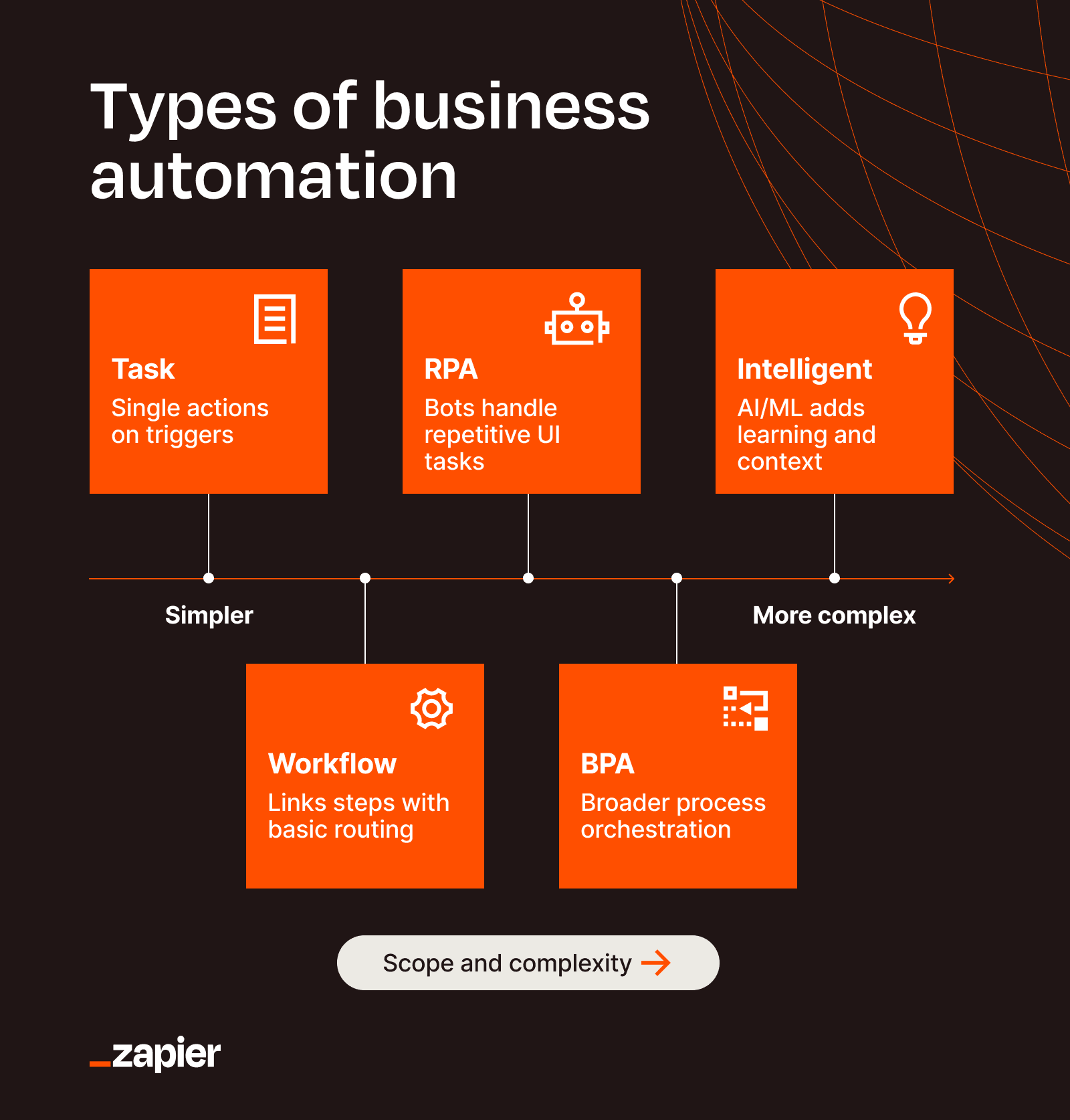
Types of Business Automation
The categories overlap, and people use the terms interchangeably. Knowing the differences makes it easier to figure out where to start.
- Simple triggers: Two-step automations that connect one app to another. When X happens, do Y.
- Multi-step workflows: Chains of actions with conditional logic. If A, then B, unless C, then D.
- Department-wide processes: Standardized workflows that span multiple teams and dozens of handoffs.
- AI-powered automation: Agents that make judgment calls based on context, not just predefined rules.
Most teams should start with simple triggers. Connect two apps. Watch it work. Then add complexity as you learn what breaks and what scales.
Why This Matters More Than It Sounds
The boring, repetitive tasks aren't just time sinks. They're error-prone. Manual data entry between systems creates mismatches. Missed follow-ups lose deals. Delayed onboarding frustrates new hires and clients.
At scale, automation transforms operations. What used to require a dedicated coordinator now runs in the background. What used to take a day happens in minutes. What used to depend on someone remembering happens every single time.
Logicity's Take
How to Start Without a Science Project
The key insight is that you don't need to build custom integrations from scratch. Tools like Zapier connect the apps you already use. You're automating the handoffs, not replacing the software.
- Pick one task you do repeatedly. Something you copy-paste between apps, or a notification you send every time something happens.
- Map the trigger and action. What starts the task? What should happen when it does?
- Build the automation in a no-code tool. Test it with real data.
- Watch for edge cases. What happens when the data is incomplete? When someone skips a step?
- Expand gradually. Add more steps, more conditions, more apps.
The worst approach is trying to automate everything at once. Start with one workflow that saves you 30 minutes a week. Learn how the tools work. Then tackle the next one.
When teams start automating, they often adopt AI tools without IT oversight. Here's how to manage that.
Common Starting Points
Some automations show up in almost every business. These are good candidates for your first workflow.
- New lead notifications: When someone fills out a form, create a contact in your CRM and alert the sales team.
- Client onboarding: When a deal closes, spin up a project with tasks and add the client to your welcome email sequence.
- Invoice reminders: When payment is overdue, send a follow-up without manual tracking.
- Meeting prep: When a meeting is scheduled, pull relevant contact info and recent interactions into a summary.
- Support escalation: When a ticket meets certain criteria, route it to the right team and notify a manager.
None of these require custom code. They're standard patterns that work across industries.
What Changes When This Works
The immediate benefit is time savings. But the bigger shift is reliability. Automated processes don't forget steps. They don't have bad days. They don't get distracted.
This changes how you can scale. Adding more clients or projects doesn't mean proportionally more manual work. The system handles the repetitive parts while your team focuses on the work that actually requires human judgment.
Frequently Asked Questions
Do I need technical skills to set up business automation?
No. Modern tools like Zapier use visual interfaces where you select triggers and actions from menus. No coding required for most workflows.
How much does business automation cost?
Free plans exist for basic automations. Paid plans start around $20/month and scale based on the number of tasks you automate. Far cheaper than hiring someone to do the work manually.
What tasks should I automate first?
Start with repetitive data entry between apps. Form submissions to CRM, deal closures to project management, or support tickets to notifications. Pick something you do weekly that takes 15-30 minutes.
Can automation handle complex decision-making?
Basic automation handles rules-based decisions. AI-powered automation can handle more nuanced judgment calls, but start with simple if-then logic before adding AI.
What happens when automation breaks?
Good automation tools include error notifications and logs. You'll know when something fails and can fix it. Build in manual fallbacks for critical processes.
Need Help Implementing This?
Source: The Zapier Blog
Huma Shazia
Senior AI & Tech Writer
Produced with AI assistance and reviewed by the Logicity editorial team. Learn more in our Editorial Policy.