Key Takeaways
- SEQUENCE automates data generation, saving 25% time on manual spreadsheet tasks
- Finance and ops teams can eliminate click-and-drag busywork for schedules and invoices
- Dynamic arrays reduce spreadsheet errors that cost businesses thousands annually
Read in Short
The Excel SEQUENCE function generates entire data series from a single formula. For business leaders, this means finance teams spend less time on manual data entry, fewer errors in reports, and faster turnaround on schedules and invoices. With 1.5 billion Excel users worldwide, even a 25% productivity boost translates to massive ROI.
According to [How-To Geek](https://www.howtogeek.com/microsoft-excel-sequence-function-real-world-uses/), if you're still clicking and dragging in Excel to create long lists of data, you're operating in old-school mode. The SEQUENCE function is a modern dynamic array tool that generates entire series of values from a single formula, making it a powerful solution for automated headers and complex grids.
Here's what that means for your business: every hour your finance team spends manually filling cells is an hour they're not analyzing cash flow, forecasting revenue, or catching errors before they become expensive problems. The SEQUENCE function isn't just a technical feature. It's a productivity multiplier.
Why Should CEOs Care About an Excel Function?
Let's be direct. You're not going to write Excel formulas yourself. But you should care about this because spreadsheet inefficiency is a hidden tax on your operations. A recent analysis suggests users who master dynamic array functions like SEQUENCE see a 25% productivity increase compared to manual methods.
For a finance team of five people spending 10 hours weekly on repetitive data entry, that's 650 hours annually. At an average loaded cost of $50/hour, you're looking at $32,500 in recoverable productivity. Per team.
“The SEQUENCE function is a great and efficient alternative to creating a series of numeric values. It is much better than clicking and dragging the fill handle... it makes data entry faster and reduces errors.”
— Leila Gharani, Microsoft MVP and Founder of XelPlus
How Does the Excel SEQUENCE Function Work?
The SEQUENCE function takes up to four arguments: rows, columns, start value, and step increment. Only the first is required. What makes it powerful is its "spill" behavior. Enter the formula once, and Excel automatically fills neighboring cells with the generated series.
Think of it as telling Excel: "Generate 100 invoice numbers starting at 10001, incrementing by 1." One formula. Done. No clicking. No dragging. No risk of accidentally skipping a number.
| Formula | Output | Business Use Case |
|---|---|---|
| =SEQUENCE(10) | Numbers 1-10 in a column | Simple task lists, ranking items |
| =SEQUENCE(12,1,1,1) | Numbers 1-12 vertically | Monthly headers for annual reports |
| =SEQUENCE(10,10,10,10) | 10x10 grid from 10 to 1000 | Pricing matrices, volume discount tables |
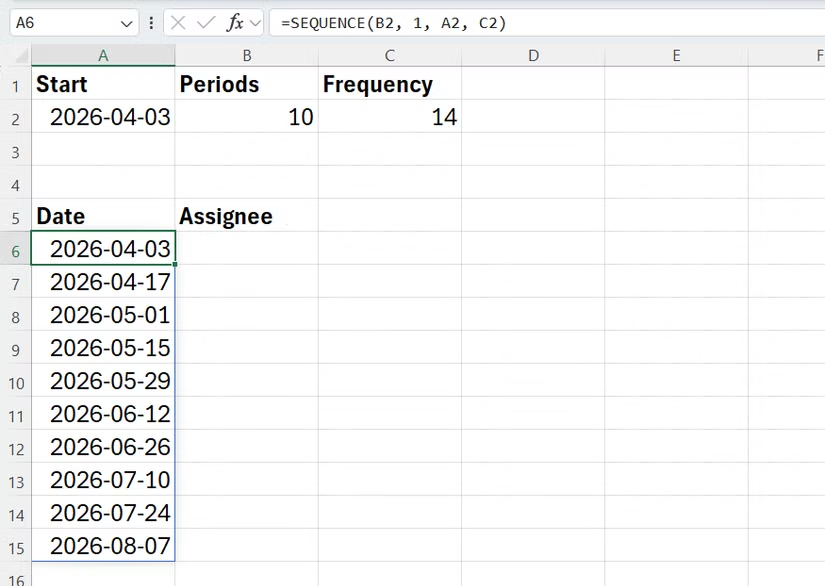
| =SEQUENCE(52,1,DATE(2026,1,5),7) | 52 weekly dates | Payment schedules, project milestones |
The function is available in Excel 2021 or later, Excel for Microsoft 365, Excel for the web, and mobile versions. If your organization is still on older Excel versions, this is another reason to consider upgrading your Microsoft licensing.
3 Business Applications That Save Real Hours
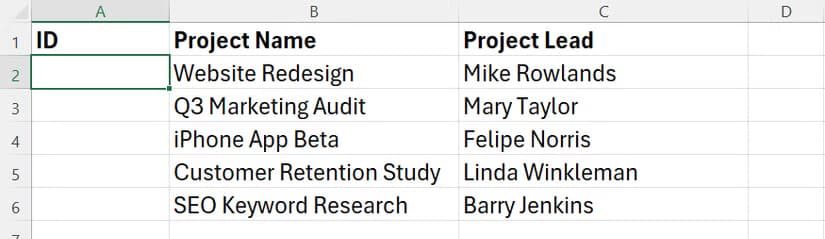
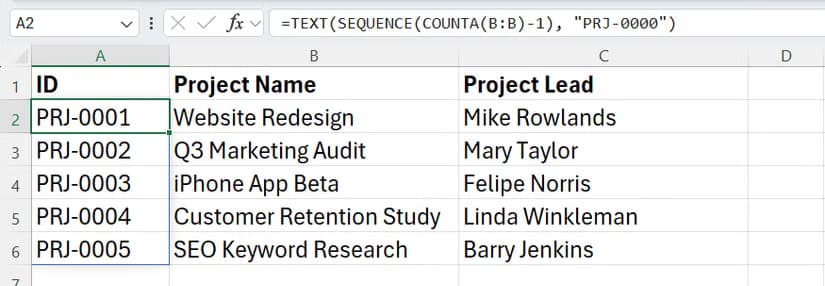
1. Automated Invoice and Order Numbering
Manual invoice numbering is error-prone and time-consuming. Skip a number, and you've created an audit headache. Duplicate a number, and you've got a compliance issue. SEQUENCE eliminates both risks.
Set your starting invoice number and let the formula generate the rest. When you add new rows, the sequence updates automatically. Your accounts receivable team stops wasting time on data entry and starts focusing on collections.
2. Dynamic Date Headers for Financial Reports
Every monthly report needs date headers. Every quarterly board deck needs period labels. Manually typing these is the kind of low-value task that accumulates into serious time waste.
“SEQUENCE is a game-changer for accountants... use it to create dynamic date headers or payment schedules that automatically adjust when the start date or duration changes.”
— Mynda Treacy, Microsoft MVP and Founder of My Online Training Hub
Combine SEQUENCE with date functions, and your report templates become self-updating. Change the fiscal year start date in one cell, and every header throughout the workbook adjusts automatically. This is particularly valuable for organizations with non-calendar fiscal years.
3. Payment Schedules and Project Timelines
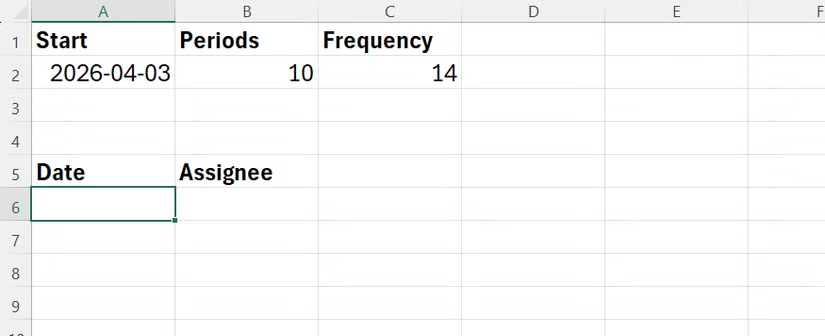
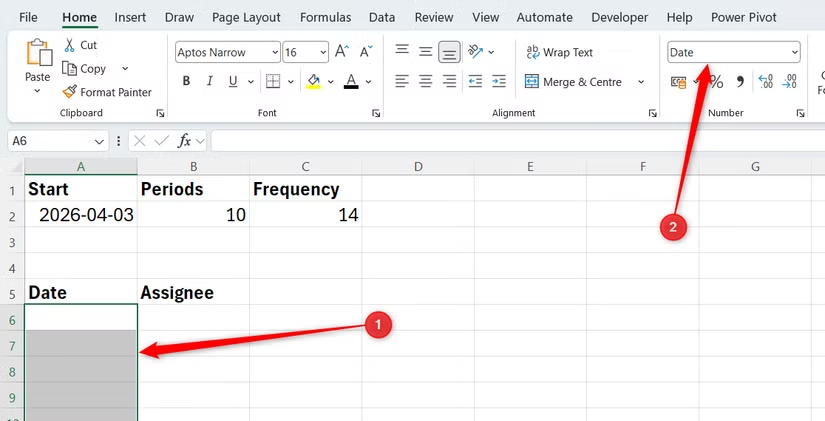
Loan amortization tables, subscription billing schedules, project milestone trackers. All require sequential dates or periods. SEQUENCE generates these instantly, and more importantly, maintains consistency when plans change.
If you're managing SaaS billing and need to project 36 months of revenue recognition, SEQUENCE builds that grid in seconds. Your finance team can focus on the analysis, not the data structure.
The Bigger Picture: Dynamic Arrays Change Excel Strategy
SEQUENCE is part of Microsoft's "Dynamic Array" update that fundamentally changed Excel from a cell-by-cell calculation engine to an array-first platform. This isn't incremental improvement. It's architectural change.
For IT leaders evaluating spreadsheet strategy, this means Excel is becoming more powerful but also more complex. The gap between Excel novices and experts is widening. Organizations that invest in training see compounding returns. Those that don't watch their best analysts waste time on tasks that should take seconds.
“Excel's SEQUENCE function is one of those features that might seem simple at first glance, but when you start combining it with other functions, that's when the real magic happens.”
— Sumit Bansal, Microsoft MVP and Founder of Trump Excel
If your team is still using Google Sheets for collaborative work, it's worth noting that Sheets has similar array capabilities. We've covered how [Gemini in Google Sheets](gemini-in-google-sheets-save-hours-on-data-work) can further automate data work for teams committed to the Google ecosystem.
Implementation: What It Actually Takes
The good news: SEQUENCE requires no IT infrastructure changes. If you have Excel 2021 or Microsoft 365, you already have access. The implementation cost is purely training time.
✅ Pros
- • Zero software cost if you have current Excel licensing
- • Immediate productivity gains for trained users
- • Reduces data entry errors that cause downstream problems
- • Templates become self-maintaining, reducing update burden
❌ Cons
- • Requires Excel 2021 or Microsoft 365 (older versions incompatible)
- • Learning curve for staff unfamiliar with array formulas
- • Files using dynamic arrays may not open correctly in older Excel versions
- • Over-reliance on complex formulas can create maintenance challenges
For most organizations, the practical path is identifying your heaviest Excel users, investing 2-4 hours in targeted training, and letting them build templates that benefit the broader team. The ROI timeline is weeks, not months.
When Excel Isn't Enough: Knowing the Limits
SEQUENCE is powerful, but it's not a replacement for proper systems. If your organization is managing thousands of invoices, you need accounting software. If you're tracking complex projects across departments, you need project management tools. Excel is for analysis and ad-hoc work, not as your system of record.
The pattern we see with successful organizations: they use Excel for what it's good at (analysis, modeling, quick reports) while maintaining proper systems for transactional data. SEQUENCE makes Excel better at its core strengths without trying to turn it into something it's not.
For teams using Google Workspace, AI-powered automation offers similar productivity gains.
Hardware solutions that complement software productivity improvements.
Frequently Asked Questions About Excel SEQUENCE
Frequently Asked Questions
How much does Excel SEQUENCE cost to implement?
Zero additional software cost if you have Excel 2021 or Microsoft 365. The only investment is training time, typically 2-4 hours for proficient users to master dynamic array functions.
Is SEQUENCE worth the training investment for my finance team?
Yes, for teams spending significant time on repetitive data entry. A 25% productivity improvement on 10 hours weekly of spreadsheet work saves 130 hours annually per person. At typical finance salaries, that's $6,500+ in recovered productivity per team member.
Will SEQUENCE formulas work if I share files with clients using older Excel?
No. Files using dynamic arrays like SEQUENCE require Excel 2021 or Microsoft 365 to open correctly. For client-facing files, consider converting to static values before sharing, or export as PDF.
Can SEQUENCE replace our invoicing software?
No. SEQUENCE is for data generation within spreadsheets, not transaction management. Use it for analysis, reporting, and modeling. Keep proper accounting software for your system of record.
How long does it take to see ROI from training staff on SEQUENCE?
Most organizations see productivity gains within the first week after training. The formula itself is learned in minutes; the value comes from building templates that save time on recurring tasks.
Logicity's Take
At Logicity, we build automation systems for businesses, primarily using AI agents, n8n workflows, and custom web applications. Excel isn't our core domain, but we work with enough finance teams and operations managers to see a clear pattern: spreadsheet inefficiency is often the canary in the coal mine for broader automation opportunities. When a client tells us their team spends hours on manual data entry in Excel, our first question is whether that data should even live in a spreadsheet. Often, the answer is no. The real solution is connecting their CRM to their invoicing system, or building a simple dashboard that pulls live data instead of requiring manual exports. That said, SEQUENCE and other dynamic array functions are genuinely useful for the analytical work that should stay in Excel. We've seen Indian startups and SMEs dramatically improve their financial reporting by training one Excel power user who then builds templates for the whole team. The 25% productivity stat matches what we observe in practice. For Hyderabad-based businesses specifically: if you're still running on pirated Office 2016, the Microsoft 365 Business Basic plan at roughly ₹150/user/month is probably your highest-ROI technology investment this quarter. Modern Excel features alone justify the upgrade.
Need Help Implementing This?
If your team is drowning in manual spreadsheet work and you're wondering whether the real solution is better Excel skills or proper automation, we can help you figure that out. Logicity specializes in building AI-powered workflows and business automation systems. Sometimes the answer is training. Sometimes it's connecting your existing tools. Sometimes it's building something new. Let's talk about what makes sense for your situation.
Source: How-To Geek
Huma Shazia
Senior AI & Tech Writer
Produced with AI assistance and reviewed by the Logicity editorial team. Learn more in our Editorial Policy.