
Key Takeaways

- YellowKey exploit bypasses BitLocker encryption using files on a USB stick and a simple reboot sequence
- The exploit files disappear after single use, behavior consistent with a deliberate backdoor
- TPM-and-PIN protection reportedly does not prevent the attack
A security researcher has published a zero-day exploit that bypasses BitLocker encryption on Windows 11 and Windows Server systems. The attack requires nothing more than a USB stick with specific files and a keyboard shortcut during reboot.
The exploit, named YellowKey, was released by security researcher Chaotic Eclipse (also known as Nightmare-Eclipse). Eclipse previously published two other zero-day exploits, BlueHammer and RedSun, after alleging that Microsoft's security team dismissed their disclosure reports.
How the Exploit Works
The attack process is disturbingly simple. An attacker copies a folder called "FsTx" and its contents into the "System Volume Information" directory on any USB stick. They then use Shift+Click to restart Windows into the recovery environment, but switch to holding the Control key during the reboot.
The machine reboots without displaying any menus or asking for authentication. It drops the user into an elevated command line with full access to the previously encrypted drive. No BitLocker keys required.
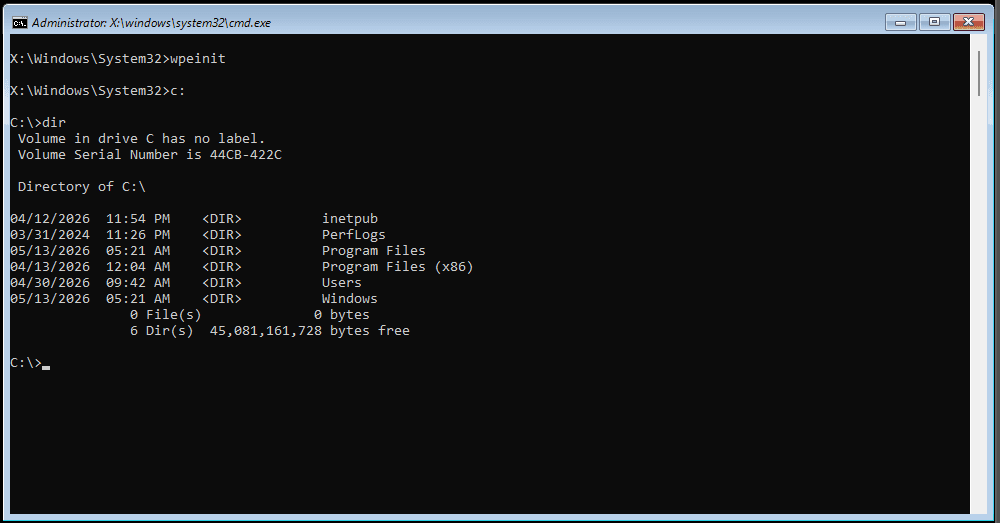
Tom's Hardware confirmed the exploit works as described. After testing, they noted that the exploit files disappear from the USB stick after a single use. This self-destructing behavior is consistent with a deliberate backdoor rather than an accidental vulnerability.
Affected Systems
YellowKey affects Windows 11, Windows Server 2022, and Windows Server 2025. Windows 10 is reportedly not vulnerable. This matters because BitLocker is enabled by default in Windows 11, meaning millions of machines worldwide rely on it for drive encryption.
The scope includes home users, enterprises, and government systems. Any organization that upgraded to Windows 11 for its supposedly improved security features now faces questions about their encryption strategy.
TPM Protection Does Not Help
Eclipse claims that using a full TPM-and-PIN setup does not prevent the attack. According to the researcher, they have a variant for TPM-protected scenarios but have not published a proof-of-concept for it yet.
There is one limitation. A drive cannot be removed from one machine and opened on another because the encryption keys are stored in the original machine's TPM. But this offers limited comfort. Stealing an entire laptop, mini-PC, or desktop is not difficult for a determined attacker.
A Pattern of Disclosure Frustration
Eclipse has released four zero-day exploits in the past month. The first two, BlueHammer and RedSun, allowed Windows Defender to grant system administrator privileges. Eclipse published them after Microsoft allegedly dismissed their security reports.
The researcher stated they "could have made some insane cash selling this" but chose public disclosure instead. The implication is clear: if vendors dismiss researchers, those researchers may go public rather than silent.
Second Exploit: GreenPlasma
Eclipse also announced a second zero-day called GreenPlasma. This exploit allegedly performs local privilege escalation to gain system-level access. A complete proof-of-concept is not yet available, but given Eclipse's track record with YellowKey, BlueHammer, and RedSun, the threat should be taken seriously.




Logicity's Take
What Organizations Should Do Now
- Audit which systems use BitLocker as their sole encryption layer
- Consider physical security measures for machines containing sensitive data
- Evaluate third-party encryption solutions as a supplement or replacement
- Monitor for Microsoft's response and any forthcoming patches
- Review USB port policies and boot sequence restrictions
Microsoft has not yet issued a public statement or patch for YellowKey. Given the severity, a response should come soon. Until then, organizations relying on BitLocker face a difficult decision: trust encryption that has a known bypass, or scramble for alternatives.
Another case of organizations facing difficult security decisions when vulnerabilities are exploited
How security failures can escalate to regulatory scrutiny
Frequently Asked Questions
Which Windows versions are affected by the YellowKey BitLocker exploit?
YellowKey affects Windows 11, Windows Server 2022, and Windows Server 2025. Windows 10 is reportedly not vulnerable to this specific exploit.
Does TPM protection prevent the BitLocker bypass?
According to the researcher, a full TPM-and-PIN setup does not prevent the attack. A variant for TPM-protected scenarios exists but has not been publicly released.
Can attackers use YellowKey on stolen drives?
Not directly. Because encryption keys are stored in the original machine's TPM, attackers would need physical access to the entire computer, not just the drive.
Is there a patch available for YellowKey?
As of publication, Microsoft has not released a patch or public statement about the YellowKey vulnerability.
Why did the researcher publish this exploit publicly?
Chaotic Eclipse claims Microsoft's security team dismissed their disclosure reports, leading them to publish the exploits publicly rather than through responsible disclosure channels.
Need Help Implementing This?
Source: Latest from Tom's Hardware
Huma Shazia
Senior AI & Tech Writer
Produced with AI assistance and reviewed by the Logicity editorial team. Learn more in our Editorial Policy.