
Key Takeaways

- YellowKey exploit bypasses BitLocker encryption on Windows 11 and Server 2022/2025
- The vulnerability works through Windows Recovery Environment using crafted USB files
- Researcher claims TPM+PIN protections do not prevent exploitation
Two Unpatched Flaws, One Angry Researcher
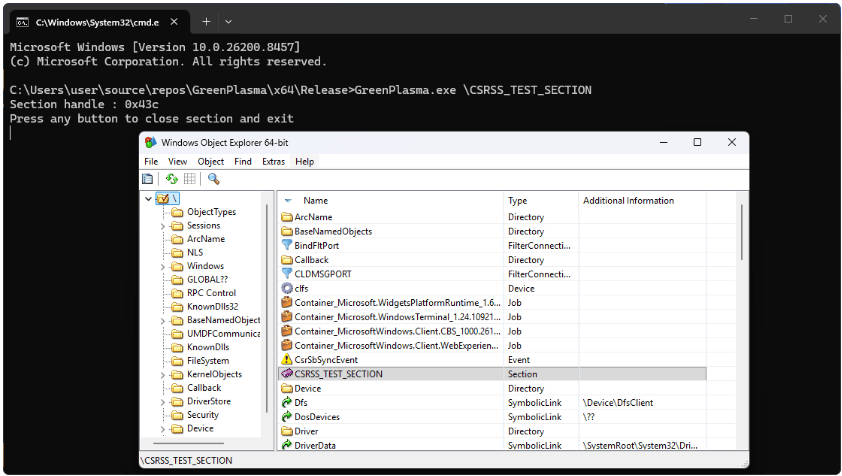
A cybersecurity researcher has published proof-of-concept exploits for two unpatched Microsoft Windows vulnerabilities. The flaws, named YellowKey and GreenPlasma, include a BitLocker encryption bypass and a privilege-escalation bug. Neither has been fixed by Microsoft.
The researcher, known as Chaotic Eclipse or Nightmare Eclipse, describes the BitLocker bypass as functioning like a backdoor. The vulnerable component exists only in the Windows Recovery Environment (WinRE), which Windows uses to repair boot-related issues.
This disclosure follows the same researcher's previous release of two other zero-day flaws: BlueHammer (CVE-2026-33825) and RedSun (no identifier assigned). Both are local privilege escalation bugs. Both were exploited in the wild shortly after public disclosure.
“I think it will take a while even for MSRC to find the real root cause of the issue. I just never managed to understand why this vulnerability is sooo well hidden.”
— Chaotic Eclipse
The researcher said the decision to publicly disclose YellowKey and GreenPlasma was driven by dissatisfaction with Microsoft's handling of bug reports. Chaotic Eclipse has promised to continue leaking exploits for undocumented Windows vulnerabilities. They've also teased "a big surprise" for the next Patch Tuesday.
How YellowKey Works
YellowKey affects Windows 11 and Windows Server 2022/2025. The attack requires placing specially crafted 'FsTx' files on a USB drive or the EFI partition. After rebooting into WinRE and holding the CTRL key, the exploit spawns a shell with unrestricted access to BitLocker-protected volumes.
The bypass also works without external storage. An attacker with existing access can copy the malicious files directly to the EFI partition on the target drive.

Independent security researcher Kevin Beaumont confirmed that the YellowKey exploit is valid. He agreed that BitLocker effectively has a backdoor. As a temporary mitigation, Beaumont recommended using a BitLocker PIN and a BIOS password.
Will Dormann, principal vulnerability analyst at Tharsos Labs, also confirmed that the YellowKey exploit worked with the FsTx files on a USB drive.
TPM+PIN May Not Help
In an update, Chaotic Eclipse claimed the real root cause remains unknown to the general public. More concerning: the researcher says the vulnerability works even in TPM (Trusted Platform Module) and PIN environments.
“No, TPM+PIN does not help, the issue is still exploitable regardless. I asked myself this question, can it still work in a TPM+PIN environment? Yes it does, I'm just not publishing the PoC, I think what's out there is already bad enough.”
— Chaotic Eclipse
The researcher has not released the TPM+PIN bypass exploit, suggesting they consider it too dangerous even by their standards.
Related Microsoft BitLocker security update
Business Risk Assessment
BitLocker is the default full-disk encryption solution for Windows enterprise environments. Many organizations rely on it to protect sensitive data on laptops and servers. A working bypass undermines a core assumption of endpoint security.
The attack requires physical access to the target machine. This limits remote exploitation but creates serious risks for stolen laptops, compromised servers, or insider threats. Organizations with high-value data should assume encrypted drives are no longer secure against determined attackers with physical access.
Microsoft has not yet released a patch or official guidance. Until they do, the recommended mitigations are BIOS passwords (to prevent WinRE boot), physical security controls, and monitoring for unauthorized reboots into recovery mode.
Logicity's Take
Frequently Asked Questions
What is the YellowKey BitLocker bypass?
YellowKey is an unpatched vulnerability that bypasses BitLocker encryption through the Windows Recovery Environment. Attackers use specially crafted files on a USB drive or EFI partition to gain unrestricted access to encrypted drives.
Which Windows versions are affected by YellowKey?
The exploit affects Windows 11 and Windows Server 2022/2025. The researcher claims the vulnerability works even with TPM and PIN protections enabled.
Does the YellowKey exploit require physical access?
Yes. The attacker needs physical access to the machine to reboot into Windows Recovery Environment and trigger the exploit. Remote exploitation is not possible with this specific vulnerability.
How can organizations protect against YellowKey?
Security researchers recommend setting a BIOS password to prevent unauthorized WinRE boots, enabling BitLocker PIN (though the researcher claims this can also be bypassed), and implementing strong physical security controls.
Has Microsoft patched the YellowKey vulnerability?
No. As of the disclosure date, Microsoft has not released a patch or official guidance for YellowKey or GreenPlasma.
Need Help Implementing This?
Source: BleepingComputer
Manaal Khan
Tech & Innovation Writer
Produced with AI assistance and reviewed by the Logicity editorial team. Learn more in our Editorial Policy.