Key Takeaways
- Continue On debuts with Android 17, enabling one-tap task transfers from phone to tablet
- Developers can use activity deeplinks for native app handoffs or fall back to web browsers
- Google may expand the feature to ChromeOS, Windows, and Googlebook laptops in future updates
Google finally answers Apple's eight-year head start
Apple introduced Handoff in 2014. For eight years, iPhone and Mac users could start writing an email on their phone, then finish it on their laptop without missing a beat. Android users watched from the sidelines, stuck with half-measures from individual manufacturers.
That gap closes with Android 17. Google announced Continue On during an Android developer session at I/O, bringing platform-level device handoffs to the entire Android ecosystem. The feature does exactly what the name suggests: start something on your phone, continue it on your tablet.
How Continue On actually works
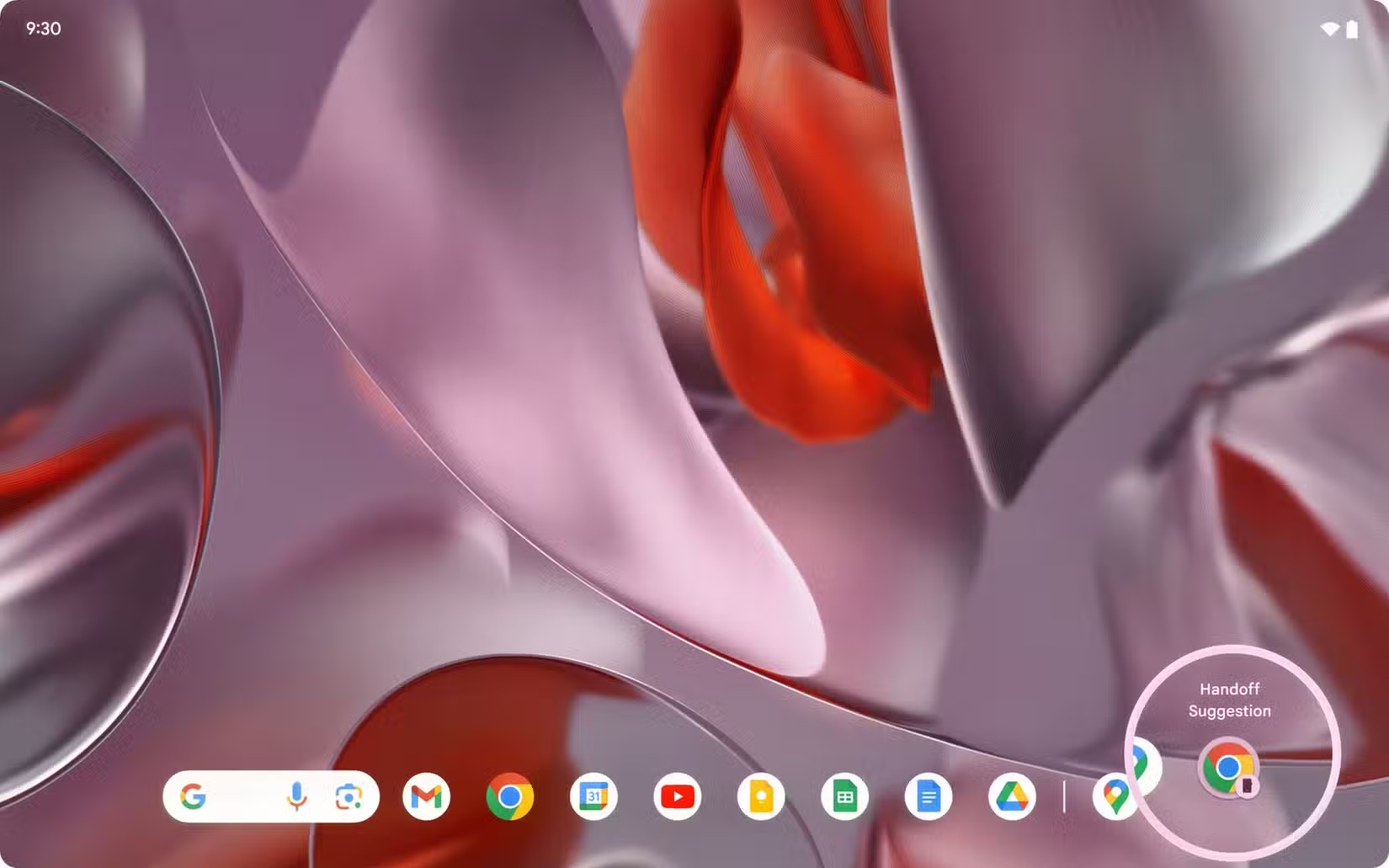
When you're using a compatible app on your Android phone, a handoff suggestion appears in your tablet's taskbar. One tap opens the same task on the larger screen. You don't need to manually sync, email yourself links, or hunt through recent files.
Developers have three options for implementing Continue On. The first uses an activity deeplink to open the native app on the receiving device. This gives the smoothest experience, assuming the app is installed on both devices.
The second option is a web fallback. If the app isn't installed on your tablet, the task opens in your default browser instead. You lose some native functionality, but you don't lose your work.
The third is a direct-to-web approach, where developers skip native app detection entirely and always open in the browser. This works well for web-first services that don't need platform-specific features.
Current limitations
Continue On launches with a narrow focus: phone-to-tablet transfers only. You can't hand off tasks from your phone to your Chromebook, your Windows laptop, or another phone. The feature requires Android 17 on both devices, which limits the initial user base to people with newer hardware.
App support will also take time to build. Developers need to implement the feature using Google's new APIs. Until they do, your favorite apps won't show handoff suggestions.
Logicity's Take
What comes next
Google hasn't announced a timeline, but the framework is designed for expansion. ChromeOS support seems like the obvious next step, given that Google controls both platforms. Windows integration would require cooperation from Microsoft, but Google already maintains Chrome and various productivity apps on that platform.
The mention of Googlebook laptops in Google's developer materials hints at ambitions beyond tablets. Google may be positioning Continue On as a core differentiator for its entire hardware ecosystem.
More on Google's platform-level product changes
Why this matters for Android's multi-device future
Samsung, Xiaomi, and other manufacturers have built their own continuity solutions. These work, but they fragment the Android experience. A Samsung phone talks to a Samsung tablet. A Xiaomi phone talks to a Xiaomi laptop. Nothing talks to everything.
Continue On changes that equation. If Google can establish this as the standard, any Android phone could hand off to any Android tablet. That's the promise, at least. Execution will depend on how aggressively Google pushes adoption and whether manufacturers embrace the standard or continue building parallel systems.
Frequently Asked Questions
When is Android Continue On available?
Continue On launches with Android 17. Both your phone and receiving device need to run Android 17 or later for the feature to work.
Does Continue On work with iPhones or Windows PCs?
Not at launch. The initial release only supports Android phone-to-Android tablet handoffs. Google may expand to ChromeOS and Windows in future updates.
Which apps support Continue On?
Developers need to implement the feature using Google's APIs. App support will grow over time, but not all apps will work at launch.
How is Continue On different from Samsung's continuity features?
Samsung's features are proprietary and only work across Samsung devices. Continue On is a platform-level feature that should work across all Android devices running Android 17.
Need Help Implementing This?
Source: MakeUseOf
Other Major Announcements from Google I/O 2026
The new article details several major announcements from Google I/O 2026 not covered in the original, including the 'Intelligent Eyewear' smart glasses, the 'Universal Cart' shopping assistant, and the 'Omni' AI model. It also provides performance benchmarks for the now-available Gemini 3.5 Flash, noting it is four times faster than previous 'frontier' models.
Huma Shazia
Senior AI & Tech Writer
Produced with AI assistance and reviewed by the Logicity editorial team. Learn more in our Editorial Policy.