Key Takeaways

- Android 17 will automatically terminate calls from spoofed banking numbers in partnership with Revolut, Itaú Unibanco, and Nubank
- Live Threat Detection expands to catch SMS forwarding abuse, hidden app icons, and concealed accessibility overlays
- Mark as lost feature adds biometric authentication requirement, blocking thieves even if they have your passcode
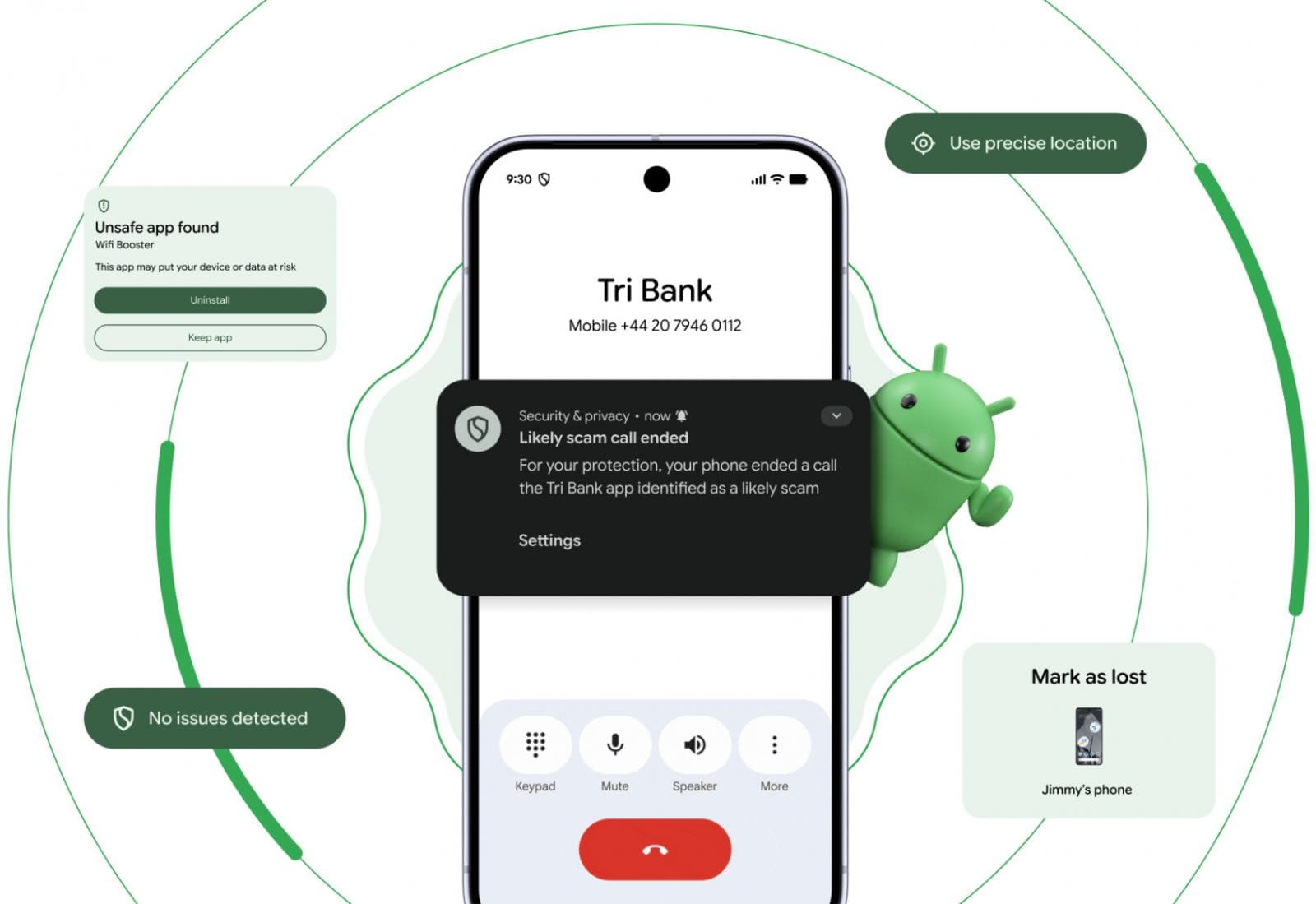
Android 17, expected next month, takes a direct shot at banking scammers. Google's new operating system will automatically detect and terminate calls from numbers spoofing financial institutions. The system works by partnering with banking apps to verify whether incoming calls actually originate from legitimate bank phone lines.
The authentication happens through app-level queries. Android compares incoming caller IDs against an internal list provided by banks. These numbers are ones the banks have explicitly flagged as never used for customer communication. When a match triggers, Android cuts the connection before the scammer can work their script.
Which Banks Are Supported?
Three major players join the initial rollout: Revolut, the digital banking app with millions of users globally; Itaú Unibanco, Brazil's largest retail and commercial bank; and Nubank, the Latin American digital banking giant. Google hasn't announced additional banking partners, but the framework suggests expansion is planned.

The feature arrives with Android 17 but won't stay exclusive to the newest devices. Google confirmed it will backport scam call protection to phones running Android 11 and later. That's six years of Android devices gaining access to the protection.
Live Threat Detection Gets Sharper
Android's Live Threat Detection, the anti-stalkerware system built on Play Protect, is learning new tricks. The system analyzes app behavior in real time and flags potential risks. Android 17 expands its detection capabilities to catch several abuse techniques that slipped through before.
- SMS forwarding misuse, where malicious apps intercept two-factor authentication codes
- Concealed accessibility overlays that can capture screen taps and sensitive input
- Apps that hide or alter their icons to avoid detection
- Malicious background launches that run without user awareness
Advanced Protection, the device-level security mode introduced in Android 16, also gets tighter. Android 17 restricts accessibility service access to apps explicitly labeled as accessibility tools. It disables device-to-device unlocking entirely. Chrome loses WebGPU support under Advanced Protection mode, closing a potential attack surface. Google also added scam detection for chat notifications.
Stolen Phone? Thieves Hit a Wall
Google's "Mark as lost" feature gets a critical upgrade. In Android 17, you can lock a phone using biometric authentication as an option beyond passcode or PIN. The practical effect: if a thief grabs your phone and watches you enter your PIN, they still can't disable tracking or access the device once you mark it lost. They would need your fingerprint or face.
Once marked lost, the phone locks down hard. Quick Settings becomes unavailable. WiFi and Bluetooth connections get disabled, preventing the thief from putting the phone in airplane mode or pairing it to other devices.
This theft protection won't be limited to Android 17 devices everywhere. Google is rolling it out to Android 10 and later phones in select markets: Argentina, Chile, Colombia, Mexico, and the United Kingdom. Remote Lock and Theft Detection Lock will also become enabled by default on Android 17 devices and some Android 10+ devices in these markets.
Chrome Gets Pre-Installation Malware Scanning
A smaller but significant change: Chrome for Android will now scan downloaded APK files for known malware before installation. This catches malicious apps that users sideload from websites rather than the Play Store. It's not foolproof against zero-day threats, but it adds a checkpoint against known bad actors.
Logicity's Take
More on Google's Android feature roadmap
When Can You Get These Features?
Android 17 is expected to roll out next month. The banking scam call protection will be available on Android 11 and later, though the exact timeline for backporting wasn't specified. Theft protection features in select markets will reach Android 10 and later devices.
For the scam call blocking specifically, you'll need your bank to be a partner. Revolut, Itaú Unibanco, and Nubank users benefit first. If you bank elsewhere, you're waiting on your financial institution to join the program.
Frequently Asked Questions
Which Android versions get the banking scam call protection?
The feature launches with Android 17 but Google will backport it to Android 11 and later. You'll also need to use a participating banking app like Revolut, Itaú Unibanco, or Nubank.
How does Android 17 detect spoofed banking calls?
Android queries the banking app and compares the calling number against an internal list of numbers the bank has flagged as never used for customer communication. If a scammer spoofs one of these numbers, Android terminates the call.
What happens when I mark my Android phone as lost?
The phone requires biometric authentication to unlock, Quick Settings becomes unavailable, and WiFi and Bluetooth connections are disabled. Thieves can't access or disable tracking even if they know your PIN.
Which countries get the theft protection features on older Android versions?
Argentina, Chile, Colombia, Mexico, and the United Kingdom will receive theft protection features on Android 10 and later devices in the initial rollout.
Does Android 17 scan APK files before installation?
Yes, Chrome for Android will scan downloaded APK files for known malware before you install them, adding protection against malicious sideloaded apps.
Need Help Implementing This?
Source: BleepingComputer
Social Media and UI Enhancements in Android 17
The new article reveals Android 17's significant social media focus through a Meta partnership, introducing Ultra HDR, Night Sight, and optimized upload pipelines for Instagram. It also details new UI features like 'app bubbles,' game controller remapping, and the inclusion of Gemini Intelligence and 3D emoji.
Googlebooks and Gemini Intelligence Unveiled at The Android Show
The new article introduces 'Googlebooks,' a new lineup of laptops designed for 'Gemini Intelligence' generative AI features, marking the 15th anniversary of Chromebooks. It also highlights upcoming AirDrop-related updates, Instagram editing tools for Android, and progress on unifying the ChromeOS and Android platforms.
Manaal Khan
Tech & Innovation Writer
Produced with AI assistance and reviewed by the Logicity editorial team. Learn more in our Editorial Policy.