Key Takeaways
- Router device lists are often cryptic and unreliable for identifying connected devices
- Standby devices like streaming sticks and printers consume bandwidth and pose security risks
- Network scanning apps like Fing can identify manufacturers, models, and alert you to new connections
A quick scan of your home network will probably reveal devices you forgot existed, and possibly some you never authorized. Jorge Aguilar at MakeUseOf ran a network audit and found three unrecognized connections. One was an open security hole, another a forgotten printer broadcasting to every device in the house, and the third a streaming stick quietly downloading updates with the TV screen black.
The problem starts with your router's built-in device list. It shows cryptic hostnames, raw MAC addresses, or blank fields. Distinguishing your smart thermostat from an intruder becomes guesswork. Most people trust this list as the source of truth. That trust is misplaced.
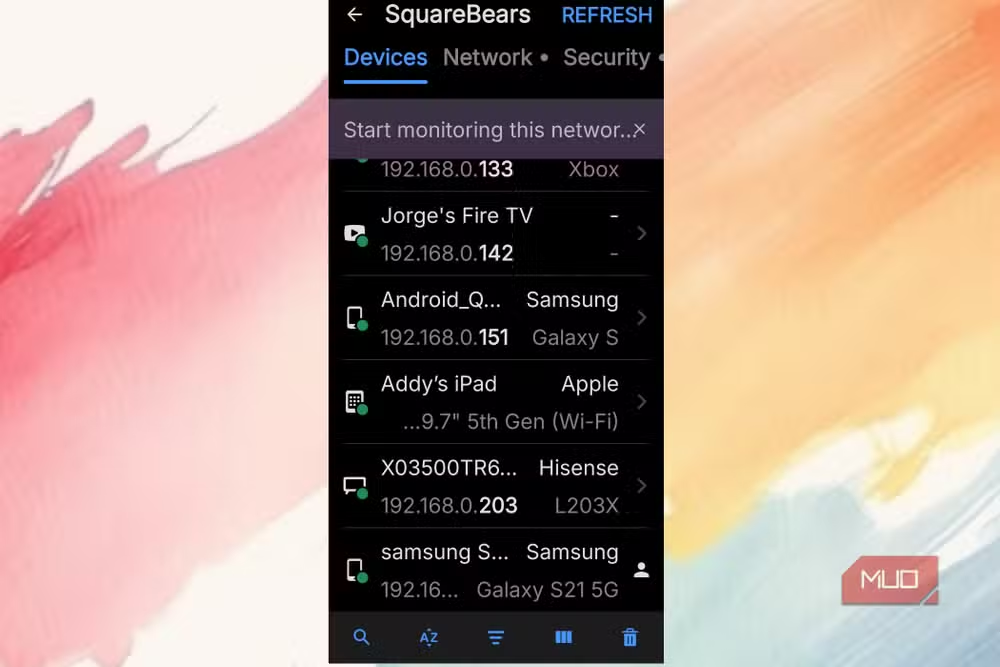
Why your router's device list fails you
Router interfaces were designed for configuration, not security auditing. They'll show you something is connected but rarely tell you what it actually is. A device might appear as "Unknown" or a string of hexadecimal characters. When you have dozens of IoT devices, phones, laptops, and smart home gadgets, identifying an unauthorized connection becomes nearly impossible.
Dedicated network scanning apps solve this by querying each device's hardware address and network behavior. Fing, for example, completes a full scan in about 30 seconds. It identifies manufacturers, specific models, and operating systems. That level of detail transforms a wall of gibberish into actionable information.
The three devices hiding on the network
Aguilar's scan turned up three active connections he didn't recognize. The first showed no manufacturer, no hostname. Just "guest." He had no guests. He blocked it and nothing in his house stopped working. Someone had been on his network, potentially able to intercept traffic if credentials were weak.
The second was an old HP DeskJet printer on a dusty power strip in another room. It hadn't printed anything in weeks, yet it maintained a DHCP lease and constantly broadcast its presence. Background noise from a forgotten device.
The third was the biggest bandwidth drain: a Fire TV Stick hammering away with updates and streaming preview content while the TV sat dark. Smart devices stay half-awake to respond instantly when you pick up the remote. They're polling servers, pulling telemetry, downloading video. The "off" button doesn't actually turn most things off.
How to scan your network and find hidden devices
Apps like Fing handle all the address mapping automatically once you connect to your Wi-Fi. They find every active device and display IP addresses, manufacturer names, and connection types. Beyond listing devices, these apps can alert you the moment something new joins your network. You can then block it without logging into your router.
The process takes about 30 seconds. What you're looking for: anything with no recognizable name, devices from manufacturers you don't own products from, or multiple entries for what should be a single device. Each of these warrants investigation.
Standby mode is the bandwidth thief
Gaming consoles, smart TVs, media players, printers. They're built to wake instantly and grab updates in the background. Even on standby, they maintain active network connections. The average home network faces 29 cyberattack attempts daily, according to 2026 security data. Each forgotten device is another potential entry point.
The statistics are sobering: 41% of smart home devices still use factory-default or weak passwords. IoT-specific malware attacks increased 124% during 2025. Consumers take an average of 8.3 months to apply security patches after a vulnerability disclosure.
What the security community recommends
Discussion on Reddit's r/homeautomation and r/networking subreddits pointed to a consistent recommendation: VLAN segmentation. Isolate IoT devices on their own network segment so a compromised smart bulb can't access your main computers. It's more setup work, but it creates real barriers.
A recurring theme in community discussions: manufacturers should face liability for shipping devices without mandatory password changes. Until that happens, the burden falls on users to audit regularly.
New Matter protocol features can improve smart device onboarding security
Context on current router capabilities and limitations
Frequently Asked Questions
How do I find unknown devices on my home network?
Use a network scanning app like Fing, which identifies every connected device by manufacturer, model, and operating system within about 30 seconds. Your router's built-in list is often too cryptic to be useful.
Can someone be using my Wi-Fi without my knowledge?
Yes. Unauthorized connections can appear as generic hostnames or blank entries in your router's device list. A network scanner reveals the actual device details, making intruders identifiable.
Do devices still use bandwidth when turned off?
Most smart devices never fully power down. They maintain standby connections to poll servers, download updates, and pull telemetry. Unplugging them is the only way to stop this completely.
How often should I scan my home network for security?
Security researchers recommend monthly scans at minimum, or setting up automatic alerts for new device connections. The average home network faces 29 cyberattack attempts daily.
What should I do if I find an unknown device on my network?
Block it immediately through your network scanner or router settings. Then change your Wi-Fi password and check that other devices still work. If everything functions normally, the blocked device wasn't yours.
Logicity's Take
The bigger story here isn't about one person's network audit. It's that consumer IoT security has become a silent crisis. Manufacturers ship devices optimized for convenience, not security, and the average user has no practical way to monitor what's actually happening on their network. Until routers ship with scanning tools built in and mandatory password changes become standard, home networks will remain soft targets. The 8.3-month patch delay statistic is damning. Most vulnerabilities are exploited within days of disclosure.
Need Help Implementing This?
Want guidance on securing your home or business network? Contact Logicity for recommendations on network monitoring tools, VLAN segmentation strategies, and IoT security best practices tailored to your setup.
Source: MakeUseOf
Huma Shazia
Senior AI & Tech Writer
Produced with AI assistance and reviewed by the Logicity editorial team. Learn more in our Editorial Policy.






