Key Takeaways
- Windows 11 Insider Preview Build 26300.8493 allows taskbar repositioning to top, left, or right screen edges
- Users can now toggle off recommended content in the Start menu and customize its size
- Changes require no restart and are currently available only in the Experimental channel
Microsoft has restored one of the most requested features to Windows 11: the ability to resize and reposition the taskbar. The change arrives in Windows 11 Insider Preview Build 26300.8493, now rolling out to testers in the Experimental channel.
Starting with this build, users can move the taskbar to the top, left, or right side of the screen. They can also shrink it using smaller buttons, which reclaims vertical space for applications.
“The ability to move the taskbar to the top or sides of the screen has been one of the most requested features, and we are bringing it to Windows 11.”
— Diego Baca, partner director of Microsoft Design
How to Change Taskbar Position
The new settings live in Settings > Personalization > Taskbar > Taskbar behaviors. Users will find the position option alongside the existing taskbar icon alignment setting.
To make the taskbar smaller, check the "Show smaller taskbar buttons" option in the same dialog. This reduces both icon size and overall taskbar height. No restart or sign-out is required for either change to take effect.
Start Menu Gets More Control
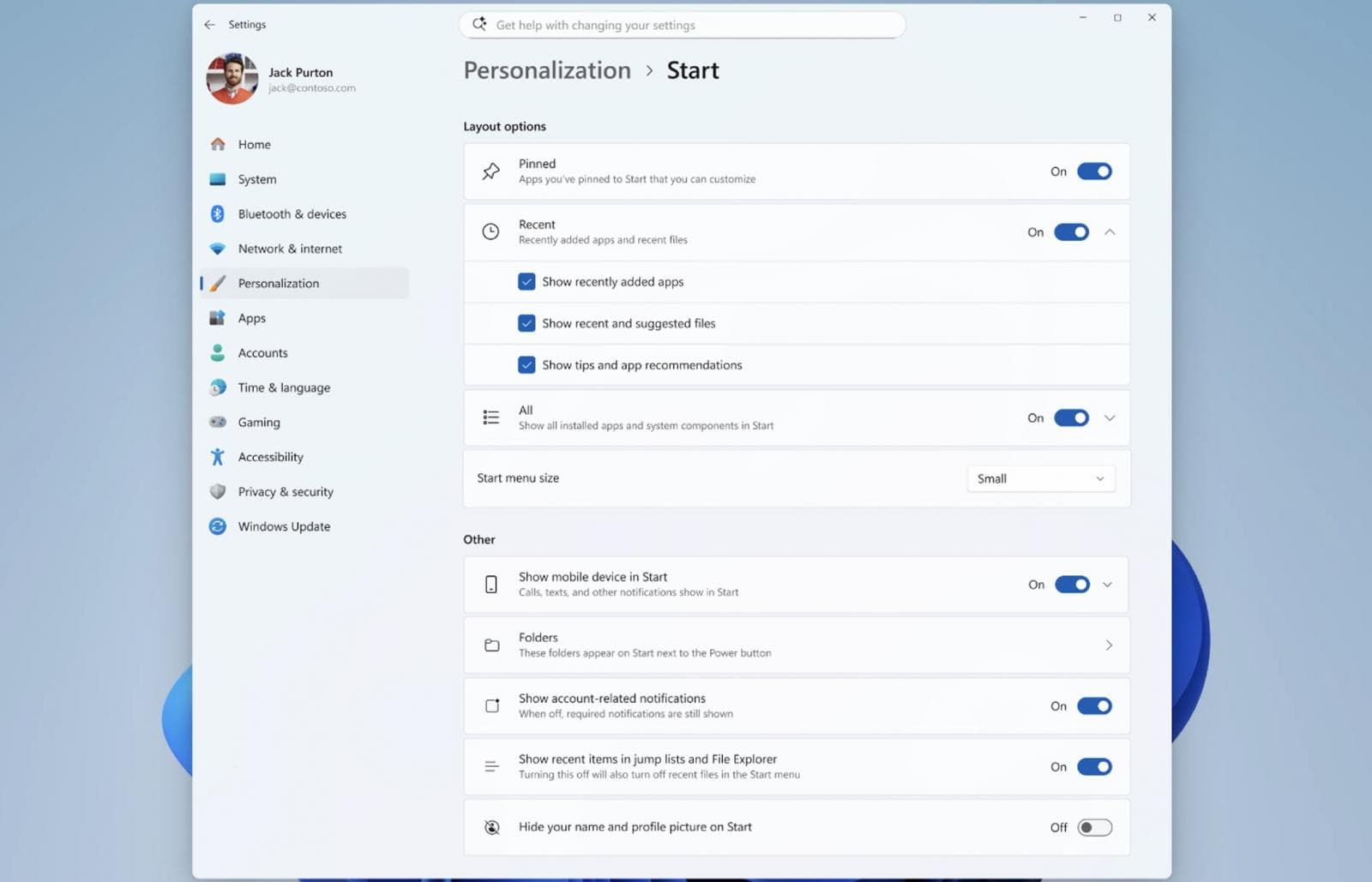
Microsoft is also giving users more control over the Start menu. The update allows toggling off recommended content entirely and adjusting the menu's size.
“If you want a Start menu with just your pinned apps, you can turn off Recommended and All. If you want a full Start that shows everything, you can leave it all on. The goal is simple: it is your choice, and it should be easy to make.”
— Diego Baca, Microsoft Design
One thing Microsoft will keep: a list of recently installed apps. The company considers this a key way for users to discover new applications alongside the Microsoft Store.
Additional Start menu changes include improved file relevance. Microsoft is adjusting how files appear and their order to prioritize the most relevant items. Users can also hide their name and profile picture from the Start menu.
Part of a Broader Windows 11 Overhaul
These changes follow a pattern. Earlier this month, Microsoft announced it was testing a modern Windows Run dialog with dark mode support. The new version removes the "Browse" button, which only 0.0038% of users clicked in a sample of 35 million.
The modern Run dialog will not turn on automatically. Users will need to enable it manually in Settings > Advanced Settings.
Windows president Pavan Davuluri previewed some of these changes in March. Microsoft pledged to improve Windows 11 system performance and make it more responsive. Beyond taskbar and Start menu updates, the company plans to reduce notifications, simplify settings, and require fewer reboots during device setup on new PCs.
Related Windows 11 customization tips
When Will This Reach Everyone?
The features are currently limited to Insiders in the Experimental channel. Microsoft has not announced a timeline for wider release. Features in the Experimental channel often take several months to reach stable builds, and some never graduate at all.
For users who have waited years for taskbar flexibility, the wait continues a bit longer. But the fact that Microsoft is testing these changes suggests they are on track for eventual release.
Recent Windows security news

Logicity's Take
Frequently Asked Questions
Can I move the Windows 11 taskbar to the top of the screen?
Yes, but only in Windows 11 Insider Preview Build 26300.8493 or later in the Experimental channel. The feature is not yet available in stable releases.
How do I make the Windows 11 taskbar smaller?
Go to Settings > Personalization > Taskbar > Taskbar behaviors and check "Show smaller taskbar buttons." This reduces icon size and taskbar height.
Can I remove recommended content from the Windows 11 Start menu?
In the latest Insider Preview builds, yes. Microsoft is testing a toggle that lets users turn off recommended content entirely.
When will the resizable taskbar come to all Windows 11 users?
Microsoft has not announced a release date. Features in the Experimental channel typically take several months to reach stable builds.
Need Help Implementing This?
Source: BleepingComputer
Manaal Khan
Tech & Innovation Writer
Produced with AI assistance and reviewed by the Logicity editorial team. Learn more in our Editorial Policy.