Key Takeaways
- VS Code's multi-process architecture keeps extensions from crashing the main editor
- The Continue extension adds AI coding assistance without switching to a new IDE
- Language Server Protocol enables intelligent code completion across any programming language
VS Code remains the default choice for developers who want flexibility without bloat. It's the editor you start with as a beginner and keep using as a professional. The secret is its extension system. You add features when you need them, not before.
That approach works especially well for AI coding tools. Instead of switching to Cursor or another AI-first editor, you can bolt on AI capabilities to an environment you already know. The Continue extension does exactly that, and according to Jorge Aguilar at How-To Geek, it's become impossible to work without.
Why VS Code Handles Extensions So Well
VS Code separates different tasks into their own processes. The UI runs separately from background operations. If a plugin crashes or runs a heavy calculation, your screen doesn't freeze.
Extensions live inside a separate Extension Host process. This matters because it means VS Code runs smoothly on hardware that doesn't have much power. You can write code on a low-end laptop and still get a responsive experience. The main renderer only focuses on drawing the screen and handling keyboard inputs.
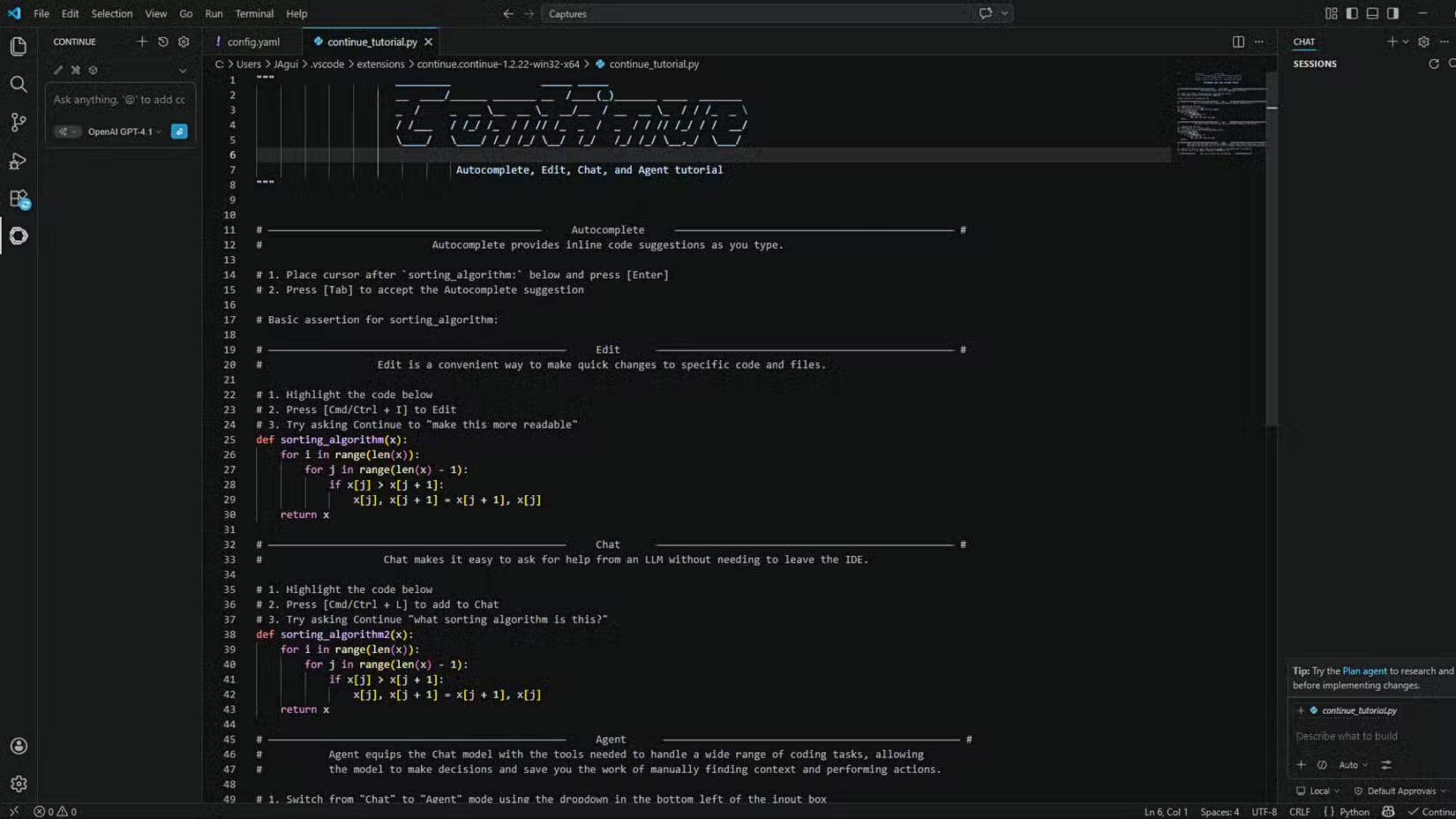
The editor's core uses the Monaco Editor component. It includes IntelliSense, fast syntax highlighting, code folding, and smart autocompletion out of the box. You get these features without needing a heavy IDE installation.
Language Server Protocol Changes Everything
One technical decision makes VS Code particularly good at understanding your code: the Language Server Protocol (LSP). This system moves the heavy work of code analysis into background processes.
Instead of building a massive compiler into the editor, VS Code talks to external language servers. These servers understand Python, Rust, Go, TypeScript, and pretty much any other language. You get accurate completions and error checking by downloading the right extension from the marketplace.
This architecture is why adding AI works so well. The editor already knows how to communicate with external services. An AI extension just becomes another background process that VS Code can query.
Continue: AI Without the IDE Switch
The Continue extension adds AI coding assistance directly into VS Code. You get chat-based help, code completion suggestions, and the ability to ask questions about your codebase without leaving your editor.
For developers who've considered switching to Cursor or Windsurf but didn't want to abandon their VS Code setup, Continue offers a middle path. Your keybindings stay the same. Your other extensions keep working. You just gain AI features on top.
The extension works with multiple AI backends. You can connect it to local models or cloud services depending on your privacy requirements and hardware. This flexibility matters for enterprise developers who can't send code to external APIs.
Comparing dedicated AI editors if you want to evaluate alternatives
The Case for Staying Lightweight
Full IDEs like IntelliJ or Visual Studio include features most developers never touch. They're powerful, but that power comes with memory overhead and slower startup times.
VS Code's approach is additive. You start minimal and add what you need. For AI coding assistance, this means you're not paying the performance cost of features you don't use. The editor stays responsive even on machines that would struggle with heavier alternatives.
Google recently released its own VS Code fork, but the original remains the more widely supported option. The extension marketplace has plugins for nearly every language and workflow you can imagine.
Getting Started with Continue
- Open VS Code's Extensions panel (Ctrl+Shift+X or Cmd+Shift+X)
- Search for "Continue" and install the extension
- Configure your preferred AI backend in the extension settings
- Use the sidebar panel to chat with AI or highlight code for suggestions
The setup takes a few minutes. Once configured, you can highlight code and ask questions, request refactoring suggestions, or generate new functions based on natural language descriptions.
Logicity's Take
Frequently Asked Questions
Is the Continue extension free?
Continue is open source and free to use. You may incur costs depending on which AI backend you connect, such as OpenAI API charges or cloud model subscriptions.
Can Continue work with local AI models?
Yes. Continue supports local models like Ollama and LM Studio, letting you run AI assistance entirely on your machine without sending code to external servers.
How does Continue compare to GitHub Copilot?
Continue offers more flexibility in choosing your AI backend, while Copilot is tightly integrated with GitHub's infrastructure. Continue is open source; Copilot requires a subscription.
Will the Continue extension slow down VS Code?
VS Code runs extensions in a separate process, so even if Continue performs heavy operations, the main editor interface stays responsive.
Does Continue support all programming languages?
Continue works with any language that VS Code supports. The quality of AI suggestions depends on your chosen model's training data for that language.
Need Help Implementing This?
Source: How-To Geek
Huma Shazia
Senior AI & Tech Writer
Produced with AI assistance and reviewed by the Logicity editorial team. Learn more in our Editorial Policy.