Key Takeaways
- Running Services Monitor shows both user and system processes on Android, unlike the hidden Developer Options feature
- The app requires Shizuku for elevated privileges to monitor and stop system services
- You can view RAM consumption, battery stats, network stats, and permission logs for individual apps
Desktop operating systems have always had process monitors. Windows has Task Manager. Linux has htop. These tools show exactly what's running on your machine, foreground or background. Android doesn't include anything comparable out of the box.
Yes, there's a "Running Services" option buried in Developer Options. But it only shows active user apps. No system services. No specific details. It's essentially useless for real troubleshooting.
Running Services Monitor is a free, open-source app that brings proper process monitoring to Android. It requires elevated privileges through Shizuku, but once configured, it exposes system internals that Android normally hides from users.
What Running Services Monitor Actually Shows
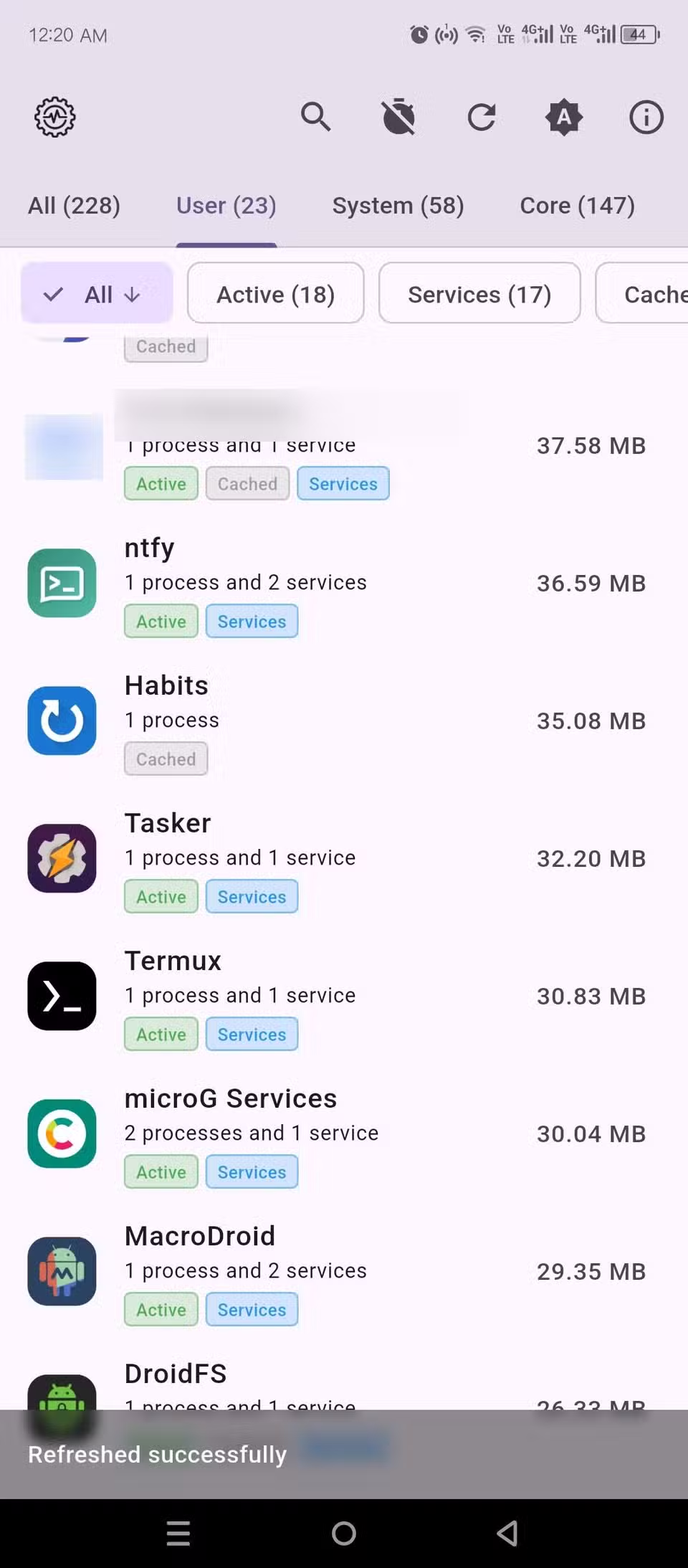
The app provides a detailed breakdown of memory usage across your device. You can filter by user apps or system services, which is helpful when you're trying to figure out what's eating your battery or RAM.
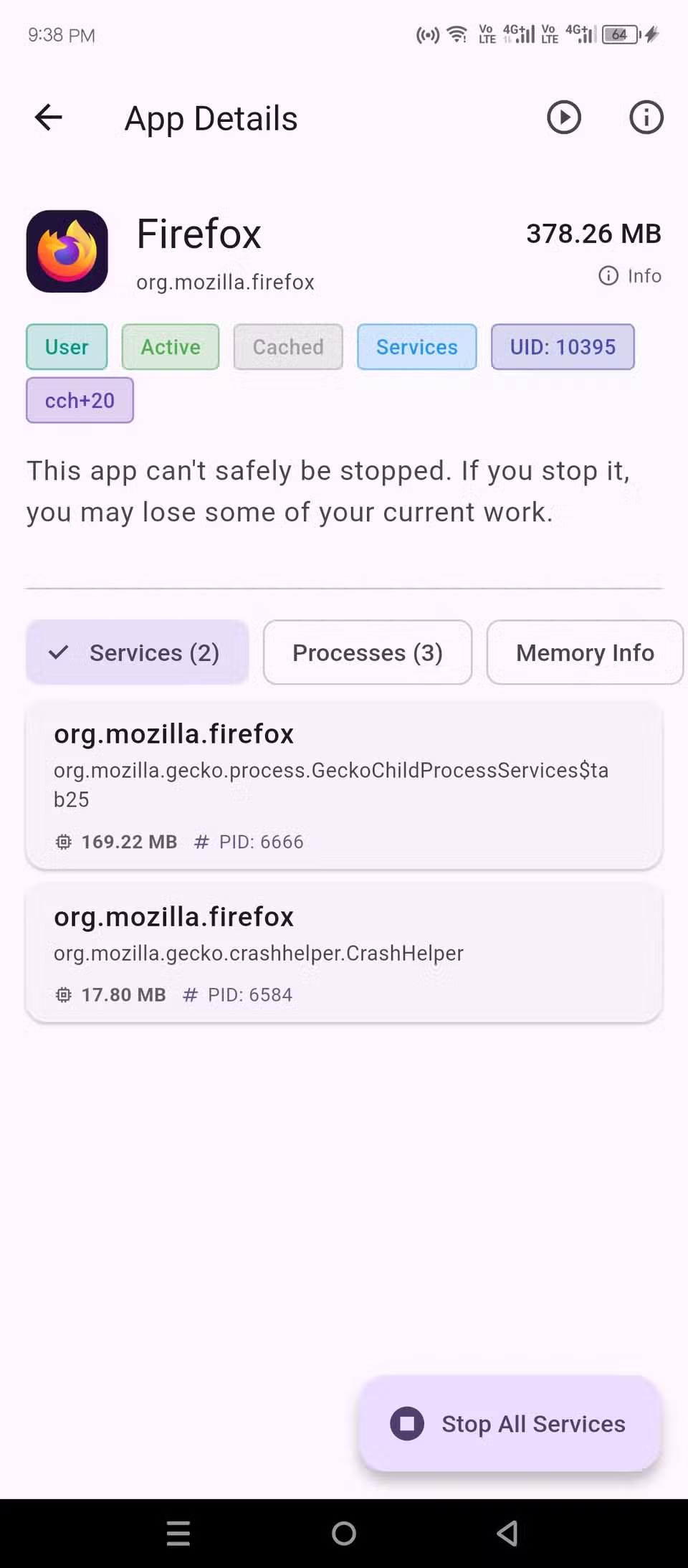
Tap any app and you get a comprehensive view of its running services and processes. The app shows raw console output from each active service, process IDs, and RAM consumption for each one. This is the kind of information Android keeps hidden from typical users.
There's a Memory Info tab with even more technical details about RAM usage. You can also run ADB dumpsys commands on individual apps directly from the interface. These commands pull battery stats, network stats, CPU stats, and appops, which logs exactly which permissions an app has accessed and when.
Stopping Rogue Processes
The practical payoff: you can stop all running services and kill all processes of any app with a single tap. If your phone overheats randomly or battery drains too fast, this gives you a precise tool to identify and kill the culprit.
Why This Requires Shizuku
Running Services Monitor needs elevated privileges to access system-level information. Shizuku is an app that grants these permissions without requiring root access. It works by using ADB (Android Debug Bridge) to create a privileged session that other apps can tap into.
Setting up Shizuku involves connecting your phone to a computer and running a few ADB commands. Once configured, it persists until you restart your phone. Some users set up wireless ADB so Shizuku can restart itself automatically.
Who Actually Needs This
Most people won't need a full task monitor on their phone. Android's automatic memory management works well enough for typical use. But if you're diagnosing performance issues, auditing app behavior for privacy reasons, or just curious about what's actually running on your device, this fills a real gap.
- Diagnosing random battery drain or overheating
- Checking what permissions an app actually uses (not just what it requests)
- Killing background services that restart themselves
- Understanding RAM usage patterns across apps
The app supports both light and dark themes and runs efficiently in the background when monitoring.
Logicity's Take
Another diagnostic tool for power users who want visibility into system behavior
Frequently Asked Questions
Does Running Services Monitor require root access?
No. It uses Shizuku to gain elevated privileges through ADB, which doesn't require rooting your device.
What's the difference between this and Android's built-in Running Services?
The built-in option only shows active user apps without details. Running Services Monitor displays system services, process IDs, RAM consumption, and lets you run ADB commands on individual apps.
Can I use this to improve battery life?
Yes. The app shows which processes consume resources in the background, and you can stop them with a single tap. It also displays battery stats through ADB dumpsys commands.
Is Running Services Monitor safe to use?
It's open-source, so the code is publicly auditable. The Shizuku permissions do grant significant system access, so only install apps you trust.
Need Help Implementing This?
Source: How-To Geek
Huma Shazia
Senior AI & Tech Writer
Produced with AI assistance and reviewed by the Logicity editorial team. Learn more in our Editorial Policy.






