Key Takeaways

- Rokarolla targets 217 banking and cryptocurrency apps using phishing overlays to steal credentials
- The malware disguises itself as Google Play Protect and distributes via fake Chrome and TikTok downloads
- Operators have 137 commands for complete device control, including keylogging and screenshot capture
A new Android banking trojan called Rokarolla is targeting 217 banking and cryptocurrency applications. Mobile security firm Zimperium discovered the malware, which spreads through malicious websites offering fake Google Chrome or TikTok downloads. Once installed, Rokarolla gives attackers near-complete administrative control over the infected device.
The trojan's sophistication stands out. It packs 137 distinct commands for remote device manipulation, allowing operators to steal lock screen credentials, intercept SMS messages, log keystrokes, and capture screenshots with timestamps. For anyone running banking or crypto apps on Android, this is the kind of threat that bypasses casual security habits.
How Rokarolla infects devices
The infection chain is clever. Rokarolla acts as a dropper, impersonating Google Play Protect during installation. It presents users with a choice to install Chrome or TikTok, both of which contain the actual malware payload. This mimicry exploits the trust users place in Android's built-in security tools.
Once launched, Rokarolla immediately requests Accessibility service permissions, plus access to notifications, SMS, and calls. Granting these permissions is the point of no return. Accessibility services let the malware interact with other apps, read screen content, and approve system prompts without user input.
The malware then phones home to its command-and-control server, sending a device profile: phone model, Android version, locale, display specs, battery level, storage, and RAM. Zimperium says attackers use this data to generate a unique identifier for each victim.
What Rokarolla steals and how
The trojan's primary goal is financial theft. It checks the infected device against its list of 217 targeted applications. If it finds a match, it downloads a corresponding phishing payload. When the victim opens a targeted banking or crypto app, Rokarolla displays a fake login overlay that captures credentials, credit card numbers, and other financial data.
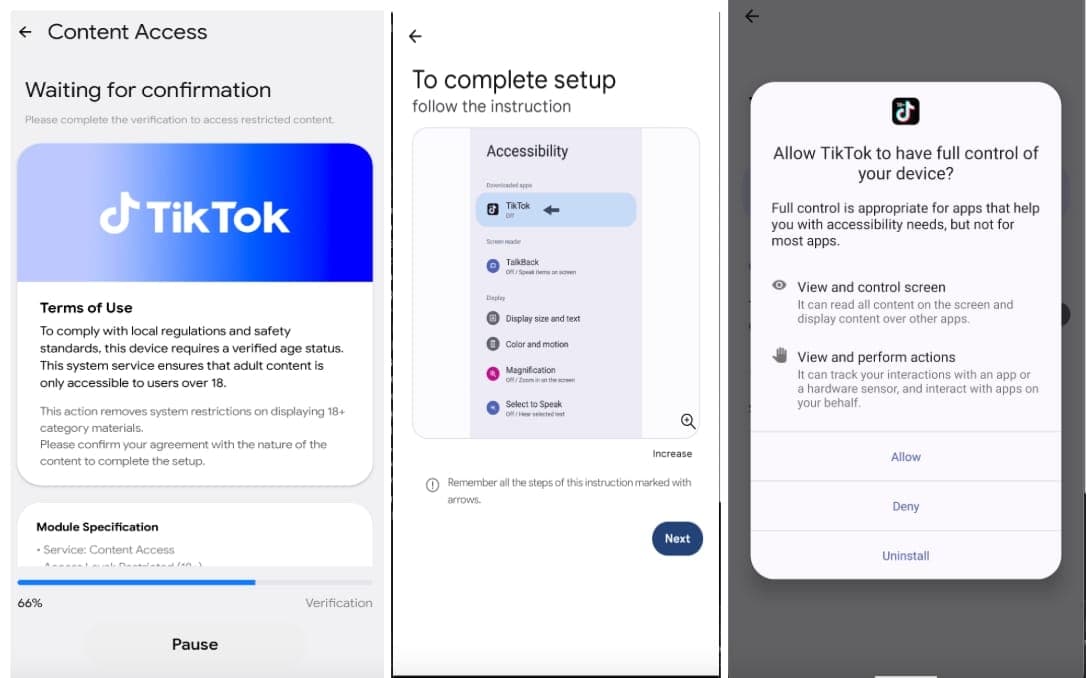
But overlays serve multiple purposes beyond credential theft. Rokarolla uses them to capture lock-screen PINs and patterns, letting operators access devices even when locked. Fake installation screens can hide malware activity and block user interaction during critical operations.
Zimperium published the full list of 137 commands on GitHub. The data-theft capabilities include:
- Stealing SMS messages and extracting contact information
- Harvesting WhatsApp contacts
- Continuous keystroke logging
- Recording on-screen content via UI logging
- Copying and manipulating clipboard contents
- Blocking incoming calls and bank fraud alerts
- Periodic screenshot capture with timestamps
How Rokarolla evades detection
The malware employs several tactics to stay hidden. It disables Google Play Protect, removing Android's first line of defense. It hides its app icon from the drawer, so users cannot easily find and remove it. It silences audio and vibration to avoid alerting victims during malicious operations. It keeps the screen awake indefinitely when needed for automated tasks.
Zimperium did not find Rokarolla on Google Play. The malware spreads exclusively through sideloading, downloaded as APK files from malicious websites. This distribution method targets users who download apps outside official channels.
Why Accessibility Services are the weak point
Accessibility Services remain the Achilles' heel of Android security. These permissions were designed to help users with disabilities interact with their devices. Malware authors discovered they also provide exactly the elevated capabilities needed to bypass standard Android protections.
With Accessibility access, an app can read screen content from other apps, perform gestures, tap buttons, and approve system prompts. That is everything a banking trojan needs to intercept two-factor authentication codes, auto-approve transfers, and defeat security measures that rely on user confirmation.
Discussions on r/androidsecurity highlight that dropper attacks abusing Accessibility Services have become the primary vector for financial malware. The security community continues urging users to limit these permissions to genuinely essential applications.
How to protect yourself
The first rule: do not sideload apps unless you explicitly trust the publisher. Downloading APKs from random websites is exactly how Rokarolla spreads. Stick to Google Play, and verify the developer before installing anything that touches your finances.
Second, audit your Accessibility permissions regularly. Go to Settings > Accessibility and review which apps have this access. If you see anything unfamiliar, revoke it immediately. Legitimate apps rarely need these permissions.
Third, watch for red flags during installation. Any app that asks you to install another app, or that mimics system security tools like Google Play Protect, should trigger suspicion. Real Play Protect does not prompt you to install Chrome or TikTok.
Frequently Asked Questions
Is Rokarolla on Google Play?
No. Zimperium confirmed the malware spreads only through malicious websites offering fake APK downloads. It has not appeared in the official Play Store.
Which apps does Rokarolla target?
The trojan targets 217 specific banking and cryptocurrency applications. When it detects a targeted app, it downloads a matching phishing overlay.
Can Rokarolla bypass two-factor authentication?
Yes. By intercepting SMS messages and capturing screen content, the malware can steal one-time passwords and authentication codes.
How do I check if my phone is infected?
Check Settings > Accessibility for unfamiliar apps with elevated permissions. Also verify Google Play Protect is enabled and running normally.
Why does Rokarolla need Accessibility permissions?
Accessibility Services let apps read screen content, perform taps, and interact with other applications. This allows Rokarolla to steal data from banking apps and approve transactions without user input.
Logicity's Take
Rokarolla represents the maturation of mobile banking threats. The combination of dropper delivery, Play Protect impersonation, and 137 remote commands shows professional malware development, not amateur work. For enterprises, this is a reminder that mobile device management and strict sideloading policies are not optional. For consumers, the lesson is simpler: if an app asks for Accessibility permissions and is not explicitly helping someone with a disability, deny it.
Need Help Implementing This?
Logicity works with technology teams to develop mobile security policies and incident response playbooks. If your organization needs help assessing mobile threat exposure or implementing device management controls, reach out to our consulting team.
Source: BleepingComputer
Manaal Khan
Tech & Innovation Writer
Produced with AI assistance and reviewed by the Logicity editorial team. Learn more in our Editorial Policy.