
Key Takeaways

- Defender for Endpoint can now automatically isolate compromised devices without manual intervention
- Isolated devices stay connected to Defender for continued monitoring and forensic investigation
- The feature is currently in preview mode and works only on onboarded end-user workstations
Microsoft is rolling out a preview feature that lets Defender for Endpoint automatically isolate compromised devices. The goal: cut off attackers before they can spread through your network.
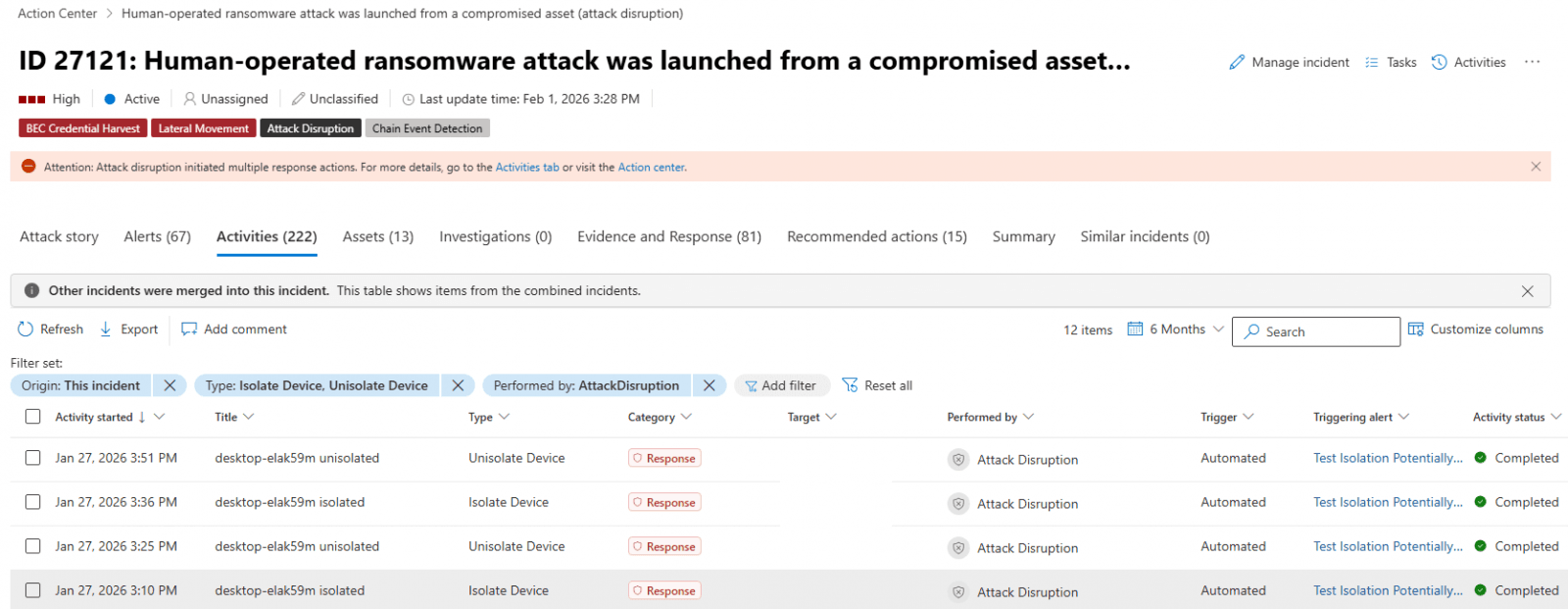
The new capability works as part of automatic attack disruption, a system designed to contain threats while giving security teams more time to respond. When Defender detects a high-confidence compromise, it can now disconnect the device from the network without waiting for human approval.
How Automatic Isolation Works
The feature targets a specific problem in enterprise security: lateral movement. Once attackers compromise a single endpoint, they typically pivot across the network to escalate privileges, steal data, or deploy ransomware. Automatic isolation breaks that chain.
When a device is flagged as compromised, Defender disconnects it from the broader network. But here's the key detail: the device keeps its connection to the Defender for Endpoint service. This lets security teams continue monitoring and investigating the machine remotely.
“Automatic isolation helps reduce the risk of further impact on the organization, limit attacker lateral movement, and prevent impacts such as data exfiltration and ransomware propagation.”
— Microsoft
Sarah Anderson, Lead Security Researcher at Microsoft, explained the shift in approach: "By automating the isolation of compromised endpoints, we shift the balance from reactive incident response to proactive containment, denying attackers the time they need to pivot."

Requirements and Limitations
The automatic isolation feature has specific requirements. It works only on onboarded end-user workstations managed by Defender for Endpoint. Servers and unmanaged devices are excluded from automatic containment.
Security operators retain full control over isolated devices. Once an incident investigation is complete and risks are mitigated, admins can release devices from containment. The process is straightforward: select the device from the Device inventory or open the device page and choose "Release from isolation" from the action menu.
Building on Existing Capabilities
This isn't Microsoft's first move toward automated endpoint containment. The company has been expanding Defender's isolation capabilities for years.
Microsoft also recently started testing automatic traffic blocking to and from undiscovered Windows endpoints. This feature targets devices that haven't been onboarded to Defender, aiming to prevent attackers from using unknown assets as footholds.
Security Community Response
The feature has drawn mixed reactions from security professionals. Many welcome the reduced manual workload, especially during off-hours when security teams may be understaffed. The ability to contain threats automatically at 3 AM is a real operational advantage.
But some administrators worry about false positives. What happens when a critical business machine gets automatically disconnected during a crucial operation? Discussions on r/sysadmin and r/DefenderATP suggest testing the feature in a restricted policy group before enabling it enterprise-wide.
Marcus Thorne, Senior CISO Advisor, highlighted the forensic benefits: "The ability to disconnect a device while keeping the security umbilical cord attached is significant for digital forensics."
Why This Matters for Enterprise Security
Human-operated attacks are among the most damaging threats enterprises face. Unlike automated malware, these attacks involve adversaries manually navigating networks, adapting to defenses, and escalating privileges over days or weeks.
Microsoft reports that automated disruption achieves 99.9% precision with its high-fidelity AI triggers. This accuracy matters: automatic isolation that constantly generates false positives would be worse than useless.
The timing is notable. EDR systems have detected a 400% increase in lateral movement attempts since 2024. Attackers are getting faster at pivoting through networks. Automated containment is one way to match that speed.
Logicity's Take
Getting Started
The feature is currently in preview mode. Organizations using Microsoft Defender for Endpoint can access it through their existing management console. Microsoft recommends starting with a limited device group to evaluate behavior before broader deployment.
For organizations with mixed environments, Microsoft also recently introduced scheduled antivirus scans for Linux systems through the Defender portal, mdatp managed JSON configuration, or the mdatp command-line tool. These scans support daily quick scans, interval-based quick scans, and weekly full scans.
Frequently Asked Questions
Which devices support automatic isolation in Microsoft Defender?
Automatic isolation currently works only on onboarded end-user workstations managed by Microsoft Defender for Endpoint. Servers and unmanaged devices are not supported for automatic containment.
Can isolated devices still be monitored?
Yes. Isolated devices retain connectivity to the Microsoft Defender for Endpoint service. Security teams can continue monitoring and investigating the device remotely while it remains disconnected from the broader network.
How do I release a device from automatic isolation?
Select the device from the Device inventory in the Defender portal or open the device page directly. Then choose "Release from isolation" from the action menu after completing your investigation.
Is automatic isolation available now?
The feature is currently in preview mode. Organizations using Defender for Endpoint can access it through their management console, though Microsoft recommends testing with a limited device group first.
Does automatic isolation work for ransomware attacks?
Yes. The feature is specifically designed to prevent lateral movement in human-operated attacks, including ransomware. It can also isolate compromised user accounts, not just devices, to block attackers using stolen credentials.
Recent enterprise security incident highlighting data breach risks
Need Help Implementing This?
Source: BleepingComputer
Huma Shazia
Senior AI & Tech Writer
Produced with AI assistance and reviewed by the Logicity editorial team. Learn more in our Editorial Policy.