Key Takeaways

- All supported Windows versions, client and server, are affected after installing June 2026 security updates
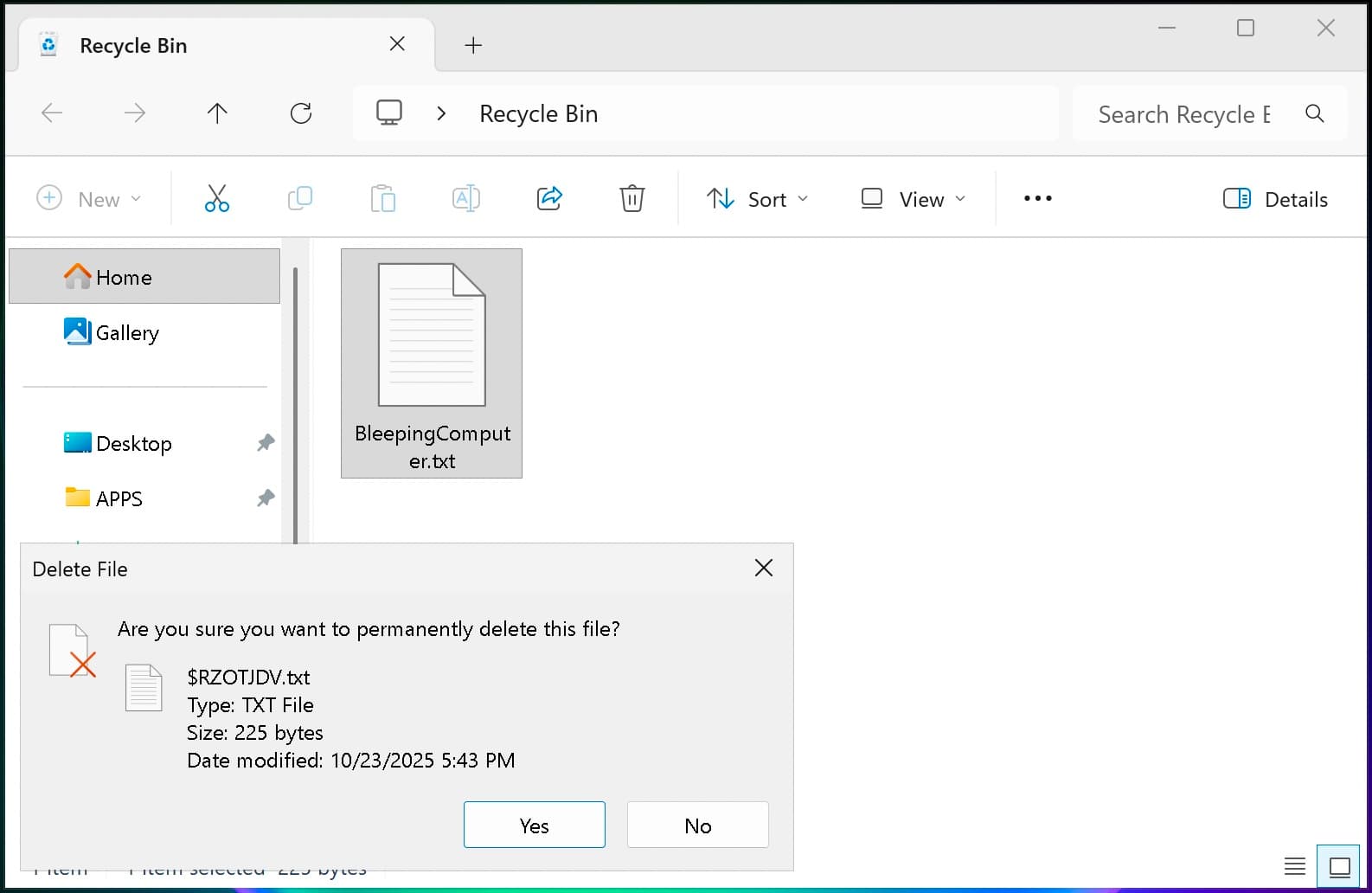
- The bug shows internal filenames like $Rxxxxx.ext instead of original names in delete confirmations
- Microsoft is working on a fix; enterprise users can contact Business Support for an immediate workaround
Microsoft has confirmed that the June 2026 security updates introduce a Windows Recycle Bin bug affecting every supported version of the operating system. When users try to permanently delete a file from the Recycle Bin, the confirmation dialog now displays a cryptic internal filename like $Rxxxxx.ext rather than the file's actual name. The bug spans Windows 10, Windows 11, and Windows Server releases going back to 2012.
The issue is cosmetic but confusing. You click delete on a file you recognize as "quarterly_report.xlsx," and the prompt asks if you're sure you want to remove "$R7f3ab.xlsx." Microsoft confirmed the behavior in a Thursday update to the Windows release health dashboard, noting that the Recycle Bin itself still shows the correct filename, and restoring files works normally.
Which Windows versions are affected?
The scope is broad. Microsoft listed every supported Windows release as vulnerable to this bug after installing the June 2026 patches.
On the client side: Windows 11 versions 26H1, 25H2, 24H2, and 23H2; Windows 10 version 22H2; and Windows 10 Enterprise LTSC editions from 2016 through 2021. For servers: Windows Server 2025, 2022, 2019, 2016, 2012 R2, and 2012.
That covers essentially any Windows machine still receiving security updates. Microsoft did not say how many users have reported the problem or whether it appears on every affected system.
Why does Windows use $R filenames internally?
When you delete a file, Windows doesn't just move it to a Recycle Bin folder under its original name. It renames the file to $Rxxxxx.ext, where xxxxx is a random identifier, and stores the original filename and path in a companion $Ixxxxx file. This prevents collisions if you delete two files with the same name from different folders.
The system has worked invisibly since Windows 95. Under normal operation, the Recycle Bin UI reads the $I metadata and shows you the human-readable name. The June 2026 update apparently broke that lookup in the delete confirmation dialog specifically.
Is there a fix or workaround?
Microsoft says its engineers are working on a patch, which will ship in a future Windows update. No timeline was given.
For enterprises that need an immediate solution, Microsoft offers a workaround through its Business Support team. The company did not disclose what the workaround involves, only that organizations should contact support to apply it.
“A workaround is available for affected devices. To apply this workaround in your organization and mitigate the issue, please contact Microsoft's Support for business.”
— Microsoft, Windows release health dashboard
Individual users are left waiting for the official fix. In the meantime, the bug does not affect file deletion itself. If you confirm the delete, the correct file is removed. The dialog just looks wrong.
Other June 2026 update issues
This Recycle Bin bug isn't the only regression from this month's patches. Earlier this week, Microsoft confirmed that third-party apps can no longer launch Word, Excel, PowerPoint, Access, or other Office applications after the June updates. That issue also lacks a public fix.
On Thursday, Microsoft patched a separate problem that caused the June 2026 security updates to fail entirely on Windows Server 2016 systems missing the May KB5087537 update. That one is resolved.
The pattern is familiar. Patch Tuesday fixes arrive, break something, and Microsoft spends the following weeks shipping out-of-band corrections. For IT teams, it means testing updates in staging environments before rolling them out remains non-negotiable.
Logicity's Take
This is a low-severity bug with high annoyance potential. Users who don't recognize the $R naming convention may hesitate to confirm deletions, worried they're removing the wrong file. For IT departments fielding confused calls, the friction adds up. Microsoft's decision to gate the workaround behind enterprise support, rather than publishing it openly, suggests either the fix is complex or they're close enough to a general patch that they don't want to create documentation debt.
Frequently Asked Questions
Does this Recycle Bin bug delete the wrong files?
No. The bug only affects the confirmation dialog display. The correct file is deleted if you proceed.
Can I skip the June 2026 Windows update to avoid this bug?
You could, but the June updates include security patches. Skipping them leaves your system exposed to vulnerabilities that attackers may already be exploiting.
What does $Rxxxxx mean in the Recycle Bin?
It's Windows' internal naming convention for deleted files. The $R file contains the file data; a companion $I file stores the original filename and path.
When will Microsoft release a fix?
Microsoft has not announced a date. Fixes for Patch Tuesday regressions typically arrive within two to four weeks.
Need Help Implementing This?
If your organization is dealing with Windows update regressions or needs help with patch management strategy, our team covers enterprise IT and security topics regularly. Subscribe to Logicity.in for updates, or reach out to discuss consulting partnerships.
Source: BleepingComputer
Huma Shazia
Senior AI & Tech Writer
Produced with AI assistance and reviewed by the Logicity editorial team. Learn more in our Editorial Policy.