Key Takeaways
- A structured prompt can transform Claude from a code generator into an exercise-driven tutor
- Claude's Artifacts feature renders code live alongside chat, eliminating context-switching
- The method takes about two minutes to set up and tracks progress across sessions
The Problem With Using AI to Learn Coding
If you've tried using Claude or ChatGPT to learn programming, you've probably experienced the same frustration. You ask how to build something, the AI spits out hundreds of lines of working code, and you copy-paste it without understanding the logic. You watched a magic trick. You didn't learn the trick.
This happens because AI coding assistants default to doing the work for you. They're optimized to solve problems, not teach problem-solving. Without structure, you end up with functional code and zero understanding of the algorithm behind it.
Tech journalist Dibakar Ghosh at How-To Geek developed a prompt that fixes this. His approach turns Claude into an exercise-driven tutor that assigns problems, waits for your solution, gives feedback, and tracks your progress across sessions.
Why Claude Specifically Works for This
Any LLM can answer coding questions in natural language. That's useful. But Claude has a feature that makes it particularly effective for learning: Artifacts.
In Claude's web or desktop app, Artifacts renders code live in a panel next to the chat. When you're learning HTML or CSS, you write your code and immediately see the output. No switching between a code editor, browser, and documentation tabs. Everything stays in one place.
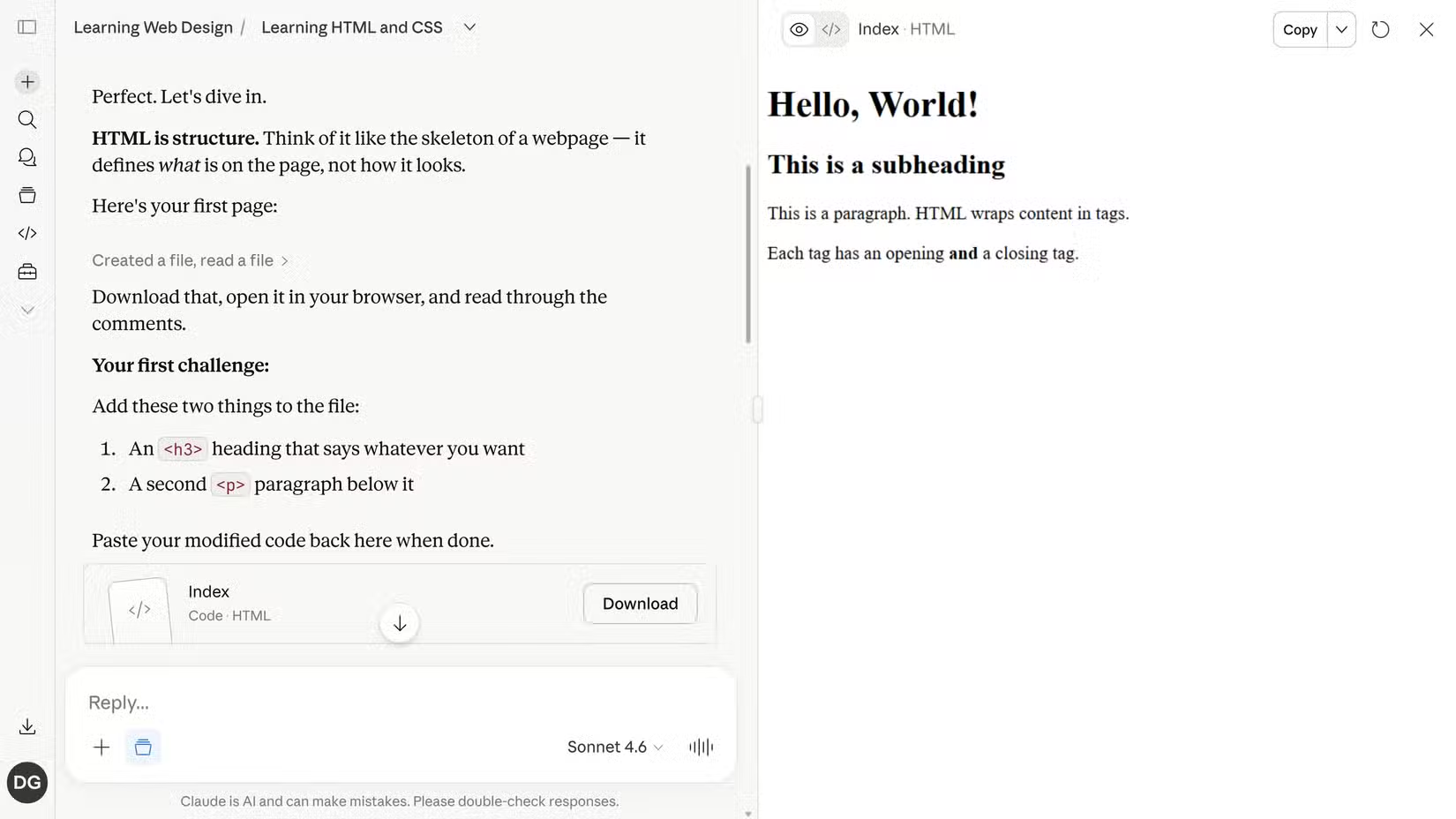
This tight feedback loop matters for learning. When you see your code render instantly, you connect syntax to output faster. Mistakes become visible immediately. You spend less time debugging environment issues and more time understanding concepts.
How the Tutor Prompt Works
The prompt transforms Claude's behavior in three ways. First, it stops Claude from giving you complete solutions. Instead, Claude assigns exercises that force you to write the code yourself. It provides hints when you're stuck, but the actual implementation stays your responsibility.
Second, it structures lessons around progressive difficulty. The tutor starts with fundamentals, then builds complexity based on what you've demonstrated you understand. If you struggle with a concept, it assigns more practice. If you breeze through, it moves forward.
Third, it tracks your progress and difficulties. Claude remembers where you got stuck in previous sessions and references that context to refine future teaching. This creates continuity across your learning, rather than starting fresh every time.
The Daily Workflow
The setup takes about two minutes. You paste the tutor prompt into Claude's system instructions or project context, specify what you want to learn, and start your session. Claude begins by assessing your current level, then assigns your first exercise.
A typical session looks like this: Claude presents a problem. You write your solution. Claude reviews it, pointing out errors or suggesting improvements. You revise. When you get it right, Claude explains any deeper concepts and assigns the next challenge.
The difference from typical AI interaction is effort distribution. Normally, the AI does the work. Here, you do the work. Claude provides structure, feedback, and explanation. This mirrors how effective human tutoring works.
Limitations to Know
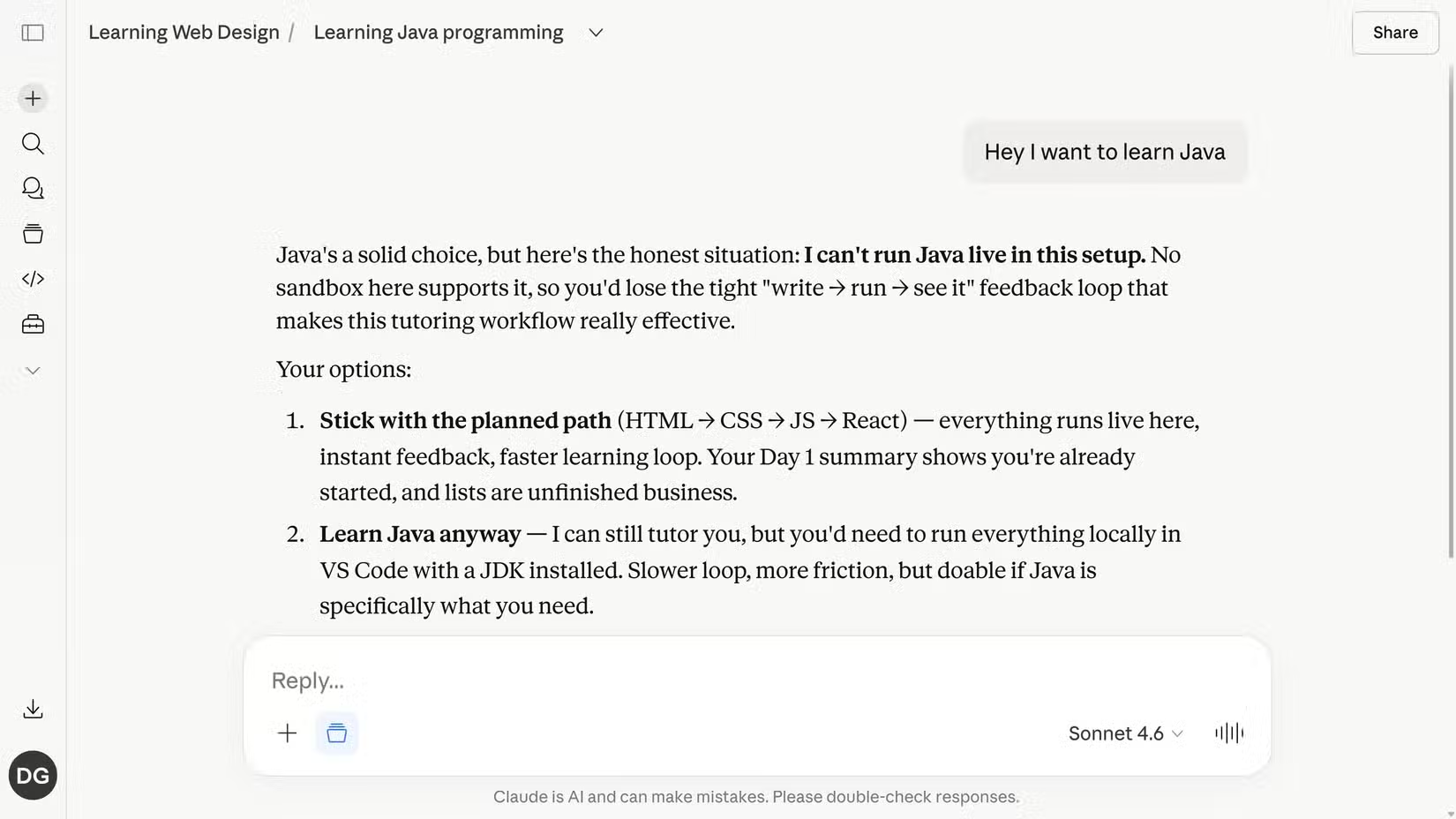
Claude's Artifacts feature works well for web technologies like HTML, CSS, and JavaScript. You can see your code render live. But languages like Java or Python don't render in the browser the same way. For those, Claude offers to continue with explanation-based teaching or help you set up a local environment like VS Code.
Context window limits also matter. While Claude remembers your progress within a conversation, very long learning sessions might hit token limits. Starting new conversations periodically, with a summary of your progress, keeps things manageable.
For running Claude-style coding locally without cloud costs
Why This Beats Traditional Learning Methods
Traditional online learning presents two frustrations. Video courses move at their own pace, not yours. Google searches require you to frame problems as keywords and hope someone already wrote about your specific issue in a way that makes sense.
An LLM tutor eliminates both problems. You ask questions in natural language. You get contextual answers tailored to what you're building. The pace adjusts to your understanding. When you need more practice on loops, you get more practice on loops.
The exercise-driven approach adds accountability that passive learning lacks. You can't skip ahead without demonstrating competence. The tutor won't move to arrays until you've proven you understand variables. This structure prevents the common pattern of learning a little about everything but mastering nothing.

Logicity's Take
Frequently Asked Questions
Does Claude remember my coding progress between sessions?
Within a single conversation, yes. For new conversations, you'll need to provide a brief summary of where you left off, or use Claude's Projects feature to maintain persistent context.
Can this method work with ChatGPT instead of Claude?
The prompt can work with any capable LLM, but ChatGPT lacks Claude's Artifacts feature for live code rendering. You'd need to test code in a separate environment.
What programming languages work best with Claude as a tutor?
HTML, CSS, and JavaScript work best because Claude renders them live. Python, Java, and other languages require a local development environment for testing.
Is Claude Pro required for this to work?
The free tier works for basic sessions, but Pro's higher message limits and priority access make extended learning sessions more practical.
Need Help Implementing This?
Source: How-To Geek
Manaal Khan
Tech & Innovation Writer
Produced with AI assistance and reviewed by the Logicity editorial team. Learn more in our Editorial Policy.