Key Takeaways
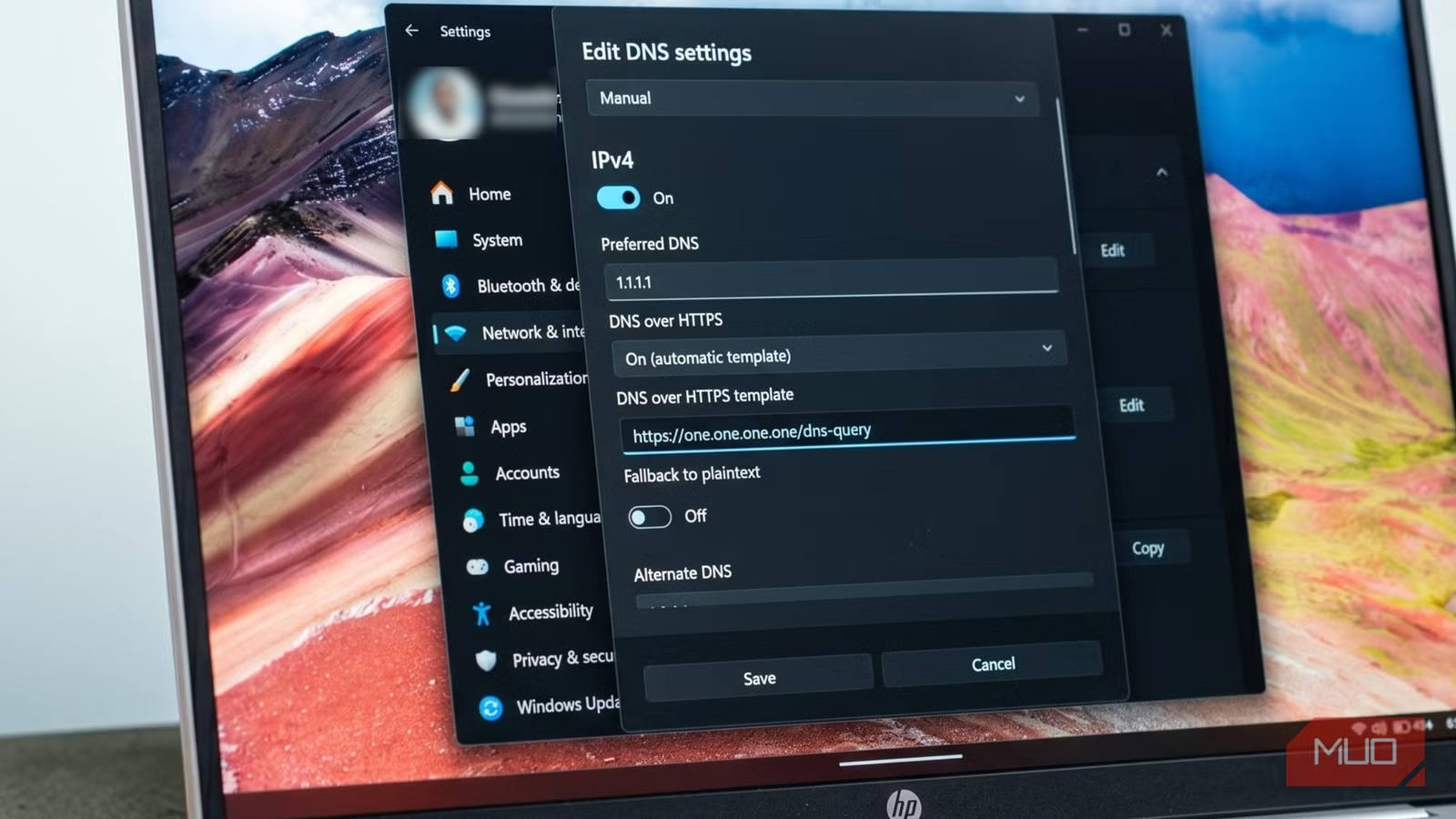
- Windows 11 has a built-in DNS over HTTPS (DoH) setting that encrypts DNS queries, hiding your browsing destinations from your ISP
- The feature is accessible through Settings > Network & Internet without requiring third-party software or registry edits
- DoH shifts DNS visibility from your ISP to your chosen resolver (Cloudflare, Google, etc.), so pick one you trust
Windows 11 includes a DNS over HTTPS (DoH) setting that encrypts your DNS queries, cutting off one of the easiest ways your ISP can monitor which websites you visit. The feature shipped with Windows 11 and sits in the standard Settings UI, no registry hacks or third-party apps required. Turning it on takes about two minutes and closes a privacy gap that most users don't know exists.
Why your ISP can see every site you visit
Before your browser connects to any website, your computer asks a DNS resolver to translate the domain name into an IP address. On most home networks, that resolver belongs to your ISP. The problem: classic DNS queries travel unencrypted over port 53. Your ISP sees every domain you look up, and that lookup happens before the HTTPS padlock icon ever appears.
The padlock means the page content is encrypted. It does not cover the initial DNS query. Check a job board on your lunch break, browse a health forum, compare mortgage rates. Each of those lookups leaves a clean, readable entry in your ISP's logs.

What DNS over HTTPS actually does
DoH wraps your DNS query inside an ordinary HTTPS request and sends it over port 443, the same port that nearly every website already uses. To anyone monitoring your network traffic, that query looks identical to normal web traffic. Your ISP can see you're sending encrypted data to Cloudflare or Google's DNS servers, but not which domains you're resolving.
This doesn't make you invisible. Your chosen DNS resolver (Cloudflare, Google, Quad9, etc.) can still see your queries. You're relocating surveillance, not eliminating it. The difference is that you get to pick who handles your lookups instead of defaulting to whoever your ISP chose.
Step-by-step: enable DoH in Windows 11
DoH support first appeared in Windows 10 Insider builds around mid-2020 (Build 19628), but it never reached stable Windows 10 in a reliable form. Windows 11 made it accessible through the standard Settings interface. Here's the process:
- Press Win+I to open Settings, then navigate to Network & Internet
- Click your active connection (Wi-Fi or Ethernet)
- Click Hardware properties
- Find DNS server assignment and click Edit
- Switch the dropdown from Automatic (DHCP) to Manual
- Toggle IPv4 on and enter your preferred DNS resolver. For Cloudflare: 1.1.1.1 (preferred) and 1.0.0.1 (alternate). For Google: 8.8.8.8 and 8.8.4.4
- Set the DNS over HTTPS dropdown to On (automatic template)
- Repeat for IPv6 if you want full coverage, then save
After saving, check the DNS server entry on that settings page. It should display "Encrypted" next to the resolver address. That's your confirmation the setting is actually working, not just configured and ignored.
Check your browser settings too
Chrome, Firefox, and Edge all manage their own DNS settings independently from the operating system. If your browser is configured to use a specific DNS resolver or has its own DoH setting, it may override what you just configured in Windows. Check your browser's privacy or security settings to confirm it's using the system DNS or set it to the same encrypted resolver.
Which DNS resolver should you use?
The main DoH-compatible resolvers are Cloudflare (1.1.1.1), Google (8.8.8.8), and Quad9 (9.9.9.9). Each has different privacy policies and performance characteristics. Cloudflare claims it doesn't log your IP address or sell data. Google logs queries but says it anonymizes them. Quad9 focuses on blocking malicious domains.
Speed varies by location. Cloudflare generally benchmarks fastest for North American users, but test both if performance matters to you. The privacy difference between them is largely a matter of which company's promises you trust more.
What DoH doesn't protect
Encrypted DNS hides your queries from your ISP, but it doesn't anonymize your traffic. Your ISP still sees the IP addresses you connect to after the DNS lookup completes. Many large sites share IP addresses, which adds some obscurity, but if you're connecting to a site with a dedicated IP, your ISP can infer the destination.
Server Name Indication (SNI), another piece of metadata in HTTPS connections, can also reveal the domain you're visiting. Encrypted Client Hello (ECH) addresses this, but it requires support from both your browser and the destination server. DoH is one layer of protection, not a complete privacy solution.
Logicity's Take
DoH is the rare privacy setting that actually does something concrete. It won't make you anonymous, but it closes a specific, well-documented surveillance vector with zero performance cost. For anyone running Windows 11, there's no good reason to leave it off. The two minutes to configure it are worth it.
Frequently Asked Questions
Does DNS over HTTPS slow down my internet?
No. Modern DoH resolvers like Cloudflare and Google are often faster than ISP-provided DNS. The encryption overhead is negligible on current hardware.
Can my ISP still see which websites I visit with DoH enabled?
They can see the IP addresses you connect to, but not the DNS queries that reveal domain names. This provides partial protection, especially for sites that share IP addresses with others.
Does Windows 10 support DNS over HTTPS?
DoH appeared in Windows 10 Insider builds but never shipped in stable Windows 10 through the standard Settings UI. Windows 11 is required for the built-in interface.
Should I enable DoH for IPv6 as well?
Yes, if your network uses IPv6. DNS queries can travel over either protocol, so enabling DoH for both ensures all queries are encrypted.
Will DoH break my work VPN or corporate network?
Some corporate networks rely on internal DNS servers for accessing internal resources. If you encounter issues, you may need to disable DoH when connected to your work network.
Need Help Implementing This?
If you're managing DNS settings across a fleet of Windows machines or need guidance on enterprise DNS privacy configurations, reach out to Logicity. We can connect you with network security specialists who handle this daily.
Source: MakeUseOf
Huma Shazia
Senior AI & Tech Writer
Produced with AI assistance and reviewed by the Logicity editorial team. Learn more in our Editorial Policy.






