Key Takeaways
- DuckDuckGo serves contextual ads based only on your current search, not a profile built from your history
- Google's AI Overview is mandatory and sits above results; DuckDuckGo's AI features are opt-in
- DuckDuckGo offers font, color, and layout customization that Google Search lacks
DuckDuckGo vs Google Search comes down to one question: do you want a search engine that profiles you or one that doesn't? Google holds 92% of the search market, but alternatives are growing. DuckDuckGo saw a 30.5% traffic spike on May 25, right after Google I/O 2026, according to Thurrott. That timing isn't coincidental.
The case for switching isn't abstract. Google builds a detailed profile from your searches, YouTube history, Maps usage, and activity on third-party sites running Google Analytics and Ads. That profile sells targeted ads. DuckDuckGo runs a different model: contextual ads based solely on your current search term. No IP logging, no behavioral tracking, no ad following you across the web.

Why Google's tracking settings don't solve the problem
Google offers toggles to disable some tracking. But trust is the issue. In 2025, a federal jury ordered Google to pay $425 million for tracking users who had explicitly turned off tracking in their account settings. The company collected data anyway.
This isn't a settings problem you can fix. It's a business model problem. Google's revenue depends on knowing what you do across the web. Every product, from Gmail to Chrome to Android, feeds that system. Disabling one toggle doesn't exit you from surveillance capitalism.
DuckDuckGo takes a different approach: it doesn't collect the data in the first place. You can also access a Tor version of DuckDuckGo for additional anonymity, routing your searches through the onion network.
How DuckDuckGo handles AI differently than Google
Google Gemini now appears everywhere. The worst implementation is in Search. AI Overview sits above organic results, forcing you to scroll past generated summaries before seeing actual links. There's no default setting to turn it off.
The quality problem makes this worse. AI Overview hallucinations are well documented. When you need accurate information, a generated summary that might be wrong is worse than no summary at all.
DuckDuckGo has AI features too. Duck.ai lets you chat with models from Anthropic, OpenAI, and others. Search Assist provides AI summaries for certain queries. The difference: both are opt-in. You choose whether AI shows up in your results. Settings > AI Features gives you a dropdown to control how often, or whether, you see AI overviews.
Customization options Google doesn't offer
Google Search's customization stops at SafeSearch, region, language, dark mode, and preferred sources. That's the list.
DuckDuckGo goes further. You can change fonts, colors, and layout. These aren't cosmetic extras for power users. They're accessibility features. Someone with visual impairments or strong preferences about information density actually benefits from this control.
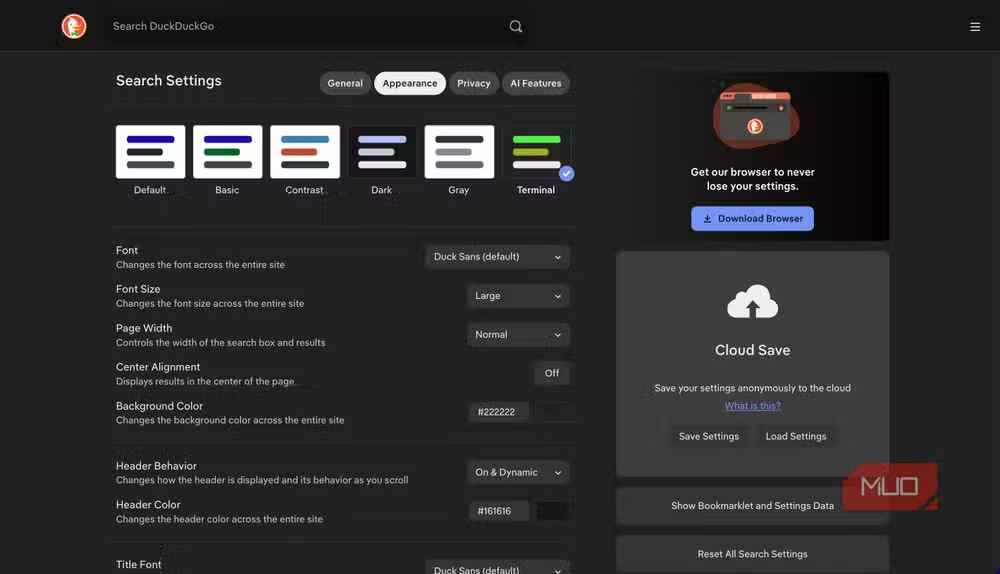
The trade-off is that DuckDuckGo lacks Google's "preferred sources" feature, which lets you prioritize certain sites in results. For most users, the expanded visual customization matters more than source prioritization.
What you give up by switching
DuckDuckGo's results are sometimes less precise than Google's. Google has spent two decades optimizing its ranking algorithm with data from billions of searches. DuckDuckGo sources results from multiple engines, including Bing, which means occasional relevance gaps.
The ads are less targeted, which means occasionally seeing something irrelevant. That's the trade-off for privacy. A contextual ad based on "best running shoes" shows you running shoe ads, but it won't know you were researching knee injuries last week.
For searches requiring local business information, Google Maps integration gives Google an edge. DuckDuckGo works with Apple Maps, which is solid but doesn't match Google's local business data depth.
How to make the switch
Changing your default search engine takes under a minute in any browser. In Chrome: Settings > Search engine > DuckDuckGo. In Firefox: Settings > Search > Default Search Engine. Safari, Edge, and Brave follow similar paths.
The harder part is breaking the muscle memory of typing "google.com" directly. Set DuckDuckGo as your homepage too. After a week, the habit shifts.
If you find a search where DuckDuckGo's results aren't good enough, add "!g" to your query. That "bang" redirects the search to Google anonymously through DuckDuckGo. You get Google's results without the full tracking. It's a useful escape hatch.
Another perspective on switching away from dominant tools for better alternatives
Frequently Asked Questions
Is DuckDuckGo as good as Google for search results?
DuckDuckGo's results are slightly less precise for some queries, especially local searches. It sources from Bing and other engines. For most searches, the difference is minor. Use the !g bang command to route through Google when needed.
Does DuckDuckGo have AI like Google?
Yes, but it's opt-in. Duck.ai provides chat with models from Anthropic and OpenAI. Search Assist shows AI summaries for certain queries. Both can be disabled entirely in Settings > AI Features.
How does DuckDuckGo make money without tracking?
DuckDuckGo serves contextual ads based on your current search term only. If you search for running shoes, you see running shoe ads. No profile, no tracking, no ads following you across the web.
Can I use DuckDuckGo with Chrome?
Yes. Go to Chrome Settings > Search engine and select DuckDuckGo from the list. You can also install the DuckDuckGo Privacy Essentials extension for additional tracker blocking.
What is the DuckDuckGo Tor version?
DuckDuckGo offers a .onion address accessible through the Tor browser. This routes your searches through the Tor network for additional anonymity beyond standard DuckDuckGo privacy protections.
Logicity's Take
The privacy argument for DuckDuckGo is straightforward. The practical argument is more nuanced: Google's aggressive AI integration is degrading search quality for many users. Mandatory AI Overviews that hallucinate, results pushed below the fold, an interface optimized for keeping you on Google properties rather than sending you to answers. DuckDuckGo's opt-in AI approach may appeal to users frustrated by Google's direction, regardless of their privacy stance. The 30.5% traffic spike after Google I/O suggests some users reached their limit.
Need Help Implementing This?
Looking to migrate your organization's default search settings or implement privacy-first tooling across your team? Contact us for guidance on browser configuration, privacy extensions, and data governance policies that work at scale.
Source: MakeUseOf
Manaal Khan
Tech & Innovation Writer
Produced with AI assistance and reviewed by the Logicity editorial team. Learn more in our Editorial Policy.






