Key Takeaways
- AI agent frameworks provide reusable components for planning, tool use, memory, and observability that chatbot platforms lack.
- LangGraph suits custom workflows, CrewAI excels at multi-agent collaboration, and Microsoft's unified framework targets enterprise Azure teams.
- Operations teams should match framework choice to existing stack, required control level, and whether they need multi-agent orchestration.
AI agent frameworks are software toolkits that help teams build, deploy, and manage autonomous AI systems. Unlike chatbots that respond to prompts and stop, agents plan actions, call external tools, and iterate based on outcomes. For operations and RevOps teams looking to automate complex workflows across CRMs, support systems, and internal tools, the framework you choose determines what your agent can do, what it remembers, and how much visibility you have when something breaks.
Disclosure
Some links in this post are affiliate links — Logicity earns a commission if you sign up, at no extra cost to you. We only link products we have used or actively recommend.
The market for these frameworks has grown fast. LangChain crossed 10,000 GitHub stars faster than almost any open-source AI project. CrewAI raised $25 million in 2024. Microsoft merged AutoGen and Semantic Kernel into a single framework. Google released its Agent Development Kit for GCP-native teams. The options keep multiplying, and picking the wrong one means rewriting integrations six months later.
What makes an AI agent framework different from a chatbot?
Traditional chatbots are reactive. You send a prompt, they reply, the interaction ends. AI agents are proactive. They break down goals into steps, decide which tools to call, execute actions, observe results, and adjust their approach. That loop, perceive-reason-act, runs continuously until the task is done or the agent hits a constraint.
Frameworks provide the scaffolding for this behavior. They handle LLM integration, letting agents connect to GPT-4, Claude, or open-source models. They manage tool calling, so agents can query APIs, run code, or trigger workflows. They store memory, both short-term context within a session and long-term recall across sessions. And they provide observability, logging decisions, tool calls, and failures so you can debug what went wrong.
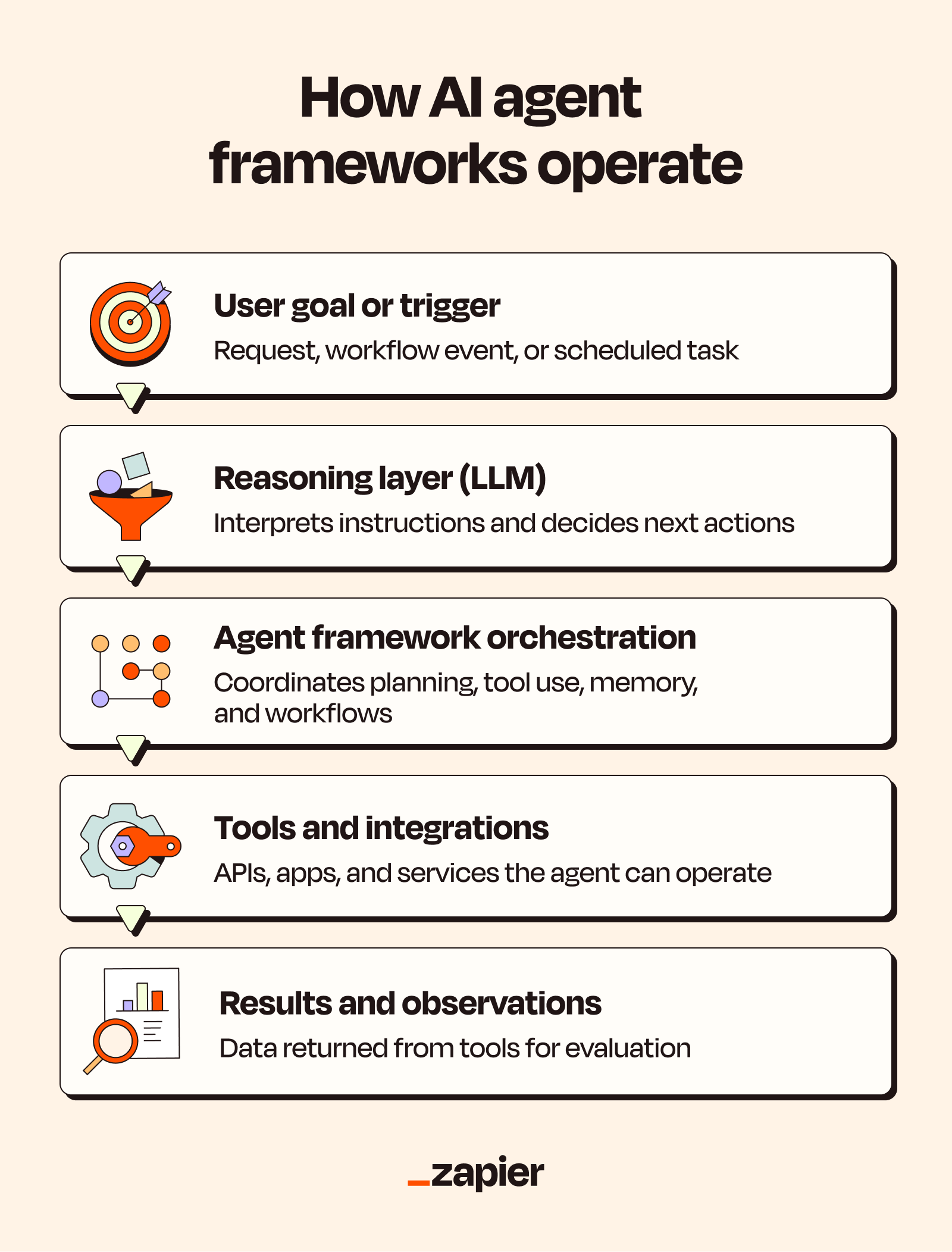
For operations teams, the tool-calling layer matters most. An agent that can update HubSpot records, create Asana tasks, and post summaries to Slack without custom API code removes hours of integration work. Zapier offers a ready-made tool layer connecting agents to over 9,000 apps, with OAuth-based authentication and granular permissions controlling what the agent can access.
The six frameworks operations teams should evaluate
Each framework optimizes for different constraints. Some prioritize flexibility for developers. Others simplify multi-agent coordination. A few target specific cloud ecosystems. Here's how the major options compare.
| Framework | Best for | Key strength |
|---|---|---|
| LangGraph | Custom agent workflows | Stateful, graph-based design with human-in-the-loop support |
| CrewAI | Multi-agent collaboration | Role-based agent design mimicking human team structures |
| LlamaIndex | Data-heavy applications | Connecting documents, APIs, and knowledge bases to LLMs |
| Microsoft Agent Framework | Azure enterprise teams | Unified successor to AutoGen and Semantic Kernel |
| Google ADK | GCP-native teams | Multi-language support with native Google Cloud deployment |
| PydanticAI | Type-safe Python development | Model-agnostic with strong validation |
LangGraph: Control over every decision point
LangGraph, built by the LangChain team, structures agent workflows as directed graphs. Each node represents a step: an LLM call, a tool invocation, a conditional branch. This design gives developers granular control over execution flow and makes it easy to insert human approval at specific points.
For RevOps teams, that human-in-the-loop capability matters. An agent that auto-qualifies leads and updates your CRM might work fine for low-stakes records. But for enterprise deals, you probably want a human to approve before the agent moves a $500K opportunity to the next stage. LangGraph's architecture makes that checkpoint explicit rather than hacked in.
CrewAI: Agents that work like teams
CrewAI assigns roles to different agents, a researcher, a writer, a reviewer, and orchestrates their collaboration. This mirrors how human teams divide work. Instead of one agent handling an entire task, specialized agents pass outputs to each other.
The framework works well when tasks naturally decompose into distinct roles. A support workflow might use one agent to classify incoming tickets, another to draft responses, and a third to check compliance before sending. Each agent focuses on what it does best, and the framework manages handoffs.
LlamaIndex: When your agent needs to read the docs
LlamaIndex specializes in connecting LLMs to data. It indexes documents, APIs, and knowledge bases, then retrieves relevant context when an agent needs it. If your operations workflows depend on internal documentation, product specs, or customer data spread across systems, LlamaIndex handles the retrieval layer.
The framework pairs well with others. You might use LangGraph for orchestration and LlamaIndex for retrieval, or combine CrewAI's multi-agent structure with LlamaIndex-powered knowledge access.
Microsoft and Google: Enterprise ecosystem plays
Microsoft's unified Agent Framework merges AutoGen and Semantic Kernel into a single toolkit with deep Azure AI Foundry integration. If your company runs on Microsoft 365, Dynamics, and Azure, this framework reduces friction. You get native connectors to the services you already use.
Google's Agent Development Kit (ADK) targets GCP-native teams. It supports multiple programming languages and emphasizes deliberate context management. Agents built on ADK deploy natively to Google Cloud with minimal configuration.
Both frameworks trade flexibility for integration depth. They're harder to use outside their home ecosystems but easier to operate within them.
How to choose the right framework for your team
Start with your existing stack. If you're on Azure, Microsoft's framework saves integration time. If you're on GCP, Google's ADK makes deployment simpler. If you're cloud-agnostic or multi-cloud, LangGraph and CrewAI offer more flexibility.
Next, consider your use case's complexity. Single-agent workflows that call a few APIs don't need CrewAI's multi-agent orchestration. But if your process requires multiple specialized roles, or if you want agents to debate and refine outputs, CrewAI's design fits better.
Finally, evaluate your team's technical depth. LangGraph and PydanticAI assume Python fluency and comfort with abstraction. CrewAI's role-based model is more intuitive for teams without deep AI engineering experience. For non-technical operators, hosted solutions like Zapier's agent layer let you build without managing framework code at all.
Logicity's Take
For most operations teams, the framework decision comes down to control versus speed. LangGraph gives you precision but demands engineering time. CrewAI accelerates multi-agent builds but constrains how you structure workflows. If you're connecting agents to [Salesforce](https://logicity.in/r/salesforce), [Pipedrive](https://logicity.in/r/pipedrive), or other CRMs, check whether Zapier's app layer or [Make](https://logicity.in/r/make)'s scenario builder already handles your integrations. Sometimes the best framework is no framework at all.
Memory and observability: The unsexy essentials
Agents without memory forget everything between sessions. That's fine for one-off tasks, but operations workflows often span days. A lead-nurturing agent needs to remember past interactions. A support agent should know what the customer already tried.
Most frameworks offer both short-term memory, context within a session, and long-term memory, recall across sessions. The implementation details vary. Some store memory in vector databases. Others use structured logs. What matters is whether the memory system fits your compliance and privacy requirements.
Observability is the other essential. When an agent makes a bad decision, you need to trace why. What tool did it call? What data did it see? Where did the reasoning break down? Frameworks with strong logging and tracing, LangGraph and Microsoft's toolkit in particular, make debugging faster.
Frequently Asked Questions
What's the difference between an AI agent and a chatbot?
Chatbots are reactive, responding to prompts and stopping. AI agents are proactive, planning actions, calling tools, and iterating based on results until a task is complete.
Do I need coding skills to use AI agent frameworks?
Most frameworks like LangGraph and CrewAI require Python knowledge. For no-code options, hosted platforms like Zapier offer agent capabilities without writing framework code.
Can AI agents connect to CRM and project management tools?
Yes. Frameworks support tool calling through APIs, and platforms like Zapier provide pre-built connectors to over 9,000 apps including CRMs and project management systems.
Which AI agent framework is best for enterprise use?
Microsoft's unified Agent Framework suits Azure-native enterprises. Google ADK targets GCP teams. LangGraph and CrewAI work better for cloud-agnostic or multi-cloud setups.
How do AI agents remember context across sessions?
Frameworks implement long-term memory using vector databases or structured logs. This lets agents recall past interactions and maintain continuity across sessions.
See how AI agents are moving from backend frameworks to consumer devices
Need Help Implementing This?
If you're evaluating AI agent frameworks for your operations stack, Logicity can help you map requirements to the right toolkit. Contact us for a consultation.
Source: The Zapier Blog
Manaal Khan
Tech & Innovation Writer
Produced with AI assistance and reviewed by the Logicity editorial team. Learn more in our Editorial Policy.