Key Takeaways
- Google Forms can auto-grade quizzes and release results immediately or after manual review
- Conditional logic lets you route respondents to different sections based on their answers
- Gemini integration now generates entire forms from natural language prompts
Google Forms commands 48.45% of the global survey software market. That's a staggering share for a tool many dismiss as "too simple." The perception gap exists because most users never venture past the basics. Under the surface, Forms handles conditional logic, self-grading assessments, email verification, and direct data pipelines to Sheets. Here are nine features that separate casual users from power users.
How do you turn a Google Form into a self-grading quiz?
Forms doesn't market itself as quiz software, but teachers and team leads have quietly used it for years. Open the Settings tab and flip the toggle labeled "Make this a quiz." That single action unlocks several options: release grades immediately after submission or hold them for manual review, let respondents see correct answers and point values, and add feedback text to each question.
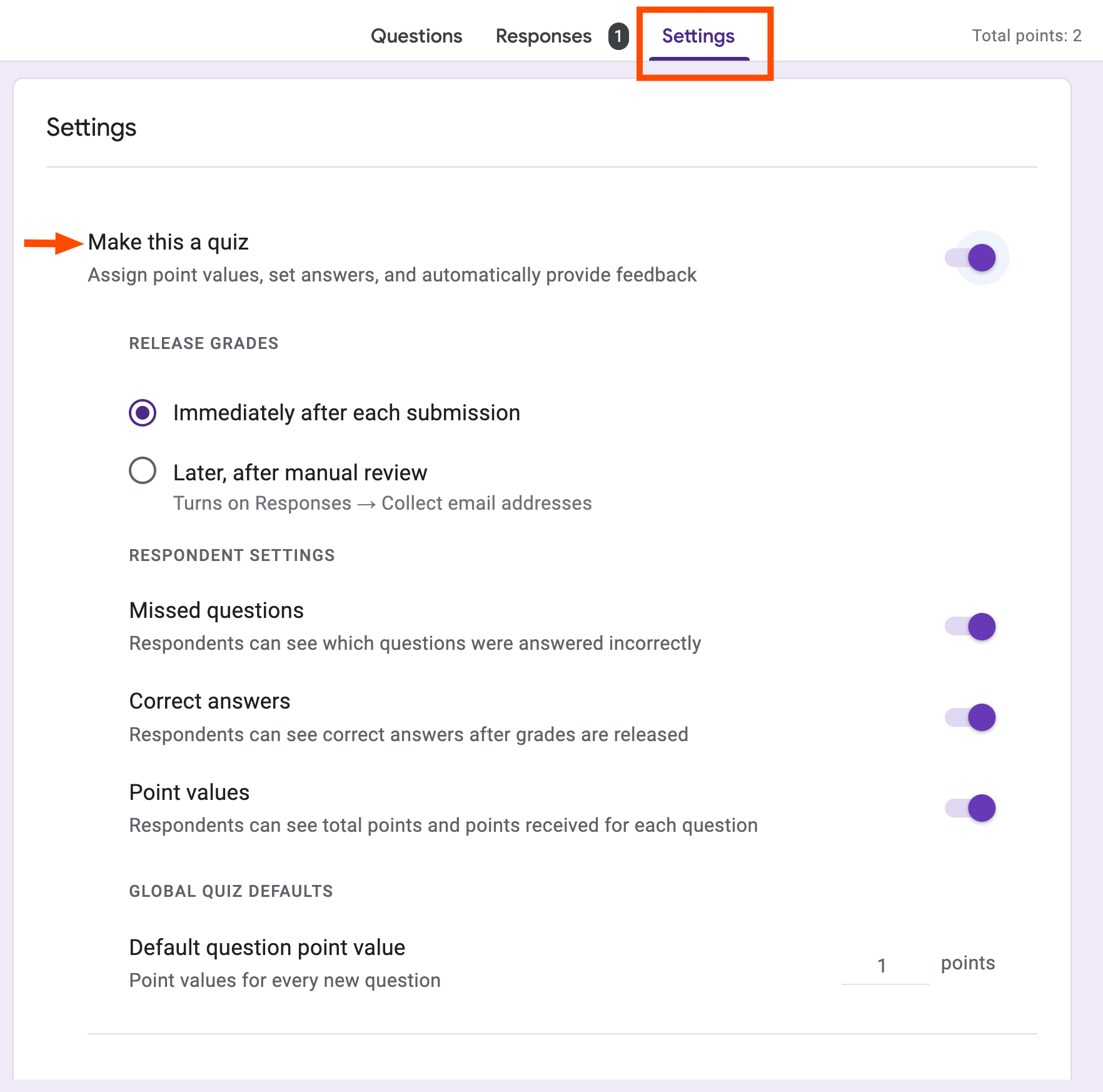

For multiple-choice questions, click Answer key and select the correct response. Forms grades those automatically. Short-answer questions get trickier. If the acceptable answer can vary in wording, mark those by hand. For straightforward factual responses, exact-match grading works fine.
How do you limit responses to one per person?
By default, Forms collects no identity information. Anyone can submit multiple times. Useful for anonymous feedback, problematic for voting or registrations. The fix: Settings > Responses > toggle "Limit to 1 response." This forces respondents to sign in with a Google account before submitting.
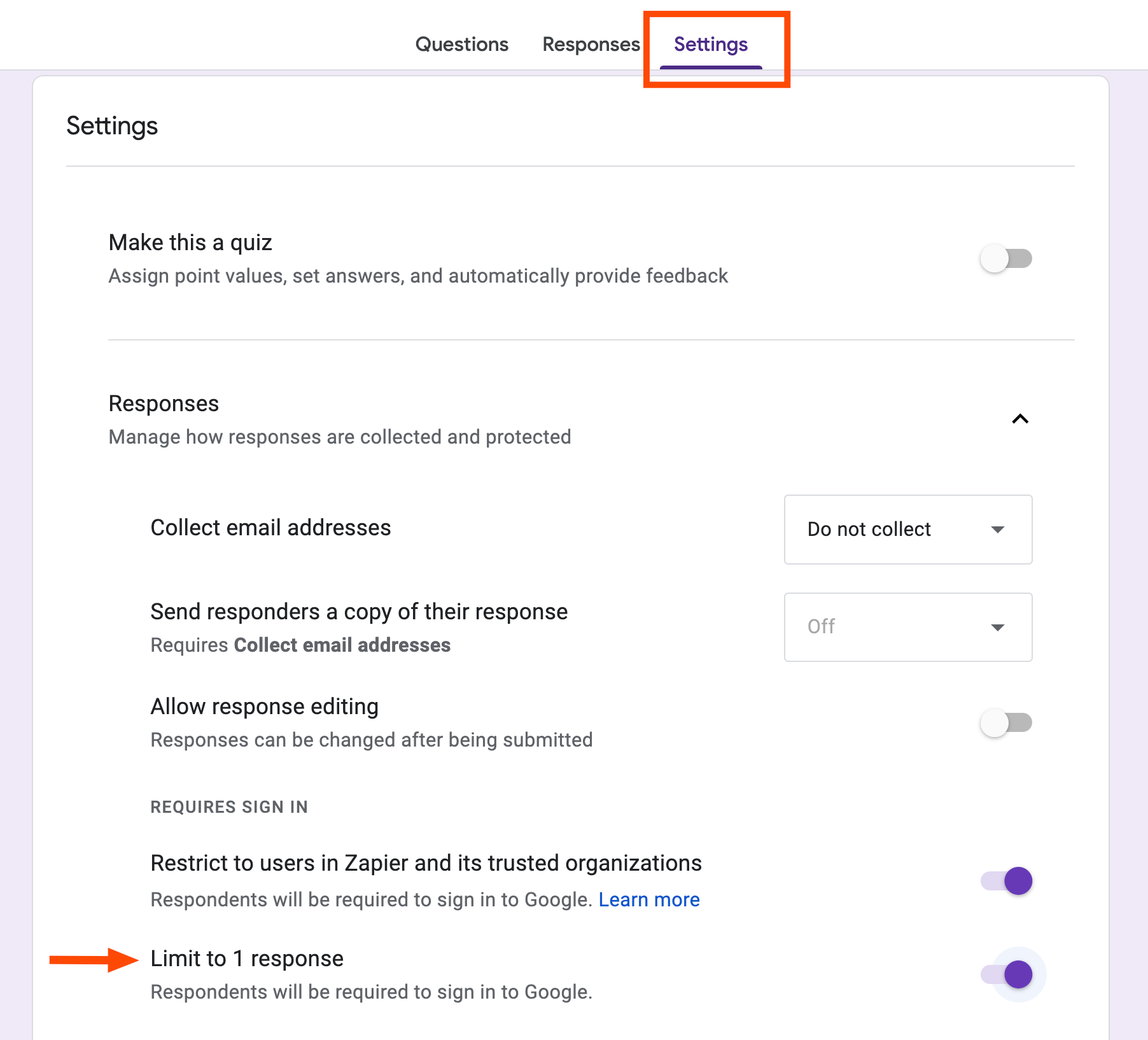
A trade-off exists. Not every respondent has a Google account. If your audience skews outside the Google ecosystem, forcing sign-in will cost you completions. For internal company surveys where everyone uses Workspace, the restriction makes sense. For public-facing forms, weigh the fraud risk against accessibility.
How does conditional logic work in Google Forms?
Conditional questions, sometimes called branching logic, route respondents to different sections based on their answers. A job application might ask "Which role are you applying for?" and then show only the questions relevant to that role.
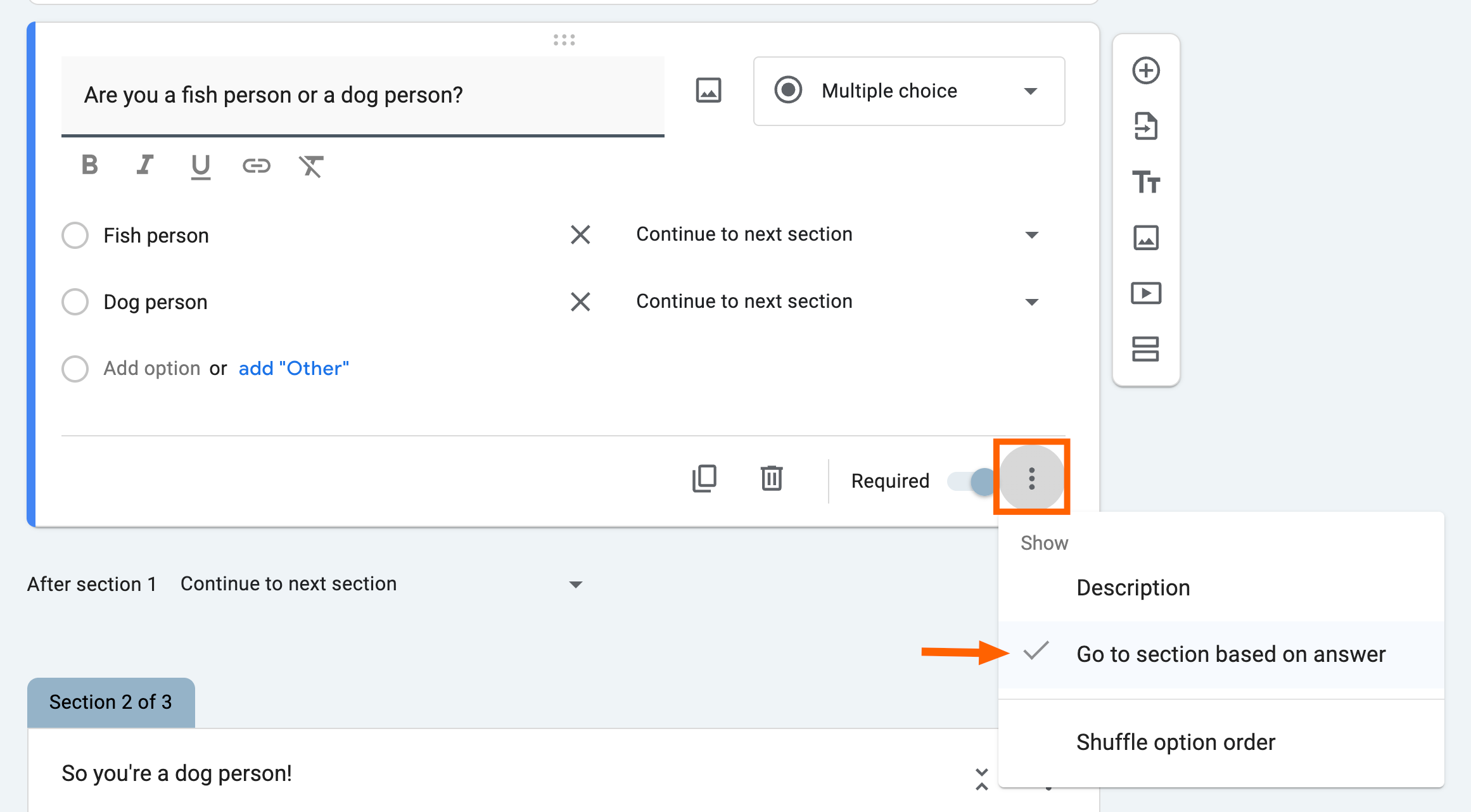
The setup requires splitting your form into sections first. Then, on the question that determines the route, click the three-dot menu and select "Go to section based on answer." Each answer choice gets a dropdown where you specify the destination section. Conditional logic only works with multiple-choice or dropdown question types.
Reddit communities share creative applications: digital escape rooms where wrong answers loop back to the start, inventory systems where product type determines which fields appear, and multi-stage approval workflows. The branching is simple compared to dedicated form builders, but it handles most real-world scenarios.
How do you customize a form's appearance?
The default Google Forms aesthetic is functional and purple. If you need branding consistency, click the paint palette icon to open the theme panel. You can upload a custom header image, and Forms will automatically pull accent colors from it to style the rest of the form.

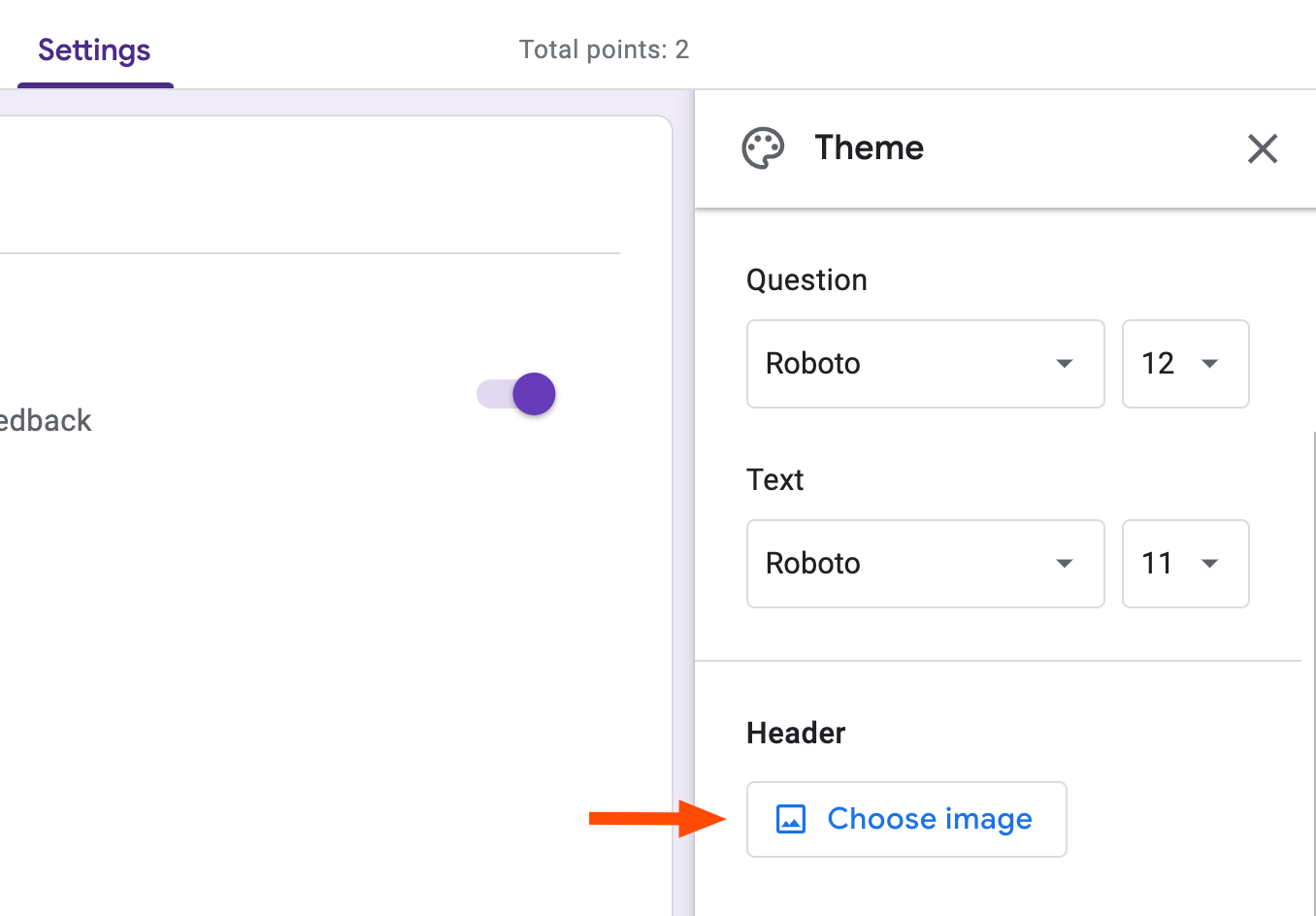
Pre-made headers exist if you don't have brand assets handy. The image dimensions that work best are 1600 x 400 pixels. Anything outside that ratio gets cropped, sometimes awkwardly.

How do you collect verified email addresses?
Two options exist under Settings > Responses > Collect email addresses. "Verified" requires respondents to sign in with Google, guaranteeing the address is real and active. "Responder input" lets people type any address, verified or not.
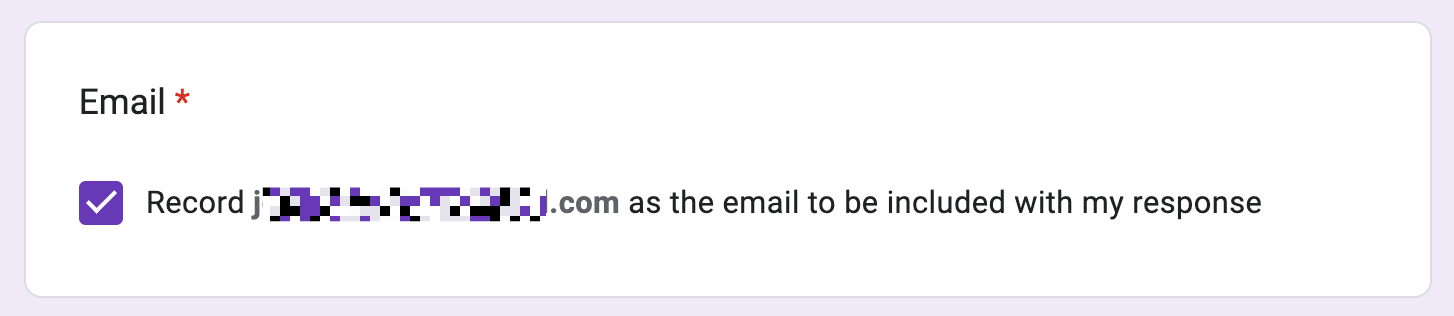
For follow-up surveys or event registrations where you need accurate contact info, verified is safer. For low-stakes feedback where sign-in friction would tank response rates, responder input works. You can also enable "Send respondents a copy of their response," which helps with confirmation emails.
How do you route responses directly to Google Sheets?
Every Forms response can flow automatically into a spreadsheet. Click the Responses tab, then the Sheets icon. You can create a new spreadsheet or link to an existing one. From there, Sheets becomes your analysis layer. Pivot tables, charts, conditional formatting, Apps Script automation, all available without manual export.
Power users take this further. Third-party tools like Zapier can trigger actions when new rows appear: Slack notifications, Trello cards, CRM entries. The form becomes a data entry point for an entire workflow.
Compare automation platforms that extend Google Forms capabilities
Can Gemini generate forms automatically?
Google integrated Gemini into Forms in late 2024. Instead of building questions manually, you can describe what you need in plain language: "Create a customer satisfaction survey for a restaurant with questions about food quality, service speed, and likelihood to recommend." Gemini generates a draft you can edit.
The generated forms are starting points, not finished products. You'll want to add conditional logic, adjust question types, and remove anything that doesn't fit. But for quickly scaffolding a complex form, the time savings are real.
Two features worth adding to your workflow
Progress bars show respondents how much of a long form remains. Enable this under Settings > Presentation > "Show progress bar." It reduces abandonment on multi-section surveys.
Templates let you save configured forms for reuse. Google maintains a template gallery, but creating your own from a polished form ensures consistency across teams. Duplicate the form, strip out old responses, and share the template link.
Logicity's Take
Google Forms occupies an unusual position: free, ubiquitous, and underestimated. The 48% market share reflects not just price but integration depth. For organizations already on Workspace, Forms eliminates the need for standalone survey tools in most scenarios. The Gemini integration hints at where this goes next: forms that build themselves from meeting transcripts or project briefs. For now, mastering conditional logic and Sheets integration delivers the highest return on learning time.
Frequently Asked Questions
Can Google Forms prevent multiple submissions without requiring sign-in?
No. The only built-in method to limit responses to one per person requires respondents to sign in with a Google account. Without sign-in, Forms cannot verify identity.
Does Google Forms support file uploads?
Yes. Add a file upload question type. Uploaded files are stored in the form owner's Google Drive, and you can set file type and size restrictions.
Can you embed a Google Form in a website?
Yes. Click Send, then the embed icon (<>). Copy the iframe code and paste it into your site's HTML. You can adjust width and height parameters.
Is Google Forms HIPAA compliant?
Google Workspace can be configured for HIPAA compliance with a Business Associate Agreement, but Forms alone doesn't guarantee compliance. Consult your compliance team before collecting protected health information.
Need Help Implementing This?
Looking to automate your data collection or build advanced form workflows? Reach out to our consulting partners at Logicity.in for implementation guidance tailored to your stack.
Source: The Zapier Blog
Manaal Khan
Tech & Innovation Writer
Produced with AI assistance and reviewed by the Logicity editorial team. Learn more in our Editorial Policy.