Key Takeaways
- AIOps aggregates data across your entire tech stack and correlates events into a single coherent story
- Traditional monitoring shows individual tool status but misses how problems cascade across systems
- Most enterprise data is never analyzed. AIOps learns what matters and filters the rest
An IT professional recently shared a telling detail: his team receives over 4,000 alerts every day. Most are garbage. A server running slightly hot. A usage spike that means nothing. But they cannot ignore them because one might actually crash the infrastructure. So the team spends half their day sifting through logs instead of improving the tech stack.
That is the problem AIOps was built to solve. AIOps (artificial intelligence for IT operations) uses machine learning to do what most IT teams cannot: cut through the chaos. For anyone managing complex IT environments, it is the difference between firefighting all day and actually making things better.
1. Observability Across Complex IT Environments
Most IT environments are living ecosystems. They constantly grow and change. You have old, reliable legacy on-prem servers. A handful of cloud platforms brought in last year. Shiny new SaaS tools for every department. That custom internal tool someone built five years ago that no one remembers how to maintain. Probably a few shadow tools your security team does not even know about.
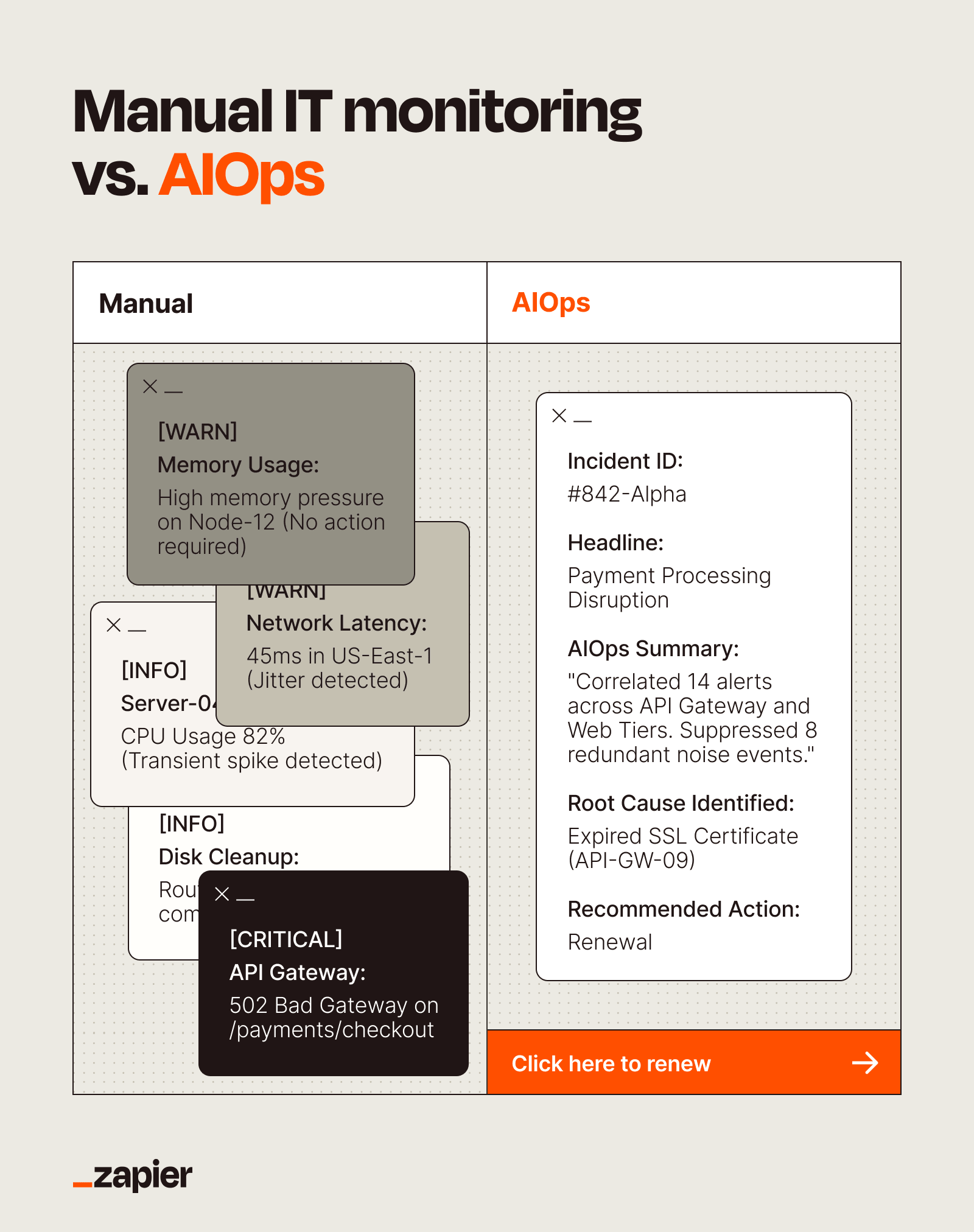
Traditional monitoring software only gives you a slice of that picture. It tells you the status of one tool, or if a server in the Virginia data center is running hot. But if a slowdown in your cloud database is impacting your customer-facing app, which floods your support team's queue? You are on your own.
An AIOps strategy gives you observability, automates analysis of monitoring data, and helps you understand relationships between every moving part. Instead of dashboards that do not speak to one another, it aggregates data across your entire stack. It correlates events like a spike in CPU usage, a network latency issue, or a sudden increase in login failures into a single, coherent story.
2. Reduced Data Waste and Better Data Governance
There is a dirty secret about enterprise data: most of it is useless. Organizations generate petabytes of logs, metrics, and traces. The vast majority is never looked at. Some call it "dark data." It is expensive to store and provides zero value.
AIOps filters all that data by learning what actually matters. Instead of hoarding everything, you keep what is useful and discard the rest. This cuts storage costs and improves governance by reducing the attack surface and compliance burden of maintaining data nobody needs.
3. Time Management and Issue Prioritization
When 4,000 alerts hit your inbox daily, everything feels urgent. Nothing gets proper attention. AIOps changes this by analyzing patterns and context to rank issues by actual impact. A minor memory spike on a non-critical server gets deprioritized. A database latency issue affecting customer transactions gets flagged immediately.
This is not just about speed. It is about accuracy. Machine learning models improve over time, learning which alerts led to real incidents and which were false positives. Your team stops chasing ghosts.
4. Savings Through Resource Optimization
Infrastructure costs spiral when nobody knows what is actually being used. AIOps provides visibility into resource utilization across your entire environment. You can identify idle servers, underused cloud instances, and redundant services.
Consolidation becomes data-driven. Instead of guessing which systems can be combined or decommissioned, you have evidence. This reduces hardware costs, cloud spending, and the operational burden of maintaining unnecessary infrastructure.
5. Improved Outage Management
When systems go down, every minute costs money. Traditional incident response involves multiple teams scrambling to identify the root cause. Each team checks their own domain. Communication happens through Slack messages and hurried calls. Hours pass.
AIOps accelerates this process by correlating symptoms across systems and suggesting probable causes. If a database failure, network congestion, and application errors all started within the same two-minute window, the platform connects those dots automatically. Teams know where to look first.
6. More Productive and Focused Teams
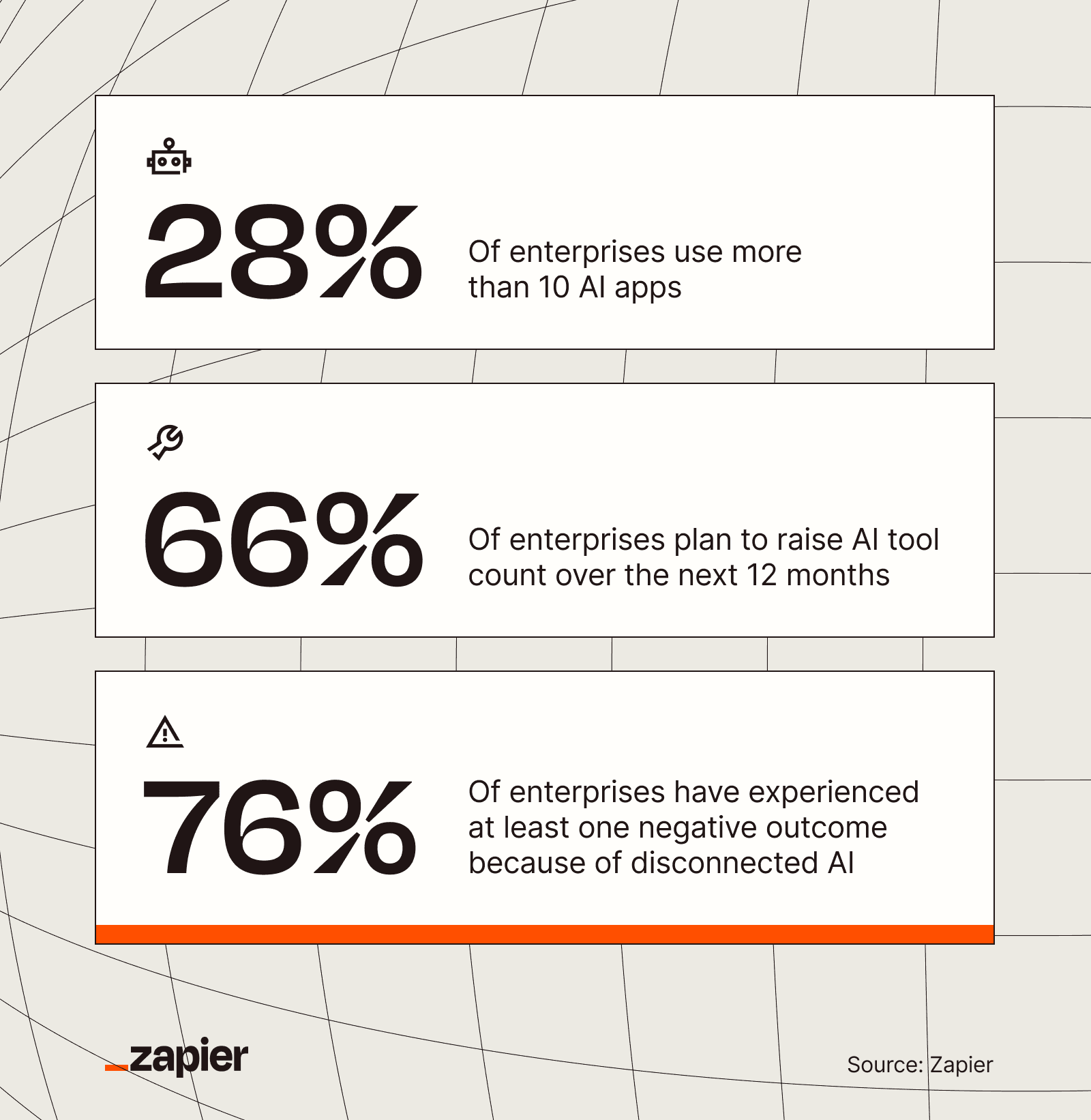
IT professionals did not get into the field to spend half their day reviewing meaningless alerts. They wanted to build systems, solve hard problems, and improve infrastructure. AIOps gives them that time back.
When automated systems handle noise filtering and initial triage, engineers focus on strategic work. They can modernize legacy systems, implement new capabilities, and tackle technical debt. Morale improves because people work on interesting problems instead of repetitive alert review.
7. Cross-Team Collaboration
Siloed monitoring creates siloed teams. When each group only sees their own dashboards, nobody has the full picture. Problems that span multiple domains become finger-pointing exercises.
A unified AIOps platform gives all teams the same view of system health. When an incident occurs, everyone sees the same data and correlation analysis. This shared context enables faster collaboration and reduces the politics of incident response.
8. Better User Satisfaction
Ultimately, all these benefits roll up to one outcome: systems that work better for the people who use them. Faster incident response means less downtime. Proactive problem identification means issues get fixed before users notice. Optimized resources mean applications run faster.
Whether your users are internal employees or external customers, they experience more reliable systems. Support tickets decrease. Complaints drop. Trust increases.
AIOps Automation Tips
Implementing AIOps is not a flip-the-switch project. Start by integrating your existing monitoring tools into a central platform. Most AIOps solutions support common APIs and can ingest data from multiple sources.
- Begin with one high-pain area rather than trying to cover everything at once
- Feed the system historical data so machine learning models can learn your environment's patterns
- Set up feedback loops so the system learns when its prioritization was correct
- Gradually expand coverage as confidence in the platform grows
The goal is not to replace human judgment but to augment it. AIOps handles the volume problem. Your team handles the complexity problem.
Logicity's Take
Frequently Asked Questions
What is the difference between AIOps and traditional IT monitoring?
Traditional monitoring shows the status of individual tools and systems. AIOps correlates data across your entire tech stack, identifies relationships between events, and uses machine learning to filter noise and prioritize real issues.
How long does it take to implement AIOps?
Initial deployment can take weeks to months depending on environment complexity. However, the machine learning models continue improving over time as they learn your specific patterns and incident history.
Does AIOps replace IT staff?
No. AIOps handles volume and noise filtering, freeing IT staff to focus on strategic work like system improvements, modernization, and solving complex problems that require human judgment.
What data does AIOps need to work effectively?
AIOps platforms ingest logs, metrics, traces, and events from across your infrastructure. The more data sources connected, the better the correlation analysis. Historical data helps train the machine learning models.
How does AIOps handle false positives?
Machine learning models learn from feedback over time. When teams mark alerts as false positives, the system adjusts its prioritization. Accuracy improves as the platform learns your environment's normal behavior patterns.
Another example of AI integration with professional tools
Need Help Implementing This?
Source: The Zapier Blog
Huma Shazia
Senior AI & Tech Writer
Produced with AI assistance and reviewed by the Logicity editorial team. Learn more in our Editorial Policy.