Key Takeaways
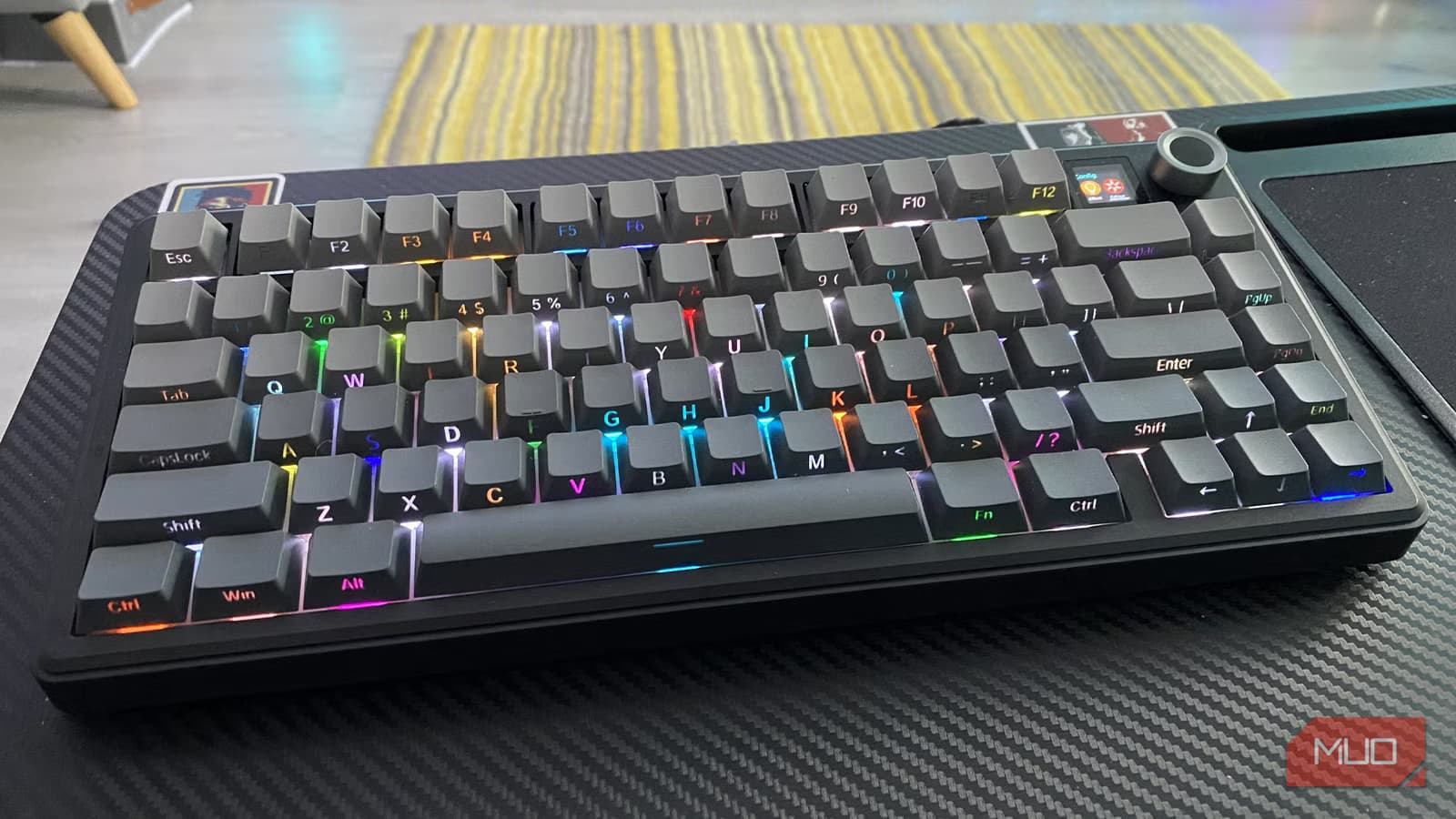
- QWERTY's dominance stems from 1890s business decisions and training inertia, not typing efficiency
- Dvorak places 70% of keystrokes on the home row versus roughly 33% for QWERTY
- Colemak changes only 17 keys from QWERTY, making it the easiest alternative to learn
QWERTY won by showing up early and refusing to leave. Five keyboard layouts prove this point: each one improved on QWERTY's efficiency, reduced finger travel, or solved real ergonomic problems. All of them lost to inertia, not to a fair engineering contest.
Christopher Latham Sholes' early typewriters used something closer to alphabetical order. They jammed frequently under fast typing. Sholes reorganized the keys, though historians like Koichi Yasuoka argue that telegraph operator training and Remington's sales strategy shaped the final layout at least as much as any anti-jamming goal. The popular claim that QWERTY was designed to slow typists down is folklore, not history.
What locked QWERTY in place was market consolidation. Remington started selling typewriters in 1874. By 1891, over 100,000 QWERTY machines were in use. Then in 1893, several manufacturers merged into the Union Typewriter Company and adopted QWERTY as the shared standard. From that point, the layout stopped competing and started inheriting. Every typist trained on it made retraining the next one more expensive. Every machine sold narrowed the window for alternatives.
Why did Dvorak fail to replace QWERTY?
August Dvorak and William Dealey took a different approach. They studied English letter frequency and hand physiology before patenting their layout in 1936. The goal: place the most common letters where fingers naturally rest and cut the total distance fingers travel across a workday.
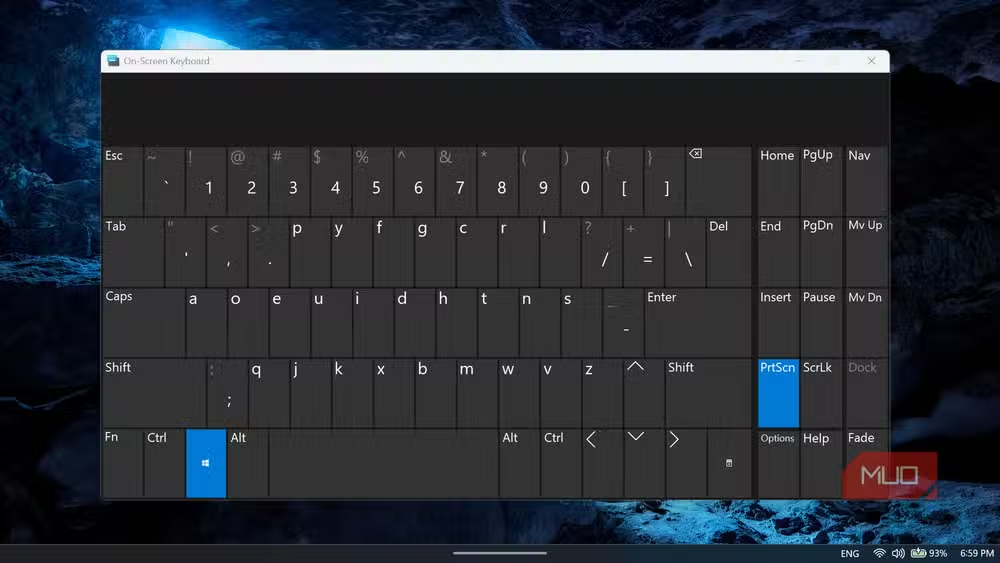
The result was a home row built around letters that do most of the work in English. About 70% of keystrokes on a Dvorak keyboard land on the home row, compared to roughly a third on QWERTY. That's a significant reduction in cumulative finger movement across thousands of words.
Dvorak never broke through commercially, and the reason reveals how standards actually work. By 1936, hundreds of thousands of QWERTY-trained typists sat in offices across the country. Retraining them cost money. Replacing machines cost more. The efficiency gains Dvorak offered were real, but they were future gains that required present investment from organizations that had already sunk their money into QWERTY.
How does Colemak improve on QWERTY without abandoning it?
Shai Coleman released Colemak in 2006 with a more practical question: how much can you improve comfort while changing as little as possible? Instead of rebuilding the keyboard from scratch, Colemak moves only 17 keys from their QWERTY positions. Shortcuts like Ctrl+Z, Ctrl+X, Ctrl+C, and Ctrl+V stay in place. The learning curve drops dramatically compared to Dvorak.
The tradeoff is obvious. Colemak doesn't optimize as aggressively as Dvorak, but it's far easier to adopt. Most people report reaching basic proficiency in three to four weeks. For someone who types eight hours a day and can't afford weeks of reduced productivity, Colemak offers a middle path that Dvorak never did.
What is Colemak-DH and why does it exist?
Colemak-DH is a modification that addresses one specific complaint about standard Colemak: the placement of the D and H keys requires lateral finger stretches that some typists find uncomfortable. The DH variant moves these keys to positions that reduce that sideways reach, particularly on column-staggered keyboards.
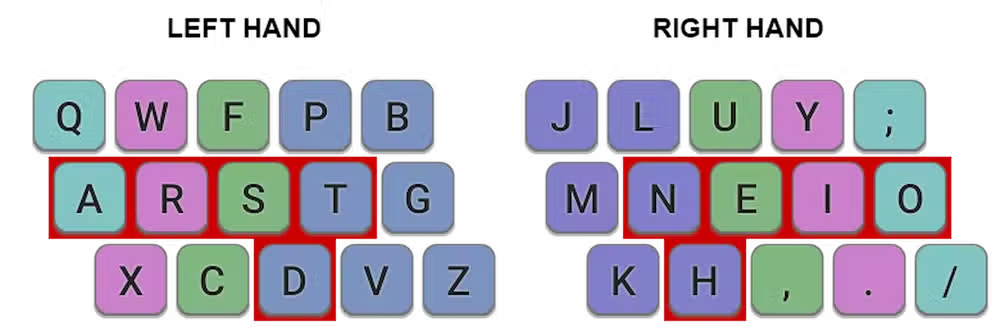
This kind of iteration is common in the alternative layout community. The baseline layouts establish principles, then users fork them to match their specific typing habits or keyboard hardware. It's a sharp contrast to QWERTY, which has remained essentially frozen since the 1890s.
Does Workman fix what Colemak missed?
The Workman layout, released in 2010, focuses on reducing finger movement in a different way than Colemak. Its designer, OJ Bucao, prioritized minimizing lateral finger stretches and optimizing for the natural strength differences between fingers. The index and middle fingers, which are stronger, handle more of the workload.
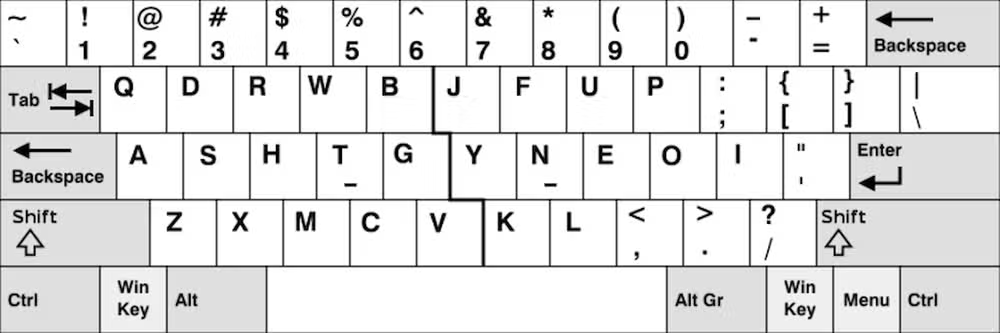
Workman's approach appeals to typists who found Colemak's compromises unsatisfying but couldn't commit to Dvorak's complete departure from QWERTY. It occupies a niche between the two, though that niche has never grown large enough to challenge either.
Why do ergonomic keyboards like Maltron require their own layouts?
The Maltron keyboard takes a more radical approach. It redesigns the physical keyboard itself, curving the key wells to match hand anatomy and splitting the layout into separate left and right sections. The Maltron layout is designed specifically for this hardware, placing the E key under the thumb and reorganizing other frequent letters to minimize strain.
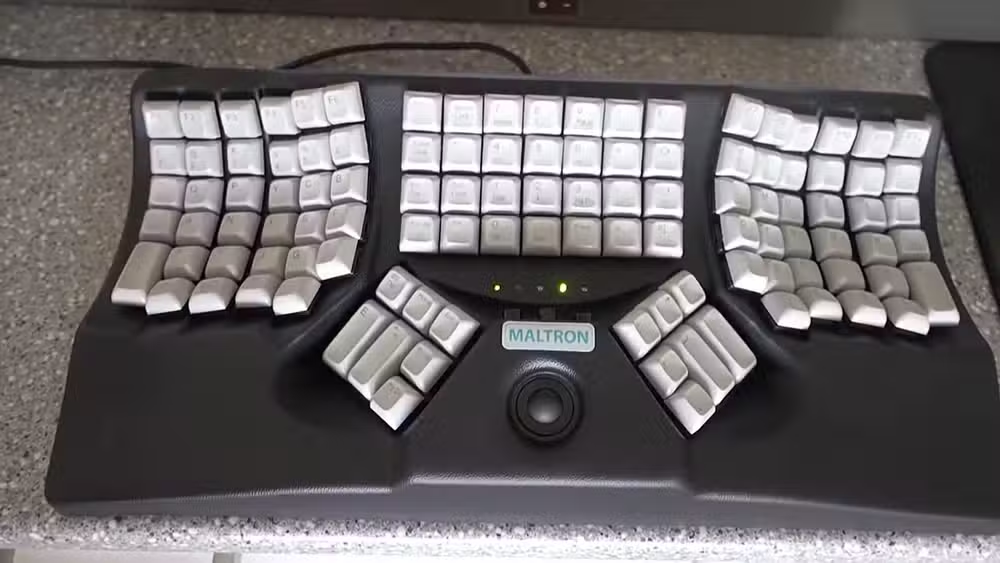
This coupling of hardware and software layout represents the furthest departure from QWERTY's assumptions. It's also the most expensive and least portable option. You can't casually use a colleague's machine or type on your phone with Maltron muscle memory. The solution that optimizes typing the most also isolates you the most from the installed base that QWERTY created.
Another example of how legacy technical decisions create lock-in effects
What does QWERTY's survival actually prove?
Less than 1% of computer users worldwide type on non-QWERTY layouts. This isn't because the alternatives failed to deliver on their promises. Dvorak does reduce finger travel. Colemak is easier to learn than its competitors claimed. Workman does account for finger strength. Maltron does minimize strain on ergonomic hardware.
They lost because QWERTY was good enough, and good enough with a 150-year head start beats better in almost any standards competition. The same dynamic plays out in file formats, programming languages, and operating systems. The first mover advantage compounds until the cost of switching exceeds the benefit of switching, regardless of the technical merits.
Logicity's Take
QWERTY's persistence is a case study in path dependency, not keyboard design. For founders building products, the lesson is uncomfortable: being first with something adequate often beats being second with something great. The switching costs you create early become your moat later. If you're considering learning an alternative layout, Colemak's minimal changes make it the most practical choice for someone who still needs to use other people's machines.
Frequently Asked Questions
Is Dvorak actually faster than QWERTY?
Studies show mixed results on raw speed, but Dvorak consistently reduces finger travel by placing 70% of keystrokes on the home row versus 33% for QWERTY. The efficiency gain is clearer than the speed gain.
How long does it take to learn Colemak?
Most users report reaching basic proficiency in three to four weeks of regular practice. Because Colemak only changes 17 keys from QWERTY, the learning curve is shorter than Dvorak's.
Can I switch keyboard layouts on Windows or Mac?
Yes. Both Windows 11 and macOS include Dvorak and Colemak as built-in options. You can add them through keyboard settings without installing third-party software.
Why didn't better keyboard layouts replace QWERTY?
By the time alternatives existed, millions of typists were already trained on QWERTY and organizations had invested in QWERTY equipment. The cost of switching exceeded the efficiency benefits.
What keyboard layout is best for reducing RSI?
Layouts that minimize finger travel, like Dvorak and Colemak, may reduce repetitive strain. However, ergonomic factors like keyboard angle, wrist position, and break frequency matter more than layout choice.
Need Help Implementing This?
If you're exploring alternative keyboard layouts for your team or considering ergonomic hardware investments, reach out to Logicity for guidance on the productivity and training tradeoffs involved.
Source: MakeUseOf
Manaal Khan
Tech & Innovation Writer
Produced with AI assistance and reviewed by the Logicity editorial team. Learn more in our Editorial Policy.






