Key Takeaways
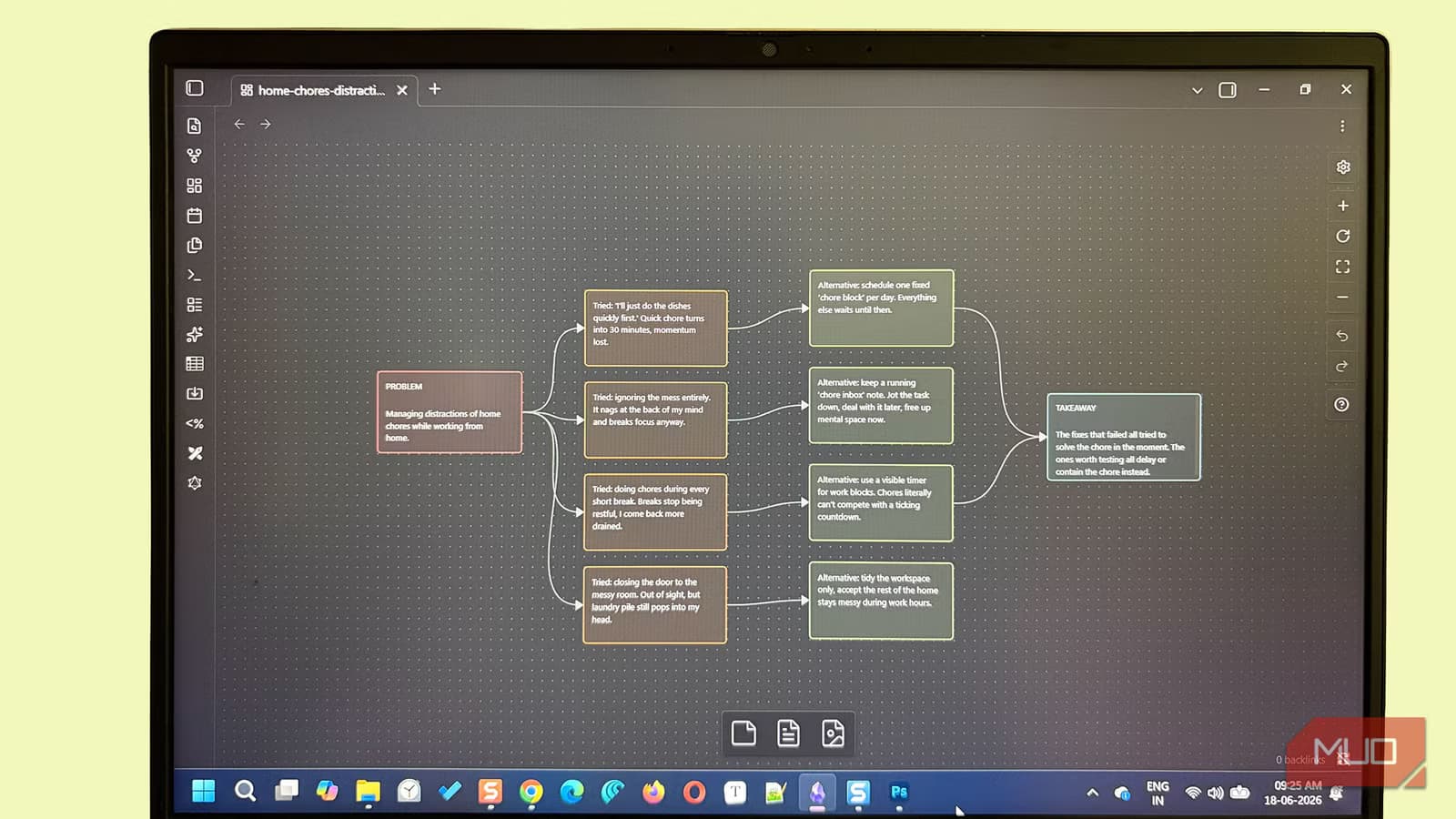
- Graph View is built into Obsidian and reveals hidden connections between notes, helping identify orphaned content that needs linking or deletion
- Canvas provides an infinite whiteboard for spatial thinking, brainstorming, and planning without creating cluttered markdown files
- Excalidraw's 6 million downloads make it the most popular community plugin for hand-drawn diagrams integrated with your vault
Obsidian ships with built-in visualization tools most users never discover. Beyond that, a handful of free community plugins transform the markdown editor into a visual thinking environment. The combination lets you map connections between notes, sketch concepts, and convert dense text into navigable mind maps.
The appeal is straightforward: walls of text hide relationships. A visual representation surfaces patterns that linear reading misses. For anyone managing research notes, project documentation, or a personal knowledge base, these Obsidian visualization plugins offer genuine utility without paid software or complex setup.
Graph View: the map already in your vault
Graph View is built directly into Obsidian. Press Ctrl + G and you see your entire vault as a network of nodes and edges. Each note becomes a dot; each link becomes a line connecting them.
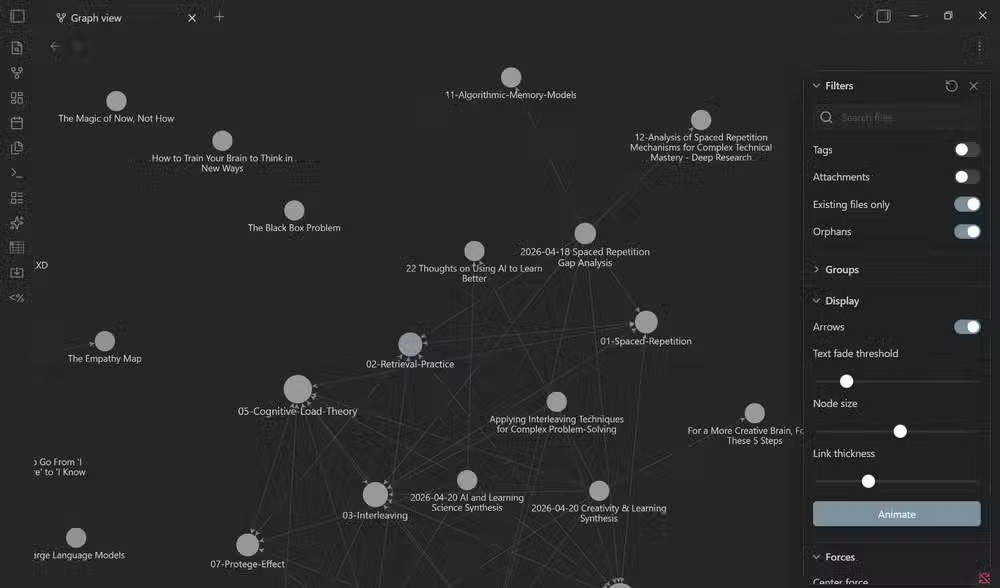
The practical value lies in what it reveals. Well-connected notes appear as dense clusters. Orphaned notes, those with no incoming or outgoing links, float alone at the periphery. Those orphans signal a problem: either the note needs linking to related content, or it should be deleted entirely.
Color-coding adds another layer. You can group nodes by tags or folders, turning a chaotic web into a segmented map of your knowledge domains. For visual learners, seeing connections reinforces recall better than reading the same links in text form.
Canvas: the infinite whiteboard
Canvas ships with Obsidian as a built-in feature. Think of it as a digital whiteboard with no edges. You can place notes, images, PDFs, and freestanding text cards anywhere on the surface, then drag them around to explore relationships spatially.
The brainstorming workflow works like this: place a problem statement on one side of the canvas, common solutions that fail on another, and potential alternatives floating between them. Moving pieces around often sparks ideas that linear outlining misses.
Double-click anywhere on the canvas to create temporary cards for quick thoughts. These cards stay on the canvas without cluttering your vault folder with single-sentence markdown files. When a card deserves permanence, right-click and select "Convert to file" to promote it to a proper note.
Beyond brainstorming, Canvas works for trip planning, project timelines, or any scenario where spatial arrangement beats sequential lists.
Excalidraw: hand-drawn diagrams inside Obsidian
With over 6 million downloads, Excalidraw is the most popular community plugin in the Obsidian ecosystem. It brings hand-drawn style diagrams directly into your vault.
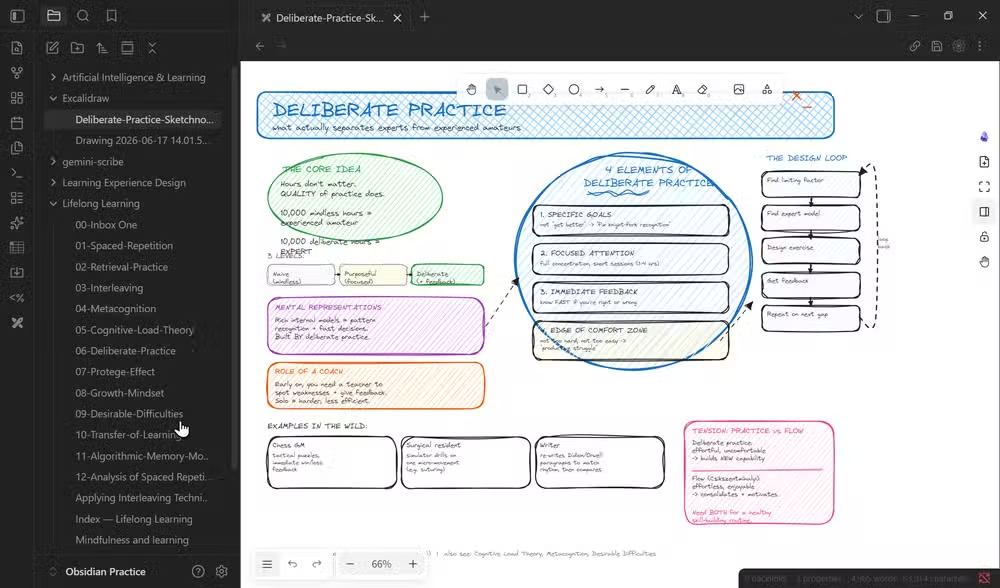
The plugin handles workflows, annotated screenshots, visual notes, and concept sketches. The hand-drawn aesthetic lowers the barrier for people who feel intimidated by precise diagramming tools. A rough sketch of a concept often clarifies faster than another page of written explanation.
Excalidraw drawings are fully interactive. You can link specific elements within a sketch back to individual markdown notes in your vault. This turns a simple diagram into a navigable visual index of related content.
Zsolt Viczián, the plugin's creator, maintains extensive documentation and tutorials for users who want to develop visual thinking habits.
Mind Map plugin: dense notes made scannable
The Obsidian Mind Map plugin converts your existing note structure into collapsible branching diagrams. It reads your H1, H2, and H3 headings plus bullet points, then renders them as a tree you can expand and collapse.
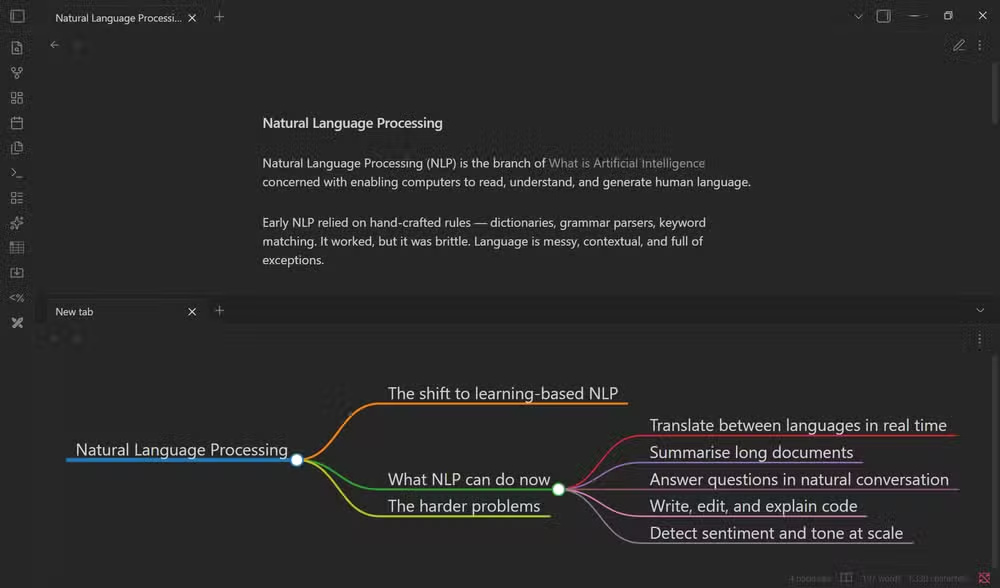
The use case is research and learning. A long note covering an unfamiliar topic feels overwhelming as continuous text. The same content displayed as a branching mind map becomes approachable. You can navigate by expanding only the sections you need.
The plugin is basic. It reads your existing markdown hierarchy rather than offering a full-featured mind mapping canvas. But that simplicity means zero learning curve. Your notes already have structure; the plugin just displays it differently.
Juggl: advanced graph styling
For users who want more control than Graph View provides, Juggl offers advanced styling options for vault visualization. It supports custom node shapes, colors, and edge styles based on metadata in your notes.
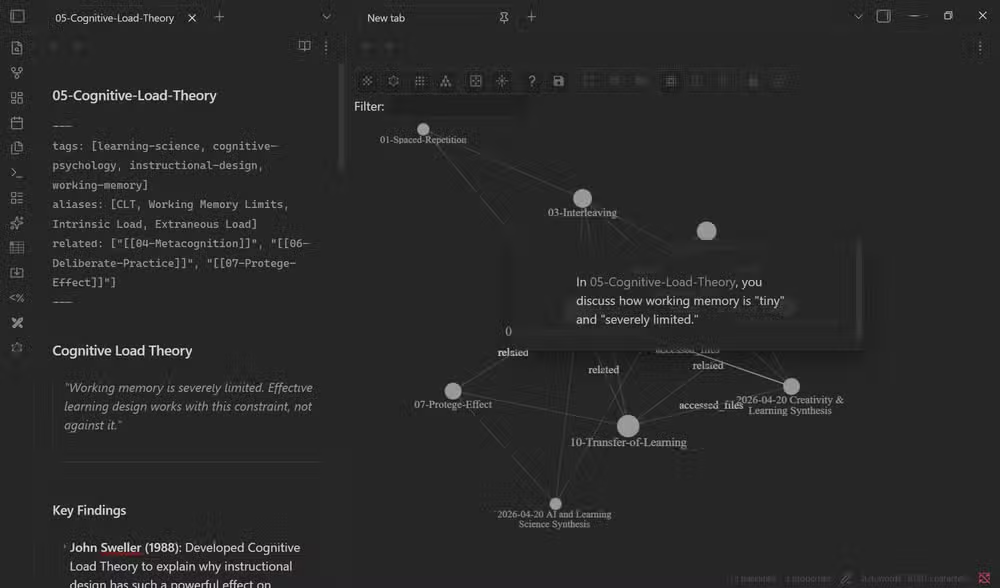
Juggl's strength is granularity. You can define visual rules that make certain note types instantly recognizable. Project notes might appear as squares, meeting notes as circles, and reference material as diamonds. The result is a graph that communicates note types at a glance.
When visualization actually helps
These tools solve specific problems. Graph View audits your vault structure, revealing gaps and isolated content. Canvas supports spatial reasoning during planning and brainstorming. Excalidraw handles situations where a sketch communicates faster than prose. Mind Map makes long, structured documents scannable.
The trap is adding visualization for its own sake. A neat-looking graph of 500 notes provides no value if you never use it to find orphans or spot clusters. The question is always whether the visual representation helps you think or act differently than text alone.
Another practical guide to optimizing software you already own
Logicity's Take
Obsidian's plugin ecosystem has quietly built what commercial tools charge hundreds of dollars for: integrated visual thinking inside a markdown editor. The strategic opportunity here is workflow consolidation. Teams currently using Miro for whiteboarding, draw.io for diagrams, and a separate note app could potentially unify everything in Obsidian. The constraint remains mobile: Obsidian's mobile apps support fewer plugins, so power users still face friction when switching devices.
Frequently Asked Questions
Is Obsidian Graph View a plugin or built-in?
Graph View is built directly into Obsidian. You don't need to install anything. Press Ctrl + G to open it immediately in any vault.
Does Excalidraw work with Obsidian Sync?
Yes. Excalidraw drawings are stored as files in your vault, so they sync through Obsidian Sync, iCloud, Dropbox, or any other sync solution you use for your vault.
Can I convert Canvas cards to permanent notes?
Right-click any card on the Canvas and select "Convert to file" to turn a temporary visual card into a permanent markdown note in your vault.
What's the difference between Graph View and Juggl?
Graph View is built-in with basic styling. Juggl is a community plugin that adds custom node shapes, colors, and edge styles based on note metadata, giving more visual control over how your graph appears.
Does Obsidian Mind Map require a specific note structure?
It reads your existing H1, H2, H3 headings and bullet points. No special formatting required. If your notes already use standard markdown hierarchy, the plugin works immediately.
Need Help Implementing This?
Setting up a visual knowledge management system for your team? Logicity covers productivity tools, developer workflows, and AI integration. Subscribe for weekly breakdowns of the tools reshaping how technical teams work.
Source: MakeUseOf
Manaal Khan
Tech & Innovation Writer
Produced with AI assistance and reviewed by the Logicity editorial team. Learn more in our Editorial Policy.






