Key Takeaways

- Microsoft Edge injects ads and pop-ups when users try to download competing browsers
- Syncthing provides free, private file syncing between devices without OneDrive's subscription pressure
- Kdenlive offers professional video editing without Clipchamp's export restrictions or watermarks
Windows 11 ships with apps that do less than you need while simultaneously doing more than you want. Edge pushes Copilot. OneDrive nags about subscriptions. The new Outlook tries to unify everything and pleases nobody. If you're tired of Microsoft's bundled software fighting for your attention and your wallet, open-source alternatives exist that simply do the job.
Sydney Butler at How-To Geek compiled a list of the four worst offenders and their replacements. The common thread: Microsoft's included apps aren't bad at their core functions, but they're loaded with upsells, telemetry, and features that serve the company more than the user.
Why Microsoft Edge deserves replacement
Edge is competent. It's Chromium-based, fast, and handles web standards correctly. The problem is what Microsoft bolted on top. Open a fresh installation and you'll find a sidebar stuffed with Microsoft services, a Copilot chat button at the top, and an operating system that fights you when you try to switch.
The browser actively sabotages competing products. Navigate to Chrome's download page and Edge injects a pop-up urging you to reconsider. Search for "download Chrome" and Edge sometimes shows a paid ad. Butler notes that "the added trust of Microsoft rings hollow when the browser watches what you do to try and influence your decisions at the last moment."
Firefox is the recommended alternative. Mozilla's browser prioritizes browsing over ecosystem lock-in. It offers strong privacy controls, extensive extension support, and a clean interface. Unlike Chrome, it doesn't feed another advertising giant.
OneDrive's 5GB trap and the Syncthing solution
OneDrive announces itself the moment you sign into Windows. It offers 5GB free, a storage amount too small for serious backup but just enough to create dependency. The real goal is pushing Microsoft 365 subscriptions with their 1TB storage bundles.
For users who want file syncing between devices without cloud storage or subscriptions, Syncthing works better. It's decentralized, encrypted, and free. Files transfer directly between your machines without passing through Microsoft's servers. The trade-off: you need storage on both ends, and there's no web interface for remote access.
Pair Syncthing with a NAS if you want always-available storage without the cloud. Solutions like UGREEN's DXP4800 provide up to 136TB of local capacity, though the upfront cost exceeds years of subscription fees.
The new Outlook tries to do everything, does nothing well
Microsoft's rebuilt Outlook app aims to unify email, calendars, contacts, tasks, and cloud services. The ambition sounds reasonable. The execution doesn't match. The new client replaced the simpler Windows Mail app, forcing users into a heavier application whether they wanted it or not.
Thunderbird, Mozilla's email client, handles mail without the sprawl. It supports multiple accounts, calendar integration via add-ons, and strong privacy defaults. It won't sync with Microsoft's ecosystem as smoothly, but that's partly the point. For users whose email isn't tied to Exchange, Thunderbird does less and works better.
Clipchamp's hidden costs vs Kdenlive's full toolkit
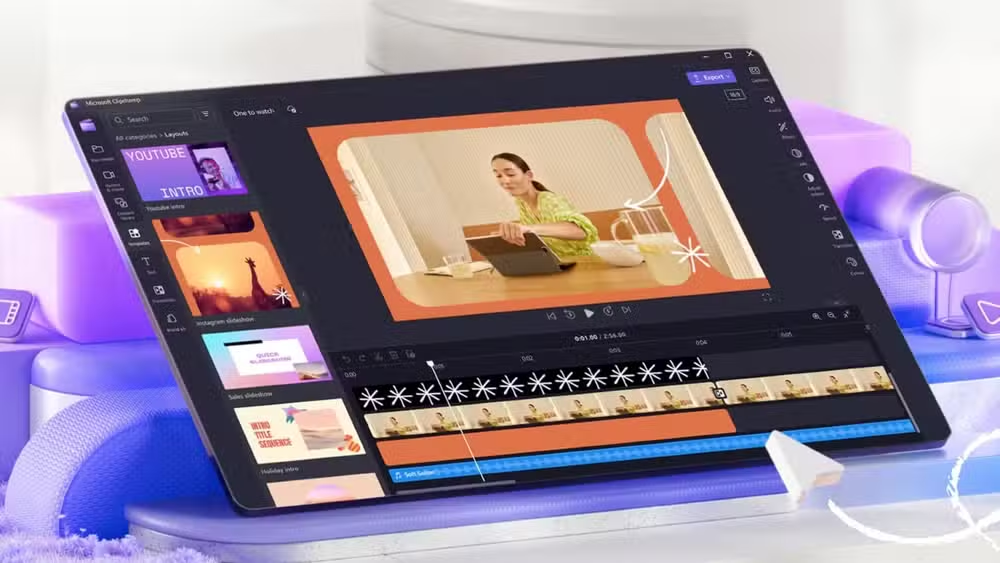
Microsoft acquired Clipchamp and bundled it with Windows 11 as the default video editor. It's browser-based, which means it works anywhere but processes slowly. The free tier restricts export quality and watermarks output.
Kdenlive is the open-source counter. It's a full non-linear editor running locally, so export speed depends on your hardware rather than your subscription tier. No watermarks, no artificial resolution caps, no recurring fees. The learning curve is steeper than Clipchamp's drag-and-drop simplicity, but the ceiling is far higher.

The pattern behind the bloat
These four apps share a business model: free enough to create habit, limited enough to push upgrades. Edge wants you in Microsoft's search and AI ecosystem. OneDrive wants 365 subscriptions. The new Outlook wants enterprise buy-in. Clipchamp wants export fees.
Open-source alternatives don't need you locked in. Firefox survives on donations and search deals. Syncthing has no revenue model beyond its developers' goodwill. Thunderbird runs on Mozilla Foundation support. Kdenlive accepts contributions. They lack polish in places, and support comes from forums rather than help desks. But they do what they claim without ulterior motives.
For users considering moving beyond Windows entirely, understanding the Linux landscape helps
Logicity's Take
Microsoft's bundled apps aren't incompetent; they're conflicted. They serve two masters: the user who wants software that works, and Microsoft's revenue targets that demand engagement metrics and subscription conversions. Open-source tools serve one master. That clarity shows in the experience. For technical users willing to spend an hour on setup, the switch pays back in years of cleaner computing.
Frequently Asked Questions
Can I completely uninstall Microsoft Edge from Windows 11?
Not easily. Microsoft blocks standard uninstall methods. You can disable it, remove shortcuts, and set another browser as default, but Edge remains on the system for WebView components. Third-party scripts exist to force removal, but they may break some Windows features.
Is Syncthing secure for sensitive files?
Yes. Syncthing uses TLS encryption for data in transit and requires device authorization before syncing. Files never pass through external servers. Your security depends on the devices themselves, not a cloud provider's practices.
Does Thunderbird work with Microsoft 365 and Exchange accounts?
With configuration. Thunderbird supports IMAP and SMTP for Microsoft 365 email. Full Exchange integration (shared calendars, contacts) requires add-ons like TbSync. It works, but not as seamlessly as Outlook on Exchange infrastructure.
Why does Windows include so many pre-installed apps?
Revenue and retention. Pre-installed apps drive users toward Microsoft services, generate telemetry data, and create subscription opportunities. Some apps (like Edge) also fulfill system functions that Windows expects to be present.
Need Help Implementing This?
Switching from Microsoft's bundled apps to open-source alternatives requires some setup time but pays off in cleaner, faster computing. If your team needs guidance on deploying Firefox, Thunderbird, or Syncthing across multiple machines, reach out for implementation support.
Source: How-To Geek
Manaal Khan
Tech & Innovation Writer
Produced with AI assistance and reviewed by the Logicity editorial team. Learn more in our Editorial Policy.






