Key Takeaways
- Yazi is a Rust-based file manager with Miller column layout and async I/O for fast navigation
- tdf renders PDFs in the terminal with search, hot-reloading, and dynamic resizing
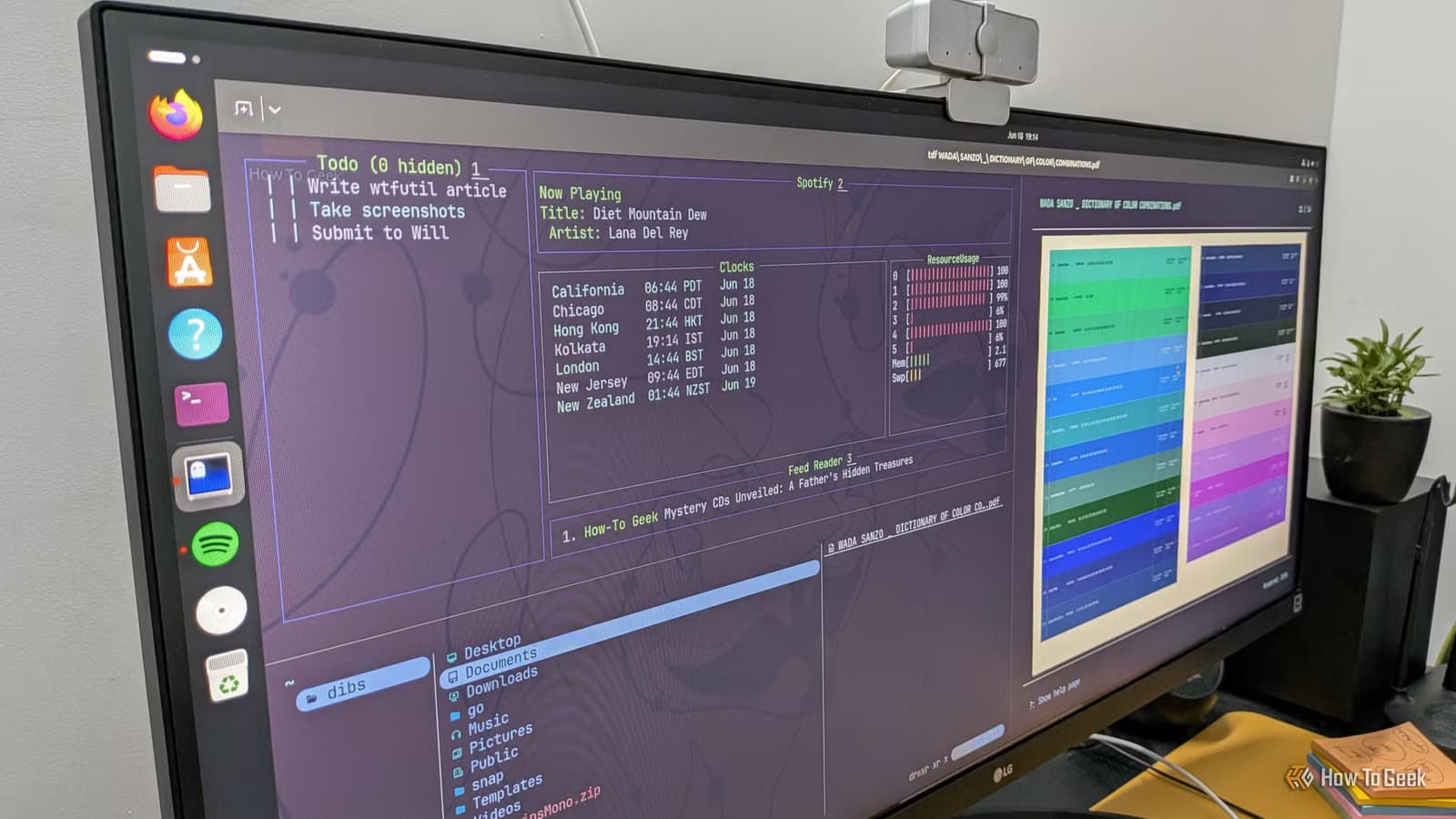
- wtf provides a modular dashboard with 60+ widgets for RSS, weather, Docker, and more
The terminal can do more than run commands and edit config files. A growing ecosystem of TUI (terminal user interface) apps now handles everyday tasks like file browsing, document viewing, and system monitoring. Three tools stand out for a weekend project: Yazi for file management, tdf for reading PDFs, and wtf for building a personal dashboard.
These aren't toys. They're faster, lighter, and often more focused than their graphical counterparts. If you spend time in the command line anyway, adding these to your workflow removes the context-switching cost of opening a GUI app.
Yazi: a file manager that actually keeps up with you
Yazi is what happens when you take the classic terminal file manager concept and rebuild it in Rust with async I/O. The result is navigation that stays responsive even in directories with thousands of files.
The interface uses Miller columns. Three panes show the parent directory on the left, the current directory in the center, and a preview of the selected file or folder on the right. You always know where you came from and what you're about to open. It's the same layout macOS Finder uses in column view, but keyboard-driven.
File previews render quickly, including images if your terminal supports them (Kitty and Ghostty do; most default terminals don't). Think of it as an evolved Ranger. If you've used Ranger, the muscle memory transfers.
Installation instructions live on Yazi's GitHub page. Most package managers also carry it.
tdf: a PDF viewer without the bloat
Most PDF readers ship with annotation tools, digital signature support, and form-filling features. If you just want to read a document, that's overhead you don't need.
tdf strips PDF viewing down to the essentials. Built on ratatui, a Rust framework for TUI apps, it handles large PDFs without freezing. Pages render asynchronously in the background, so scrolling stays smooth. The layout adjusts dynamically when you resize your terminal window.
Two features stand out. First, search works as you'd expect. Find a word, and tdf highlights every occurrence. Second, hot reloading. If the PDF changes while you're viewing it, tdf updates automatically. No need to close and reopen.
The catch: tdf requires a terminal that renders images. Default terminals on most distributions can't. You'll need Kitty, Ghostty, or another graphics-capable terminal.
wtf: a personal dashboard in your terminal
The name is unfortunate. The tool is useful.
wtf is a modular dashboard that runs in your terminal. You configure a grid and fill it with widgets (called modules). Over 60 are available: RSS feeds, weather, to-do lists, Docker container status, Git repository info, and more.
The appeal is consolidation. Instead of checking five different apps or browser tabs for status updates, you open one terminal window. Everything you care about sits in a single view.
Configuration happens in a YAML file. You define which modules to display and where they appear on the grid. The learning curve is steeper than Yazi or tdf, but the payoff is a dashboard tailored exactly to your needs.
Why terminal apps are gaining ground
Linux desktop market share hit 4.4% in early 2024, its highest ever. That's still a small slice of the overall pie, but the community is growing. And within that community, terminal-centric workflows are having a moment.
Part of this is practical. Terminal apps typically use less RAM and start faster than GUI equivalents. Part of it is aesthetic. Subreddits like r/unixporn celebrate customized terminal setups, and the visual consistency of a terminal-based workflow has genuine appeal.
But the biggest factor might be focus. A terminal app does one thing. No sidebar notifications, no menu bars, no visual clutter. You open it, do the task, close it. For developers and engineers who already live in the terminal, that friction-free experience compounds over hundreds of daily interactions.
What you need to get started
- A modern terminal emulator. Kitty and Ghostty are the best choices if you want image previews in Yazi and tdf.
- Rust installed on your system. All three tools are written in Rust, and some installation methods require cargo.
- Basic comfort with the command line. None of these tools are hard to use, but they assume you know how to navigate directories and edit config files.
Setup time is minimal. Yazi and tdf work out of the box once installed. wtf requires configuration, but the documentation walks through the process.
Another weekend project using open-source tools
Frequently Asked Questions
Do these terminal apps work on macOS?
Yes. Yazi, tdf, and wtf all run on macOS. You'll need a compatible terminal like Kitty for full image preview support.
Are terminal apps harder to use than GUI apps?
Not necessarily. The interface is different. Keyboard shortcuts replace mouse clicks. Once you learn the bindings, many users find terminal apps faster.
Which terminal emulator should I use for these apps?
Kitty and Ghostty are the top choices. Both support image rendering, which Yazi and tdf require for full functionality.
Can I use these apps through SSH?
Mostly yes. Text-based features work over SSH. Image previews depend on your SSH client and terminal setup.
Logicity's Take
The real value here isn't the apps themselves. It's the workflow philosophy. GUI applications optimize for discoverability. Everything is visible, clickable, explorable. Terminal apps optimize for repeatability. You learn the commands once, and every subsequent use is faster. For professionals who perform the same tasks hundreds of times, that tradeoff makes sense. The weekend project framing is clever: it lowers the commitment barrier enough to actually try the tools.
Need Help Implementing This?
Setting up a terminal-first workflow involves more than installing a few apps. Logicity can help you design development environments, standardize tooling across teams, and document workflows for onboarding. Reach out to discuss your setup.
Source: How-To Geek
Huma Shazia
Senior AI & Tech Writer
Produced with AI assistance and reviewed by the Logicity editorial team. Learn more in our Editorial Policy.






