Key Takeaways
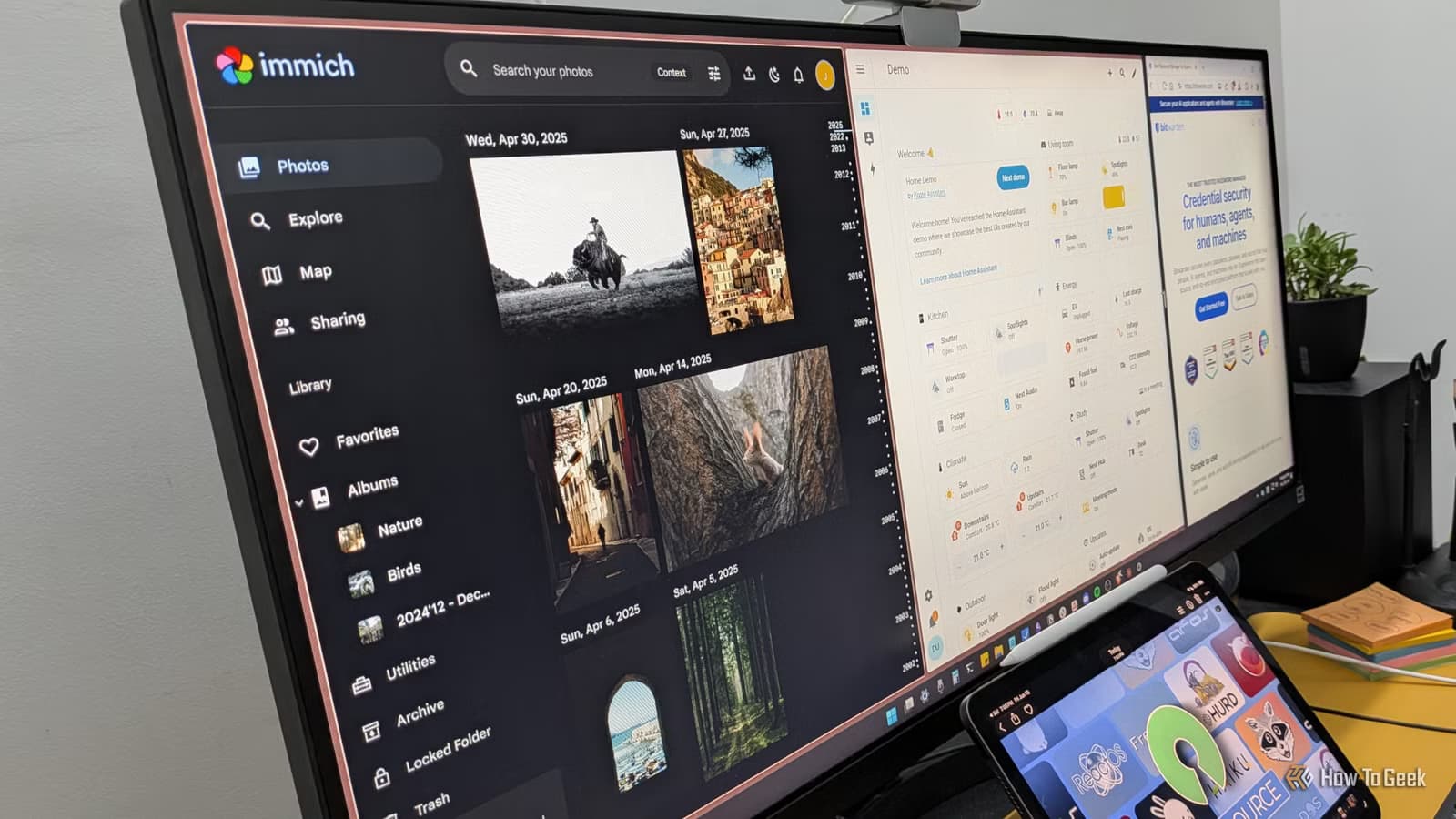
- Home Assistant replaces Google Home and Alexa with local smart home control, keeping automation data off corporate servers
- Immich offers Google Photos-style face recognition and search without uploading images to third-party servers
- Bitwarden provides password management with the option to self-host, giving you full control over credential storage
Three open-source apps can replace the data-hungry defaults on your devices: Home Assistant for smart home control, Immich for photo management, and Bitwarden for passwords. Each runs locally or on your own server, cutting the data stream that normally flows to Google, Amazon, and other platforms. Setup takes a weekend at most.
The appeal is simple. When your smart lights report to Google Home, Google knows when you're awake, when you leave, when you return. When your photos sync to Google Photos, Google's servers process every face, every location, every scene. When Chrome saves your passwords, those credentials live on infrastructure you don't control. None of this feels like surveillance. But the data adds up to a remarkably detailed picture of your life.
Home Assistant: smart home control without the cloud
Smart home devices are genuinely useful. Lights that turn on when you arrive, blinds that adjust with the sun, AC that kicks in when humidity spikes. The efficiency gains are real. You save electricity because the house stops relying on human memory.
The problem is how most people connect these devices. Plug everything into Google Home or Alexa, and you've invited those companies to monitor your entire living space. If voice assistants are involved, recordings of conversations may exist on servers you'll never see. There's no strict evidence Google or Amazon misuse this data maliciously, but the theoretical inferences are unsettling: when you're home, when you're not, what you say.
Home Assistant cuts that link. It creates a local network for your smart gadgets, routing commands through your own hardware instead of a cloud service. The platform supports devices across brands, so you're not locked into one ecosystem just to make things talk to each other. Cross-device automations become possible. One sensor triggers a plug, which triggers a thermostat, and you get genuinely integrated routines instead of isolated single-brand silos.
Setup takes some effort. You'll need a Raspberry Pi or a spare machine to run the server. But the tradeoff is full ownership of your home automation data.
Immich: Google Photos features, local processing
Google Photos is convenient. Face recognition, object tagging, natural-language search. If you have tens of thousands of images, these features actually matter. But they work because Google processes every photo on its servers. Every face, every scene, every embedded GPS coordinate passes through infrastructure you don't own.
Immich replicates those features locally. You self-host it, point it at your photo library, and it runs machine learning on your own hardware. Face detection, object recognition, contextual search. All of it happens on your NAS or server, not on a third-party platform.
There's an obvious tradeoff. Google Photos offers free storage up to a limit. Immich requires you to provide your own, typically a NAS. You're buying hardware and managing it yourself. But that's the point. Your photos live on drives you control. Over the long run, the cost often beats paying Google indefinitely for cloud storage.
Bitwarden: passwords you actually control
Password managers are essential. Reusing passwords across sites is how most accounts get compromised. But built-in browser managers like Chrome's send your credentials through Google's servers. Third-party options like LastPass have suffered breaches that exposed encrypted vaults.
Bitwarden is open-source and offers a self-hosted option. You can run your own server, keeping credentials entirely on your infrastructure. Even if you use their hosted service, the open-source codebase means the encryption is auditable. Security researchers can verify what the software actually does with your data.
The interface works across browsers and devices. Auto-fill, password generation, secure notes. The core features match commercial alternatives. The difference is transparency. You know what's happening because the code is public.
Is self-hosting worth the effort?
Self-hosting demands time. You'll configure servers, troubleshoot networking, manage updates. The convenience gap between Google's one-click setup and running your own Home Assistant instance is real.
But the privacy gap is also real. 79% of Americans express concern about how companies use their data, according to Pew Research. In 2023 alone, over 2,800 data breaches exposed more than 8 billion records in the US. When your data lives on someone else's server, their security failures become your exposure.
Open-source alternatives shift that risk. You're responsible for your own security, but you're also not subject to breaches at companies you never chose to trust.
What you'll need to get started
- Home Assistant: Raspberry Pi 4 or spare PC, Ethernet connection, 30-60 minutes for initial setup
- Immich: NAS or server with at least 4GB RAM, Docker installed, existing photo library to import
- Bitwarden: browser extension for immediate use, or Docker server for self-hosting
Start with Bitwarden if you want quick results. The browser extension works immediately with their hosted service. Home Assistant and Immich require more upfront work but deliver the biggest privacy gains for the devices that know the most about your daily life.
Logicity's Take
The real story here isn't privacy paranoia. It's that open-source tools have finally caught up to commercial quality for these specific use cases. Five years ago, self-hosted photo management meant clunky interfaces and no AI features. Today, Immich rivals Google Photos in capability. The gap has closed enough that choosing self-hosting is now a practical decision, not just an ideological one. For technical teams at startups and enterprises, this also raises a question: if these personal tools work well, what about self-hosted alternatives to Slack, Google Workspace, or analytics platforms?
Frequently Asked Questions
Do I need technical skills to set up Home Assistant?
Basic familiarity with IP addresses and networking helps. The Home Assistant documentation walks through installation step by step. Most users report 30-60 minutes for initial setup on a Raspberry Pi.
Can Immich match Google Photos' search quality?
Immich uses machine learning for face detection and object recognition, but results depend on your hardware. A machine with a decent GPU will process faster and may yield better accuracy than CPU-only setups.
Is Bitwarden's hosted service secure if I don't self-host?
Yes. Bitwarden uses end-to-end encryption, meaning the company cannot read your passwords. The open-source code allows independent security audits, which have not revealed major vulnerabilities.
How much does self-hosting cost compared to cloud services?
Upfront hardware costs for a NAS run $200-500. Ongoing electricity is minimal. Over 3-5 years, this typically costs less than equivalent Google One or iCloud storage plans, especially for large photo libraries.
Related security concern for iPhone users considering their device privacy
Need Help Implementing This?
Setting up self-hosted infrastructure for your team or company? Logicity covers enterprise privacy and DevOps tooling. Subscribe to our newsletter for practical guides on deploying open-source alternatives at scale.
Source: How-To Geek
Huma Shazia
Senior AI & Tech Writer
Produced with AI assistance and reviewed by the Logicity editorial team. Learn more in our Editorial Policy.






