
Key Takeaways

- You can share Google Keep notes like Google Docs, making family grocery lists or vacation packing collaborative
- Handwritten notes are searchable if your writing is legible enough for the app to read
- Version history lets you recover earlier versions of notes, but only on the web version
Google Keep works like a stack of digital sticky notes. You create one, write something, and forget about it until you need it. That simplicity is the point. But with 500 million downloads on Android and over 10 years of development since its 2013 launch, Google has quietly added features that most users never discover.
The app supports up to 10,000 characters per note (and 20,000 for list items), which gives you more space than a typical "simple" note app suggests. Here's what else you might be missing.
Share Notes Like Google Docs
This feature tops the list because it solves a common household problem: duplicate grocery runs. You can share any Google Keep note with other people, exactly like sharing a Google Doc. Everyone with access can edit the same note in real time.
A shared grocery list means no one buys milk when someone else already picked it up. It also works for vacation packing lists, household to-do items, or any note that needs multiple contributors.
To share on web, click the collaborator button that looks like a portrait picture. On mobile, tap the three dots in the lower right corner, then select Collaborator.
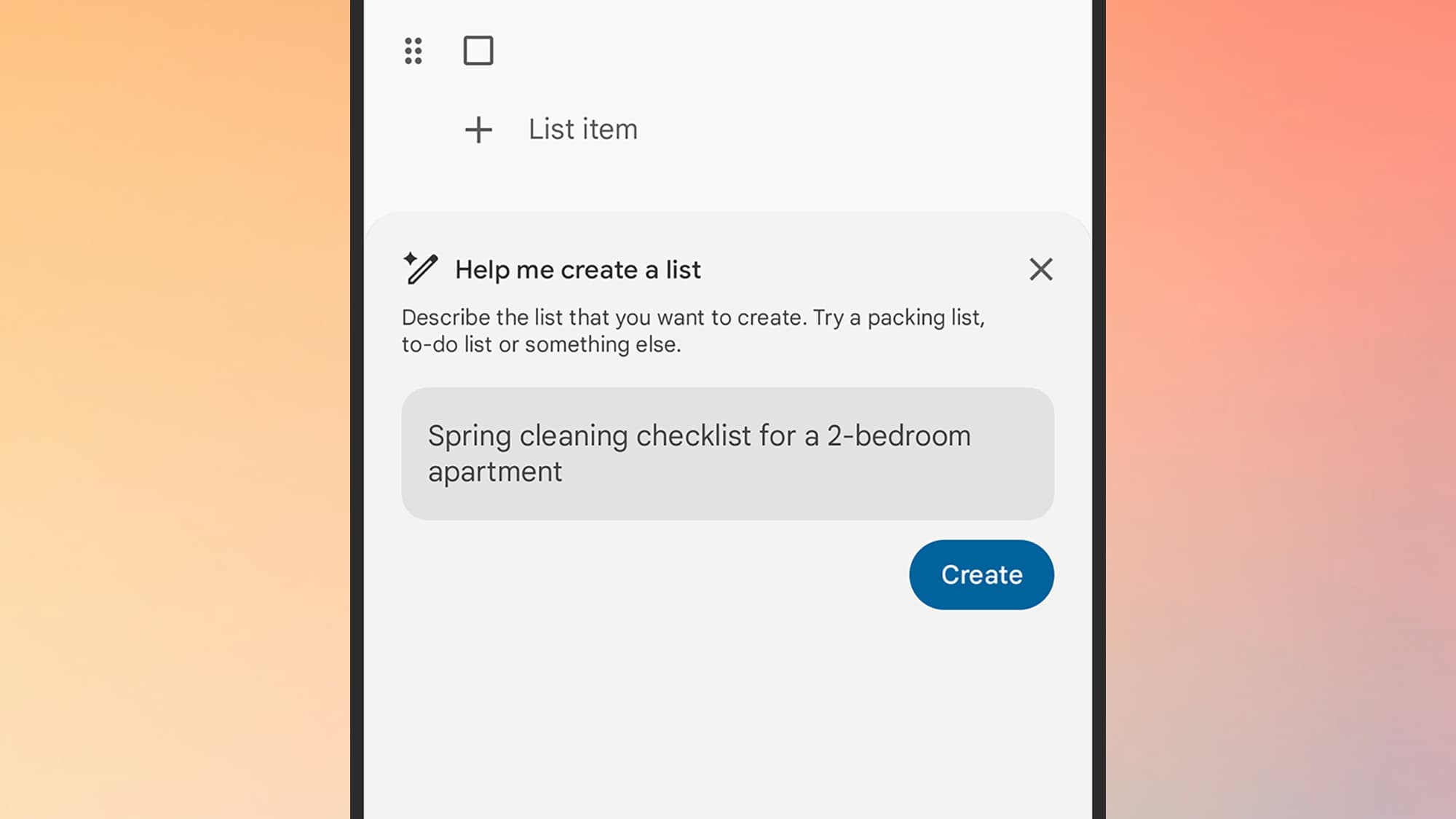
Use Gemini to Generate Lists
Google's AI assistant can now help you create lists inside Keep. Ask it for things to do on a trip to New York, a back-to-school shopping list for a 10-year-old, the best horror movies of the 1970s, or a to-do list for planning a 30th wedding anniversary. Gemini returns a working list you can edit.
The catch: this feature only works on Android, only applies to list notes, and requires a paid Google AI subscription. If you meet all three criteria, tap the plus button, select List, then tap "Help me create a list" and enter your prompt.
Search Your Handwritten Notes
You can create drawing notes in Google Keep on both web and mobile. What you might not realize: if you write notes using your finger or a stylus, the app can read the text within them.
Your handwritten text shows up in Google Keep search results. The one requirement is that your writing needs to be legible enough for the app to parse. If you scrawl like a doctor, this may not help you.
Recover Earlier Versions With Version History
Version history is something you don't always get with note apps. Apple Notes, for example, doesn't offer it. Google Keep does. You can go back to earlier versions of a note if you accidentally check off items you shouldn't have, want to revert to an earlier version of an idea, or want to reuse an entire list.
One limitation: this only works on the web version. Click the three dots next to a note, then select Version history. You'll see a list of previous versions you can download in HTML format. There's no option to directly overwrite your current note, but you can copy the content back manually.
Why Keep Beats Complex Productivity Apps
Google Keep occupies a specific niche in the crowded productivity market. It prioritizes speed and simplicity over the complex relational databases found in apps like Notion or Obsidian. It works best as a "rapid capture" layer: you offload fleeting thoughts, photos, and voice memos instantly, then move them into more structured systems later if needed.
“Your mind is for having ideas, not holding them.”
— David Allen, productivity consultant and author of 'Getting Things Done'
That philosophy captures why Keep works. On Reddit communities like r/productivity and r/GoogleKeep, users often call it the "Goldilocks" app for people who feel overwhelmed by complex productivity systems. The debates typically center on its lack of folders versus the power of its label and tagging system. The consensus: Keep's greatest feature is friction removal. You open it, you type, you close it.
The Rapid Capture Workflow
Power users often integrate Keep with Gmail and Google Calendar in what some call the "Google Trifecta" workflow. Keep handles the quick capture. Calendar handles scheduling. Gmail handles communication. Each tool does one job well instead of one tool doing everything poorly.
This approach works especially well for people who tried and abandoned Notion or Obsidian. Those apps are powerful, but their power creates friction. You end up organizing your system instead of using it. Keep avoids that trap by offering fewer options.
Logicity's Take
Frequently Asked Questions
Frequently Asked Questions
Can I share Google Keep notes with people who don't use Google Keep?
The person you share with needs a Google account. Once they have one, they can access shared notes through the Keep web app, Android app, or iOS app.
Does Google Keep work offline?
Yes. Notes you create offline sync automatically when you reconnect to the internet. This makes it useful for quick capture in areas with poor connectivity.
Is Google Keep free?
The core app is free. The Gemini list generation feature requires a paid Google AI subscription and only works on Android.
Can I export my Google Keep notes?
Yes. You can use Google Takeout to export all your Keep notes. Individual notes with version history can be downloaded in HTML format from the web app.
What's the character limit for Google Keep notes?
Each note supports up to 10,000 characters. List items can hold up to 20,000 characters total.
More on built-in app features that replace third-party tools
Related Google AI developments
Need Help Implementing This?
Source: Lifehacker
Huma Shazia
Senior AI & Tech Writer
Produced with AI assistance and reviewed by the Logicity editorial team. Learn more in our Editorial Policy.






