Key Takeaways
- WebView2 hybrid apps use 60-70% less memory than equivalent Electron applications
- Native Windows integration means better system tray, file dialogs, and OS-level features
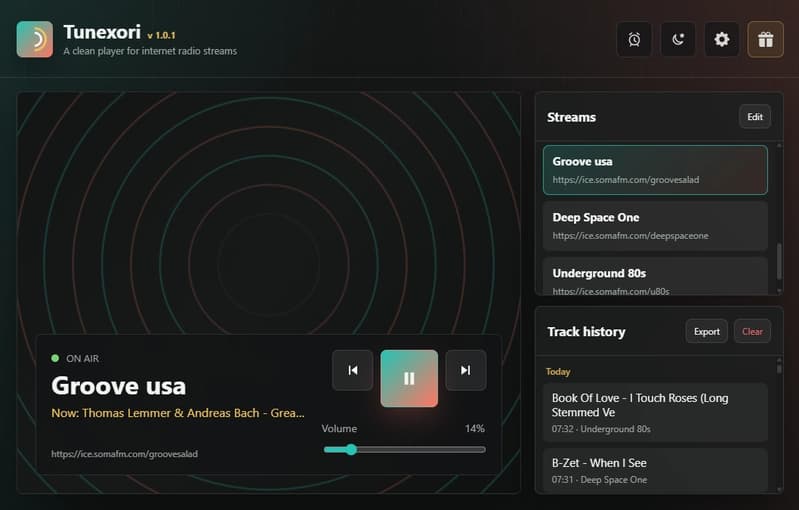
- Open-source projects like Tunexori prove the viability of lightweight desktop architectures
Read in Short
A developer built Tunexori, an open-source Windows internet radio player, using C# WinForms and Microsoft's WebView2. The project demonstrates why hybrid desktop architectures are becoming attractive alternatives to Electron for companies building Windows applications. Key advantages: native OS integration, significantly lower memory usage, and the flexibility of web-based UI development.
Why Windows Desktop App Development Strategy Matters in 2025
Here's a scenario your engineering team has probably debated: You need to build a Windows desktop application. Do you go full native and deal with dated UI tooling? Do you use Electron and accept the 200MB+ memory overhead? Or is there a middle path that gives you the best of both worlds?
This is exactly the architectural decision that led developer jemontenis to create Tunexori, an open-source internet radio player that's become an interesting case study in modern Windows development. The app needed to feel native, integrate deeply with Windows (system tray, file dialogs, background playback), but also have a modern, flexible UI that could be iterated quickly.
The solution? A hybrid approach using WinForms as the native shell and Microsoft's WebView2 for the interface layer. For business leaders evaluating desktop application strategies, this architecture deserves serious consideration.
What Is WebView2 and Why Should CTOs Care?
WebView2 is Microsoft's embedded browser control based on Chromium (the same engine powering Chrome and Edge). Unlike Electron, which bundles an entire browser runtime with each application, WebView2 uses the Edge installation already present on Windows 10 and 11 machines.
This architectural difference has real business implications:
- Smaller installer sizes (your app doesn't ship a browser)
- Lower memory footprint (shared runtime across all WebView2 apps)
- Automatic security updates through Windows Update
- Native Windows APIs remain fully accessible
For companies maintaining multiple desktop applications, WebView2 means your users aren't running three separate Chromium instances eating up RAM. That's not a trivial concern when your enterprise customers are running your software alongside dozens of other applications.
The Tunexori Architecture: A Technical Blueprint
Let's break down how Tunexori demonstrates this hybrid approach in practice. The app uses a straightforward but effective stack:
Tunexori Tech Stack
C# .NET 9 for the core application logic, Windows Forms for native OS integration (tray icon, menus, file dialogs), WebView2 for the user interface, NAudio for audio stream handling, and JSON for local settings storage.
The genius of this approach is clear separation of concerns. WinForms handles everything that needs to feel 'Windows-native': the system tray icon that persists when you minimize, context menus that match OS conventions, file dialogs for exporting data, and installer creation. WebView2 handles the main interface where you actually interact with the app, allowing the developer to use HTML, CSS, and JavaScript for rapid UI iteration.
This isn't just clever engineering. It's a pragmatic response to a real business constraint: native Windows UI tooling (WinForms, WPF) can feel dated, but going full web-based means losing OS integration that users expect from desktop software.
WebView2 vs Electron: What's the Real Difference?
| Factor | WebView2 + WinForms | Electron | Native WinForms/WPF |
|---|---|---|---|
| Memory Usage | Low (shared runtime) | High (bundled Chromium) | Lowest |
| Installer Size | Small (5-20MB typical) | Large (100MB+) | Smallest |
| UI Flexibility | High (web technologies) | High (web technologies) | Limited |
| Cross-Platform | Windows only | Windows, Mac, Linux | Windows only |
| Native OS Integration | Excellent | Good (with workarounds) | Excellent |
| Developer Pool | Web + .NET developers | Web developers | Microsoft ecosystem developers |
| Update Mechanism | Windows Update + custom | Custom only | Custom only |
The trade-off is clear: if you need cross-platform support, Electron or alternatives like Tauri remain compelling. But if you're building specifically for Windows enterprise environments, which many B2B companies are, WebView2 offers a leaner path.
Another example of lightweight tool development that prioritizes simplicity over feature bloat
Business Case: When Does This Architecture Make Sense?
Not every project should use WebView2. Here's when this hybrid approach delivers the most value:
- Windows-first enterprise applications where your customers are primarily on Windows 10/11
- Tools that need deep OS integration (system tray apps, file system watchers, background services)
- Applications where memory efficiency matters (running alongside resource-intensive software)
- Teams with both .NET and web development expertise
- Products where installer size affects distribution (slow corporate networks, email attachments)
Tunexori hits several of these criteria. It's a utility app that lives in the system tray, needs to handle background audio playback, and benefits from a small footprint. The developer explicitly wanted native window behavior combined with a modern UI that would be painful to build with classic WinForms controls.
Development Speed: The Hidden Business Advantage
One underappreciated benefit of the WebView2 approach is development velocity. Web UI development is simply faster for most teams. You get hot reloading, browser DevTools for debugging, vast CSS frameworks for styling, and a massive ecosystem of JavaScript libraries.
Tunexori's developer noted that 'easier UI iteration' and 'a cleaner visual design than classic WinForms controls' were key reasons for choosing WebView2. This isn't about technical preference. It's about shipping features faster.
For business leaders, this translates to shorter development cycles and the ability to iterate on UI/UX without deep Windows expertise. Your web developers can contribute to the interface while your .NET developers handle the native integration layer.
Similar principles of optimizing resource usage while maintaining functionality
Real-World Implementation Details Worth Noting
A few technical decisions in Tunexori are worth highlighting for teams considering similar projects:
- NAudio for audio handling: This mature .NET library handles the actual stream playback, demonstrating how WebView2 apps can leverage the full .NET ecosystem for heavy lifting
- Connection watchdog: The app includes reconnection logic for unstable streams, showing how desktop apps can provide resilience that web apps struggle with
- Local JSON storage: Simple, file-based settings avoid the complexity of databases for single-user applications
- GitHub Releases for updates: A pragmatic update mechanism that doesn't require building custom infrastructure
These choices reflect a bootstrapped mindset that's relevant beyond this specific project. Not every feature needs enterprise infrastructure. Sometimes the simplest solution that works is the right business decision.
Limitations and Honest Trade-Offs
✅ Pros
- • Significantly lower memory usage than Electron
- • Native Windows integration out of the box
- • Smaller installer sizes
- • Automatic Chromium security updates via Windows
- • Can leverage entire .NET ecosystem
- • Web developers can contribute to UI work
❌ Cons
- • Windows-only (no Mac or Linux support)
- • Requires Edge/WebView2 runtime (pre-installed on Windows 10/11)
- • Less community resources than Electron
- • Debugging across native and web layers can be complex
- • Not suitable for applications needing cross-platform parity
What This Means for Your Desktop Strategy
Tunexori is a small project, but it validates an approach that scales. Microsoft itself uses WebView2 in Outlook, Teams features, and other products. The architecture is production-ready for enterprise use.
For CTOs and engineering managers evaluating desktop application strategies, the key questions are: Who are your users? (Windows enterprise vs. cross-platform consumers) What's your team's expertise? (Web-heavy vs. Microsoft stack) How important is resource efficiency? (Critical for utilities, less so for primary applications)
If you're building Windows-first and your team knows web development, the WebView2 hybrid approach deserves a serious look. The Tunexori project provides a working reference implementation you can study.
Another technology choice that balances capability with practical implementation constraints
Frequently Asked Questions
Frequently Asked Questions
How much does WebView2 development cost compared to Electron?
Development costs are roughly comparable since both use web technologies for UI. The difference comes in maintenance and infrastructure: WebView2 apps don't need custom update mechanisms for the browser runtime (Windows Update handles it), and smaller installers reduce CDN and distribution costs. For enterprise apps distributed to thousands of users, these savings add up.
How long does it take to build a WebView2 hybrid application?
For teams familiar with .NET and web development, a basic hybrid app can be prototyped in days. Tunexori, a fully-featured application with audio handling, system tray integration, and multiple features, was built by a single developer. Enterprise projects with more complexity typically take 2-4 months for initial release, comparable to Electron timelines.
Is WebView2 mature enough for enterprise production use?
Yes. Microsoft uses WebView2 in production across multiple products including Outlook and Teams features. The runtime receives regular security updates through Windows Update, and Microsoft provides enterprise deployment tools. The technology has been generally available since late 2020 and powers millions of installations.
What happens if a user doesn't have WebView2 installed?
WebView2 is pre-installed on Windows 11 and most updated Windows 10 machines. For edge cases, your installer can include the WebView2 bootstrapper (around 1.5MB) which downloads and installs the runtime if missing. Microsoft provides this installer component for free.
Can we migrate an existing Electron app to WebView2?
Partially. Your web UI code (HTML, CSS, JavaScript) transfers directly. The native integration layer needs rewriting from Node.js to .NET. For complex Electron apps with heavy Node.js dependencies, this can be substantial work. For simpler apps, teams report 2-4 week migration timelines for the native layer while keeping UI code largely intact.
Need Help Implementing This?
Evaluating desktop application architectures for your organization? Logicity works with engineering teams to assess technology choices, plan migrations, and implement modern application strategies. Our team has hands-on experience with WebView2, Electron, and native Windows development across enterprise environments.
Source: DEV Community
Manaal Khan
Tech & Innovation Writer
Produced with AI assistance and reviewed by the Logicity editorial team. Learn more in our Editorial Policy.